
VStabiliser2dLite C++ library
v1.0.0
Table of contents
- Overview
- Versions
- Library files
- Key features and capabilities
- Supported pixel formats
- VStabiliser2dLite class description
- VStabiliser2dLite class declaration
- getVersion method
- initVStabiliser method
- setParam method
- getParam method
- getParams method
- executeCommand method
- stabilise method
- getOffsets method
- encodeSetParamCommand method of VStabiliser interface class
- decodeAndExecuteCommand method
- encodeCommand method of VStabiliser interface class
- decodeCommand method of VStabiliser interface class
- Data structures
- VStabiliserParams class description
- Build and connect to your project
- Example
- Demo application
Overview
VStabiliser2dLite is a C++ library for fast 2D digital video stabilization (horizontal offset and vertical offset). The library is designed for camera systems requiring video vibration compensation without any external dependencies — it requires only a C++17 compiler and the CMake build system. The library is written in standard C++17. The motion-estimation FFT is provided by the bundled, header-only PocketFFT (BSD-3-Clause; see src/impl/fft.h) — no third-party libraries need to be installed or linked. The stabilization algorithm estimates inter-frame motion by phase correlation in the frequency domain (FFT) and applies a Kalman motion filter to separate vibration from intentional camera movement. It inherits the interface from VStabiliser (source code included, Apache 2.0 license), providing a standardized and interchangeable contract compatible with other VStabiliser-based implementations. The library supports various pixel formats (RGB24, BGR24, GRAY, YUV24, YUYV, UYVY, NV12, NV21, YV12, YU12, listed in the Frame class) and performs calculations in a single computational thread.
Versions
Table 1 - Library versions.
| Version | Release date | What’s new |
|---|---|---|
| 1.0.0 | 05.06.2026 | First version. |
Library files
The library is supplied only as source code. The repository structure is shown below:
CMakeLists.txt --------------------- Main CMake file of the library.
3rdparty --------------------------- Folder with third-party libraries.
    CMakeLists.txt ----------------- CMake file to include third-party libraries.
    VStabiliser -------------------- Folder with VStabiliser interface library source code.
src -------------------------------- Folder with library source code.
    CMakeLists.txt ----------------- CMake file of the library.
    VStabiliser2dLite.h ------------ Main library header file.
    VStabiliser2dLiteVersion.h ----- Header file with library version.
    VStabiliser2dLiteVersion.h.in -- Service CMake file to generate version file.
    VStabiliser2dLite.cpp ---------- C++ class definitions file.
    impl --------------------------- Folder with algorithm implementation files.
        VStabiliser2dLiteImpl.h ---- Library implementation header file.
        VStabiliser2dLiteImpl.cpp -- C++ implementation file.
        ImageMotionFilter2d.h ------ Kalman motion filter header file.
        ImageMotionFilter2d.cpp ---- Kalman motion filter implementation.
        fft.h ---------------------- Bundled PocketFFT (header-only, BSD-3-Clause).
demo ------------------------------- Folder for demo application.
    CMakeLists.txt ----------------- CMake file for demo application.
    3rdparty ----------------------- Folder with third-party libraries.
        CMakeLists.txt ------------- CMake file to include third-party libraries.
        SimpleFileDialog ----------- Folder with SimpleFileDialog library source code.
    main.cpp ----------------------- Source C++ file of demo application.
benchmark -------------------------- Folder for benchmark application.
    CMakeLists.txt ----------------- CMake file for benchmark application.
    main.cpp ----------------------- Source C++ file of benchmark application.
static ----------------------------- Folder with static assets.
    test.mp4 ----------------------- Test video used as the default input
examples --------------------------- Folder with examples.
    CMakeLists.txt ----------------- CMake file to include examples.
    BgrExample --------------------- Example for BGR24 pixel format.
    BgrWithoutCopyingExample ------- Example for BGR24 pixel format.
    GrayExample -------------------- Example for GRAY pixel format.
    Nv12Example -------------------- Example for NV12 pixel format.
    Nv21Example -------------------- Example for NV21 pixel format.
    RgbExample --------------------- Example for RGB24 pixel format.
    UyvyExample -------------------- Example for UYVY pixel format.
    Yu12Example -------------------- Example for YU12 pixel format.
    YuvExample --------------------- Example for YUV24 pixel format.
    YuyvExample -------------------- Example for YUYV pixel format.
    Yv12Example -------------------- Example for YV12 pixel format.
Key features and capabilities
Table 2 - Key features and capabilities.
| Parameter and feature | Description |
|---|---|
| Programming language | C++ (standard C++17). No external dependencies. |
| Supported OS | Any operating system with a C++17 compiler and CMake 3.13 or higher. |
| Number of stabilization axes | 2D stabilization: horizontal and vertical offset only. Rotation compensation is not supported in VStabiliser2dLite. |
| Supported pixel formats | RGB24, BGR24, GRAY, YUV24, YUYV, UYVY, NV12, NV21, YV12, YU12. |
| Allocated memory | Not mode than 330 KB without input and output image data size. Doesn’t depends on video frames size. |
| Maximum compensated frame shift | The library detects inter-frame motion up to 20% of frame size. |
| Boresight correction | The library provides a method to add constant offsets for the result image: horizontal offset (pixels) and vertical offset (pixels). |
Supported pixel formats
The Frame library bundled in VStabiliser2dLite defines the Fourcc enum for supported pixel formats. VStabiliser2dLite supports RAW pixel formats and converts the input to GRAY internally for motion estimation. Fourcc enum declaration:
enum class Fourcc
{
    /// RGB 24bit pixel format.
    RGB24 = MAKE_FOURCC_CODE('R', 'G', 'B', '3'),
    /// BGR 24bit pixel format.
    BGR24 = MAKE_FOURCC_CODE('B', 'G', 'R', '3'),
    /// YUYV 16bits per pixel format.
    YUYV  = MAKE_FOURCC_CODE('Y', 'U', 'Y', 'V'),
    /// UYVY 16bits per pixel format.
    UYVY  = MAKE_FOURCC_CODE('U', 'Y', 'V', 'Y'),
    /// Grayscale 8bit.
    GRAY  = MAKE_FOURCC_CODE('G', 'R', 'A', 'Y'),
    /// YUV 24bit per pixel format.
    YUV24 = MAKE_FOURCC_CODE('Y', 'U', 'V', '3'),
    /// NV12 pixel format.
    NV12  = MAKE_FOURCC_CODE('N', 'V', '1', '2'),
    /// NV21 pixel format.
    NV21  = MAKE_FOURCC_CODE('N', 'V', '2', '1'),
    /// YU12 (YUV420) - Planar pixel format.
    YU12  = MAKE_FOURCC_CODE('Y', 'U', '1', '2'),
    /// YV12 (YVU420) - Planar pixel format.
    YV12  = MAKE_FOURCC_CODE('Y', 'V', '1', '2'),
};
VStabiliser2dLite class description
VStabiliser2dLite class declaration
VStabiliser2dLite.h contains the VStabiliser2dLite class declaration. VStabiliser2dLite inherits the interface from VStabiliser. Class declaration:
namespace cr
{
namespace vstab
{
class VStabiliser2dLite: public VStabiliser
{
public:

    /// Class constructor.
    VStabiliser2dLite();

    /// Class destructor.
    ~VStabiliser2dLite();

    /// Get string of current VStabiliser2dLite class version.
    static std::string getVersion();

    /// Init all video stabiliser parameters by params structure.
    bool initVStabiliser(const cr::vstab::VStabiliserParams& params) override;

    /// Set value to parameter with given id.
    bool setParam(cr::vstab::VStabiliserParam id, float value) override;

    /// Get parameter with given id.
    float getParam(cr::vstab::VStabiliserParam id) override;

    /// Get params.
    void getParams(VStabiliserParams& params) override;

    /// Execute command.
    bool executeCommand(VStabiliserCommand id, float value = 0.0f) override;

    /// Stabilise video frame.
    bool stabilise(cr::video::Frame& src, cr::video::Frame& dst) override;

    /// Get offsets: horizontal, vertical and rotation.
    void getOffsets(float& dX, float& dY, float& dA) override;

    /// Decode and execute command.
    bool decodeAndExecuteCommand(uint8_t* data, int size) override;
};
}
}
getVersion method
The getVersion() method returns the current VStabiliser2dLite class version as a string. Method declaration:
static std::string getVersion();
Method can be used without a VStabiliser2dLite class instance. Example:
std::cout << "VStabiliser2dLite version: " << VStabiliser2dLite::getVersion();
Console output:
VStabiliser2dLite version: 1.0.0
initVStabiliser method
The initVStabiliser(…) method initializes the video stabilizer from a set of parameters. Method declaration:
bool initVStabiliser(const cr::vstab::VStabiliserParams& params) override;
| Parameter | Description |
|---|---|
| params | VStabiliserParams class object. |
Returns: TRUE if parameters were accepted or FALSE if not.
setParam method
The setParam(…) method changes a single video stabilizer parameter. NOTE: the new value is applied only on the next processed video frame. Thread-safe — backed by std::atomic<T> per field; safe to invoke from any thread, including concurrently with stabilise(...). Method declaration:
bool setParam(cr::vstab::VStabiliserParam id, float value) override;
| Parameter | Description |
|---|---|
| id | Parameter ID according to VStabiliserParam enum. |
| value | Parameter value. Depends on parameter ID. |
Returns: TRUE if param was accepted or FALSE if not.
getParam method
The getParam(…) method returns the current value of a single video stabilizer parameter. Thread-safe — lock-free atomic load; safe to invoke from any thread, including concurrently with stabilise(...). Method declaration:
float getParam(cr::vstab::VStabiliserParam id) override;
| Parameter | Description |
|---|---|
| id | Parameter ID according to VStabiliserParam enum. |
Returns: Parameter value, or 0 if the parameter is not supported / not used by VStabiliser2dLite. This deliberately deviates from the base VStabiliser interface (which documents -1) — see Table 3 below for the per-parameter behaviour.
getParams method
The getParams(…) method returns all video stabilizer parameters. Thread-safe — may be invoked from any thread. Method declaration:
void getParams(VStabiliserParams& params) override;
| Parameter | Description |
|---|---|
| params | VStabiliserParams class object to be filled. |
executeCommand method
The executeCommand(…) method executes a video stabilizer action command. Thread-safe — atomic field updates for RESET / ON / OFF; HOLD_MSEC publishes the deadline through a single atomic store. Safe to invoke from any thread, including concurrently with stabilise(...). Method declaration:
bool executeCommand(VStabiliserCommand id, float value = 0.0f) override;
| Parameter | Description |
|---|---|
| id | Command ID according to VStabiliserCommand enum. |
| value | Command argument. Depends on command ID. |
Returns: TRUE if the command was executed or FALSE if not.
stabilise method
The stabilise(…) method performs video stabilization. Concurrent calls from multiple threads are serialised internally by a std::mutex (the FFT scratch buffers, the ping-pong spectrum index and the Kalman filter state are non-atomic and not re-entrant); for best throughput call from a single processing thread per VStabiliser2dLite instance. Method declaration:
bool stabilise(cr::video::Frame& src, cr::video::Frame& dst) override;
| Parameter | Description |
|---|---|
| src | Source frame. Only RAW pixel formats are supported (compressed formats such as JPEG, H264, HEVC are not). Supported formats: RGB24, BGR24, GRAY, YUV24, YUYV, UYVY, NV12, NV21, YV12, YU12. All formats use 2D stabilization only. |
| dst | Result frame. Pixel format matches the source frame. If stabilization is disabled (MODE = 0) the library copies the source frame to the result frame. If the destination frame is not initialized the library initializes it. |
Returns: TRUE if the video frame was processed or FALSE in case of any errors.
getOffsets method
The getOffsets(…) method returns the offsets applied to the last processed video frame. For VStabiliser2dLite, the rotation angle dA is always 0 (rotation is not estimated). Method declaration:
void getOffsets(float& dX, float& dY, float& dA) override;
| Parameter | Description |
|---|---|
| dX | Horizontal offset in pixels applied to the last processed frame. |
| dY | Vertical offset in pixels applied to the last processed frame. |
| dA | Rotational angle in radians. Always 0 in VStabiliser2dLite. |
encodeSetParamCommand method of VStabiliser interface class
The encodeSetParamCommand(…) static method encodes command to change any parameters of remote video stabiliser. To control a stabiliser remotely, the developer has to develop his own protocol and according to it encode the command and deliver it over the communication channel. To simplify this, the VStabiliser class contains static methods for encoding the control commands. The VStabiliser class provides two types of commands: a parameter change command (SET_PARAM) and an action command (COMMAND). encodeSetParamCommand(…) designed to encode SET_PARAM command. Method declaration:
static void encodeSetParamCommand(uint8_t* data, int& size, VStabiliserParam id, float value);
| Parameter | Description |
|---|---|
| data | Pointer to data buffer for encoded command. Must have size >= 11. |
| size | Size of encoded data. Will be 11 bytes. |
| id | Parameter ID according to VStabiliserParam enum. |
| value | Parameter value. |
encodeSetParamCommand(…) is static and used without VStabiliser class instance. This method used on client side (control system). Example:
// Buffer for encoded data.
uint8_t data[11];
// Size of encoded data.
int size = 0;
// Encode command.
VStabiliser::encodeSetParamCommand(data, size, VStabiliserParam::X_FILTER_COEFF, 0.8f);
encodeCommand method of VStabiliser interface class
The encodeCommand(…) static method encodes video stabiliser action command. To control a stabiliser remotely, the developer has to develop his own protocol and according to it encode the command and deliver it over the communication channel. To simplify this, the VStabiliser class contains static methods for encoding the control commands. The VStabiliser class provides two types of commands: a parameter change command (SET_PARAM) and an action command (COMMAND). encodeCommand(…) designed to encode COMMAND command (action command). Method declaration:
static void encodeCommand(uint8_t* data, int& size, VStabiliserCommand id, float value = 0.0f);
| Parameter | Description |
|---|---|
| data | Pointer to data buffer for encoded command. Must have size >= 11. |
| size | Size of encoded data. Will be 11 bytes. |
| id | Command ID according to VStabiliserCommand enum. |
| value | Command argument. Depends on command ID. |
encodeCommand(…) is static and used without VStabiliser class instance. This method used on client side (control system). Encoding example:
// Buffer for encoded data.
uint8_t data[11];
// Size of encoded data.
int size = 0;
// Encode command.
VStabiliser::encodeCommand(data, size, VStabiliserCommand::HOLD_MSEC, 1200);
decodeCommand method of VStabiliser interface class
The decodeCommand(…) static method designed to decode command on video stabiliser side. To control a stabiliser remotely, the developer has to develop his own protocol and according to it encode the command and deliver it over the communication channel. To simplify this, the VStabiliser interface class contains static method to decode input command (commands should be encoded by methods encodeSetParamCommand(…) or encodeCommand(…)). The VStabiliser class provides two types of commands: a parameter change command (SET_PARAM) and an action command (COMMAND). Method declaration:
static int decodeCommand(uint8_t* data, int size, VStabiliserParam& paramId, VStabiliserCommand& commandId, float& value);
| Parameter | Description |
|---|---|
| data | Pointer to input command. |
| size | Size of command. Must be 11 bytes (both COMMAND and SET_PARAM are encoded as 11 bytes). |
| paramId | Video stabiliser parameter ID according to VStabiliserParam enum. After decoding SET_PARAM command the method will return parameter ID. |
| commandId | Video stabiliser command ID according toVStabiliserCommand enum. After decoding COMMAND the method will return command ID. |
| value | Video stabiliser parameter value after decoding SET_PARAM command or command argument after decoding COMMAND. |
Returns: 0 - in case decoding COMMAND, 1 - in case decoding SET_PARAM command or -1 in case errors.
decodeCommand(…) is static and used without VStabiliser class instance. Command decoding example:
// Buffer for encoded data.
uint8_t data[11];
int size = 0;
VStabiliser::encodeCommand(data, size, VStabiliserCommand::ON);

// Decode command.
VStabiliserCommand commandId;
VStabiliserParam paramId;
float value = (float)(rand() % 20);
if (VStabiliser::decodeCommand(data, size, paramId, commandId, value) != 0)
{
    cout << "Command not decoded" << endl;
    return false;
}
decodeAndExecuteCommand method
The decodeAndExecuteCommand(…) method decodes and executes command on video stabiliser side. The decodeAndExecuteCommand(…) method can be safely called from any thread. Method declaration:
bool decodeAndExecuteCommand(uint8_t* data, int size) override;
| Parameter | Description |
|---|---|
| data | Pointer to input command. |
| size | Size of command. Must be 11 bytes (both SET_PARAM and COMMAND are encoded as 11 bytes). |
Returns: TRUE if command decoded (SET_PARAM or COMMAND) and executed (action command or set param command).
Data structures
VStabiliserParam enum
VStabiliserParam enum lists video stabilizer parameters. Declared in VStabiliser.h of the VStabiliser library. Enum declaration:
namespace cr
{
namespace vstab
{
enum class VStabiliserParam
{
    /// Not used by VStabiliser2dLite (kept for VStabiliser-interface
    /// compatibility — always operates on the full source frame).
    SCALE_FACTOR = 1,
    /// Not used by VStabiliser2dLite. The per-frame shift limit is
    /// hard-wired in code (37.5 % of the source width). setParam(...)
    /// returns false, getParam(...) returns 0.
    X_OFFSET_LIMIT,
    /// Not used by VStabiliser2dLite. Same rules as X_OFFSET_LIMIT.
    Y_OFFSET_LIMIT,
    /// Not supported by VStabiliser2dLite (rotation is not estimated).
    A_OFFSET_LIMIT,
    /// Horizontal stabilization strength. Range [0, 1]: 0 - near pass-through
    /// (almost no stabilization), 1 - strongest stabilization.
    X_FILTER_COEFF,
    /// Vertical stabilization strength. Range [0, 1]: 0 - near pass-through
    /// (almost no stabilization), 1 - strongest stabilization.
    Y_FILTER_COEFF,
    /// Not supported by VStabiliser2dLite (rotation is not estimated).
    A_FILTER_COEFF,
    /// Stabilisation mode: 0 - off (the library copies the input image),
    /// 1 - stabilisation on.
    MODE,
    /// Transparent border mode: 0 - black borders, 1 - borders filled from
    /// previous frames.
    TRANSPARENT_BORDER,
    /// Constant horizontal image offset in pixels added to each processed
    /// frame (boresight correction).
    CONST_X_OFFSET,
    /// Constant vertical image offset in pixels added to each processed
    /// frame (boresight correction).
    CONST_Y_OFFSET,
    /// Not supported by VStabiliser2dLite (rotation is not applied).
    CONST_A_OFFSET,
    /// Read only. Horizontal offset (pixels) applied to the last frame.
    INSTANT_X_OFFSET,
    /// Read only. Vertical offset (pixels) applied to the last frame.
    INSTANT_Y_OFFSET,
    /// Not supported by VStabiliser2dLite (rotation is not estimated).
    INSTANT_A_OFFSET,
    /// Not used by VStabiliser2dLite (single algorithm).
    TYPE,
    /// Not used by VStabiliser2dLite.
    CUT_FREQUENCY_HZ,
    /// Not used by VStabiliser2dLite. The motion filter runs on a fixed
    /// 30 FPS nominal time step regardless of the actual input frame rate;
    /// tune X/Y_FILTER_COEFF empirically for the host pipeline instead.
    FPS,
    /// Read only. Processing time of the last video frame, in microseconds.
    PROCESSING_TIME_MKS,
    /// Not used by VStabiliser2dLite.
    LOG_MODE,
    /// Not used by VStabiliser2dLite (single plain-C++ backend).
    BACKEND,
    /// Not used by VStabiliser2dLite.
    CUSTOM_1,
    /// Not used by VStabiliser2dLite.
    CUSTOM_2,
    /// Not used by VStabiliser2dLite.
    CUSTOM_3
};
}
}
Table 3 - Video stabilizer parameters supported by VStabiliser2dLite.
Unused parameters (rows marked not used below) are kept in the enum only for VStabiliser interface compatibility. For every such parameter setParam(...) returns false and getParam(...) returns 0 — the library does not store the value.
| Parameter | Description |
|---|---|
| SCALE_FACTOR | Not used — VStabiliser2dLite always operates on the full source frame; the FFT scale is fixed internally. |
| X_OFFSET_LIMIT | Not used. The per-frame shift limit is hard-wired in code (37.5 % of the source width — see Table 2). setParam(...) returns false, getParam(...) returns 0. |
| Y_OFFSET_LIMIT | Not used. Same rules as X_OFFSET_LIMIT. |
| A_OFFSET_LIMIT | Not used — rotation is not estimated. |
| X_FILTER_COEFF | Horizontal stabilization strength. Range [0, 1]: 0 — near pass-through (almost no stabilization), 1 — strongest stabilization. Default: 0.8. |
| Y_FILTER_COEFF | Vertical stabilization strength. Range [0, 1]: 0 — near pass-through (almost no stabilization), 1 — strongest stabilization. Default: 0.8. |
| A_FILTER_COEFF | Not used — rotation is not estimated. |
| MODE | Stabilization mode: 0 — off (library copies input frame), 1 — on. Default: 1. |
| TRANSPARENT_BORDER | 0 — black fill at shifted borders, 1 — fill from previous frame. Default: 1. |
| CONST_X_OFFSET | Constant horizontal offset in pixels added to every processed frame (boresight correction). Accepted range: 0..8192; setParam(...) returns false for values outside this range or non-finite. Default: 0. |
| CONST_Y_OFFSET | Constant vertical offset in pixels added to every processed frame (boresight correction). Accepted range: 0..8192; setParam(...) returns false for values outside this range or non-finite. Default: 0. |
| CONST_A_OFFSET | Not used — rotation is not applied. |
| INSTANT_X_OFFSET | Read only. Horizontal offset (pixels) applied to the last processed frame. |
| INSTANT_Y_OFFSET | Read only. Vertical offset (pixels) applied to the last processed frame. |
| INSTANT_A_OFFSET | Not used — getOffsets(...) always sets dA to 0. |
| TYPE | Not used — VStabiliser2dLite implements a single algorithm. |
| CUT_FREQUENCY_HZ | Not used. |
| FPS | Not used. The internal motion filter runs on a fixed 30 FPS nominal time step regardless of the actual input frame rate. Estimating the real FPS reliably is a host-side concern; the recommended practice is to tune X_FILTER_COEFF / Y_FILTER_COEFF empirically for the deployed pipeline (typically a fixed frame rate per system). |
| PROCESSING_TIME_MKS | Read only. Processing time of the last frame in microseconds. |
| LOG_MODE | Not used — the library produces no log output. |
| BACKEND | Not used — single plain-C++ backend. |
| CUSTOM_1 | Not used. |
| CUSTOM_2 | Not used. |
| CUSTOM_3 | Not used. |
VStabiliserCommand enum
VStabiliserCommand enum lists video stabilizer commands. Declared in VStabiliser.h. Enum declaration:
namespace cr
{
namespace vstab
{
enum class VStabiliserCommand
{
    /// Reset stabilisation algorithm. No params.
    RESET = 1,
    /// Enable stabilisation. After execution parameter MODE must be set to 1. No params.
    ON,
    /// Disable stabilisation. After execution parameter MODE must be set to 0. No params.
    OFF,
    /// Hold processing for some time. Parameter - time in milliseconds.
    HOLD_MSEC
};
}
}
Table 4 - Video stabilizer commands.
| Command | Description |
|---|---|
| RESET | Reset the stabilization algorithm state (clears frame buffers, zeroes offsets). |
| ON | Enable stabilization. After execution parameter MODE is set to 1. |
| OFF | Disable stabilization. After execution parameter MODE is set to 0. |
| HOLD_MSEC | Suspend stabilization for the given number of milliseconds. During the timeout the library copies input frames without applying any correction. Used to pause stabilization while a pan-tilt unit is moving. |
VStabiliserParams class description
VStabiliserParams class is used for video stabilizer initialization (initVStabiliser(…)) or to retrieve all current parameters (getParams(…)). It also provides methods to serialize/deserialize parameters and to read/write JSON configuration files. VStabiliserParams is declared in VStabiliser.h of the VStabiliser library.
VStabiliserParams class declaration
namespace cr
{
namespace vstab
{
class VStabiliserParams
{
public:
    /// Scale factor. 1 - original frame size, 2 - scaled down by 2, etc.
    int   scaleFactor{1};
    /// READ ONLY / library-managed. Maximum detectable horizontal shift in
    /// source pixels per frame. The base struct default (150) is ignored by
    /// VStabiliser2dLite: initVStabiliser(...) does NOT copy this field, and
    /// the library writes its own value (default 100) when the first frame
    /// is processed.
    int   xOffsetLimit{150};
    /// READ ONLY / library-managed. Same rules as xOffsetLimit.
    int   yOffsetLimit{150};
    /// Not used by VStabiliser2dLite (rotation is not estimated).
    float aOffsetLimit{10.0f};
    /// Horizontal stabilization strength. Range [0, 1]: 0 - near pass-through,
    /// 1 - strongest stabilization.
    float xFilterCoeff{0.9f};
    /// Vertical stabilization strength. Range [0, 1]: 0 - near pass-through,
    /// 1 - strongest stabilization.
    float yFilterCoeff{0.9f};
    /// Not used by VStabiliser2dLite (rotation is not estimated).
    float aFilterCoeff{0.9f};
    /// Enable/disable stabilisation.
    bool  enable{true};
    /// Enable/disable transparent borders.
    bool  transparentBorder{true};
    /// Constant horizontal image offset in pixels (boresight correction).
    int   constXOffset{0};
    /// Constant vertical image offset in pixels (boresight correction).
    int   constYOffset{0};
    /// Not used by VStabiliser2dLite (rotation is not applied).
    float constAOffset{0.0f};
    /// Read only. Horizontal offset (pixels) applied to the last frame.
    int   instantXOffset{0};
    /// Read only. Vertical offset (pixels) applied to the last frame.
    int   instantYOffset{0};
    /// Not used by VStabiliser2dLite (rotation is not estimated).
    float instantAOffset{0.0f};
    /// Not used by VStabiliser2dLite (single algorithm).
    int   type{2};
    /// Not used by VStabiliser2dLite.
    float cutFrequencyHz{2.0f};
    /// Not used by VStabiliser2dLite — the internal motion filter runs on a
    /// fixed 30 FPS nominal time step regardless of the actual input frame
    /// rate. Tune xFilterCoeff/yFilterCoeff empirically for the deployed
    /// pipeline instead.
    float fps{30.0f};
    /// Read only. Processing time of the last video frame, in microseconds.
    int   processingTimeMks{0};
    /// Not used by VStabiliser2dLite.
    int   logMod{0};
    /// Not used by VStabiliser2dLite (single plain-C++ backend).
    int   backend{0};
    /// Not used by VStabiliser2dLite.
    float custom1{0};
    /// Not used by VStabiliser2dLite.
    float custom2{0};
    /// Not used by VStabiliser2dLite.
    float custom3{0};

    JSON_READABLE(VStabiliserParams, scaleFactor, xOffsetLimit, yOffsetLimit,
                  aOffsetLimit, xFilterCoeff, yFilterCoeff, aFilterCoeff,
                  enable, transparentBorder, constXOffset, constYOffset,
                  constAOffset, type, cutFrequencyHz, fps, logMod, backend,
                  custom1, custom2, custom3);

    bool encode(uint8_t* data, int bufferSize, int& size,
                VStabiliserParamsMask* mask = nullptr);
    bool decode(uint8_t* data, int dataSize);
};
}
}
Table 6 - VStabiliserParams class field descriptions.
| Field | Type | Description |
|---|---|---|
| scaleFactor | int | Not used — VStabiliser2dLite always operates on the full source frame; initVStabiliser does not forward this field. |
| xOffsetLimit | int | Not used. setParam(X_OFFSET_LIMIT, ...) returns false, getParam returns 0; the per-frame shift limit is hard-wired (37.5 % of source width). |
| yOffsetLimit | int | Not used. Same rules as xOffsetLimit. |
| aOffsetLimit | float | Not used — rotation is not supported. |
| xFilterCoeff | float | Horizontal stabilization strength. Range [0, 1]: 0 — near pass-through, 1 — strongest stabilization. Default 0.8. |
| yFilterCoeff | float | Vertical stabilization strength. Range [0, 1]: 0 — near pass-through, 1 — strongest stabilization. Default 0.8. |
| aFilterCoeff | float | Not used — rotation is not supported. |
| enable | bool | Enable/disable stabilization. Default true. |
| transparentBorder | bool | Enable/disable transparent borders. Default true. |
| constXOffset | int | Constant horizontal offset in pixels (boresight correction). Accepted range 0..8192. Default 0. |
| constYOffset | int | Constant vertical offset in pixels (boresight correction). Accepted range 0..8192. Default 0. |
| constAOffset | float | Not used — rotation is not supported. |
| instantXOffset | int | Read only. Horizontal offset applied to the last frame. |
| instantYOffset | int | Read only. Vertical offset applied to the last frame. |
| instantAOffset | float | Not used — getOffsets(...) always sets dA to 0. |
| type | int | Not used — VStabiliser2dLite implements a single algorithm. |
| cutFrequencyHz | float | Not used. |
| fps | float | Not used. The internal motion filter runs on a fixed 30 FPS nominal time step. Tune xFilterCoeff / yFilterCoeff empirically for the deployed pipeline instead. |
| processingTimeMks (read only) | int | Processing time of the last frame in microseconds. |
| logMod | int | Not used. |
| backend | int | Not used — single plain-C++ backend. |
| custom1 | float | Not used. |
| custom2 | float | Not used. |
| custom3 | float | Not used. |
Serialize video stabiliser params
The encode(…) method serializes the video stabilizer parameters for transmission over a communication channel. Method declaration:
bool encode(uint8_t* data, int bufferSize, int& size,
            VStabiliserParamsMask* mask = nullptr);
| Parameter | Description |
|---|---|
| data | Pointer to the output data buffer. |
| bufferSize | Capacity of the output buffer in bytes. |
| size | Output: size in bytes of the encoded payload written to data. |
| mask | Optional pointer to VStabiliserParamsMask to select which fields to include. Pass nullptr to serialize all fields. |
Returns: TRUE if the parameters were encoded successfully or FALSE if the buffer was too small.
Example:
VStabiliserParams in;
uint8_t data[1024];
int size = 0;
in.encode(data, 1024, size);
std::cout << "Encoded data size: " << size << " bytes" << std::endl;
Deserialize video stabiliser params
The decode(…) method deserializes the video stabilizer parameters. Method declaration:
bool decode(uint8_t* data, int dataSize);
| Parameter | Description |
|---|---|
| data | Pointer to the input data buffer (produced by encode(...)). |
| dataSize | Size of the input data buffer in bytes. |
Returns: TRUE if decoded successfully or FALSE otherwise.
Example:
VStabiliserParams in;
uint8_t data[1024];
int size = 0;
in.encode(data, 1024, size);

VStabiliserParams out;
if (!out.decode(data, size))
    std::cout << "Can't decode data" << std::endl;
Read params from JSON file and write to JSON file
The bundled ConfigReader library provides methods to read and write parameters from/to a JSON file:
VStabiliserParams in;
in.scaleFactor = 2;
in.fps = 25.0f;
// Note: xOffsetLimit / yOffsetLimit are library-managed and ignored by
// initVStabiliser(...) — assigning them in the user struct has no effect.

// Write params to file.
cr::utils::ConfigReader inConfig;
inConfig.set(in, "VStabiliserParams");
inConfig.writeToFile("VStabiliser2dLiteParams.json");

// Read params from file.
cr::utils::ConfigReader outConfig;
outConfig.readFromFile("VStabiliser2dLiteParams.json");
VStabiliserParams out;
outConfig.get(out, "VStabiliserParams");
VStabiliser2dLiteParams.json will look like:
{
    "VStabiliserParams": {
        "aFilterCoeff": 0.9,
        "aOffsetLimit": 10.0,
        "backend": 0,
        "constAOffset": 0.0,
        "constXOffset": 0,
        "constYOffset": 0,
        "custom1": 0.0,
        "custom2": 0.0,
        "custom3": 0.0,
        "cutFrequencyHz": 2.0,
        "enable": true,
        "fps": 25.0,
        "logMod": 0,
        "scaleFactor": 2,
        "transparentBorder": true,
        "type": 2,
        "xFilterCoeff": 0.9,
        "xOffsetLimit": 150,
        "yFilterCoeff": 0.9,
        "yOffsetLimit": 150
    }
}
Note: Many fields above (
scaleFactor,xOffsetLimit,yOffsetLimit,aOffsetLimit,aFilterCoeff,constAOffset,type,cutFrequencyHz,fps,logMod,backend,custom1..3) are part of the shared VStabiliserParams serialization format defined by the VStabiliser interface but are not used by VStabiliser2dLite —setParam(...)for any of them returnsfalse,getParam(...)returns 0, andinitVStabiliser(...)does not copy them from the input struct. The numbers in the JSON snippet above are the parent-struct defaults;getParams(...)on a freshly-constructed VStabiliser2dLite instance reports the actual runtime defaults instead — most notablyxFilterCoeff/yFilterCoeff= 0.8, all “not used” fields = 0.
Build and connect to your project
The library itself and the benchmark have no external dependencies — only a C++17 compiler and CMake 3.13+. The demo and the per-format examples additionally require OpenCV (used only for video capture and display); when building the project standalone they are enabled by default, so OpenCV must be available, or disable them via the *_DEMO / *_EXAMPLES CMake options.
Build commands:
cd VStabiliser2dLite
mkdir build
cd build
cmake -DCMAKE_BUILD_TYPE=Release ..
cmake --build . --config Release
The demo and all OpenCV-based examples default to static/test.mp4 (relative to the working directory). Run them from the project root so the path resolves correctly:
# From the project root:
./build/bin/VStabiliser2dLiteDemo
./build/bin/VStabiliser2dLiteBenchmark
./build/bin/VStabiliser2dLiteRgbExample
To connect VStabiliser2dLite as a submodule to your CMake project, copy or add the repository to your 3rdparty/ folder and add the following to your 3rdparty/CMakeLists.txt:
cmake_minimum_required(VERSION 3.13)
project(3rdparty LANGUAGES CXX)

SET(PARENT ${PARENT}_YOUR_PROJECT_3RDPARTY)
SET(${PARENT}_SUBMODULE_CACHE_OVERWRITE OFF CACHE BOOL "" FORCE)

add_subdirectory(VStabiliser2dLite)
Then in your target’s CMakeLists.txt:
target_link_libraries(${PROJECT_NAME} VStabiliser2dLite)
Example
Below is a minimal example (identical to examples/BgrExample). It uses OpenCV to read frames from the bundled static/test.mp4, stabilises each BGR24 frame and displays the source and stabilised video in two windows. Press ESC to exit or SPACE to reset the stabiliser. For a build with no external dependencies (no OpenCV), see the benchmark application, which generates two synthetic YUV24 frames containing a single bright rectangle shifted by a fixed offset and measures the per-frame stabilisation cost in pure C++.
#include <iostream>
#include <opencv2/opencv.hpp>
#include <VStabiliser2dLite.h>

// Entry point.
int main(void)
{
    // Init video source.
    cv::VideoCapture cap;
    if (!cap.open("static/test.mp4"))
        return -1;

    // Get video frame size.
    int width = (int)cap.get(cv::CAP_PROP_FRAME_WIDTH);
    int height = (int)cap.get(cv::CAP_PROP_FRAME_HEIGHT);

    // Init images.
    cv::Mat opencvSrcFrame(cv::Size(width, height), CV_8UC3);
    cv::Mat opencvDstFrame(cv::Size(width, height), CV_8UC3);
    cr::video::Frame srcFrame(width, height, cr::video::Fourcc::BGR24);
    cr::video::Frame dstFrame(width, height, cr::video::Fourcc::BGR24);

    // Create video stabilizer object.
    cr::vstab::VStabiliser2dLite videoStabilizer;

    // Main loop.
    while (true)
    {
        // Capture next video frame.
        cap >> opencvSrcFrame;
        if (opencvSrcFrame.empty())
        {
            // If we have video we can set initial video position.
            cap.set(cv::CAP_PROP_POS_FRAMES, 1);
            videoStabilizer.executeCommand(cr::vstab::VStabiliserCommand::RESET);
            continue;
        }

        // Copy video frame data from OpenCV image to Frame object.
        memcpy(srcFrame.data, opencvSrcFrame.data, srcFrame.size);

        // Stabilise frame.
        if (!videoStabilizer.stabilise(srcFrame, dstFrame))
            std::cout << "Stabilisation not calculated" << std::endl;

        // Copy image to OpenCV image.
        memcpy(opencvDstFrame.data, dstFrame.data, dstFrame.size);

        // Show video.
        cv::imshow("SOURCE VIDEO", opencvSrcFrame);
        cv::imshow("RESULT VIDEO", opencvDstFrame);

        // Process keyboard events.
        switch (cv::waitKey(1))
        {
        case 27: // ESC - exit.
            exit(0);
        case 32: // SPACE - reset video stabilizer.
            videoStabilizer.executeCommand(cr::vstab::VStabiliserCommand::RESET);
            break;
        }
    }

    return 1;
}
Demo application
Demo application overview
The demo application is intended to evaluate the performance of the VStabiliser2dLite C++ library. The application allows you to evaluate the operation of the algorithm. It is a small OpenCV-based application and serves as an example of using the VStabiliser2dLite library. The application uses the OpenCV library for capturing video, recording video, displaying video, and forming a simple user interface, and the bundled SimpleFileDialog library (source code included, Apache 2.0 license) to open a video file through a native file dialog.
Launch and user interface
The demo application does not require installation. It is compiled for Windows x64 (Windows 10 and newer) as well as for Linux (several distros; to get the demo application for a specific Linux distro, send us a request). Table 7 shows the files that make up the demo application.
Table 7 - List of files of demo application (example for Windows OS).
| File | Description |
|---|---|
| VStabiliser2dLiteDemo.exe | Demo application executable file for windows OS. |
| opencv_world480.dll | OpenCV library file version 4.8.0 for Windows x64. |
| opencv_videoio_msmf480_64.dll | OpenCV library file version 4.8.0 for Windows x64. |
| opencv_videoio_ffmpeg480_64.dll | OpenCV library file version 4.8.0 for Windows x64. |
| VC_redist.x64 | Installer of necessary system libraries for Windows x64. |
| src | Folder with application source code. |
| static/test.mp4 | Test video file (loaded when the user selects it through the file-open dialog at startup; not auto-loaded). |
To launch demo application run VStabiliser2dLiteDemo.exe executable file on Windows x64 OS or run commands on Linux:
sudo chmod +x VStabiliser2dLiteDemo
./VStabiliser2dLiteDemo
If a message about missing system libraries appears (on Windows OS) when launching the application, you must install the VC_redist.x64.exe program, which will install the system libraries required for operation.
The demo application sets the video stabiliser parameters in code (enable = true, xFilterCoeff = 0.8, yFilterCoeff = 0.8, transparentBorder = true), so no configuration file is required. The per-frame shift limit is hard-wired (37.5 % of the source width / height — see Table 2) and not user-tunable. Command-line arguments are not parsed. At startup the application prompts on stdin:
Open file dialog? (y/n)
- Answering y/Y/yes/Yes opens a native file-open dialog via
SimpleFileDialog. Cancelling the dialog produces an empty string and the demo exits withERROR: No video source selected. - Any other answer reads the video source string from stdin — a short numeric value (e.g. “0”) opens that camera index, anything else is treated as a file path / RTSP URL.
When capturing video from a video file, the software plays the video with repetition i.e. when the end of the video file is reached, playback starts again — executeCommand(VStabiliserCommand::RESET) is called on the wrap so the Kalman state does not bleed across the loop boundary.
After the source is opened the user will see the user interface. The window shows the original video (top) and the video processed by the stabilisation algorithm (bottom). The upper part of the window shows the processing time of the current video frame.
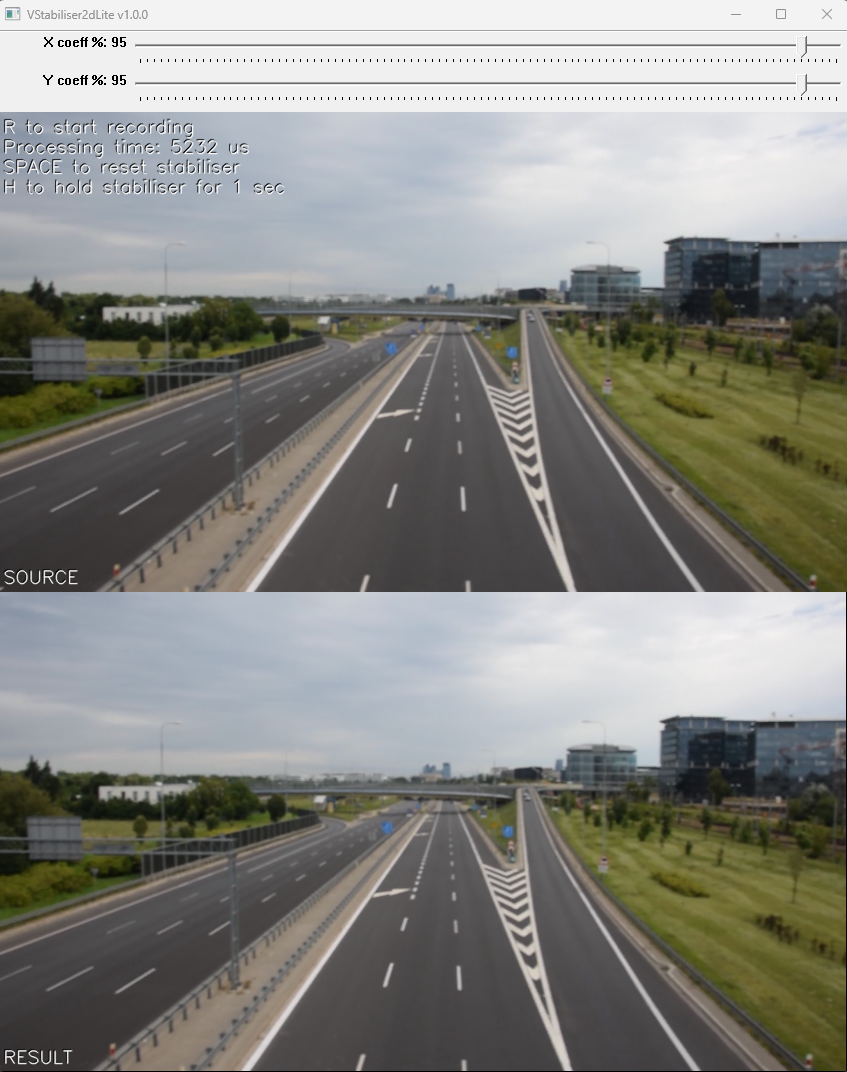
Control
To control the application, it is necessary that the main video display window was active (in focus), and also it is necessary that the English keyboard layout was activated without CapsLock mode. The program is controlled by the keyboard and by two on-screen sliders.
Table 8 - Control buttons.
| Button | Description |
|---|---|
| ESC | Exit the application. If video recording is active, it will be stopped. |
| SPACE | Reset stabilization algorithm. |
| H | Hold (pause) stabilisation for 1 second. Invokes the HOLD_MSEC command with a 1000 ms argument: input frames are passed through unchanged for one second, after which stabilisation resumes automatically. |
| R | Start/stop video recording. When video recording is enabled, a files dst_[date and time].avi (result video) and mix_[date and time].avi (combined source and result video) are created in the directory with the application executable file. Recording is performed of what is displayed to the user. To stop the recording, press the R key again. During video recording, the application shows a warning message. |
In addition to the keyboard, the application provides two on-screen sliders (Table 9), attached below the video window.
Table 9 - On-screen sliders.
| Control | Description |
|---|---|
| X Coeff % | Slider for the horizontal smoothing coefficient (X_FILTER_COEFF). Integer range 0–100 is scaled to [0..1] and applied to every frame. 0 disables horizontal compensation, 1 is maximum horizontal stabilization. |
| Y Coeff % | Slider for the vertical smoothing coefficient (Y_FILTER_COEFF). Integer range 0–100 is scaled to [0..1] and applied to every frame. 0 disables vertical compensation, 1 is maximum vertical stabilization. |