
Fmd C++ library
v1.0.3
Table of contents
- Overview
- Versions
- Library files
- Key features and capabilities
- Hardware and platform support
- Supported pixel formats
- Library principles
- Fmd class description
- Data structures
- ObjectDetectorParams class description
- Build and connect to your project
- Applications
Overview
Fmd (Flow Motion Detector) C++ library is designed for automatic detection of moving objects on videos captured by a moving camera. The library is implemented in C++ (C++17 standard). It is based on dense optical flow with automatic backend selection (OpenCV Farneback CUDA preferred, with NVIDIA VPI OFA / NVENC as a Jetson hardware fallback and OpenCV Farneback CPU as the universal fallback), 4-DOF affine ego-motion compensation, two parallel anomaly detectors over the residual flow (local N-sigma and two-window local contrast), an ensemble step with direction-coherence verification, and an IoU/centroid temporal tracker with hysteresis confirmation. Each instance of the Fmd C++ class performs frame-by-frame processing of a video data stream, processing each video frame independently. The library inherits its interface from the ObjectDetector (provides interface for object detector, source code included, Apache 2.0 license) class, offering flexible and customizable parameters. The library depends on open source OpenCV 4.x (linked, Apache 2.0 license), optionally NVIDIA VPI 3.x (linked when found, hardware-accelerated dense optical flow on Jetson platforms), and open source Logger library (source code included, Apache 2.0 license). The library is designed mainly for moving cameras (handheld, vehicle-mounted, gimbal) where conventional background-subtraction approaches fail because the background is non-stationary. It is suitable for detection of independently-moving foreground objects against complex, panning / translating backgrounds (drone detection from a moving platform, surveillance from a moving vehicle, target search from a moving aerial platform). The library uses C++17 standard.
Versions
Table 1 - Library versions.
| Version | Release date | What’s new |
|---|---|---|
| 1.0.0 | 06.06.2026 | First version. |
| 1.0.1 | 14.07.2026 | Performance optimization. Added Dual TV-L1 optical-flow backend (TYPE=3) and FRAME_BUFFER_SIZE optical-flow temporal gap. |
| 1.0.2 | 31.07.2026 | SENSITIVITY remapped to a normalized 0..1 scale (higher = more sensitive) with a re-tuned default — see setParam method. Detection quality improvements. New demo and benchmark applications — see Applications. |
| 1.0.3 | 12.10.2026 | - Submodules updated. |
Library files
The library is supplied as source code. The user is provided with a set of files in the form of a CMake project (repository). The repository structure is shown below:
CMakeLists.txt --------------------- Main CMake file of the library.
3rdparty --------------------------- Folder with third-party libraries.
    CMakeLists.txt ----------------- CMake file to include third-party libraries.
    ObjectDetector ----------------- Folder with ObjectDetector library source code.
    Logger ------------------------- Folder with Logger library source code.
src -------------------------------- Folder with library source code.
    CMakeLists.txt ----------------- CMake file of the library.
    Fmd.h -------------------------- Main library header file.
    FmdVersion.h ------------------- Header file with library version.
    FmdVersion.h.in ---------------- Service CMake file to generate version header.
    Fmd.cpp ------------------------ C++ implementation file (pImpl wrapper).
    impl --------------------------- Folder with pipeline implementation.
        FmdImpl.h ------------------ Orchestrator class header.
        FmdImpl.cpp ---------------- Orchestrator implementation.
        FlowEngine.h --------------- Optical flow backend abstraction header.
        FlowEngine.cpp ------------- VPI / Farneback backend selection logic.
        MotionCompensator.h -------- 4-DOF affine ego-motion compensation header.
        MotionCompensator.cpp ------ Ego-motion compensation implementation.
        AnomalyNSigma.h ------------ Local N-sigma anomaly detector header.
        AnomalyNSigma.cpp ---------- Local N-sigma anomaly detector implementation.
        AnomalyLocalContrast.h ----- Local-contrast anomaly detector header.
        AnomalyLocalContrast.cpp --- Local-contrast anomaly detector implementation.
        Ensemble.h ----------------- Ensemble verification and scoring header.
        Ensemble.cpp --------------- Ensemble verification and scoring implementation.
        Clustering.h --------------- Hierarchical motion-feature clustering header.
        Clustering.cpp ------------- Hierarchical clustering implementation.
        TemporalTracker.h ---------- IoU/centroid temporal tracker header.
        TemporalTracker.cpp -------- Temporal tracker implementation.
        FlowUtils.h ---------------- Shared flow utilities header.
        FlowUtils.cpp -------------- Shared flow utilities implementation.
example ---------------------------- Folder for example application.
    CMakeLists.txt ----------------- CMake file of example application.
    main.cpp ----------------------- Source C++ file of example application.
demo ------------------------------- Folder for demo application (viewer).
    CMakeLists.txt ----------------- CMake file of demo application.
    main.cpp ----------------------- Source C++ file of demo application.
benchmark -------------------------- Folder for benchmark application.
    CMakeLists.txt ----------------- CMake file of benchmark application.
    main.cpp ----------------------- Source C++ file of benchmark application.
scripts ---------------------------- Folder with helper shell scripts.
    build_opencv_cuda.sh ----------- Builds OpenCV with the CUDA optical-flow module.
    perf-run.sh -------------------- Raises Jetson clocks (optional, Jetson only).
static ----------------------------- Folder with static assets (logo, etc.).
The three applications are built automatically when Fmd is the top-level CMake project and are skipped when it is included as a subrepository. See Applications.
Key features and capabilities
Table 2 - Key features and capabilities.
| Parameter and feature | Description |
|---|---|
| Programming language | C++ (standard C++17). |
| Supported OS | Linux (Jetson and x86), Windows. The optical-flow backend chosen at runtime depends on hardware availability — see Hardware and platform support. |
| Shape of detected objects | The library is able to detect moving objects of any shape. The minimum and maximum height and width of the objects to be detected are set by the user in the library parameters. |
| Supported pixel formats | RGB24, BGR24, GRAY, YUV24, YUYV, UYVY, NV12, NV21, YV12, YU12. The library uses the GRAY format for processing. If the pixel format of the input frame is different from GRAY, the library pre-converts it to GRAY. |
| Maximum and minimum video frame size | The maximum size of video frames to be processed is 8192x8192 pixels. The size of the video frames has a significant impact on the computation time. |
| Coordinate system | The algorithm uses a window coordinate system with the zero point in the upper left corner of the video frame. |
| Calculation speed | Processing time per frame scales roughly linearly with pixel count and depends on the platform and the selected optical-flow backend. Reference measurement on a Jetson Orin NX Super (MAXN_SUPER, production Farneback CUDA backend): ≈13 ms at 640x512 (≈75 FPS), ≈42 ms per megapixel, so sustained 30 FPS holds up to about 1024x768. The VPI backend is a no-CUDA fallback and is slower (31-63 ms at 640x512). Measure your own platform with the benchmark application. |
| Discreteness of computed coordinates | The algorithm calculates the object bounding box for each detected object. The increment for position and size of the bounding box is 1 pixel. |
| Detection algorithm | Dense optical flow → 4-DOF affine ego-motion compensation → two parallel anomaly detectors over the residual flow → ensemble verification (direction coherence + magnitude uniformity) → IoU/centroid temporal tracker with hysteresis confirmation. Object velocity is reported in a camera-stabilized reference frame (ego-motion removed). |
| Working conditions | Designed mainly for moving cameras (handheld, vehicle, gimbal, drone). The 4-DOF (translation + rotation + uniform scale) ego-motion model handles typical camera pan / roll / forward-flight motion. Rapidly changing camera depth (strong zooming, fast forward translation through cluttered scene) reduces accuracy. It is recommended to use the example application to evaluate the quality of the algorithm in specific situations. |
Hardware and platform support
The library compiles and runs on any platform that provides a C++17 toolchain and OpenCV 4.x. Optical-flow performance, however, depends on which hardware-accelerated backends are available at build time. The CMake configuration detects them automatically and sets the corresponding preprocessor flags inside the Fmd target:
| CMake check | Preprocessor flag | Code paths enabled |
|---|---|---|
find_package(vpi 3.0) | FMD_HAVE_VPI=1 | VPI OFA / NVENC dense optical flow. |
TARGET opencv_cudaoptflow | FMD_HAVE_OPENCV_CUDA=1 | cv::cuda::FarnebackOpticalFlow (GPU). |
opencv2/optflow.hpp present | FMD_HAVE_OPENCV_OPTFLOW=1 | cv::optflow::DualTVL1OpticalFlow (TYPE=3). |
| (none required) | — | cv::calcOpticalFlowFarneback (CPU). |
When a flag is not defined the corresponding backend code is replaced with a stub that returns “backend not compiled in”, so the same source tree builds cleanly on any platform — the runtime selection logic simply skips unavailable paths.
The optical-flow backend is selected automatically on the first detect() call in the following preference order:
| Priority | Backend | Notes |
|---|---|---|
| 1 | Farneback CUDA | OpenCV CUDA Farneback. Preferred when opencv_cudaoptflow is built — it dominates VPI on both speed and quality. |
| 2 | VPI OFA | Jetson Orin dedicated Optical Flow Accelerator. No-CUDA fallback. |
| 3 | VPI NVENC | Encoder-based dense optical flow (older Jetson). No-CUDA fallback. |
| 4 | Farneback CPU | Universal fallback. Always available. |
Table — typical platform matrix.
| Platform | VPI | CUDA Farneback | CPU Farneback | Auto-pick |
|---|---|---|---|---|
| NVIDIA Jetson Orin — JetPack 6 | OFA (HW) | optional, requires custom OpenCV build with CUDA | yes | Farneback CUDA if built, else VPI OFA |
| Older Jetson (Xavier, Nano-Maxwell) — JetPack 5 | NVENC (HW) | optional | yes | Farneback CUDA if built, else VPI NVENC |
| x86 Linux + NVIDIA GPU + OpenCV CUDA build | no | yes | yes | Farneback CUDA |
| x86 Linux + system OpenCV (no CUDA) | no | no | yes | Farneback CPU |
| Windows + NVIDIA GPU + OpenCV CUDA build | no | yes | yes | Farneback CUDA |
| Windows + prebuilt OpenCV | no | no | yes | Farneback CPU |
| macOS / ARM Linux (non-Jetson) | no | no | yes | Farneback CPU |
To force a specific backend, set the TYPE parameter through setParam:
| TYPE value | Meaning |
|---|---|
| -1 | Auto (default). |
| 0 | VPI (OFA / NVENC, whichever works). |
| 1 | OpenCV Farneback (CPU). |
| 2 | OpenCV Farneback (CUDA). |
| 3 | OpenCV Dual TV-L1. Requires the opencv_contrib optflow module; falls back to Farneback CPU when it is not built. Never chosen by Auto. |
getParam(TYPE) returns the actually selected backend after the first detect() call: 0 for any VPI backend, 1 for Farneback CPU, 2 for Farneback CUDA, 3 for Dual TV-L1, -1 if the engine has not been initialized yet.
Supported pixel formats
The Frame library (vendored through the ObjectDetector submodule) contains the Fourcc enum which defines supported pixel formats (Frame.h file). Fmd processes RAW pixel formats only (the compressed JPEG, H264 and HEVC entries are not supported). The library uses the intensity (GRAY) channel for processing; if the input frame is in another supported format it is pre-converted to GRAY. Fourcc enum declaration:
enum class Fourcc
{
    /// RGB 24bit pixel format.
    RGB24 = MAKE_FOURCC_CODE('R', 'G', 'B', '3'),
    /// BGR 24bit pixel format.
    BGR24 = MAKE_FOURCC_CODE('B', 'G', 'R', '3'),
    /// YUYV 16bits per pixel format.
    YUYV  = MAKE_FOURCC_CODE('Y', 'U', 'Y', 'V'),
    /// UYVY 16bits per pixel format.
    UYVY  = MAKE_FOURCC_CODE('U', 'Y', 'V', 'Y'),
    /// Grayscale 8bit.
    GRAY  = MAKE_FOURCC_CODE('G', 'R', 'A', 'Y'),
    /// YUV 24bit per pixel format.
    YUV24  = MAKE_FOURCC_CODE('Y', 'U', 'V', '3'),
    /// NV12 pixel format.
    NV12  = MAKE_FOURCC_CODE('N', 'V', '1', '2'),
    /// NV21 pixel format.
    NV21  = MAKE_FOURCC_CODE('N', 'V', '2', '1'),
    /// YU12 (YUV420) - Planar pixel format.
    YU12 = MAKE_FOURCC_CODE('Y', 'U', '1', '2'),
    /// YV12 (YVU420) - Planar pixel format.
    YV12 = MAKE_FOURCC_CODE('Y', 'V', '1', '2'),
    /// JPEG compressed format.
    JPEG  = MAKE_FOURCC_CODE('J', 'P', 'E', 'G'),
    /// H264 compressed format.
    H264  = MAKE_FOURCC_CODE('H', '2', '6', '4'),
    /// HEVC compressed format.
    HEVC  = MAKE_FOURCC_CODE('H', 'E', 'V', 'C')
};
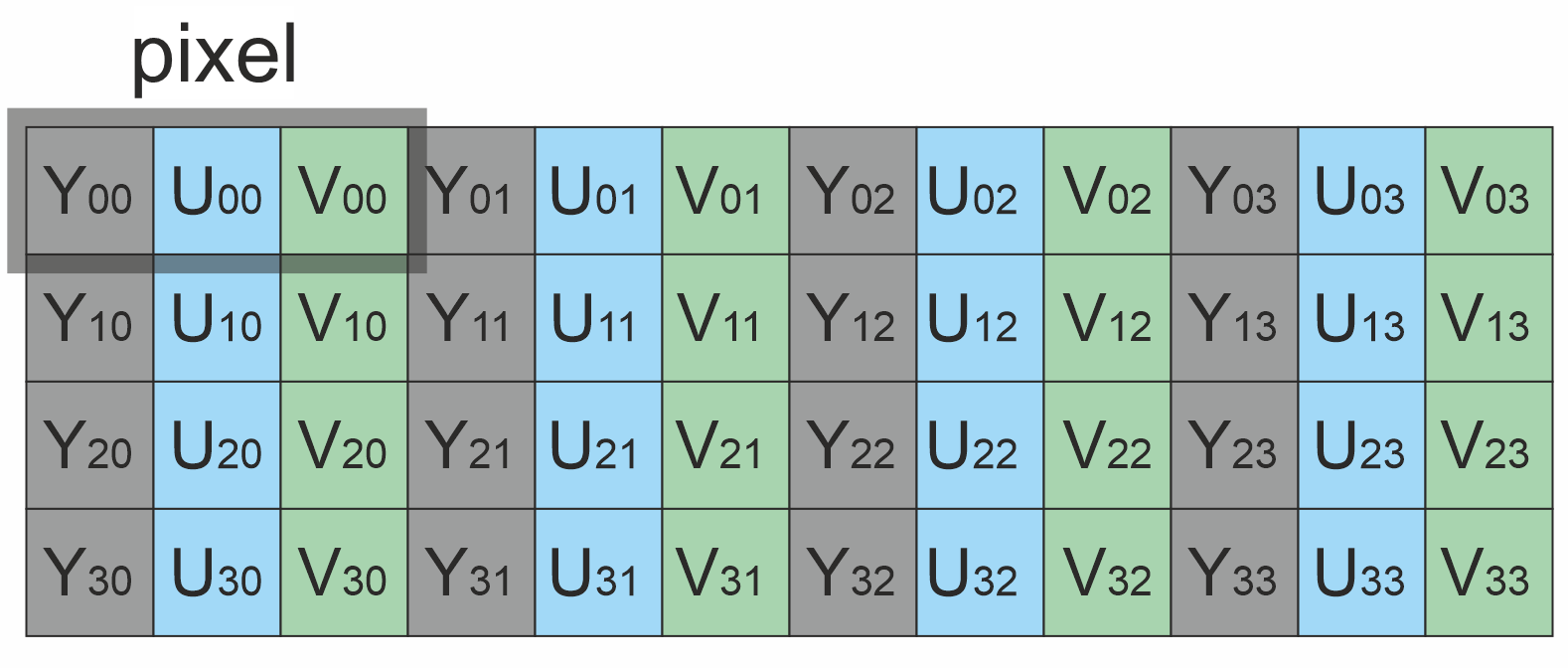
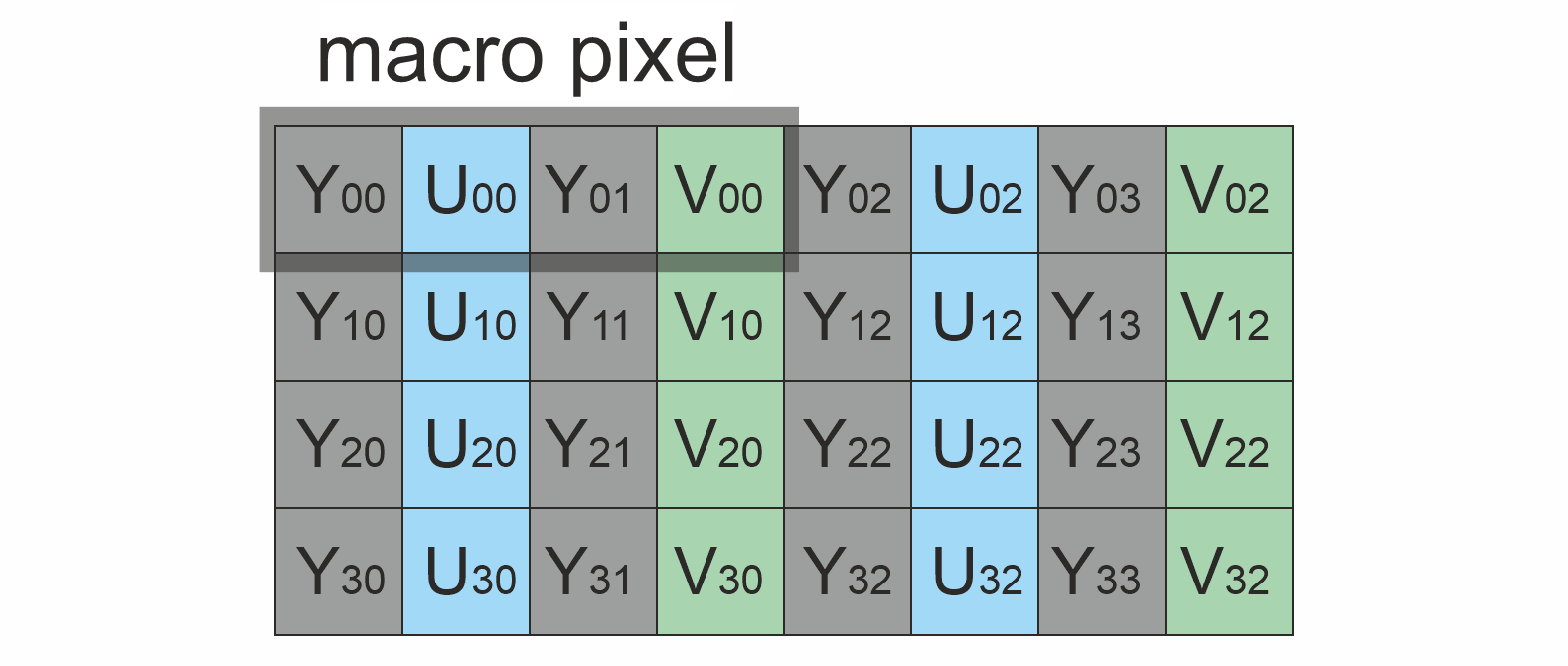
Bytes layout of supported RAW pixel formats. Example of a 4x4 pixels image.
 YUV24 YUV24 | 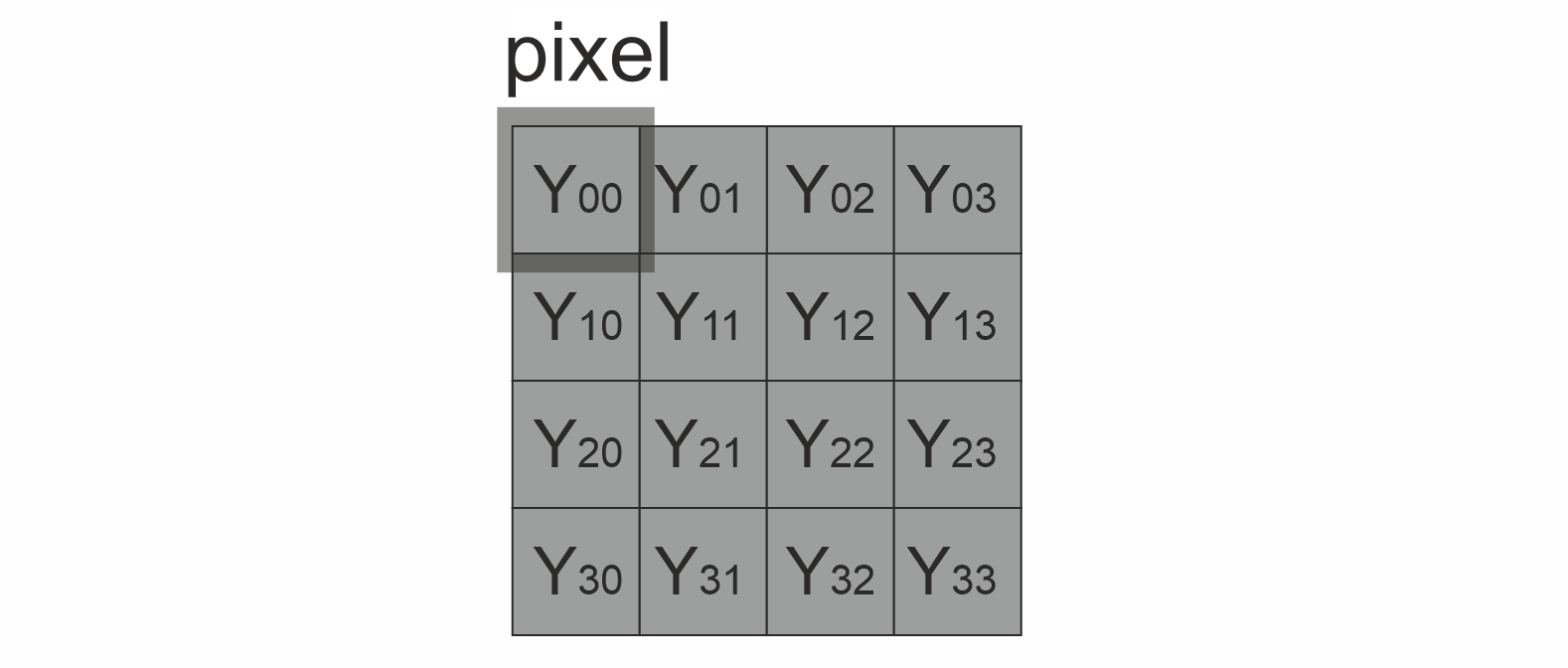 GRAY GRAY |
|---|---|
 YUYV YUYV | 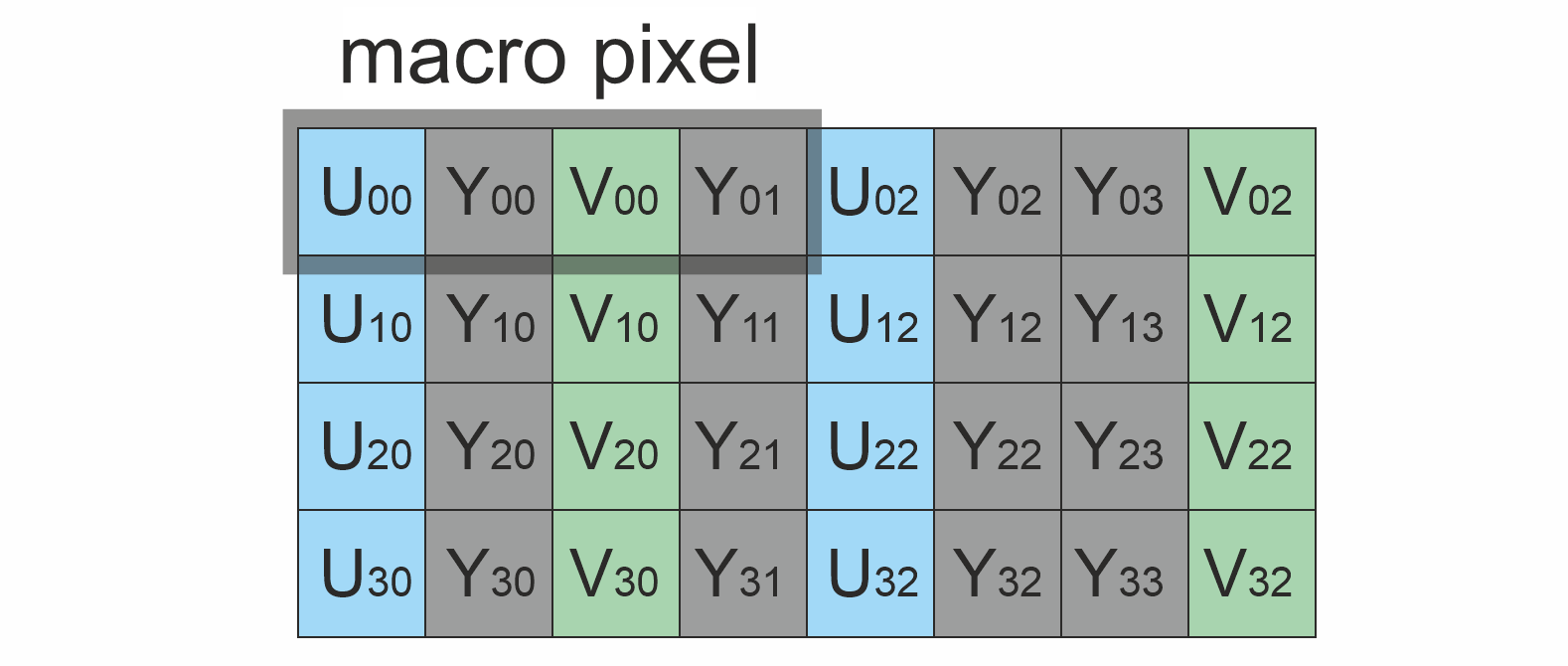 UYVY UYVY |
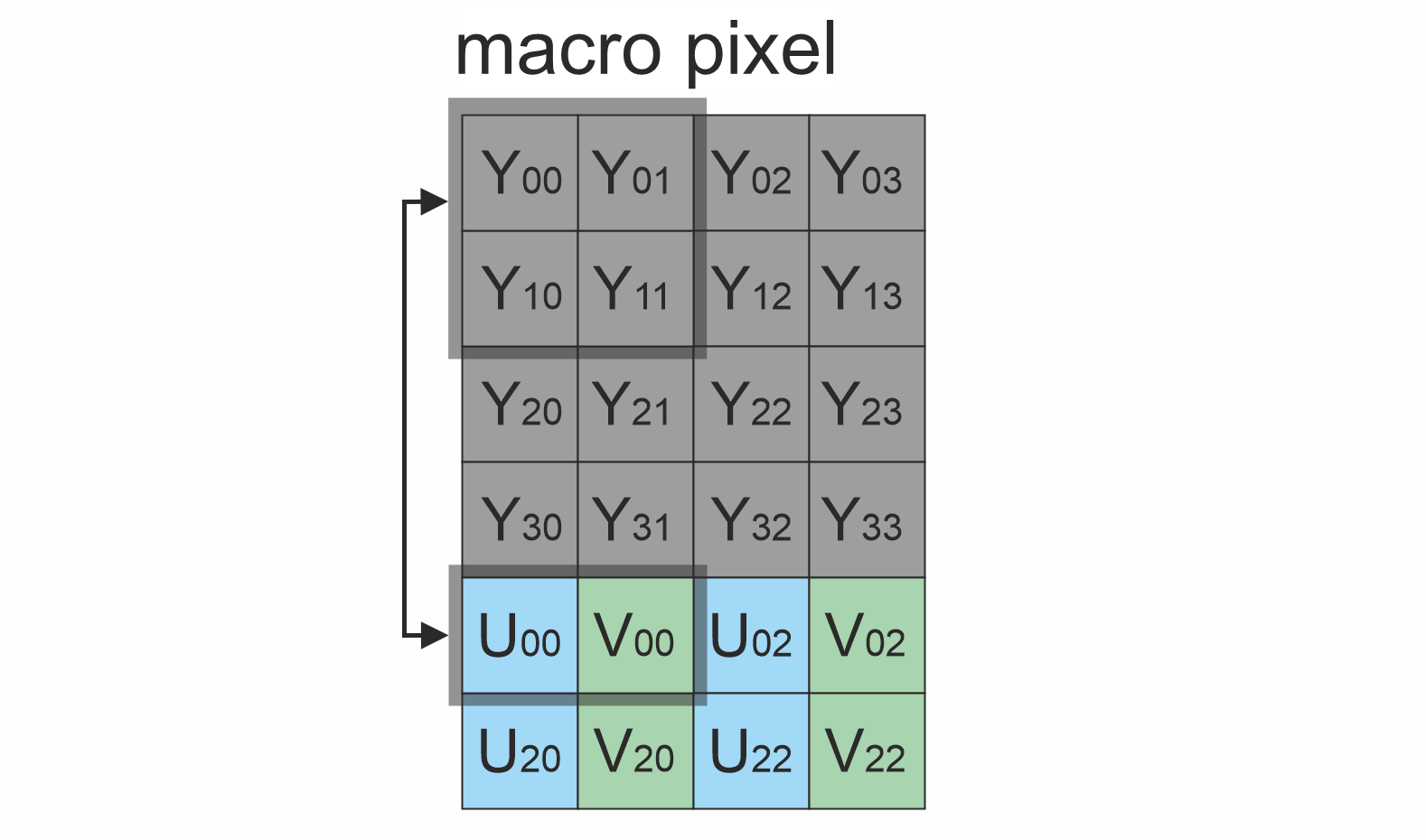 NV12 NV12 | 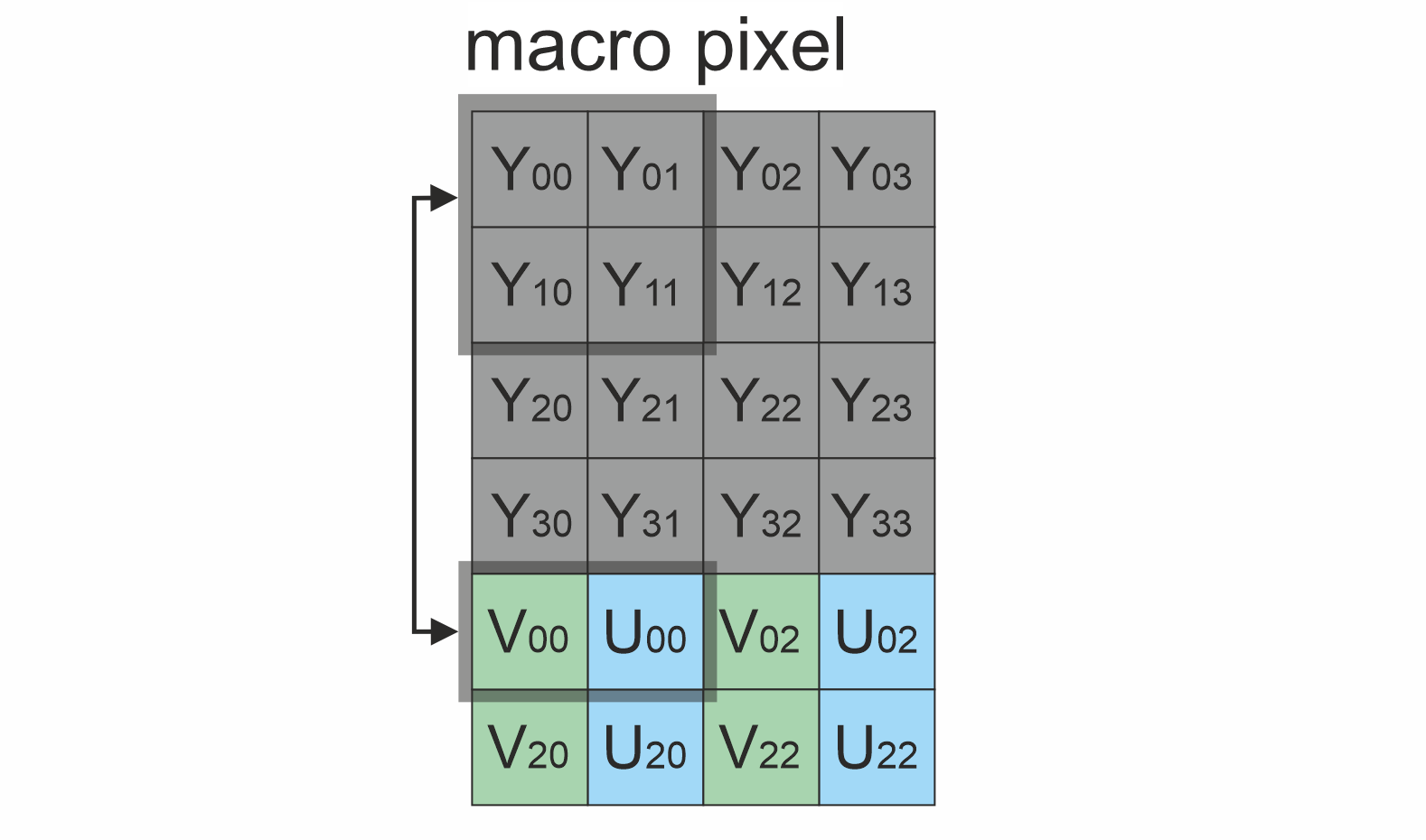 NV21 NV21 |
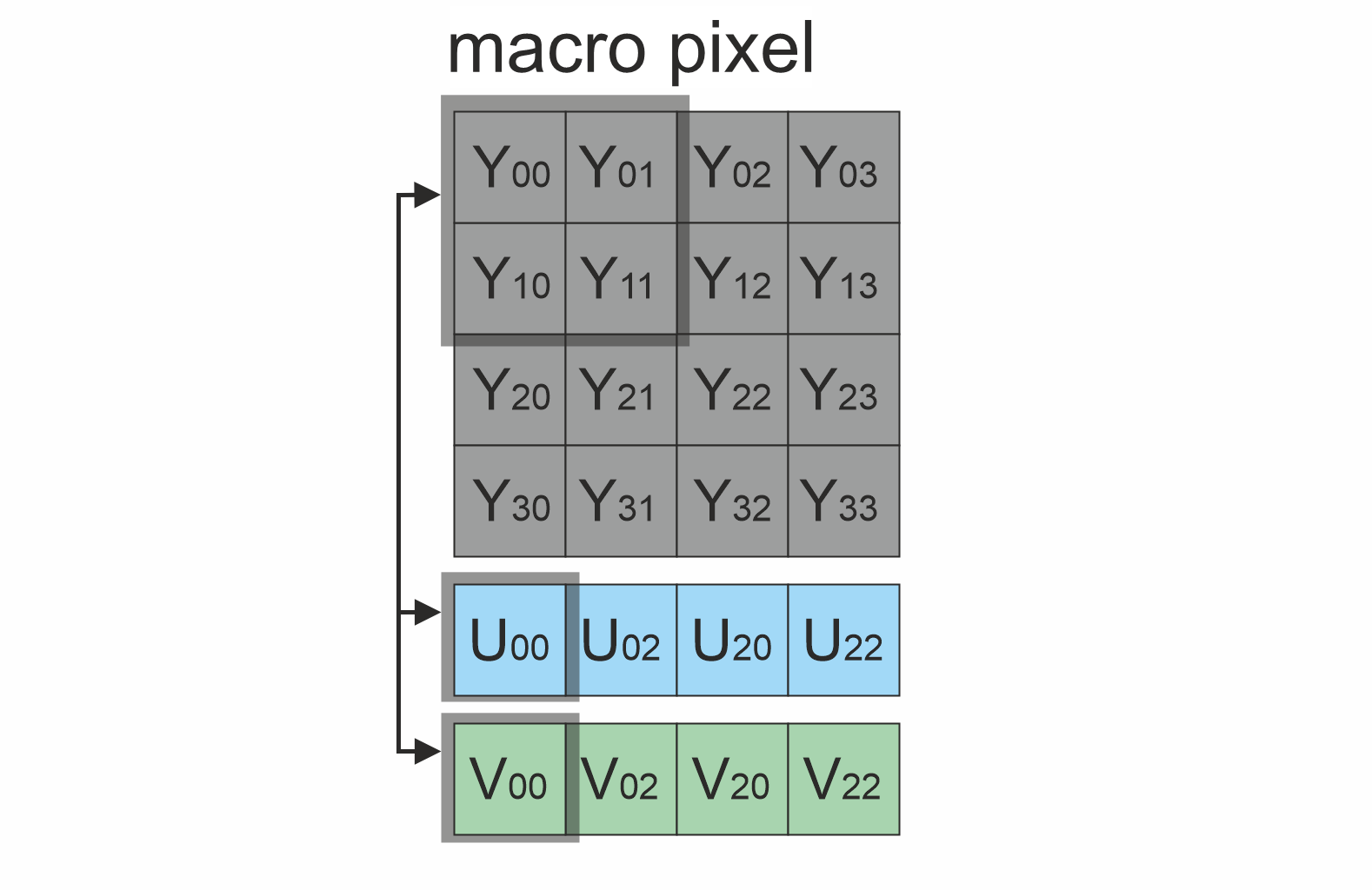 YU12 YU12 | 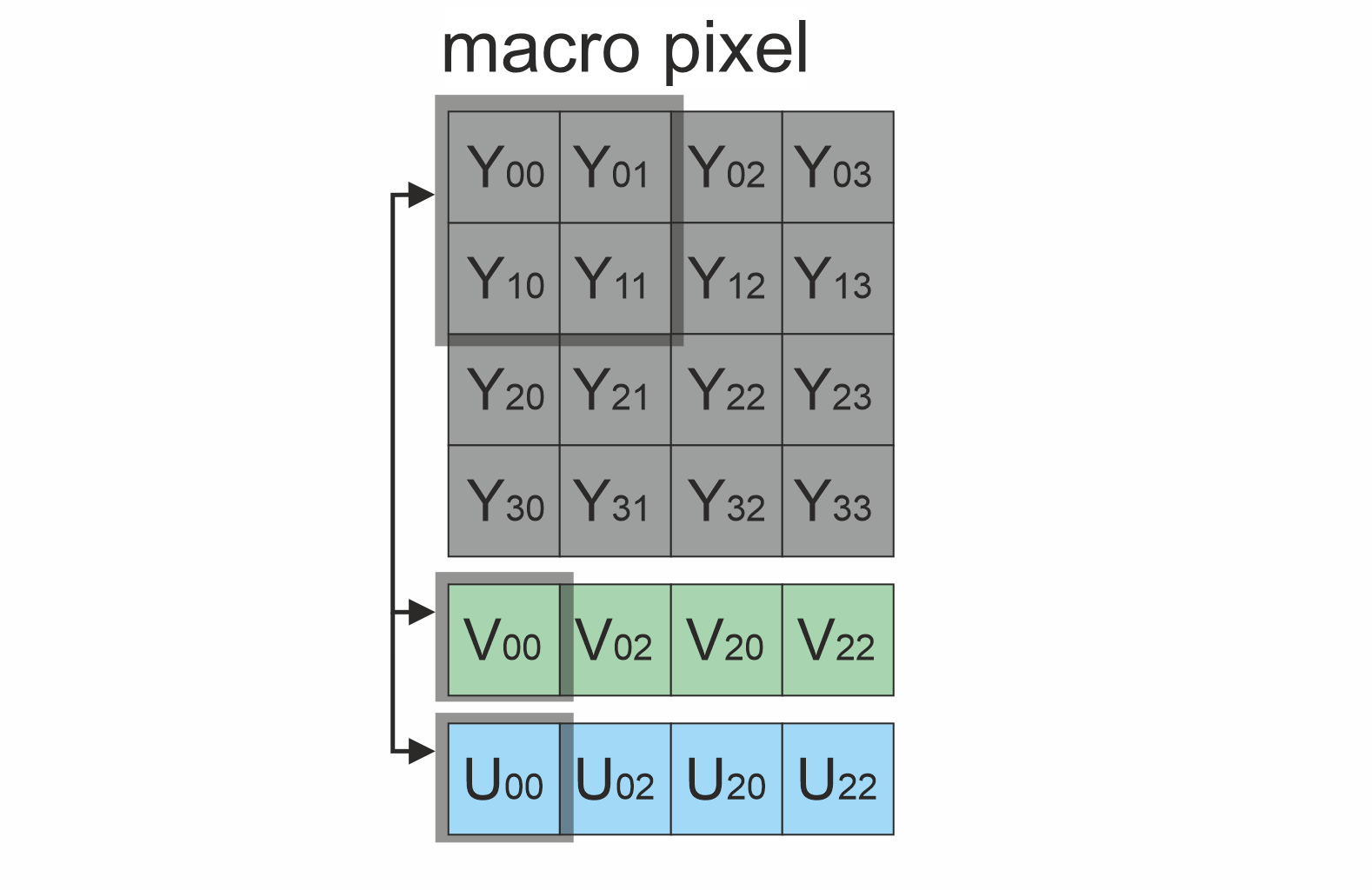 YV12 YV12 |
For planar luminance formats (GRAY, NV12, NV21, YV12, YU12) Fmd reads the Y plane directly without copy or color conversion — these are the most efficient input formats.
Library principles
The object detection algorithm consists of the following sequential steps executed on every detect() call:
- Acquire the source video frame and convert it to GRAY format (grayscale).
- Compute dense optical flow between the previous and the current grayscale frame. The backend is selected automatically (VPI OFA / NVENC / Farneback CUDA / Farneback CPU).
- Estimate a 4-DOF affine model (translation + rotation + uniform scale) of the camera ego-motion. The model is fit on spatially-distributed corner feature points with two-stage outlier rejection (exclusion regions from confirmed tracks + textured-background median flow).
- Compute the residual flow — per-pixel optical flow with the affine prediction subtracted. Pixels belonging to the static background have near-zero residual; independently moving objects produce non-zero residual.
- Run two anomaly detectors over the residual flow in parallel:
- Local N-sigma: per-pixel adaptive threshold over a sliding window of the residual magnitude.
- Local Contrast: two-window approach — magnitude minus its local mean, then an adaptive threshold on the resulting contrast map.
- Combine the two detector masks via an ensemble step: per-component verification by flow direction coherence and magnitude uniformity (hard filter), followed by additive scoring (NSigma weight + LocalContrast weight × cluster factor) and merge of co-directional overlapping detections.
- Pass the verified detections to an IoU/centroid temporal tracker with hysteresis confirmation and a hard motion check. Positions are accumulated in a camera-stabilized reference frame derived from the per-frame affine ego-motion, so velocity and displacement measurements isolate object motion from camera motion.
- The resulting confirmed objects for the current frame can be retrieved using the getObjects() method.
The library is available as source code. To use the library as source code, developers must incorporate the library files into their project. The usage sequence is:
- Include the library files in the project.
- Create an instance of the Fmd class. For multiple parallel cameras, create multiple instances.
- If necessary, modify the default library parameters using the setParam(…) method.
- Create a Frame class object for the input frame.
- Call the detect(…) method to identify objects on each frame.
- Retrieve the detected objects using the getObjects() method.
Fmd class description
Fmd class declaration
Fmd class declared in Fmd.h file. Fmd inherits from the ObjectDetector interface and lives in the cr::detector namespace. Class declaration:
class Fmd : public ObjectDetector
{
public:

    /// Get library version.
    static std::string getVersion();

    /// Class constructor.
    Fmd();

    /// Class destructor.
    ~Fmd();

    /// Init object detector with the given parameters.
    bool initObjectDetector(ObjectDetectorParams& params) override;

    /// Set parameter value.
    bool setParam(ObjectDetectorParam id, float value) override;

    /// Get parameter value.
    float getParam(ObjectDetectorParam id) override;

    /// Get full parameters snapshot.
    void getParams(ObjectDetectorParams& params) override;

    /// Get list of detected objects from the last detect() call.
    std::vector<Object> getObjects() override;

    /// Execute command.
    bool executeCommand(ObjectDetectorCommand id) override;

    /// Perform detection on a single video frame.
    bool detect(cr::video::Frame& frame) override;

    /// Set detection mask. Pixels with value 0 are ignored.
    bool setMask(cr::video::Frame mask) override;

    /// Decode binary command and execute it.
    bool decodeAndExecuteCommand(uint8_t* data, int size) override;
};
getVersion method
The getVersion() method returns string of current version of Fmd class. Method declaration:
static std::string getVersion();
Method can be used without Fmd class instance:
std::cout << "Fmd class version: " << cr::detector::Fmd::getVersion() << std::endl;
Console output:
Fmd class version: 1.0.3
initObjectDetector method
The initObjectDetector(…) method initializes the detector with a complete ObjectDetectorParams structure. Internally it calls setParam(...) for each supported field so the same validation rules apply. Method declaration:
bool initObjectDetector(ObjectDetectorParams& params) override;
| Parameter | Description |
|---|---|
| params | ObjectDetectorParams structure (see ObjectDetectorParams class description). |
Returns: TRUE if the detector was initialized, FALSE otherwise.
Calling it is optional: a newly constructed Fmd already holds the defaults of Table 3 and is ready to detect. Use this method when you want to apply your own configuration — the fields you pass are applied as given, and the values in the structure are yours to choose.
setParam method
The setParam(…) method sets a new parameter value. Method declaration:
bool setParam(ObjectDetectorParam id, float value) override;
| Parameter | Description |
|---|---|
| id | Parameter ID according to the ObjectDetectorParam enum (see ObjectDetectorParam enum). |
| value | Parameter value. Valid range depends on the parameter ID — see Table 3 below. |
Returns: TRUE if the parameter was set, FALSE if the id is unsupported, the value is out of range, or the parameter is read-only (PROCESSING_TIME_MCS).
Table 3 - Fmd parameter mapping. Some standard fields of ObjectDetectorParams have a Fmd-specific interpretation (noted in the Notes column).
| Parameter | Access | Valid range | Default | Notes |
|---|---|---|---|---|
| LOG_MODE | read / write | 0..3 | 0 | Logger destination. 0 - disable, 1 - file only, 2 - console only, 3 - console + file. |
| FRAME_BUFFER_SIZE | read / write | 1..16 | 1 | Fmd-specific meaning: optical-flow temporal gap. Dense flow is computed between the current frame and the frame N steps back (Fmd buffers the last N grayscale frames). 1 (default) = consecutive frames. N>1 widens the baseline so slow targets whose per-frame displacement sits near the flow noise floor become detectable — this is what the parameter exists for. It is scene-dependent, see Choosing FRAME_BUFFER_SIZE. Clamped to 1..16. Changing it re-primes the frame history, so the next few frames produce no output. |
| MIN_OBJECT_WIDTH | read / write | 1..8192 | 4 | Output filter: drop detected objects with width < value. |
| MAX_OBJECT_WIDTH | read / write | 1..8192 | 128 | Output filter: drop detected objects with width > value. |
| MIN_OBJECT_HEIGHT | read / write | 1..8192 | 4 | Output filter: drop detected objects with height < value. |
| MAX_OBJECT_HEIGHT | read / write | 1..8192 | 128 | Output filter: drop detected objects with height > value. |
| MIN_X_SPEED | read / write | 0.0.. | 0.0 | Output filter: drop detected objects with \|vX\| < value (pixels/frame, in stabilized reference frame). |
| MAX_X_SPEED | read / write | 0.0.. | 30.0 | Output filter: drop detected objects with \|vX\| > value. |
| MIN_Y_SPEED | read / write | 0.0.. | 0.0 | Output filter: drop detected objects with \|vY\| < value. |
| MAX_Y_SPEED | read / write | 0.0.. | 30.0 | Output filter: drop detected objects with \|vY\| > value. |
| MIN_DETECTION_PROBABILITY | read / write | 0.0..1.0 | 0.0 | Stored but currently not applied: Fmd reports Object::p = 1.0 for confirmed tracks. |
| X_DETECTION_CRITERIA | read / write | 1..256 | 20 | Score-sum threshold to confirm a track. The tracker’s internal confirmThreshold is set to max(X_DETECTION_CRITERIA, Y_DETECTION_CRITERIA). |
| Y_DETECTION_CRITERIA | read / write | 1..256 | 20 | See X_DETECTION_CRITERIA. |
| RESET_CRITERIA | read / write | 1..256 | 3 | Number of consecutive unmatched frames after which a track is dropped (tracker’s maxMissed). |
| SENSITIVITY | read / write | 0.0..1.0 | 0.70 | Normalized detection sensitivity, higher = more sensitive (more detections, more false positives). Internally it is mapped linearly onto the N-sigma threshold shared by both anomaly detectors: nSigma = 6.0 - value * 5.0, so 0.0 is the strictest useful setting and 1.0 the most sensitive. The default 0.70 (N-sigma 2.5) is the operating point the library is tuned at. See Choosing SENSITIVITY. Changed in 1.0.2 — up to 1.0.1 this parameter was the raw N-sigma threshold (range 0.1..50, default 2.8, lower = more sensitive), and the default operating point itself was re-tuned (the 1.0.1 default corresponds to 0.64 here). |
| SCALE_FACTOR | read / write | 1 | 1 | Fmd does not downsample internally. Only the value 1 is accepted; use upstream resizing if you need lower-resolution processing. |
| NUM_THREADS | read / write | 0.. | 1 | Accepted for interface compatibility; Fmd relies on OpenCV / VPI internal threading, so this value is not consulted directly. |
| PROCESSING_TIME_MCS | read only | — | — | Last detect() call duration, microseconds. |
| TYPE | read / write | -1..3 | -1 | Fmd-specific meaning: optical-flow backend. -1 - auto, 0 - VPI, 1 - Farneback CPU, 2 - Farneback CUDA, 3 - Dual TV-L1 (requires the opencv_contrib optflow module; falls back to Farneback CPU otherwise, and is never chosen by Auto). Reading this parameter returns the actually selected backend after the first detect() call. |
| MODE | read / write | 0/1 | 1 | 0 - off (detect returns true with empty objects), 1 - on. Switching off triggers a tracker reset. |
| CUSTOM_1 / CUSTOM_2 / CUSTOM_3 | read / write | any | 0.0 | Fmd-specific tuning levers, each applied only when set > 0 (otherwise the internal default is kept): CUSTOM_1 — minimum net displacement, the stabilized-frame motion floor a track must exceed before it can confirm (suppresses quasi-stationary clutter); CUSTOM_2 — cluster reference area used by the co-moving-group penalty (smaller = stronger penalty); CUSTOM_3 — score-history window length (longer rewards sustained detections over brief flickers). |
Choosing SENSITIVITY
SENSITIVITY is the one parameter worth tuning per scene. It sets how far a local flow residual has to stand out from its neighbourhood before it can become a detection, so it trades recall against false positives:
| SENSITIVITY | Internal N-sigma | Behaviour |
|---|---|---|
| 0.0 | 6.0 | Strictest. Only very prominent motion survives; slow / small targets are lost. |
| 0.4 | 4.0 | Conservative — few false positives, reduced recall. |
| 0.64 | 2.8 | The operating point of releases up to 1.0.1. Slightly stricter than the current default. |
| 0.70 | 2.5 | Default. The operating point the library is tuned and validated at. |
| 0.8 | 2.0 | More sensitive; useful when a known target is being missed and the scene is clean. |
| 1.0 | 1.0 | Most sensitive. Expect a large number of false positives. |
Recommended practice: start at the default, then move in steps of 0.05 while watching both the targets you care about and the false-positive rate on your own footage — the demo application has a live slider for exactly this.
Note that the response is not monotonic in false positives. Around the default, a more sensitive setting can produce fewer false positives: the extra true detections give the clustering and the tracker a consistent target to lock onto, instead of confirming short-lived clutter. That is why this default was chosen over the stricter 0.64 — it improved recall, false positives and sustained-track count simultaneously on thermal footage. On visible-light footage with strong static clutter the opposite may hold, so verify on your own material rather than assuming a direction.
A newly constructed Fmd already uses the default above, so you only need to touch this parameter to tune for a scene. Note that a default-constructed ObjectDetectorParams carries the generic defaults of the shared interface rather than these —
sensitivitythere is0.04, which maps to a threshold almost nothing passes — so set the field explicitly when you configure the detector through initObjectDetector.
Choosing FRAME_BUFFER_SIZE
FRAME_BUFFER_SIZE is the optical-flow temporal gap, and it exists for one specific problem: slow targets. A target that moves only a fraction of a pixel between two consecutive frames produces a residual flow below the noise floor of the flow field itself, so no threshold can separate it from the background. Computing the flow against the frame N steps back multiplies that displacement by N and lifts the target above the noise.
The gain can be large, but it is scene-dependent and not free — the wider baseline also accumulates more ego-motion and parallax, so background residuals grow with it. On our thermal benchmark, raising the gap from 1 to 3 on the clip with the slowest, smallest targets more than tripled recall (0.17 → 0.60) and turned an intermittent track into a sustained one, while on clips whose targets already move a pixel or more per frame the same setting cut recall roughly in half and multiplied false positives by two to four.
Practical guidance:
| Situation | Suggested gap |
|---|---|
| Targets visibly move between consecutive frames (typical short/medium range) | 1 (default) |
| Targets creep — a few tenths of a pixel per frame (long range, high frame rate, near-hovering objects) | 2..3 |
| Extremely slow relative motion, static-looking target on a moving background | 4..8, expect many more false positives |
Choose it per scene, not globally: the demo application has a live Flow gap slider, so the quickest way to pick a value is to watch your own footage while moving it. Keep in mind that a higher gap also delays the first output after a start, a reset or a change of this parameter, because the frame history has to refill.
getParam method
The getParam(…) method retrieves a parameter value. Method declaration:
float getParam(ObjectDetectorParam id) override;
| Parameter | Description |
|---|---|
| id | Parameter ID according to ObjectDetectorParam enum. |
Returns: the parameter value, or -1 if the id is unsupported.
getParams method
The getParams(…) method copies the full ObjectDetectorParams snapshot, including the most recent objects list. Method declaration:
void getParams(ObjectDetectorParams& params) override;
| Parameter | Description |
|---|---|
| params | Output ObjectDetectorParams structure. |
executeCommand method
The executeCommand(…) method executes a control command. Method declaration:
bool executeCommand(ObjectDetectorCommand id) override;
| Parameter | Description |
|---|---|
| id | Command ID according to ObjectDetectorCommand enum (see ObjectDetectorCommand enum). |
Returns: TRUE if the command was accepted, FALSE otherwise.
Table 4 - Command behavior.
| Command | Description |
|---|---|
| RESET | Resets the optical-flow engine, the ego-motion compensator, the temporal tracker, and the cached previous frame. The next detect() call will be a priming call (returns TRUE with an empty objects list). |
| ON | Enables the detector (equivalent to setParam(MODE, 1)). |
| OFF | Disables the detector (equivalent to setParam(MODE, 0)). While disabled, detect() returns TRUE but reports an empty objects list; a tracker reset is also scheduled so that re-enabling produces a clean state. |
detect method
The detect(…) method performs detection on a single video frame. Method declaration:
bool detect(cr::video::Frame& frame) override;
| Parameter | Description |
|---|---|
| frame | Source video frame (Frame class). Supported pixel formats: GRAY, NV12, NV21, YV12, YU12, BGR24, RGB24, YUV24, UYVY, YUYV. |
Returns: TRUE if the frame was processed successfully (note: returns TRUE on the very first frame too, with an empty objects list — that frame is used to prime the optical-flow buffer). Returns FALSE on an invalid frame or an unsupported pixel format.
After detect() the list of confirmed objects is available via getObjects().
One frame of output latency. Internally the pipeline is one frame deep: the optical flow of frame N is computed on a worker while the rest of the pipeline processes frame N-1, which is what makes the library keep up on embedded platforms. As a consequence getObjects() after
detect(frame N)returns the objects of frame N-1. Every returned object carries the frame it belongs to inObject::frameId, so consumers that key onframeIdneed no change. Code that overlays the boxes on “the frame just passed in” will draw them one frame ahead of their target — overlay them on the previous frame instead (the example application shows the pattern). The very firstdetect()call has nothing pending yet and returns an empty list.
setMask method
The setMask(…) method sets a detection mask. Pixels of the mask equal to 0 are ignored — detections whose centers fall inside those regions are dropped before tracking. Method declaration:
bool setMask(cr::video::Frame mask) override;
Note. The detector processes the entire frame; it does not crop or inset any border internally. Masking frame-edge artifacts (overlays, OSD, fixed borders) or other regions that produce false positives is the caller’s responsibility — use this mask to exclude them.
| Parameter | Description |
|---|---|
| mask | Binary mask (Frame object). Supported pixel formats: GRAY, NV12, NV21, YV12, YU12. Only the Y plane is read. |
Returns: TRUE if the mask was accepted, FALSE on an invalid frame or an unsupported pixel format.
decodeAndExecuteCommand method
The decodeAndExecuteCommand(…) method decodes a binary command (produced by ObjectDetector::encodeSetParamCommand(...) or ObjectDetector::encodeCommand(...)) and executes it via setParam or executeCommand. Method declaration:
bool decodeAndExecuteCommand(uint8_t* data, int size) override;
| Parameter | Description |
|---|---|
| data | Pointer to a buffer with the encoded command. |
| size | Size of the buffer in bytes. |
Returns: TRUE if the command was decoded and executed, FALSE otherwise.
Data structures
ObjectDetectorCommand enum
enum class ObjectDetectorCommand
{
    RESET = 1,
    ON,
    OFF
};
ObjectDetectorParam enum
enum class ObjectDetectorParam
{
    LOG_MODE = 1,
    FRAME_BUFFER_SIZE,
    MIN_OBJECT_WIDTH,
    MAX_OBJECT_WIDTH,
    MIN_OBJECT_HEIGHT,
    MAX_OBJECT_HEIGHT,
    MIN_X_SPEED,
    MAX_X_SPEED,
    MIN_Y_SPEED,
    MAX_Y_SPEED,
    MIN_DETECTION_PROBABILITY,
    X_DETECTION_CRITERIA,
    Y_DETECTION_CRITERIA,
    RESET_CRITERIA,
    SENSITIVITY,
    SCALE_FACTOR,
    NUM_THREADS,
    PROCESSING_TIME_MCS,
    TYPE,
    MODE,
    CUSTOM_1,
    CUSTOM_2,
    CUSTOM_3
};
See Table 3 for the Fmd-specific meaning of each parameter.
Object structure
struct Object
{
    int id{0};            // stable track ID
    int frameId{0};       // input frame.frameId of the frame the object was detected on
    int type{0};          // object class — always 0 for Fmd (no classifier)
    int width{0};         // bounding box width, pixels
    int height{0};        // bounding box height, pixels
    int x{0};             // bounding box top-left x, pixels (image coords)
    int y{0};             // bounding box top-left y, pixels
    float vX{0.0f};       // horizontal velocity, pixels/frame, stabilized
    float vY{0.0f};       // vertical velocity, pixels/frame, stabilized
    float p{0.0f};        // detection probability (always 1.0 for Fmd confirmed tracks)
};
The vX and vY components are measured in a camera-stabilized reference frame: the per-frame affine ego-motion estimated by the detector is removed before differencing positions, so they reflect motion of the object relative to the static scene, not relative to the moving camera.
ObjectDetectorParams class description
ObjectDetectorParams is defined by the ObjectDetector interface library. See its documentation for the complete declaration, the JSON_READABLE macro, and the encode() / decode() serialization methods. Fmd maps the subset of fields listed in Table 3 onto its internal pipeline knobs; fields that are not in that table are stored verbatim but do not influence the algorithm.
Build and connect to your project
Before compiling you have to install OpenCV for your system. VPI is optional and is detected automatically at configure time when its CMake config is on the search path.
Installation on Linux:
sudo apt-get install -y build-essential cmake libopencv-dev
For hardware-accelerated dense optical flow on NVIDIA Jetson Orin platforms, install VPI 3.x from the JetPack repository. On x86 Linux desktops VPI is typically not used for dense flow, so the library falls back to Farneback automatically.
Jetson note. The fastest path on Jetson is still Farneback CUDA (see Hardware and platform support) — VPI is the fallback when OpenCV is built without CUDA. On a Jetson the default governor also keeps some engines below their maximum, which costs both latency and repeatability;
scripts/perf-run.sh(needssudo) raises CPU/GPU/EMC clocks viajetson_clocksand additionally pins the OFA and VIC engines thatjetson_clocksleaves alone. It changes sysfs only, does not touchnvpmodel, and resets on reboot. This matters most for a VPI deployment, where it cuts 17-30% of the per-frame time.
Installation on Windows:
- Download a prebuilt OpenCV 4.x release for Windows and extract it to any folder (recommended path C:/libs/openCV_4.x.x).
- Add path to OpenCV to Windows system variables. Settings → System → Advanced system settings → Environment Variables.
- Create a new variable in System variables with name OpenCV_DIR and path to your OpenCV build folder (for example C:/libs/openCV_4.12.0/build) and save changes.
- Optionally add %OpenCV_DIR%/x64/vc16/bin to PATH so applications find opencv_*.dll at runtime.
- A Windows reboot is sometimes required.
VPI is not officially available on Windows; on Windows the library always uses one of the Farneback backends.
Enabling the CUDA optical-flow backend (recommended):
The production backend is OpenCV Farneback CUDA (opencv_cudaoptflow module). Stock distributions — apt libopencv-dev and the prebuilt Windows release — do not include the CUDA modules, so with them the library silently falls back to CPU Farneback. To get the GPU backend, build OpenCV ≥ 4.9.0 (4.8 fails to build the CUDA modules against CUDA 12.x) together with opencv_contrib and the cudaoptflow module.
Prerequisites: an NVIDIA GPU, a recent NVIDIA driver, and the CUDA Toolkit 12.x (nvcc). Set CUDA_ARCH_BIN to the GPU’s compute capability:
| GPU | CUDA_ARCH_BIN |
|---|---|
| RTX 20xx (Turing) | 7.5 |
| RTX 30xx (Ampere) | 8.6 |
| RTX 40xx (Ada) | 8.9 |
| Jetson Orin | 8.7 |
Linux — a helper script is provided (scripts/build_opencv_cuda.sh). Stage the sources, then run it with ARCH set to your CUDA_ARCH_BIN:
git clone --branch 4.10.0 --depth 1 https://github.com/opencv/opencv.git         ~/opencv_src/opencv
git clone --branch 4.10.0 --depth 1 https://github.com/opencv/opencv_contrib.git ~/opencv_src/opencv_contrib
ARCH=8.9 bash scripts/build_opencv_cuda.sh
It installs a self-contained OpenCV to ~/opencv-cuda and leaves the system OpenCV untouched. Point Fmd at it:
cmake -S . -B build -DOpenCV_DIR=$HOME/opencv-cuda/lib/cmake/opencv4
Windows — build OpenCV + opencv_contrib with CMake and Visual Studio:
cmake -S opencv -B opencv_build -G "Visual Studio 17 2022" -A x64 ^
  -D CMAKE_INSTALL_PREFIX=C:/opencv-cuda ^
  -D OPENCV_EXTRA_MODULES_PATH=opencv_contrib/modules ^
  -D WITH_CUDA=ON -D CUDA_ARCH_BIN=8.9 ^
  -D BUILD_LIST=core,imgproc,imgcodecs,videoio,highgui,video,calib3d,features2d,flann,photo,cudev,cudaarithm,cudawarping,cudaoptflow ^
  -D WITH_GSTREAMER=OFF
cmake --build opencv_build --config Release --target INSTALL -j 8
WITH_GSTREAMER=OFF avoids a glib alloca.h build break under MSVC; FFmpeg (bundled automatically) covers video I/O. Then point Fmd at the install:
cmake -S . -B build -G "Visual Studio 17 2022" -A x64 -D OpenCV_DIR=C:/opencv-cuda/x64/vc17/lib
When configured correctly, CMake prints Fmd: opencv_cudaoptflow available — CUDA Farneback enabled, and getParam(TYPE) returns 2 (Farneback CUDA) after the first detect() call.
Build:
cd Fmd
mkdir build
cd build
cmake ..
cmake --build . --config Release
If you want connect Fmd library to your CMake project as source code you can make follow. For example, if your repository has structure:
CMakeLists.txt
src
    CMakeList.txt
    yourLib.h
    yourLib.cpp
Create folder 3rdparty in your repository and copy Fmd repository folder to 3rdparty folder. New structure:
CMakeLists.txt
src
    CMakeList.txt
    yourLib.h
    yourLib.cpp
3rdparty
    Fmd
Create 3rdparty/CMakeLists.txt with:
cmake_minimum_required(VERSION 3.13)

################################################################################
## 3RD-PARTY
## dependencies for the project
################################################################################
project(3rdparty LANGUAGES CXX)

################################################################################
## SETTINGS
################################################################################
SET(PARENT ${PARENT}_YOUR_PROJECT_3RDPARTY)
SET(${PARENT}_SUBMODULE_CACHE_OVERWRITE OFF CACHE BOOL "" FORCE)

################################################################################
## CONFIGURATION
################################################################################
SET(${PARENT}_SUBMODULE_FMD                             ON  CACHE BOOL "" FORCE)
if (${PARENT}_SUBMODULE_FMD)
    SET(${PARENT}_FMD                                   ON  CACHE BOOL "" FORCE)
    SET(${PARENT}_FMD_EXAMPLE                           OFF CACHE BOOL "" FORCE)
    SET(${PARENT}_FMD_DEMO                              OFF CACHE BOOL "" FORCE)
    SET(${PARENT}_FMD_BENCHMARK                         OFF CACHE BOOL "" FORCE)
endif()

################################################################################
## INCLUDING SUBDIRECTORIES
################################################################################
if (${PARENT}_SUBMODULE_FMD)
    add_subdirectory(Fmd)
endif()
Include the 3rdparty folder in your main CMakeLists.txt:
add_subdirectory(3rdparty)
Link Fmd in your src/CMakeLists.txt:
target_link_libraries(${PROJECT_NAME} Fmd)
The ObjectDetector interface (with Frame and ConfigReader) is transitively pulled in as a dependency of Fmd.
Applications
Three applications are built next to the library when Fmd is the top-level CMake project. All of them use only the public ObjectDetector API, so they exercise the library exactly as an integrator would:
| Application | Binary | Purpose |
|---|---|---|
| example | FmdExample | Minimal integration reference — the code to copy into your own project. |
| demo | FmdDemo | Interactive viewer to evaluate detection quality on your own footage. |
| benchmark | FmdBenchmark | Measures per-frame processing time and frame rate on your platform. |
The binaries are placed in <build folder>/bin (<build folder>/bin/Release with the Visual Studio generator). On Windows make sure the OpenCV DLLs are on PATH before running them.
Example application
The example application opens a video file with OpenCV, wraps each frame in a cr::video::Frame, runs the Fmd detector through the ObjectDetector interface and draws the bounding boxes of the detected moving objects:
FmdExample <video_file> [--headless] [--type N] [--output result.mp4]
Source code (Fmd/example/main.cpp is the complete version; the essential loop is below):
#include <opencv2/opencv.hpp>
#include <Fmd.h>

int main(void)
{
    // Open video file "test.mp4".
    cv::VideoCapture videoSource;
    if (!videoSource.open("test.mp4"))
        return -1;

    // Create detector and configure.
    cr::detector::Fmd detector;
    detector.setParam(cr::detector::ObjectDetectorParam::MIN_OBJECT_WIDTH,  4);
    detector.setParam(cr::detector::ObjectDetectorParam::MAX_OBJECT_WIDTH,  128);
    detector.setParam(cr::detector::ObjectDetectorParam::MIN_OBJECT_HEIGHT, 4);
    detector.setParam(cr::detector::ObjectDetectorParam::MAX_OBJECT_HEIGHT, 128);
    // Normalized 0..1, higher = more sensitive (0.6 == internal N-sigma 3.0).
    detector.setParam(cr::detector::ObjectDetectorParam::SENSITIVITY,       0.6f);

    cv::Mat frameBgrOpenCv;
    // The pipeline is one frame deep: detect(frame N) returns the objects of
    // frame N-1 (see the detect method). So the overlay is drawn on the previous
    // frame, kept here — a copy, because VideoCapture reuses its buffer.
    cv::Mat previousFrame;
    int frameIdx = 0;

    // Main loop.
    while (true)
    {
        videoSource >> frameBgrOpenCv;
        if (frameBgrOpenCv.empty())
        {
            detector.executeCommand(cr::detector::ObjectDetectorCommand::RESET);
            videoSource.set(cv::CAP_PROP_POS_FRAMES, 0);
            previousFrame.release();   // realign the one-frame delay
            continue;
        }

        // Wrap the OpenCV frame in cr::video::Frame.
        cr::video::Frame bgrFrame;
        bgrFrame.width   = frameBgrOpenCv.cols;
        bgrFrame.height  = frameBgrOpenCv.rows;
        bgrFrame.size    = bgrFrame.width * bgrFrame.height * 3;
        bgrFrame.data    = frameBgrOpenCv.data;
        bgrFrame.fourcc  = cr::video::Fourcc::BGR24;
        bgrFrame.frameId = static_cast<uint32_t>(frameIdx++);

        // Run detection.
        detector.detect(bgrFrame);

        // Retrieve confirmed objects and draw them on the frame they belong to.
        std::vector<cr::detector::Object> objects = detector.getObjects();
        if (!previousFrame.empty())
        {
            for (const auto& obj : objects)
            {
                cv::rectangle(previousFrame,
                              cv::Rect(obj.x, obj.y, obj.width, obj.height),
                              cv::Scalar(0, 255, 0), 2);
            }

            cv::imshow("Fmd", previousFrame);
            if (cv::waitKey(1) == 27)
                return 0;
        }

        frameBgrOpenCv.copyTo(previousFrame);
    }
    return 0;
}
Demo application
The demo application is an interactive viewer for evaluating Fmd on your own footage. It plays a video in a loop at its native frame rate, runs the detector on every frame and marks the confirmed objects, with live sliders for the parameters that matter most:
FmdDemo <video_file>
Launched without an argument on Windows it opens a file-selection dialog; on other platforms pass the file on the command line.
| Control | Action |
|---|---|
| Sensitivity slider | SENSITIVITY as 0..100, i.e. the 0..1 parameter x100 (default 70). |
| Min size / Max size sliders | MIN_/MAX_OBJECT_WIDTH and MIN_/MAX_OBJECT_HEIGHT, pixels. |
| Flow gap slider | FRAME_BUFFER_SIZE — optical-flow temporal gap, 1..16. |
| SPACE | Play / pause. |
| N | Step one frame (while paused). |
| R | Restart the clip and reset the detector. |
| ESC / Q | Quit. |
The window opens filled to the screen and can be resized freely; the sliders and the overlay are drawn into the frame and scale with the window, so they stay legible at any size. The status panel reports the selected optical-flow backend, the per-frame detector time, the number of current targets, the playback rate and the source resolution — detection always runs at the native resolution, the window only changes how the frame is displayed.
Two things to keep in mind when judging quality here: the per-frame time in step mode is higher than during continuous playback (CPU/GPU clocks drop between manual steps), and the detector needs a few frames after a start, a loop wrap or a parameter change before its output stabilizes.
Benchmark application
The benchmark application measures what the library costs on your platform. It runs a clip head-less, times detect() per frame (video decoding excluded) and prints the distribution together with the resulting frame rate:
FmdBenchmark <video_file> [options]
| Option | Description |
|---|---|
--type N | Optical-flow backend: -1 auto (default), 0 VPI, 1 Farneback CPU, 2 Farneback CUDA, 3 Dual TV-L1. |
--sensitivity S | SENSITIVITY, 0..1 (default: the library default). |
--min-size N / --max-size N | Object side limits, pixels. |
--gap N | FRAME_BUFFER_SIZE — optical-flow temporal gap, 1..16. |
--frames N | Stop after N frames read, warmup included (default: the whole clip). |
--warmup N | Frames excluded from the statistics (default 30). |
--csv <file> | Per-frame log: frame,detect_us,library_us,objects,warmup. |
--quiet | Print only the final summary. |
--help, -h | Print the option list. |
Output looks like this:
FMD 1.0.3 benchmark
  clip        : test.mkv
  frame       : 640x512 (0.33 Mpx)
  measured    : 270 frames (300 read, first 30 excluded as warmup)
  backend     : Farneback CUDA (TYPE 2)
  sensitivity : 0.700  (library default)
  detect()    : median 12.70 ms | mean 12.85 | p90 15.00 | p99 16.40 | min 12.10 | max 17.90
  throughput  : 78.7 FPS from median (66.7 FPS from p90)
  cost        : 38.5 ms/Mpx (median)
  library     : median 12.69 ms (PROCESSING_TIME_MCS, cross-check)
  detections  : 180 confirmed objects, 173 of 270 frames with >= 1
Two measurement notes. The warmup matters: the first detect() call primes the flow history and allocates GPU buffers, which takes an order of magnitude longer than the steady state, so it must not enter the statistics. And the numbers depend on the power state of the machine — clocks boost at the start of a run and may throttle later, so compare runs of the same length and prefer a few hundred frames for a figure you intend to quote. On Jetson, scripts/perf-run.sh raises the clocks to the maximum permitted by the current nvpmodel, which makes the results both faster and more repeatable.