
VStabiliserCv C++ library
v6.1.0
Table of contents
- Overview
- Versions
- Library files
- Key features and capabilities
- Supported pixel formats
- VStabiliserCv class description
- VStabiliserCv class declaration
- getVersion method
- initVStabiliser method
- setParam method
- getParam method
- getParams method
- executeCommand method
- stabilise method
- getOffsets method
- encodeSetParamCommand method of VStabiliser interface class
- encodeCommand method of VStabiliser interface class
- decodeCommand method of VStabiliser interface class
- decodeAndExecuteCommand method
- Data structures
- VStabiliserParams class description
- Build and connect to your project
- Example
- Demo application
Overview
VStabiliserCv is a C++ library for fast 2D (X and Y offsets) and 3D (X and Y offsets + rotation) digital video stabilization. It provides two algorithm types selected by the TYPE parameter: 2D translation-only stabilization (horizontal and vertical offset, TYPE 0) and 3D translation + rotation stabilization via the Fourier-Mellin transform (TYPE 1). The library is designed for camera systems requiring video vibration compensation without any mandatory external dependencies — it requires only a C++17 compiler and the CMake build system. The library is written in standard C++17. The motion-estimation FFT is provided by the bundled, header-only PocketFFT (BSD-3-Clause; see src/impl/fft.h) — no third-party libraries need to be installed or linked. The stabilization algorithm estimates inter-frame translation by cross-correlation in the frequency domain (FFT); the Fourier-Mellin type additionally estimates rotation on the log-polar magnitude spectrum. A Kalman motion filter separates vibration from intentional camera movement on every axis. Optionally, if EGL and OpenGL ES 3.0 are found at build time, the output warp (rotation together with the sub-pixel offset) of the packed three-byte formats — RGB24, BGR24 and YUV24 — is executed on the GPU, falling back to the CPU warp automatically when the device has no working GL driver. It inherits the interface from VStabiliser (source code included, Apache 2.0 license), providing a standardized and interchangeable contract compatible with other VStabiliser-based implementations. The library supports various pixel formats (RGB24, BGR24, GRAY, YUV24, YUYV, UYVY, NV12, NV21, YV12, YU12, listed in the Frame class) and performs calculations in a single computational thread (optionally, the TYPE 1 output warp can be parallelised with OpenMP — see the CUSTOM_1 parameter).
Versions
Table 1 - Library versions.
| Version | Release date | What’s new |
|---|---|---|
| 1.0.0 | 22.09.2020 | First version. |
| 1.1.0 | 22.09.2020 | - Library interface updated. - Performance improved. |
| 1.2.0 | 06.11.2020 | - Added parameters for limiting the possible offset and rotation of the video frame. - Added the ability to scale video frames to increase the speed. |
| 1.3.0 | 15.12.2020 | - The speed of image rotation operation is increased by 40%. - Bugs fixed. |
| 1.4.0 | 19.01.2021 | - Added “transparent borders” mode. |
| 1.5.0 | 08.07.2021 | - The naming of the methods changed. - Code refactored. - Added method to get string of current library version. |
| 2.0.0 | 04.01.2022 | - Calculation speed is increased by 30%. - Added support of new pixels formats: YUV, YUY2(YUYV) (2D stabilization only), UYVY (2D stabilization only) and NV12 (2D stabilization only). - Reduced number of adjustable parameters for ease of use. - Redesigned programming interface. - The mechanism of changing library parameters was redesigned. - Added the ability to use third-party libraries to rotate the image. - Fixed the bug with checking the offset and rotation limitations. - Fixed the bug of picture jumping when it is impossible to calculate the parameters of displacements on a particular frame of video. |
| 3.0.0 | 10.05.2022 | - Simplified software interface: access to software library properties via text-value key replaced by simple enumeration. - The error of transformation matrix values return has been fixed. - Redesigned control protocol parser: simplified interface and eliminated additional third-party dependencies. |
| 3.1.0 | 12.06.2023 | - Added constant offsets (X, Y and Rotation). |
| 4.0.0 | 04.08.2023 | - Changed programming interface according to VStabiliser interface class. - Added new calculation algorithm based on FFT. Calculation speed increased 80% in comparison with previous method. - Added auto calculation of filter parameters. - Added support for all RAW pixel format listed in Frame class. |
| 4.0.1 | 10.08.2023 | - Added support for python. |
| 4.0.2 | 13.11.2023 | - Frame class updated. |
| 4.0.3 | 27.12.2023 | - VStabiliser interface class updated. - getParams(…) method usage fixed in test applications. - Demo application updated (removed dependency from VSourceOpenCv library). |
| 4.0.4 | 15.01.2024 | - VStabiliser submodule updated. |
| 4.0.5 | 27.03.2024 | - VStabiliser submodule updated. - Documentation updated. |
| 4.0.6 | 21.05.2024 | - Submodules updated. - Documentation updated. |
| 4.1.0 | 25.07.2024 | - CMake structure updated. - Moved implementation to separate folder. |
| 4.2.0 | 29.09.2024 | - Update VStabiliser interface. - Add HOLD_MSEC action command. - Change executeCommand(…) method signature. |
| 5.0.0 | 02.02.2025 | - Main class name changed from VStabiliserOpenCv to VStabiliserCv. - Update documentation. |
| 5.1.0 | 03.03.2025 | - Camera trajectory filter changed to Kalman filter. - Code optimization. |
| 5.2.0 | 21.04.2025 | - Add Jetson VPI support. |
| 5.2.1 | 06.01.2026 | - Fixed frame ID and source ID copying for output frame. |
| 5.2.2 | 13.05.2026 | - Fixed initVStabiliser(...) dropping the custom1, custom2, custom3, cutFrequencyHz and logMod values from the input parameters (previously these slots were hard-coded to the internal defaults).- Added missing setParam(...) cases for CUT_FREQUENCY_HZ and LOG_MODE (previously readable but not writable).- Fixed the FFT and optical-flow paths reading m_params instead of the per-frame snapshot m_localParams for offset-limit clamps and scaleFactor (race-prone, mutex-protected).- Fixed the VPI initialization block in stabilise(...) calling prepareGrayscaleResizedImage(...) before the per-frame parameter snapshot was taken (the first frame could use stale defaults).- Documentation fixes. |
| 6.0.0 | 14.07.2026 | - Reimplemented the stabilization algorithms in pure C++17 with no external dependencies — the OpenCV (cv::dft, cv::idft, cv::warpAffine, …) and Nvidia VPI requirements were removed; the library now needs only a C++17 compiler and CMake. - Motion estimation performed by frequency-domain cross-correlation using the bundled, header-only PocketFFT (BSD-3-Clause, src/impl/fft.h).- Rotation estimated on the log-polar magnitude spectrum via the Fourier-Mellin transform (TYPE 1). - Camera-trajectory filtering via a per-axis Kalman filter. - Optional OpenMP parallelisation of the output warp (CUSTOM_1 parameter). |
| 6.1.0 | 09.09.2026 | - Added an optional OpenGL ES 3.0 / EGL GPU pipeline for the output warp of the RGB24, BGR24 and YUV24 pixel formats (CMake option VSTAB_OPENGL, default ON; automatic fall back to the CPU warp when the GPU path is unavailable).- Added the CUSTOM_2 parameter — a run-time switch for the GPU output warp: 1 — enabled (default), 0 — forces the CPU warp. Not used in builds without the GPU path. - Fixed cross-compilation for ARM platforms, for example i.MX 95: -march=native now defaults to OFF for cross-builds and is probed before use. |
Library files
The library is supplied only as source code. The repository structure is shown below:
CMakeLists.txt --------------------- Main CMake file of the library.
3rdparty --------------------------- Folder with third-party libraries.
    CMakeLists.txt ----------------- CMake file to include third-party libraries.
    VStabiliser -------------------- Folder with VStabiliser interface library source code.
src -------------------------------- Folder with library source code.
    CMakeLists.txt ----------------- CMake file of the library.
    VStabiliserCv.h ---------------- Main library header file.
    VStabiliserCvVersion.h --------- Header file with library version.
    VStabiliserCvVersion.h.in ------ Service CMake file to generate version file.
    VStabiliserCv.cpp -------------- C++ class definitions file.
    impl --------------------------- Folder with algorithm implementation files.
        VStabiliserCvImpl.h -------- Library implementation header file.
        VStabiliserCvImpl.cpp ------ C++ implementation file.
        ScalarMotionFilter.h ------- Scalar Kalman motion filter header file.
        ScalarMotionFilter.cpp ----- Scalar Kalman motion filter implementation.
        fft.h ---------------------- Bundled PocketFFT (header-only, BSD-3-Clause).
demo ------------------------------- Folder for demo application.
    CMakeLists.txt ----------------- CMake file for demo application.
    3rdparty ----------------------- Folder with third-party libraries.
        CMakeLists.txt ------------- CMake file to include third-party libraries.
        SimpleFileDialog ----------- Folder with SimpleFileDialog library source code.
    main.cpp ----------------------- Source C++ file of demo application.
benchmark -------------------------- Folder for benchmark application.
    CMakeLists.txt ----------------- CMake file for benchmark application.
    main.cpp ----------------------- Source C++ file of benchmark application.
static ----------------------------- Folder with static assets.
    test.mp4 ----------------------- Test video used as the default input
examples --------------------------- Folder with examples.
    CMakeLists.txt ----------------- CMake file to include examples.
    BgrExample --------------------- Example for BGR24 pixel format.
    BgrWithoutCopyingExample ------- Example for BGR24 pixel format.
    GrayExample -------------------- Example for GRAY pixel format.
    Nv12Example -------------------- Example for NV12 pixel format.
    Nv21Example -------------------- Example for NV21 pixel format.
    RgbExample --------------------- Example for RGB24 pixel format.
    UyvyExample -------------------- Example for UYVY pixel format.
    Yu12Example -------------------- Example for YU12 pixel format.
    YuvExample --------------------- Example for YUV24 pixel format.
    YuyvExample -------------------- Example for YUYV pixel format.
    Yv12Example -------------------- Example for YV12 pixel format.
Key features and capabilities
Table 2 - Key features and capabilities.
| Parameter and feature | Description |
|---|---|
| Programming language | C++ (standard C++17). No mandatory external dependencies (OpenMP and EGL / OpenGL ES 3.0 are optional and affect only the output warp). |
| Supported OS | Any operating system with a C++17 compiler and CMake 3.13 or higher. |
| Number of stabilization axes | Horizontal and vertical offset in every algorithm type. Algorithm TYPE 1 (3D, Fourier-Mellin) additionally stabilises rotation (roll). |
| Supported pixel formats | RGB24, BGR24, GRAY, YUV24, YUYV, UYVY, NV12, NV21, YV12, YU12. Both algorithm types (2D TYPE 0 and 3D TYPE 1) are supported for every format — see Table 4 for per-format details. |
| Allocated memory | About 1.1 MB of fixed internal buffers without input and output image data size. Doesn’t depend on video frames size. |
| Maximum compensated frame shift | The peak search covers ±48 FFT pixels of the 128-px FFT window; one FFT pixel is 1/160 of the decimated frame dimension, so the detectable inter-frame shift is up to ≈30 % of the frame dimension: for TYPE 0 — of the width horizontally and of the height vertically (full-frame anisotropic decimation), for TYPE 1 — of min(width, height) on both axes (isotropic decimation of the central square). |
| Boresight correction | The library provides methods to add constant offsets to the result image: signed horizontal and vertical offset (pixels, accepted range -8192..8192) and a constant rotational offset (radians, accepted range -π..π). They are applied to every processed frame. |
| GPU (OpenGL ES) output warp | Optional. When the library is built with EGL and OpenGL ES 3.0 (CMake option VSTAB_OPENGL, default ON), the output warp — rotation together with the sub-pixel offset — of the RGB24, BGR24 and YUV24 pixel formats runs on the GPU in an offscreen EGL context. It is used only on frames that are actually rotated (the translation-only path stays on the lossless integer pixel shift) and falls back to the CPU warp automatically if the device hardware or driver does not support it. All other pixel formats always use the CPU warp. The GPU path can additionally be switched off at run time with the CUSTOM_2 parameter (see Table 5), without rebuilding the library. Windows carries no system EGL / OpenGL ES and needs ANGLE to be supplied separately. |
Supported pixel formats
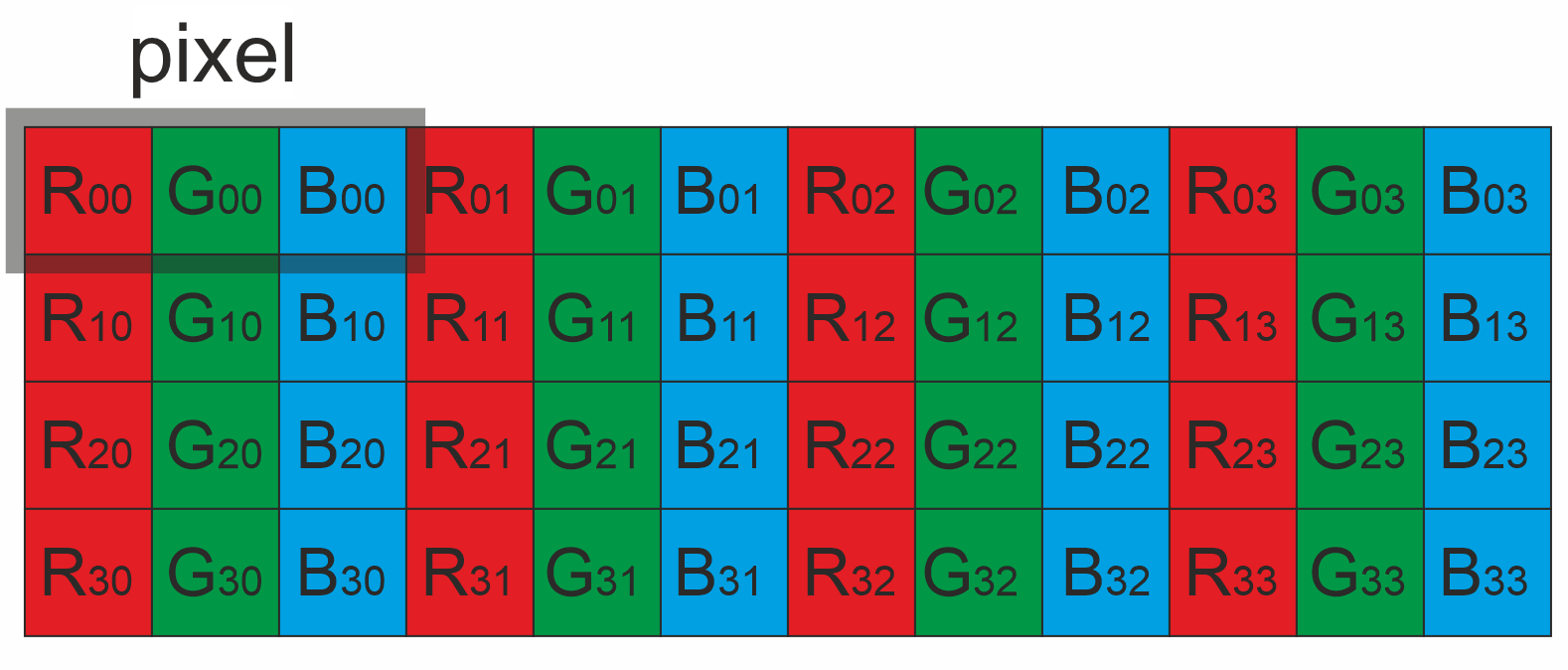
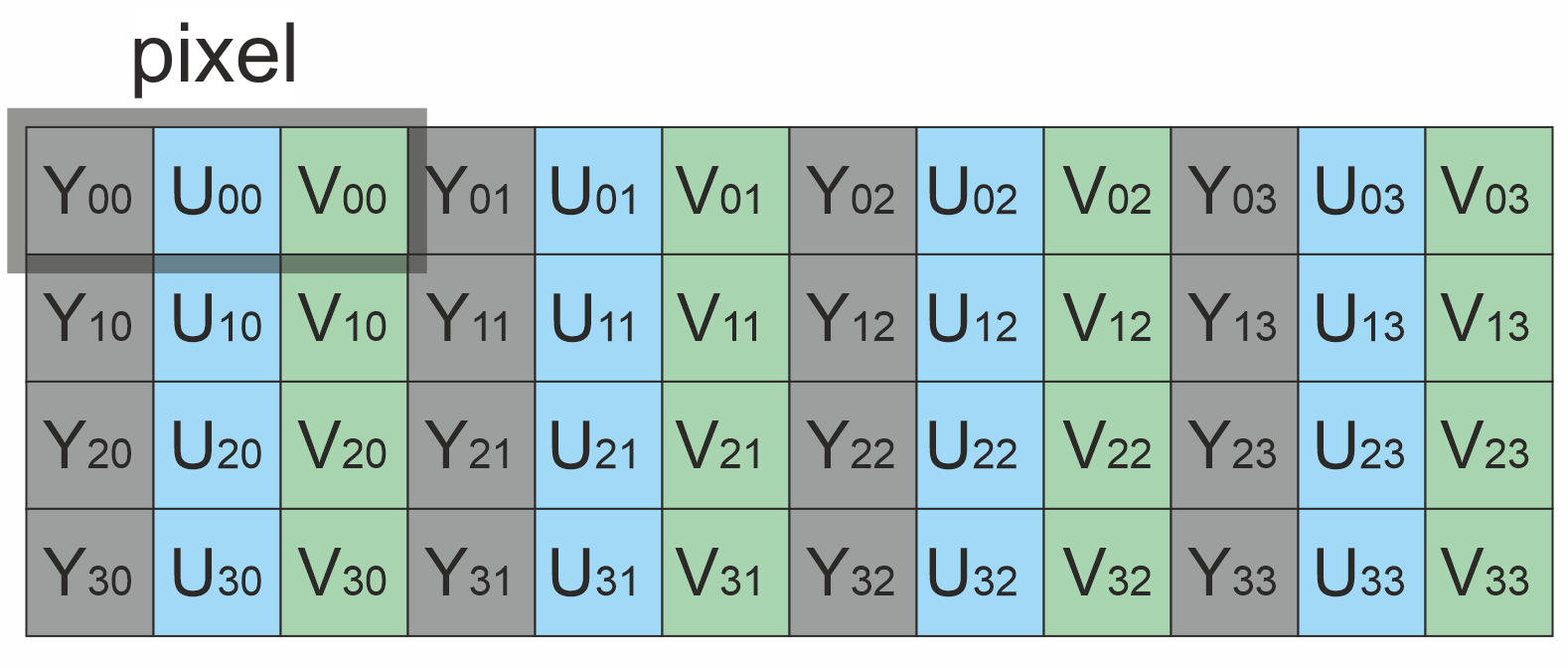
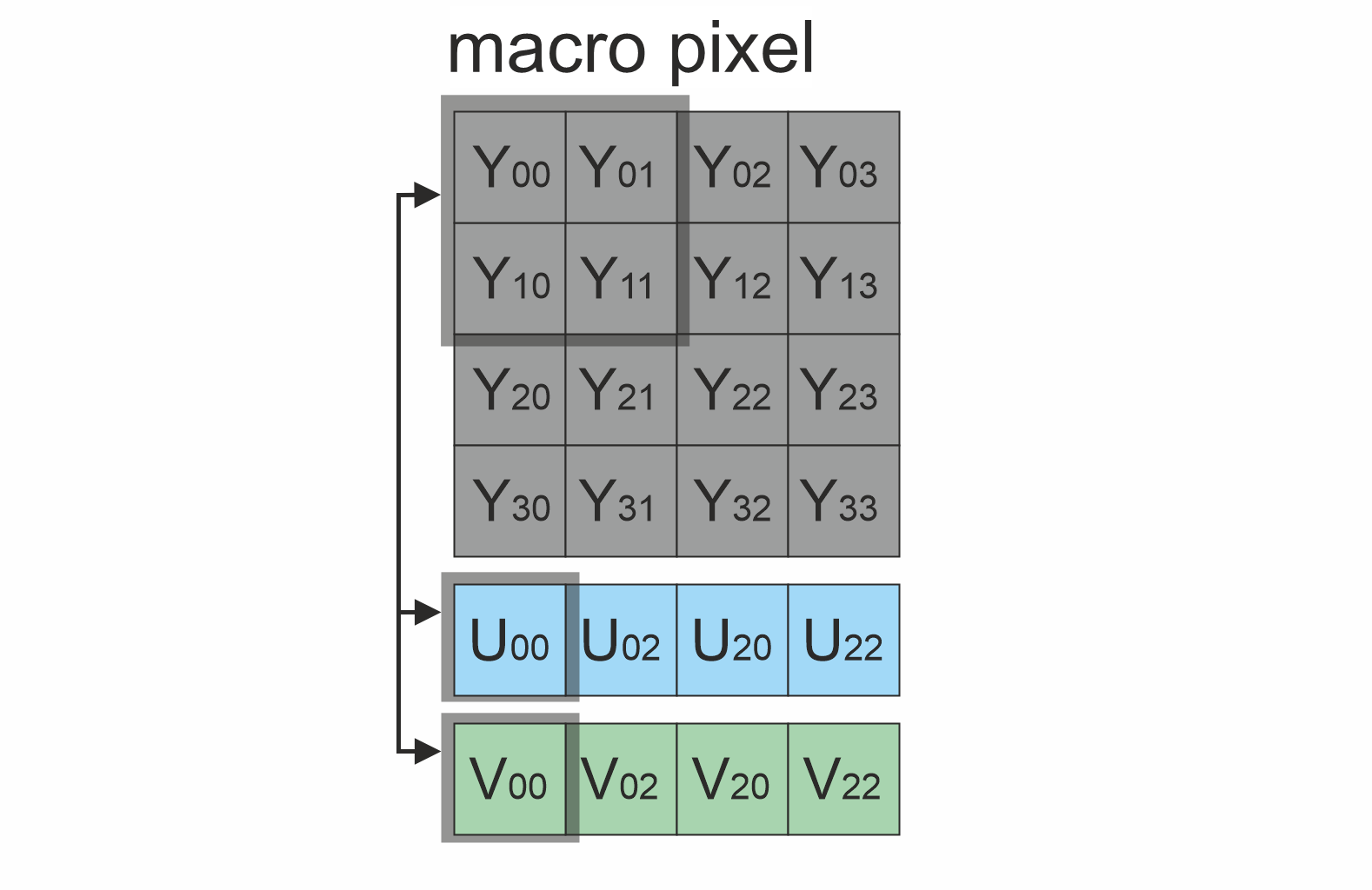
Frame library which included in VStabiliserCv library contains Fourcc enum which defines supported pixel formats (Frame.h file). VStabiliserCv library supports RAW pixel formats. The input frame is not converted to another pixel format: motion estimation samples only the luma (brightness) information from the frame (for RGB24/BGR24 — the mean of the three channels, for the YUV family — the Y bytes) into a small internal working buffer, while the compensation (pixel shift or rotation warp) is applied to the original frame with all its colour planes/channels — the output frame has the same pixel format and full colour content as the input. Fourcc enum declaration:
enum class Fourcc
{
    /// RGB 24bit pixel format.
    RGB24 = MAKE_FOURCC_CODE('R', 'G', 'B', '3'),
    /// BGR 24bit pixel format.
    BGR24 = MAKE_FOURCC_CODE('B', 'G', 'R', '3'),
    /// YUYV 16bits per pixel format.
    YUYV  = MAKE_FOURCC_CODE('Y', 'U', 'Y', 'V'),
    /// UYVY 16bits per pixel format.
    UYVY  = MAKE_FOURCC_CODE('U', 'Y', 'V', 'Y'),
    /// Grayscale 8bit.
    GRAY  = MAKE_FOURCC_CODE('G', 'R', 'A', 'Y'),
    /// YUV 24bit per pixel format.
    YUV24  = MAKE_FOURCC_CODE('Y', 'U', 'V', '3'),
    /// NV12 pixel format.
    NV12  = MAKE_FOURCC_CODE('N', 'V', '1', '2'),
    /// NV21 pixel format.
    NV21  = MAKE_FOURCC_CODE('N', 'V', '2', '1'),
    /// YU12 (YUV420) - Planar pixel format.
    YU12 = MAKE_FOURCC_CODE('Y', 'U', '1', '2'),
    /// YV12 (YVU420) - Planar pixel format.
    YV12 = MAKE_FOURCC_CODE('Y', 'V', '1', '2'),
    /// JPEG compressed format.
    JPEG  = MAKE_FOURCC_CODE('J', 'P', 'E', 'G'),
    /// H264 compressed format.
    H264  = MAKE_FOURCC_CODE('H', '2', '6', '4'),
    /// HEVC compressed format.
    HEVC  = MAKE_FOURCC_CODE('H', 'E', 'V', 'C')
};
Table 3 - Bytes layout of supported RAW pixel formats. Example of 4x4 pixels image.
 RGB24 RGB24 | 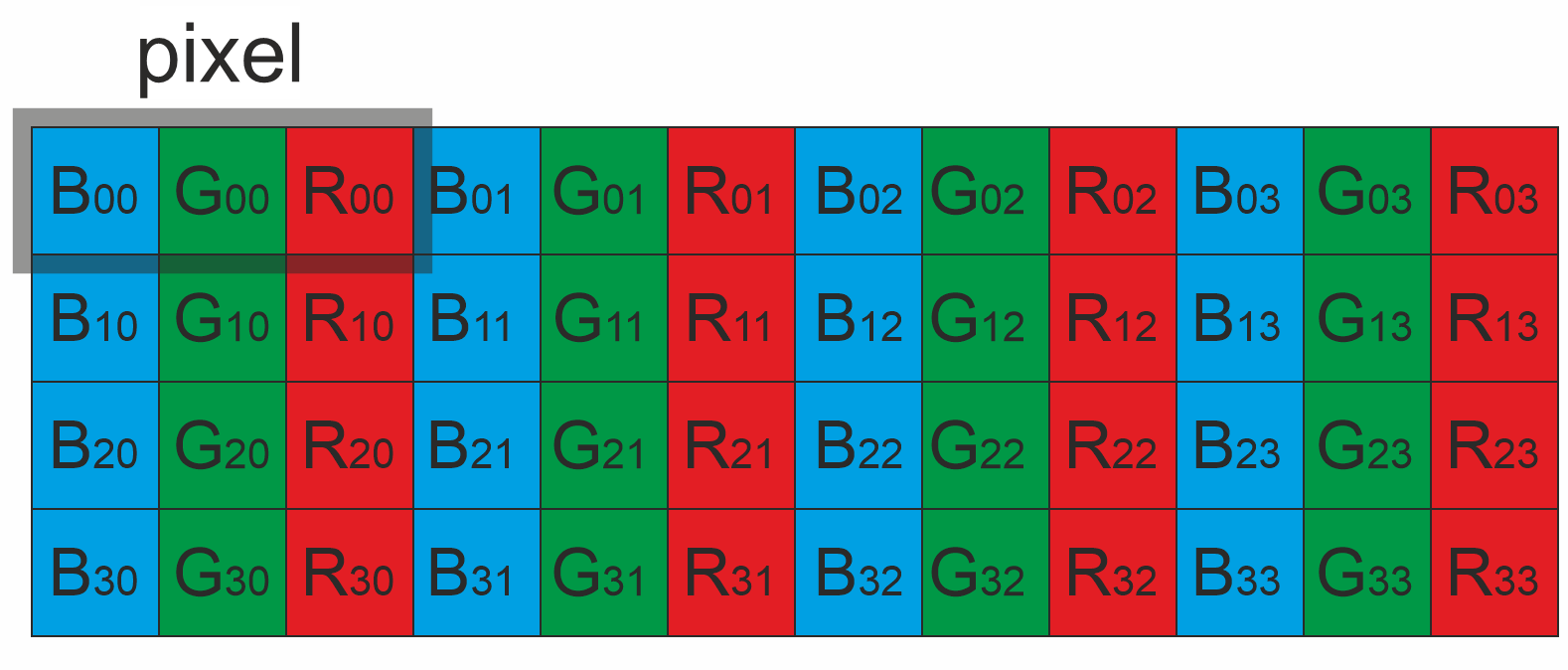 BGR24 BGR24 |
|---|---|
 YUV24 YUV24 | 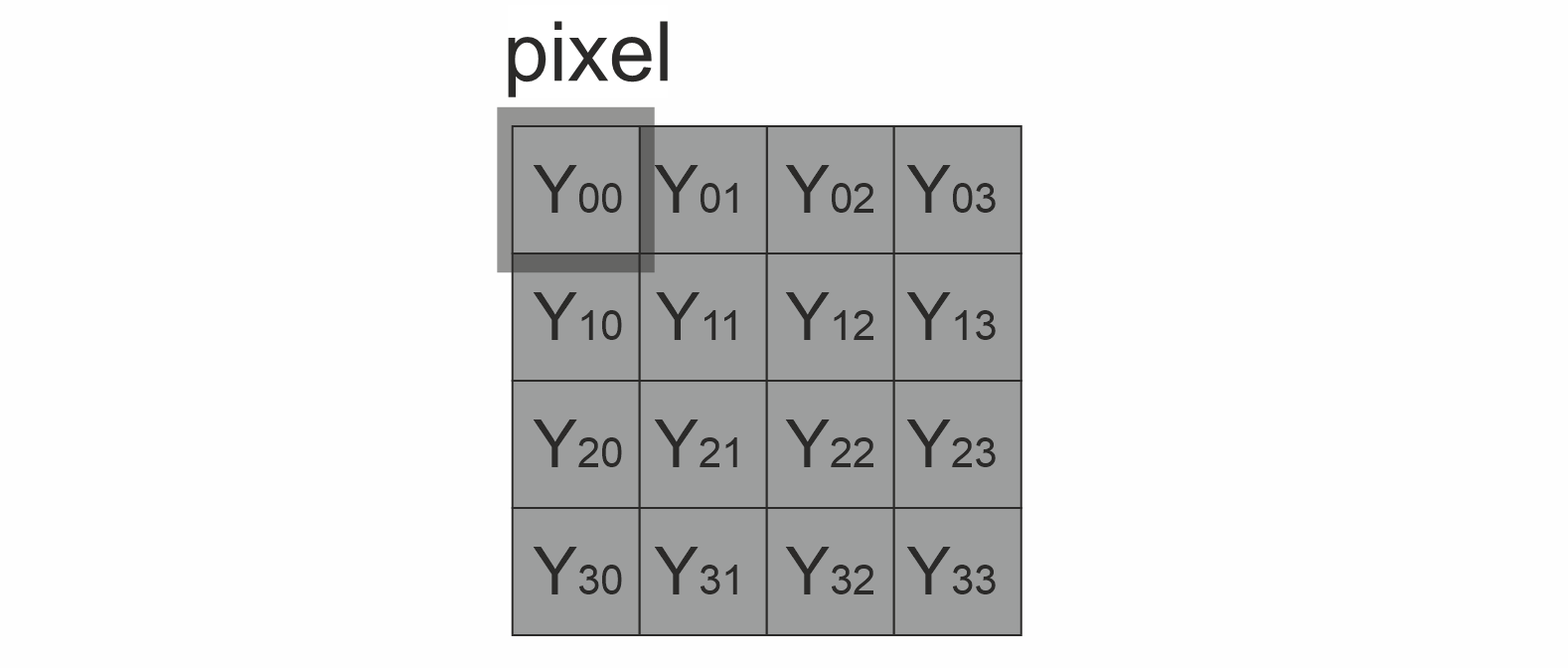 GRAY GRAY |
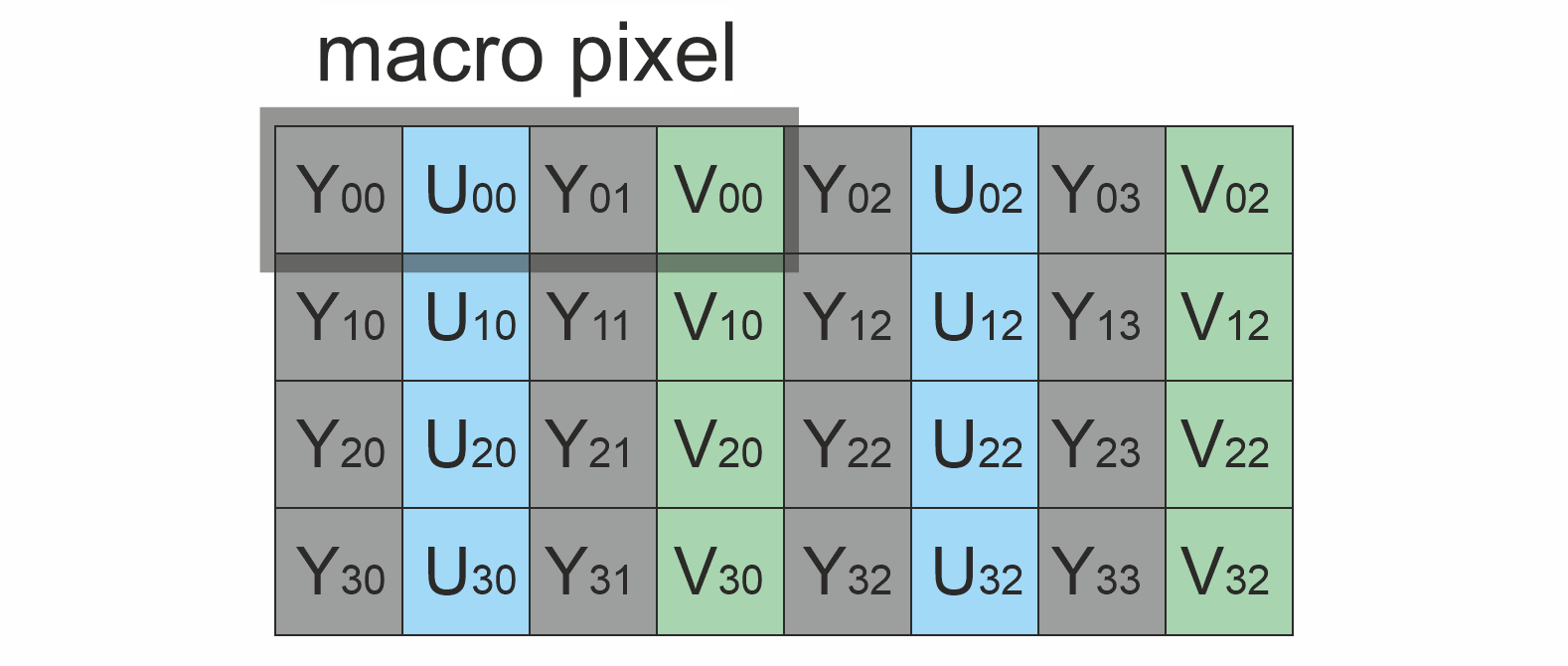 YUYV YUYV | 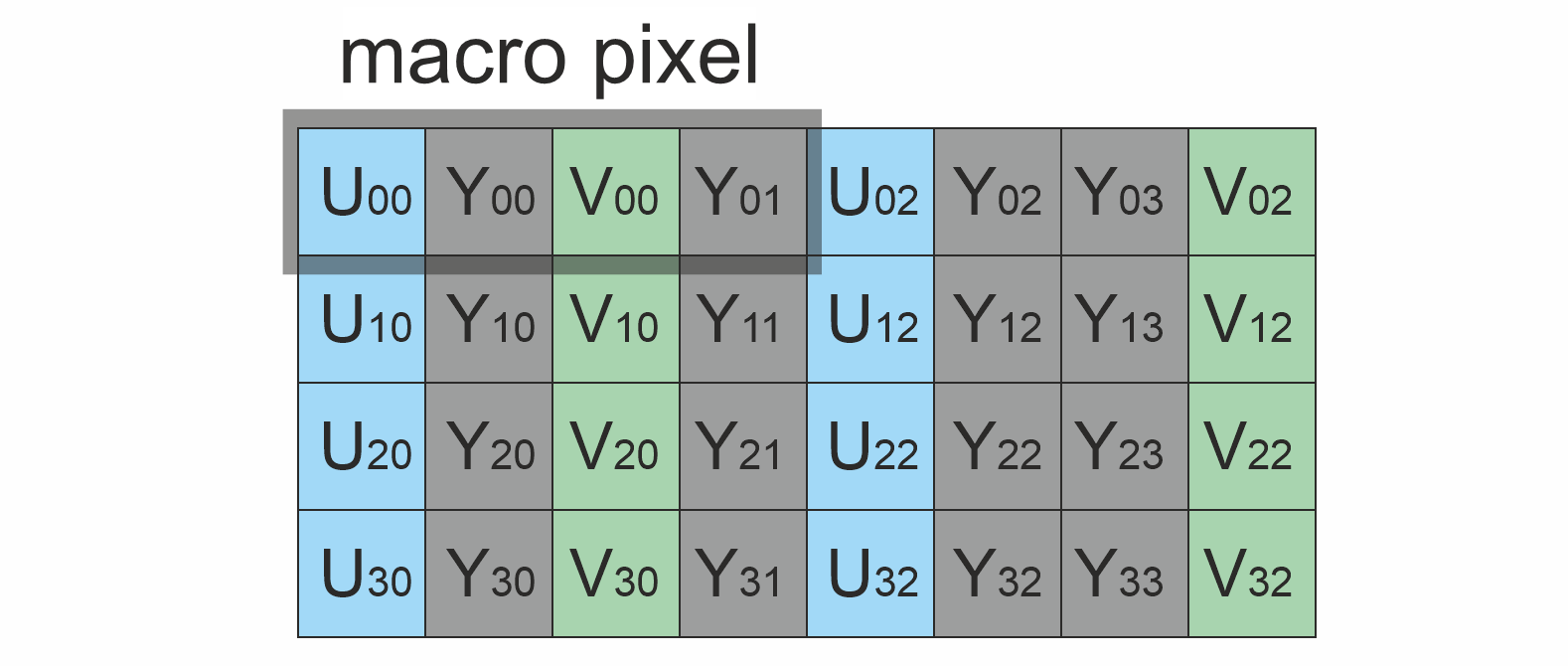 UYVY UYVY |
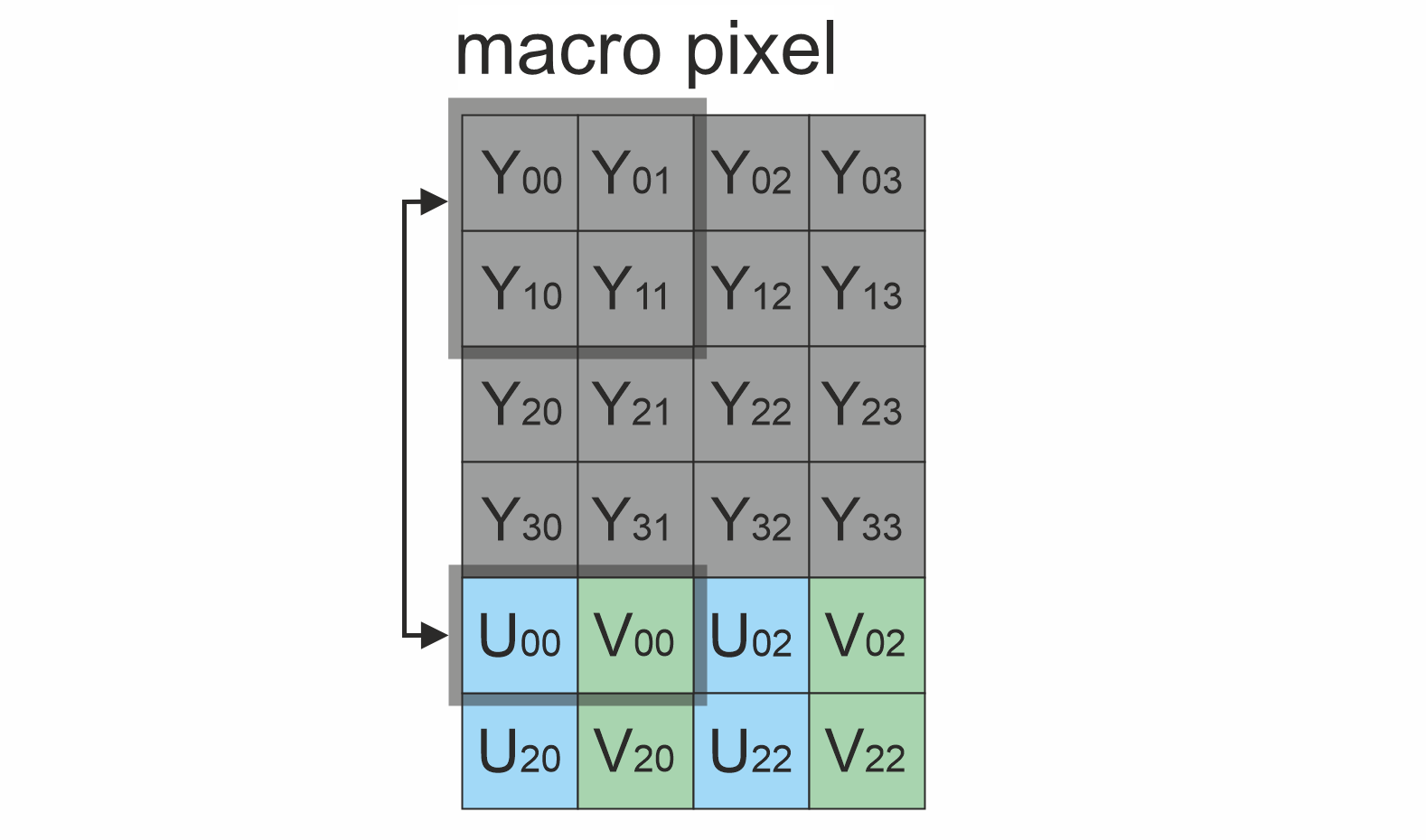 NV12 NV12 | 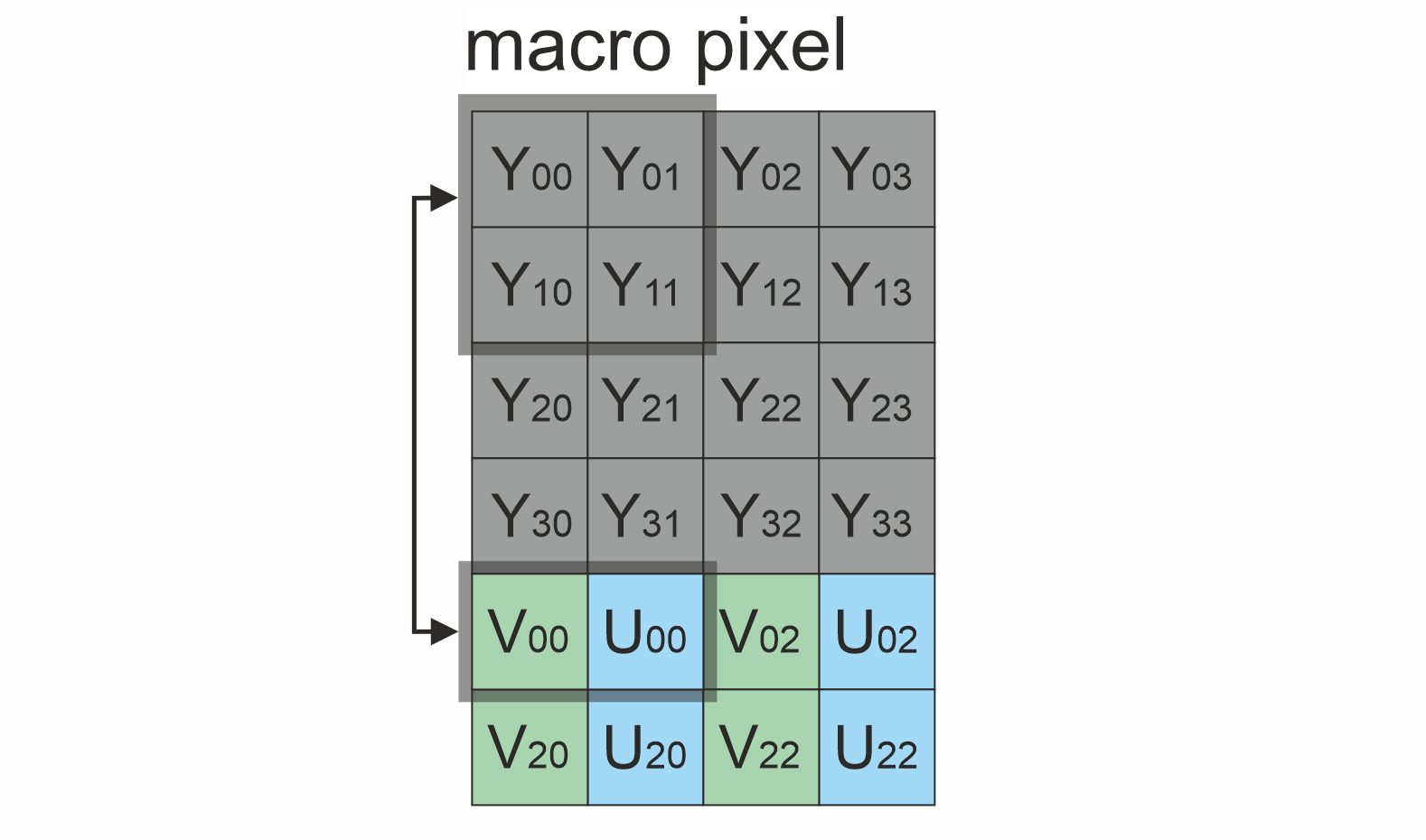 NV21 NV21 |
 YU12 YU12 | 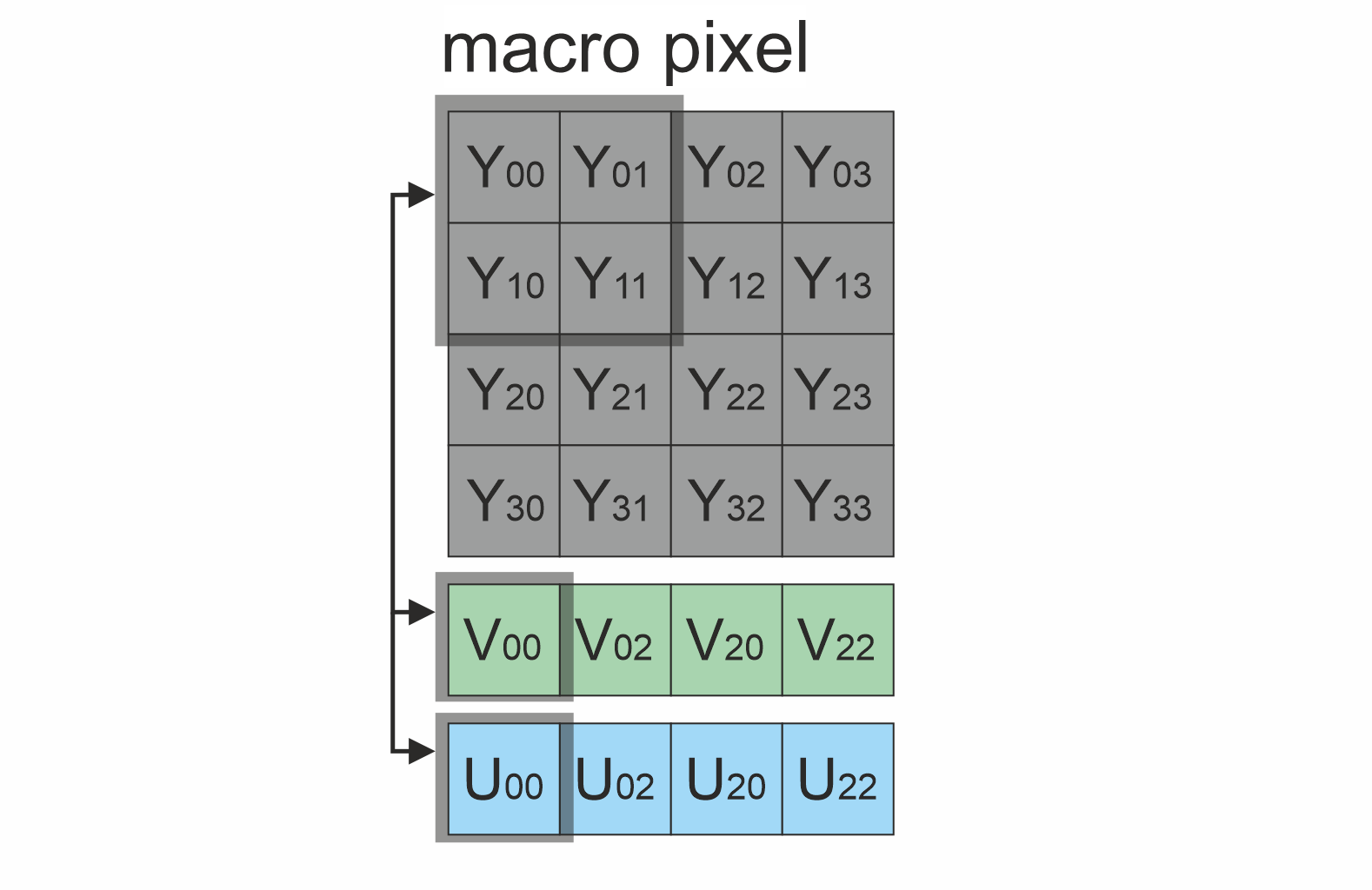 YV12 YV12 |
Both stabilization types are fully supported for every listed pixel format: motion estimation, the translation compensation (integer pixel shift) and the TYPE 1 rotation warp all handle all ten formats. The per-format differences are only in the luma source used for motion estimation and in the granularity of the translation-only (memcpy) compensation path, where the shift is rounded so the sub-sampled chroma planes stay aligned with the luma. The TYPE 1 rotation warp resamples every plane (including chroma) bilinearly with sub-pixel precision, so it has no such granularity restriction. Table 4 summarizes the per-format behaviour.
Table 4 - Stabilization support per pixel format.
| Pixel format | 2D (TYPE 0) | 3D (TYPE 1, rotation + translation) | Luma source for motion estimation | Translation granularity on the pixel-shift path | Frame dimension requirements |
|---|---|---|---|---|---|
| GRAY | Yes | Yes | Pixel bytes as-is | 1 px (both axes) | ≥ 256×256 |
| RGB24 / BGR24 | Yes | Yes | Mean of R, G, B channels | 1 px (both axes) | ≥ 256×256 |
| YUV24 | Yes | Yes | Y channel | 1 px (both axes) | ≥ 256×256 |
| YUYV / UYVY (4:2:2 packed) | Yes | Yes | Y bytes | 2 px horizontally, 1 px vertically (chroma is sub-sampled horizontally) | ≥ 256×256, width must be even |
| NV12 / NV21 (4:2:0 semi-planar) | Yes | Yes | Y plane | 2 px on both axes (chroma is sub-sampled on both axes) | ≥ 256×256, width and height must be even |
| YU12 / YV12 (4:2:0 planar) | Yes | Yes | Y plane | 2 px on both axes (chroma is sub-sampled on both axes) | ≥ 256×256, width and height must be even |
Compressed formats (JPEG, H264, HEVC) are not supported: stabilise(...) copies such frames to the output without processing (motion estimation rejects them, and the compensation stage passes the frame through unchanged).
VStabiliserCv class description
VStabiliserCv class declaration
VStabiliserCv.h contains the VStabiliserCv class declaration. VStabiliserCv inherits the interface from VStabiliser. Class declaration:
namespace cr
{
namespace vstab
{
class VStabiliserCv: public VStabiliser
{
public:

    /// Class constructor.
    VStabiliserCv();

    /// Class destructor.
    ~VStabiliserCv();

    /// Get string of current VStabiliserCv class version.
    static std::string getVersion();

    /// Init all video stabiliser parameters by params structure.
    bool initVStabiliser(const cr::vstab::VStabiliserParams& params) override;

    /// Set value to parameter with given id.
    bool setParam(cr::vstab::VStabiliserParam id, float value) override;

    /// Get parameter with given id.
    float getParam(cr::vstab::VStabiliserParam id) override;

    /// Get params.
    void getParams(VStabiliserParams& params) override;

    /// Execute command.
    bool executeCommand(VStabiliserCommand id, float value = 0.0f) override;

    /// Stabilise video frame.
    bool stabilise(cr::video::Frame& src, cr::video::Frame& dst) override;

    /// Get offsets: horizontal, vertical and rotation.
    void getOffsets(float& dX, float& dY, float& dA) override;

    /// Decode and execute command.
    bool decodeAndExecuteCommand(uint8_t* data, int size) override;
};
}
}
getVersion method
The getVersion() method returns the current VStabiliserCv class version as a string. Method declaration:
static std::string getVersion();
Method can be used without a VStabiliserCv class instance. Example:
std::cout << "VStabiliserCv version: " << VStabiliserCv::getVersion();
Console output:
VStabiliserCv version: 6.1.0
initVStabiliser method
The initVStabiliser(…) method initializes the video stabilizer from a set of parameters. Method declaration:
bool initVStabiliser(const cr::vstab::VStabiliserParams& params) override;
| Parameter | Description |
|---|---|
| params | VStabiliserParams class object. |
Returns: always TRUE. The method applies all parameters supported by VStabiliserCv (enable, xFilterCoeff, yFilterCoeff, aFilterCoeff, transparentBorder, constXOffset, constYOffset, type, custom1, custom2); if a particular value is invalid, the documented default is applied instead of it. Note: custom1 values ≤ 0 are mapped to 1 (serial warp), so the interface-struct default keeps the serial behaviour — the “auto / all cores” mode is reachable only via setParam(CUSTOM_1, 0); custom2 is enable or disable OpenGL warp, 1 - enabled, 0 - disabled.
setParam method
The setParam(…) method changes a single video stabilizer parameter. NOTE: the new value is applied only on the next processed video frame. Every numeric parameter is validated: NaN / Inf values and values outside the documented range are rejected (the method returns FALSE). Toggling MODE to a different value or switching TYPE resets the algorithm (the same behaviour as the ON / OFF commands). Thread-safe — backed by std::atomic<T> per field; safe to invoke from any thread, including concurrently with stabilise(...). Method declaration:
bool setParam(cr::vstab::VStabiliserParam id, float value) override;
| Parameter | Description |
|---|---|
| id | Parameter ID according to VStabiliserParam enum. |
| value | Parameter value. Depends on parameter ID. |
Returns: TRUE if param was accepted or FALSE if not.
getParam method
The getParam(…) method returns the current value of a single video stabilizer parameter. Thread-safe — lock-free atomic load; safe to invoke from any thread, including concurrently with stabilise(...). Method declaration:
float getParam(cr::vstab::VStabiliserParam id) override;
| Parameter | Description |
|---|---|
| id | Parameter ID according to VStabiliserParam enum. |
Returns: Parameter value, or -1 if the parameter is not supported / not used by VStabiliserCv (as documented by the base VStabiliser interface) — see Table 5 below for the per-parameter behaviour.
getParams method
The getParams(…) method returns all video stabilizer parameters. Thread-safe — may be invoked from any thread. Method declaration:
void getParams(VStabiliserParams& params) override;
| Parameter | Description |
|---|---|
| params | VStabiliserParams class object to be filled. |
executeCommand method
The executeCommand(…) method executes a video stabilizer action command. Thread-safe — atomic field updates for RESET / ON / OFF; HOLD_MSEC publishes the deadline through a single atomic store. Safe to invoke from any thread, including concurrently with stabilise(...). Method declaration:
bool executeCommand(VStabiliserCommand id, float value = 0.0f) override;
| Parameter | Description |
|---|---|
| id | Command ID according to VStabiliserCommand enum. |
| value | Command argument. Depends on command ID. |
Returns: TRUE if the command was executed or FALSE if not.
stabilise method
The stabilise(…) method performs video stabilization. The method is not re-entrant: the FFT scratch buffers, the ping-pong spectrum index and the Kalman filter state are not protected by any lock, so call it from a single processing thread per VStabiliserCv instance (setParam(...) / getParam(...) / executeCommand(...) may be invoked concurrently from other threads). The stabiliser resets itself automatically when the input frame resolution or pixel format changes mid-stream. Method declaration:
bool stabilise(cr::video::Frame& src, cr::video::Frame& dst) override;
| Parameter | Description |
|---|---|
| src | Source frame. Only RAW pixel formats are supported (compressed formats such as JPEG, H264, HEVC are not). Supported formats: RGB24, BGR24, GRAY, YUV24, YUYV, UYVY, NV12, NV21, YV12, YU12. Both frame dimensions must be at least 256 pixels. |
| dst | Result frame. Pixel format matches the source frame. If stabilization is disabled (MODE = 0) the library copies the source frame to the result frame. If the destination frame is not initialized the library initializes it. Translation-only corrections are applied as a lossless integer pixel shift; for TYPE 1, when the rotation correction is large enough to move a frame corner by at least one pixel, the correction is applied as a single rigid warp (rotation + translation) with the fixed-point 2x2 bilinear kernel (thread count set by CUSTOM_1). |
Returns: TRUE if the video frame was processed or FALSE in case of any errors.
getOffsets method
The getOffsets(…) method returns the offsets applied to the last processed video frame. The rotation angle dA is non-zero only for algorithm TYPE 1 (it reports the applied rotation correction in radians); the 2D translation-only type (TYPE 0) always reports 0. Method declaration:
void getOffsets(float& dX, float& dY, float& dA) override;
| Parameter | Description |
|---|---|
| dX | Horizontal offset in pixels applied to the last processed frame. |
| dY | Vertical offset in pixels applied to the last processed frame. |
| dA | Rotation correction in radians applied to the last processed frame. Non-zero only for TYPE 1; 0 for TYPE 0. |
encodeSetParamCommand method of VStabiliser interface class
The encodeSetParamCommand(…) static method encodes command to change any parameters of remote video stabiliser. To control a stabiliser remotely, the developer has to develop his own protocol and according to it encode the command and deliver it over the communication channel. To simplify this, the VStabiliser class contains static methods for encoding the control commands. The VStabiliser class provides two types of commands: a parameter change command (SET_PARAM) and an action command (COMMAND). encodeSetParamCommand(…) designed to encode SET_PARAM command. Method declaration:
static void encodeSetParamCommand(uint8_t* data, int& size, VStabiliserParam id, float value);
| Parameter | Description |
|---|---|
| data | Pointer to data buffer for encoded command. Must have size >= 11. |
| size | Size of encoded data. Will be 11 bytes. |
| id | Parameter ID according to VStabiliserParam enum. |
| value | Parameter value. |
encodeSetParamCommand(…) is static and used without VStabiliser class instance. This method used on client side (control system). Example:
// Buffer for encoded data.
uint8_t data[11];
// Size of encoded data.
int size = 0;
// Encode command.
VStabiliser::encodeSetParamCommand(data, size, VStabiliserParam::X_FILTER_COEFF, 0.8f);
encodeCommand method of VStabiliser interface class
The encodeCommand(…) static method encodes video stabiliser action command. To control a stabiliser remotely, the developer has to develop his own protocol and according to it encode the command and deliver it over the communication channel. To simplify this, the VStabiliser class contains static methods for encoding the control commands. The VStabiliser class provides two types of commands: a parameter change command (SET_PARAM) and an action command (COMMAND). encodeCommand(…) designed to encode COMMAND command (action command). Method declaration:
static void encodeCommand(uint8_t* data, int& size, VStabiliserCommand id, float value = 0.0f);
| Parameter | Description |
|---|---|
| data | Pointer to data buffer for encoded command. Must have size >= 11. |
| size | Size of encoded data. Will be 11 bytes. |
| id | Command ID according to VStabiliserCommand enum. |
| value | Command argument. Depends on command ID. |
encodeCommand(…) is static and used without VStabiliser class instance. This method used on client side (control system). Encoding example:
// Buffer for encoded data.
uint8_t data[11];
// Size of encoded data.
int size = 0;
// Encode command.
VStabiliser::encodeCommand(data, size, VStabiliserCommand::HOLD_MSEC, 1200);
decodeCommand method of VStabiliser interface class
The decodeCommand(…) static method designed to decode command on video stabiliser side. To control a stabiliser remotely, the developer has to develop his own protocol and according to it encode the command and deliver it over the communication channel. To simplify this, the VStabiliser interface class contains static method to decode input command (commands should be encoded by methods encodeSetParamCommand(…) or encodeCommand(…)). The VStabiliser class provides two types of commands: a parameter change command (SET_PARAM) and an action command (COMMAND). Method declaration:
static int decodeCommand(uint8_t* data, int size, VStabiliserParam& paramId, VStabiliserCommand& commandId, float& value);
| Parameter | Description |
|---|---|
| data | Pointer to input command. |
| size | Size of command. Must be 11 bytes (both COMMAND and SET_PARAM are encoded as 11 bytes). |
| paramId | Video stabiliser parameter ID according to VStabiliserParam enum. After decoding SET_PARAM command the method will return parameter ID. |
| commandId | Video stabiliser command ID according toVStabiliserCommand enum. After decoding COMMAND the method will return command ID. |
| value | Video stabiliser parameter value after decoding SET_PARAM command or command argument after decoding COMMAND. |
Returns: 0 - in case decoding COMMAND, 1 - in case decoding SET_PARAM command or -1 in case errors.
decodeCommand(…) is static and used without VStabiliser class instance. Command decoding example:
// Buffer for encoded data.
uint8_t data[11];
int size = 0;
VStabiliser::encodeCommand(data, size, VStabiliserCommand::ON);

// Decode command.
VStabiliserCommand commandId;
VStabiliserParam paramId;
float value = (float)(rand() % 20);
if (VStabiliser::decodeCommand(data, size, paramId, commandId, value) != 0)
{
    cout << "Command not decoded" << endl;
    return false;
}
decodeAndExecuteCommand method
The decodeAndExecuteCommand(…) method decodes and executes command on video stabiliser side. The decodeAndExecuteCommand(…) method can be safely called from any thread. Method declaration:
bool decodeAndExecuteCommand(uint8_t* data, int size) override;
| Parameter | Description |
|---|---|
| data | Pointer to input command. |
| size | Size of command. Must be 11 bytes (both SET_PARAM and COMMAND are encoded as 11 bytes). |
Returns: TRUE if command decoded (SET_PARAM or COMMAND) and executed (action command or set param command).
Data structures
VStabiliserParam enum
VStabiliserParam enum lists video stabilizer parameters. Declared in VStabiliser.h of the VStabiliser library. Enum declaration:
namespace cr
{
namespace vstab
{
enum class VStabiliserParam
{
    /// Not used by VStabiliserCv (kept for VStabiliser-interface
    /// compatibility — the internal decimation is fixed in code).
    SCALE_FACTOR = 1,
    /// Not used by VStabiliserCv. The per-frame shift limit is
    /// hard-wired in code (~30 % of the frame dimension). setParam(...)
    /// returns false, getParam(...) returns -1.
    X_OFFSET_LIMIT,
    /// Not used by VStabiliserCv. Same rules as X_OFFSET_LIMIT.
    Y_OFFSET_LIMIT,
    /// Not used by VStabiliserCv (the rotation correction is not
    /// limited by this parameter).
    A_OFFSET_LIMIT,
    /// Horizontal stabilization strength. Range [0, 1]: 0 - near pass-through
    /// (almost no stabilization), 1 - strongest stabilization.
    X_FILTER_COEFF,
    /// Vertical stabilization strength. Range [0, 1]: 0 - near pass-through
    /// (almost no stabilization), 1 - strongest stabilization.
    Y_FILTER_COEFF,
    /// Rotation stabilization strength (TYPE 1). Range [0, 1], same
    /// strength-to-time-constant mapping as X/Y_FILTER_COEFF: 0 - rotation
    /// axis is not stabilised at all, 1 - strongest stabilization.
    A_FILTER_COEFF,
    /// Stabilisation mode: 0 - off (the library copies the input image),
    /// 1 - stabilisation on. Toggling the value resets the algorithm.
    MODE,
    /// Transparent border mode: 0 - black borders, 1 - borders filled from
    /// previous frames.
    TRANSPARENT_BORDER,
    /// Constant horizontal image offset in pixels added to each processed
    /// frame (boresight correction). Signed, accepted range -8192..8192.
    CONST_X_OFFSET,
    /// Constant vertical image offset in pixels added to each processed
    /// frame (boresight correction). Signed, accepted range -8192..8192.
    CONST_Y_OFFSET,
    /// Constant rotational angle in radians. The library should add this
    /// offset to each processed video frame.
    CONST_A_OFFSET,
    /// Read only. Horizontal offset (pixels) applied to the last frame.
    INSTANT_X_OFFSET,
    /// Read only. Vertical offset (pixels) applied to the last frame.
    INSTANT_Y_OFFSET,
    /// Read only. Rotation correction (radians) applied to the last frame.
    /// Non-zero only for TYPE 1; the 2D translation-only type reports 0.
    INSTANT_A_OFFSET,
    /// Algorithm type: 0 - 2D stabilisation (translation only), 1 - 3D
    /// stabilisation (translation + rotation) via the Fourier-Mellin
    /// transform. Switching the type resets the algorithm.
    TYPE,
    /// Not used by VStabiliserCv.
    CUT_FREQUENCY_HZ,
    /// Not used by VStabiliserCv. The motion filter runs on a fixed
    /// 30 FPS nominal time step regardless of the actual input frame rate;
    /// tune X/Y_FILTER_COEFF empirically for the host pipeline instead.
    FPS,
    /// Read only. Processing time of the last video frame, in microseconds.
    PROCESSING_TIME_MKS,
    /// Not used by VStabiliserCv.
    LOG_MODE,
    /// Not used by VStabiliserCv (single plain-C++ backend).
    BACKEND,
    /// TYPE 1 output warp thread count via OpenMP: 1 - serial (default),
    /// N > 1 - N threads, 0 - auto (all cores). Has effect only when the
    /// library is built with OpenMP.
    CUSTOM_1,
    /// Enable OpenGL warp.
    CUSTOM_2,
    /// Not used by VStabiliserCv.
    CUSTOM_3
};
}
}
Table 5 - Video stabilizer parameters supported by VStabiliserCv.
Unused parameters (rows marked not used below) are kept in the enum only for VStabiliser interface compatibility. For every such parameter setParam(...) returns false and getParam(...) returns -1 — the library does not store the value.
| Parameter | Description |
|---|---|
| SCALE_FACTOR | Not used — the internal decimation is fixed in code (see TYPE for the sampled region). |
| X_OFFSET_LIMIT | Not used. The per-frame shift limit is hard-wired in code (≈30 % of the frame dimension — see Table 2). setParam(...) returns false, getParam(...) returns -1. |
| Y_OFFSET_LIMIT | Not used. Same rules as X_OFFSET_LIMIT. |
| A_OFFSET_LIMIT | Not used — the rotation correction is not limited by this parameter. |
| X_FILTER_COEFF | Horizontal stabilization strength. Range [0, 1]: 0 — near pass-through (almost no stabilization), 1 — strongest stabilization. Default: 0.8. |
| Y_FILTER_COEFF | Vertical stabilization strength. Range [0, 1]: 0 — near pass-through (almost no stabilization), 1 — strongest stabilization. Default: 0.8. |
| A_FILTER_COEFF | Rotation stabilization strength for TYPE 1. Range [0, 1], same strength-to-time-constant mapping as X/Y_FILTER_COEFF: 0 — the rotation axis is not stabilised at all, 1 — strongest stabilization. Default: 0.8. |
| MODE | Stabilization mode: 0 — off (library copies input frame), 1 — on. Toggling the value (by setParam(...) or the ON / OFF commands) resets the algorithm. Default: 1. |
| TRANSPARENT_BORDER | 0 — black fill at shifted borders, 1 — fill from previous frame. Default: 1. |
| CONST_X_OFFSET | Constant horizontal offset in pixels added to every processed frame (boresight correction). Signed, accepted range: -8192..8192; setParam(...) returns false for values outside this range or non-finite. Default: 0. |
| CONST_Y_OFFSET | Constant vertical offset in pixels added to every processed frame (boresight correction). Signed, accepted range: -8192..8192; setParam(...) returns false for values outside this range or non-finite. Default: 0. |
| CONST_A_OFFSET | Constant rotational angle in radians. The library will add this offset to each processed video frame. This values used for boresight correction. |
| INSTANT_X_OFFSET | Read only. Horizontal offset (pixels) applied to the last processed frame. |
| INSTANT_Y_OFFSET | Read only. Vertical offset (pixels) applied to the last processed frame. |
| INSTANT_A_OFFSET | Read only. Rotation correction (radians) applied to the last processed frame. Non-zero only for TYPE 1; the 2D translation-only type reports 0. |
| TYPE | Algorithm type: 0 — 2D translation-only stabilisation (the whole frame is decimated anisotropically into the estimation window), 1 — 3D translation + rotation stabilisation via the Fourier-Mellin transform on the log-polar magnitude spectrum (the central min(width, height) square is decimated isotropically). Only 0 and 1 are accepted — any other value is rejected (setParam(...) returns false). Switching the type resets the algorithm. Default: 0. |
| CUT_FREQUENCY_HZ | Not used. |
| FPS | Not used. The internal motion filter runs on a fixed 30 FPS nominal time step regardless of the actual input frame rate. Estimating the real FPS reliably is a host-side concern; the recommended practice is to tune X_FILTER_COEFF / Y_FILTER_COEFF empirically for the deployed pipeline (typically a fixed frame rate per system). |
| PROCESSING_TIME_MKS | Read only. Processing time of the last frame in microseconds. |
| LOG_MODE | Not used — the library produces no log output. |
| BACKEND | Not used — single plain-C++ backend. |
| CUSTOM_1 | TYPE 1 output warp thread count via OpenMP: 1 — serial (default), N > 1 — N threads, 0 — auto (all cores). Accepted range: 0..1024. Has effect only when the library is built with OpenMP. |
| CUSTOM_2 | Enable the OpenGL ES GPU output warp: 1 — enabled (default), 0 — disabled (the CPU warp is used). Accepted range: 0..1; any other value is rejected (setParam(...) returns false). Affects only the RGB24, BGR24 and YUV24 pixel formats and only the frames that are actually rotated (TYPE 1) — every other format and the translation-only path always use the CPU warp regardless of this parameter. In a build without the GPU path (VSTAB_OPENGL=OFF, or EGL / OpenGL ES not found at configure time) the parameter is not used: setParam(...) returns false and getParam(...) returns -1. |
| CUSTOM_3 | Not used. |
VStabiliserCommand enum
VStabiliserCommand enum lists video stabilizer commands. Declared in VStabiliser.h. Enum declaration:
namespace cr
{
namespace vstab
{
enum class VStabiliserCommand
{
    /// Reset stabilisation algorithm. No params.
    RESET = 1,
    /// Enable stabilisation. After execution parameter MODE must be set to 1. No params.
    ON,
    /// Disable stabilisation. After execution parameter MODE must be set to 0. No params.
    OFF,
    /// Hold processing for some time. Parameter - time in milliseconds.
    HOLD_MSEC
};
}
}
Table 6 - Video stabilizer commands.
| Command | Description |
|---|---|
| RESET | Reset the stabilization algorithm state (clears frame buffers, zeroes offsets). |
| ON | Enable stabilization. After execution parameter MODE is set to 1. |
| OFF | Disable stabilization. After execution parameter MODE is set to 0. |
| HOLD_MSEC | Suspend stabilization for the given number of milliseconds. Accepted range: 0..100000 ms (values outside return FALSE). During the timeout the library copies input frames without applying any correction. Used to pause stabilization while a pan-tilt unit is moving. |
VStabiliserParams class description
VStabiliserParams class is used for video stabilizer initialization (initVStabiliser(…)) or to retrieve all current parameters (getParams(…)). It also provides methods to serialize/deserialize parameters and to read/write JSON configuration files. VStabiliserParams is declared in VStabiliser.h of the VStabiliser library.
VStabiliserParams class declaration
namespace cr
{
namespace vstab
{
class VStabiliserParams
{
public:
    /// Not used by VStabiliserCv (initVStabiliser does not forward it).
    int   scaleFactor{1};
    /// Not used by VStabiliserCv: initVStabiliser(...) ignores this
    /// field and getParams(...) reports 0. The per-frame shift limit is
    /// hard-wired in code (~30 % of the frame dimension).
    int   xOffsetLimit{150};
    /// Not used by VStabiliserCv. Same rules as xOffsetLimit.
    int   yOffsetLimit{150};
    /// Not used by VStabiliserCv.
    float aOffsetLimit{10.0f};
    /// Horizontal stabilization strength. Range [0, 1]: 0 - near pass-through,
    /// 1 - strongest stabilization.
    float xFilterCoeff{0.9f};
    /// Vertical stabilization strength. Range [0, 1]: 0 - near pass-through,
    /// 1 - strongest stabilization.
    float yFilterCoeff{0.9f};
    /// Rotation stabilization strength for TYPE 1. Range [0, 1]:
    /// 0 - the rotation axis is not stabilised, 1 - strongest stabilization.
    float aFilterCoeff{0.9f};
    /// Enable/disable stabilisation.
    bool  enable{true};
    /// Enable/disable transparent borders.
    bool  transparentBorder{true};
    /// Constant horizontal image offset in pixels (boresight correction).
    /// Signed, accepted range -8192..8192.
    int   constXOffset{0};
    /// Constant vertical image offset in pixels (boresight correction).
    /// Signed, accepted range -8192..8192.
    int   constYOffset{0};
    /// Constant rotational angle in radians. The library should add this
    /// offset to each processed video frame.
    float constAOffset{0.0f};
    /// Read only. Horizontal offset (pixels) applied to the last frame.
    int   instantXOffset{0};
    /// Read only. Vertical offset (pixels) applied to the last frame.
    int   instantYOffset{0};
    /// Read only. Rotation correction (rad) applied to the last frame.
    /// Non-zero only for TYPE 1.
    float instantAOffset{0.0f};
    /// Algorithm type: 0 - 2D stabilisation (translation only), 1 - 3D
    /// stabilisation (translation + rotation, Fourier-Mellin). Switching the
    /// type resets the algorithm. VStabiliserCv default: 0.
    int   type{2};
    /// Not used by VStabiliserCv.
    float cutFrequencyHz{2.0f};
    /// Not used by VStabiliserCv — the internal motion filter runs on a
    /// fixed 30 FPS nominal time step regardless of the actual input frame
    /// rate. Tune xFilterCoeff/yFilterCoeff empirically for the deployed
    /// pipeline instead.
    float fps{30.0f};
    /// Read only. Processing time of the last video frame, in microseconds.
    int   processingTimeMks{0};
    /// Not used by VStabiliserCv.
    int   logMod{0};
    /// Not used by VStabiliserCv (single plain-C++ backend).
    int   backend{0};
    /// TYPE 1 output warp thread count via OpenMP. initVStabiliser(...)
    /// maps values <= 0 to 1 (serial, default); N > 1 - N threads; auto
    /// mode (all cores) is reachable only via setParam(CUSTOM_1, 0).
    float custom1{0};
    /// Enable OpenGL warp.
    float custom2{0};
    /// Not used by VStabiliserCv.
    float custom3{0};

    JSON_READABLE(VStabiliserParams, scaleFactor, xOffsetLimit, yOffsetLimit,
                  aOffsetLimit, xFilterCoeff, yFilterCoeff, aFilterCoeff,
                  enable, transparentBorder, constXOffset, constYOffset,
                  constAOffset, type, cutFrequencyHz, fps, logMod, backend,
                  custom1, custom2, custom3);

    bool encode(uint8_t* data, int bufferSize, int& size,
                VStabiliserParamsMask* mask = nullptr);
    bool decode(uint8_t* data, int dataSize);
};
}
}
Table 7 - VStabiliserParams class field descriptions.
| Field | Type | Description |
|---|---|---|
| scaleFactor | int | Not used — the internal decimation is fixed in code; initVStabiliser does not forward this field. |
| xOffsetLimit | int | Not used. setParam(X_OFFSET_LIMIT, ...) returns false, getParam returns -1, getParams reports 0; the per-frame shift limit is hard-wired (≈30 % of the frame dimension). |
| yOffsetLimit | int | Not used. Same rules as xOffsetLimit. |
| aOffsetLimit | float | Not used — the rotation correction is not limited by this field. |
| xFilterCoeff | float | Horizontal stabilization strength. Range [0, 1]: 0 — near pass-through, 1 — strongest stabilization. Default 0.8. |
| yFilterCoeff | float | Vertical stabilization strength. Range [0, 1]: 0 — near pass-through, 1 — strongest stabilization. Default 0.8. |
| aFilterCoeff | float | Rotation stabilization strength for TYPE 1. Range [0, 1]: 0 — the rotation axis is not stabilised, 1 — strongest stabilization. Default 0.8. |
| enable | bool | Enable/disable stabilization. Default true. |
| transparentBorder | bool | Enable/disable transparent borders. Default true. |
| constXOffset | int | Constant horizontal offset in pixels (boresight correction). Signed, accepted range -8192..8192. Default 0. |
| constYOffset | int | Constant vertical offset in pixels (boresight correction). Signed, accepted range -8192..8192. Default 0. |
| constAOffset | float | Constant rotational angle in radians. The library will add this offset to each processed video frame. This values used for boresight correction. |
| instantXOffset | int | Read only. Horizontal offset applied to the last frame. |
| instantYOffset | int | Read only. Vertical offset applied to the last frame. |
| instantAOffset | float | Read only. Rotation correction (radians) applied to the last frame. Non-zero only for TYPE 1. |
| type | int | Algorithm type: 0 — 2D translation-only stabilisation, 1 — 3D translation + rotation stabilisation via the Fourier-Mellin transform. Only 0 and 1 are valid. Switching the type resets the algorithm. Library default: 0. |
| cutFrequencyHz | float | Not used. |
| fps | float | Not used. The internal motion filter runs on a fixed 30 FPS nominal time step. Tune xFilterCoeff / yFilterCoeff empirically for the deployed pipeline instead. |
| processingTimeMks (read only) | int | Processing time of the last frame in microseconds. |
| logMod | int | Not used. |
| backend | int | Not used — single plain-C++ backend. |
| custom1 | float | TYPE 1 output warp thread count via OpenMP: 1 — serial (default), N > 1 — N threads, 0 — auto (all cores, via setParam only). initVStabiliser(...) maps values ≤ 0 to 1, so the struct default keeps the serial behaviour. |
| custom2 | float | Not used. setParam(...) returns false, getParam(...) returns -1, getParams(...) reports 0. |
| custom3 | float | Not used. Same rules as custom2. |
Serialize video stabiliser params
The encode(…) method serializes the video stabilizer parameters for transmission over a communication channel. Method declaration:
bool encode(uint8_t* data, int bufferSize, int& size,
            VStabiliserParamsMask* mask = nullptr);
| Parameter | Description |
|---|---|
| data | Pointer to the output data buffer. |
| bufferSize | Capacity of the output buffer in bytes. |
| size | Output: size in bytes of the encoded payload written to data. |
| mask | Optional pointer to VStabiliserParamsMask to select which fields to include. Pass nullptr to serialize all fields. |
Returns: TRUE if the parameters were encoded successfully or FALSE if the buffer was too small.
Example:
VStabiliserParams in;
uint8_t data[1024];
int size = 0;
in.encode(data, 1024, size);
std::cout << "Encoded data size: " << size << " bytes" << std::endl;
Deserialize video stabiliser params
The decode(…) method deserializes the video stabilizer parameters. Method declaration:
bool decode(uint8_t* data, int dataSize);
| Parameter | Description |
|---|---|
| data | Pointer to the input data buffer (produced by encode(...)). |
| dataSize | Size of the input data buffer in bytes. |
Returns: TRUE if decoded successfully or FALSE otherwise.
Example:
VStabiliserParams in;
uint8_t data[1024];
int size = 0;
in.encode(data, 1024, size);

VStabiliserParams out;
if (!out.decode(data, size))
    std::cout << "Can't decode data" << std::endl;
Read params from JSON file and write to JSON file
The bundled ConfigReader library provides methods to read and write parameters from/to a JSON file:
VStabiliserParams in;
in.scaleFactor = 2;
in.fps = 25.0f;
// Note: xOffsetLimit / yOffsetLimit are not used by VStabiliserCv and
// ignored by initVStabiliser(...) — assigning them has no effect.

// Write params to file.
cr::utils::ConfigReader inConfig;
inConfig.set(in, "VStabiliserParams");
inConfig.writeToFile("VStabiliserCvParams.json");

// Read params from file.
cr::utils::ConfigReader outConfig;
outConfig.readFromFile("VStabiliserCvParams.json");
VStabiliserParams out;
outConfig.get(out, "VStabiliserParams");
VStabiliserCvParams.json will look like:
{
    "VStabiliserParams": {
        "aFilterCoeff": 0.9,
        "aOffsetLimit": 10.0,
        "backend": 0,
        "constAOffset": 0.0,
        "constXOffset": 0,
        "constYOffset": 0,
        "custom1": 0.0,
        "custom2": 0.0,
        "custom3": 0.0,
        "cutFrequencyHz": 2.0,
        "enable": true,
        "fps": 25.0,
        "logMod": 0,
        "scaleFactor": 2,
        "transparentBorder": true,
        "type": 2,
        "xFilterCoeff": 0.9,
        "xOffsetLimit": 150,
        "yFilterCoeff": 0.9,
        "yOffsetLimit": 150
    }
}
Note: Several fields above (
scaleFactor,xOffsetLimit,yOffsetLimit,aOffsetLimit,cutFrequencyHz,fps,logMod,backend,custom3) are part of the shared VStabiliserParams serialization format defined by the VStabiliser interface but are not used by VStabiliserCv —setParam(...)for any of them returnsfalse,getParam(...)returns -1, andinitVStabiliser(...)does not copy them from the input struct. The numbers in the JSON snippet above are the parent-struct defaults;getParams(...)on a freshly-constructed VStabiliserCv instance reports the actual runtime defaults instead — most notablyxFilterCoeff/yFilterCoeff/aFilterCoeff= 0.8,type= 0,custom1= 1, and all “not used” fields = 0.
Build and connect to your project
The library itself and the benchmark have no mandatory external dependencies — only a C++17 compiler and CMake 3.13+ (the optional GPU warp additionally uses the system EGL and OpenGL ES libraries — see below). The demo and the per-format examples additionally require OpenCV (used only for video capture and display); when building the project standalone they are enabled by default, so OpenCV must be available, or disable them via the *_DEMO / *_EXAMPLES CMake options.
In the Release configuration the library is compiled with high-performance flags (src/CMakeLists.txt):
- GCC / Clang:
-O3 -fno-math-errno -fno-trapping-math -funroll-loops. Deliberately not-Ofast: fast-math implies-ffinite-math-only, under which the compiler folds NaN/Inf checks to constants and would silently disable the library’s input validation for values arriving from the network viadecodeAndExecuteCommand(...). -march=native -mtune=nativeis controlled by theVSTAB_NATIVE_ARCHCMake option (default ON for a native build, OFF when cross-compiling). Disable it (-DVSTAB_NATIVE_ARCH=OFF) when the binaries will be deployed to machines other than the build host —-march=nativebinaries crash with SIGILL on older CPUs.- MSVC:
/O2 /Ob3 /GL /fp:fast /Qpar /arch:AVX2(with/LTCGpropagated to consumers). - OpenMP is optional: if CMake finds it, it is linked and used to parallelise the output warp row loop (run-time thread count set by the CUSTOM_1 parameter); without OpenMP the warp always runs serially.
- OpenGL ES is optional and controlled by the
VSTAB_OPENGLCMake option (default ON): if the EGL and GLESv2 libraries and theEGL/egl.handGLES3/gl3.hheaders are found (in the toolchain sysroot for a cross-build), they are linked and the output warp of the RGB24, BGR24 and YUV24 formats runs on the GPU; otherwise the CPU warp is used. Disable it at build time with-DVSTAB_OPENGL=OFF, or leave the path compiled in and switch it off at run time with the CUSTOM_2 parameter (see Table 5). Windows needs an EGL / ES implementation installed separately — see Windows and the GPU warp.
Build commands:
cd VStabiliserCv
mkdir build
cd build
cmake -DCMAKE_BUILD_TYPE=Release ..
cmake --build . --config Release
The demo and all OpenCV-based examples default to static/test.mp4 (relative to the working directory). Run them from the project root so the path resolves correctly:
# From the project root:
./build/bin/VStabiliserCvDemo
./build/bin/VStabiliserCvBenchmark
./build/bin/VStabiliserCvRgbExample
To connect VStabiliserCv as a submodule to your CMake project, copy or add the repository to your 3rdparty/ folder and add the following to your 3rdparty/CMakeLists.txt:
cmake_minimum_required(VERSION 3.13)
project(3rdparty LANGUAGES CXX)

SET(PARENT ${PARENT}_YOUR_PROJECT_3RDPARTY)
SET(${PARENT}_SUBMODULE_CACHE_OVERWRITE OFF CACHE BOOL "" FORCE)

add_subdirectory(VStabiliserCv)
Then in your target’s CMakeLists.txt:
target_link_libraries(${PROJECT_NAME} VStabiliserCv)
Windows and the GPU warp
Windows ships no EGL and no OpenGL ES — only desktop OpenGL — so VSTAB_OPENGL=ON finds nothing and the warp is compiled for the CPU only. An EGL / ES 3.0 implementation has to be supplied, and ANGLE, which translates ES to Direct3D 11, is the usual one; vcpkg builds it from source. Run the steps below from an x64 Native Tools command prompt.
1. Install ANGLE for the same triplet the project is built with. It is compiled from source, so the command takes a while:
vcpkg install angle:x64-windows
2. Configure the build:
mkdir build && cd build
cmake .. -DCMAKE_BUILD_TYPE=Release ^
      -DCMAKE_TOOLCHAIN_FILE=<vcpkg>/scripts/buildsystems/vcpkg.cmake ^
      -DOpenCV_DIR=<opencv>/build/x64/vc16/lib
OpenCV_DIR is needed because a standalone build always enables the demo and the examples: the top-level CMakeLists.txt writes those cache variables with FORCE, so -D…=OFF on its own cannot turn them off. To build the library alone, without OpenCV, turn the forced cache rewriting off as well — the leading underscore is the empty ${PARENT} prefix:
cmake .. -DCMAKE_BUILD_TYPE=Release ^
      -DCMAKE_TOOLCHAIN_FILE=<vcpkg>/scripts/buildsystems/vcpkg.cmake ^
      -D_SUBMODULE_CACHE_OVERWRITE=OFF -D_VSTABILISER_CV_EXAMPLES=OFF ^
      -D_VSTABILISER_CV_DEMO=OFF -D_VSTABILISER_CV_BENCHMARK=OFF
3. Check the configure log. VStabiliserCv: OpenGL ES ENABLED (…/libEGL.lib, …/libGLESv2.lib) means the GPU warp is compiled in; EGL/GLESv2 (libs or headers) NOT found means CMake did not find ANGLE — check the toolchain file and the triplet.
4. Build with cmake --build . --config Release.
Deployment. The vcpkg toolchain file copies libEGL.dll and libGLESv2.dll next to every executable in the build, and the d3dcompiler_47.dll that ANGLE loads at run time is part of Windows. Configuring with -DCMAKE_PREFIX_PATH=<vcpkg>/installed/x64-windows instead of the toolchain file also builds, but then nothing copies the DLLs and they have to be shipped by hand.
Example
Below is a minimal example (identical to examples/BgrExample). It uses OpenCV to read frames from the bundled static/test.mp4, stabilises each BGR24 frame and displays the source and stabilised video in two windows. Press ESC to exit or SPACE to reset the stabiliser. For a build with no external dependencies (no OpenCV), see the benchmark application — a pure C++ synthetic accuracy-and-speed test: it renders a textured canvas through a known jitter trajectory (shift + rotation), runs four configurations (TYPE 0 2D translation-only; TYPE 1 3D rotation + translation with 1-thread and 4-thread output warp; and a TYPE 1 translation-only rotation-leakage check) and reports per-frame timing, the inter-frame MAD (mean absolute difference) reduction and the correction tracking errors against the known trajectory, with PASS/FAIL verdicts per configuration. Usage: VStabiliserCvBenchmark [width height frames] (defaults: 1920 1080 240).
#include <iostream>
#include <opencv2/opencv.hpp>
#include <VStabiliserCv.h>

// Entry point.
int main(void)
{
    // Init video source.
    cv::VideoCapture cap;
    if (!cap.open("static/test.mp4"))
        return -1;

    // Get video frame size.
    int width = (int)cap.get(cv::CAP_PROP_FRAME_WIDTH);
    int height = (int)cap.get(cv::CAP_PROP_FRAME_HEIGHT);

    // Init images.
    cv::Mat opencvSrcFrame(cv::Size(width, height), CV_8UC3);
    cv::Mat opencvDstFrame(cv::Size(width, height), CV_8UC3);
    cr::video::Frame srcFrame(width, height, cr::video::Fourcc::BGR24);
    cr::video::Frame dstFrame(width, height, cr::video::Fourcc::BGR24);

    // Create video stabilizer object.
    cr::vstab::VStabiliserCv videoStabilizer;

    // Main loop.
    while (true)
    {
        // Capture next video frame.
        cap >> opencvSrcFrame;
        if (opencvSrcFrame.empty())
        {
            // If we have video we can set initial video position.
            cap.set(cv::CAP_PROP_POS_FRAMES, 1);
            videoStabilizer.executeCommand(cr::vstab::VStabiliserCommand::RESET);
            continue;
        }

        // Copy video frame data from OpenCV image to Frame object.
        memcpy(srcFrame.data, opencvSrcFrame.data, srcFrame.size);

        // Stabilise frame.
        if (!videoStabilizer.stabilise(srcFrame, dstFrame))
            std::cout << "Stabilisation not calculated" << std::endl;

        // Copy image to OpenCV image.
        memcpy(opencvDstFrame.data, dstFrame.data, dstFrame.size);

        // Show video.
        cv::imshow("SOURCE VIDEO", opencvSrcFrame);
        cv::imshow("RESULT VIDEO", opencvDstFrame);

        // Process keyboard events.
        switch (cv::waitKey(1))
        {
        case 27: // ESC - exit.
            exit(0);
        case 32: // SPACE - reset video stabilizer.
            videoStabilizer.executeCommand(cr::vstab::VStabiliserCommand::RESET);
            break;
        }
    }

    return 1;
}
Demo application
Demo application overview
The demo application is intended to evaluate the performance of the VStabiliserCv C++ library. The application allows you to evaluate the operation of the algorithm. It is a small OpenCV-based application and serves as an example of using the VStabiliserCv library. The application uses the OpenCV library for capturing video, recording video, displaying video, and forming a simple user interface, and the bundled SimpleFileDialog library (source code included, Apache 2.0 license) to open a video file through a native file dialog.
Launch and user interface
The demo application does not require installation. It is compiled for Windows x64 (Windows 10 and newer) as well as for Linux (several distros; to get the demo application for a specific Linux distro, send us a request). Table 8 shows the files that make up the demo application.
Table 8 - List of files of demo application (example for Windows OS).
| File | Description |
|---|---|
| VStabiliserCvDemo.exe | Demo application executable file for windows OS. |
| opencv_world480.dll | OpenCV library file version 4.8.0 for Windows x64. |
| opencv_videoio_msmf480_64.dll | OpenCV library file version 4.8.0 for Windows x64. |
| opencv_videoio_ffmpeg480_64.dll | OpenCV library file version 4.8.0 for Windows x64. |
| VC_redist.x64 | Installer of necessary system libraries for Windows x64. |
| src | Folder with application source code. |
| static/test.mp4 | Test video file (loaded when the user selects it through the file-open dialog at startup; not auto-loaded). |
To launch demo application run VStabiliserCvDemo.exe executable file on Windows x64 OS or run commands on Linux:
sudo chmod +x VStabiliserCvDemo
./VStabiliserCvDemo
If a message about missing system libraries appears (on Windows OS) when launching the application, you must install the VC_redist.x64.exe program, which will install the system libraries required for operation.
The demo application sets the video stabiliser parameters in code (enable = true, xFilterCoeff = 0.95, yFilterCoeff = 0.95, aFilterCoeff = 0.95, transparentBorder = true, type = 1 — 3D rotation + translation, custom1 = 4 warp threads), so no configuration file is required. The per-frame shift limit is hard-wired (≈30 % of the frame dimension — see Table 2) and not user-tunable. Command-line arguments are not parsed. At startup the application prompts on stdin:
Open file dialog? (y/n)
- Answering y/Y/yes/Yes opens a native file-open dialog via
SimpleFileDialog. Cancelling the dialog produces an empty string and the demo exits withERROR: No video source selected. - Any other answer reads the video source string from stdin — a short numeric value (e.g. “0”) opens that camera index, anything else is treated as a file path / RTSP URL.
When capturing video from a video file, the software plays the video with repetition i.e. when the end of the video file is reached, playback starts again — executeCommand(VStabiliserCommand::RESET) is called on the wrap so the Kalman state does not bleed across the loop boundary.
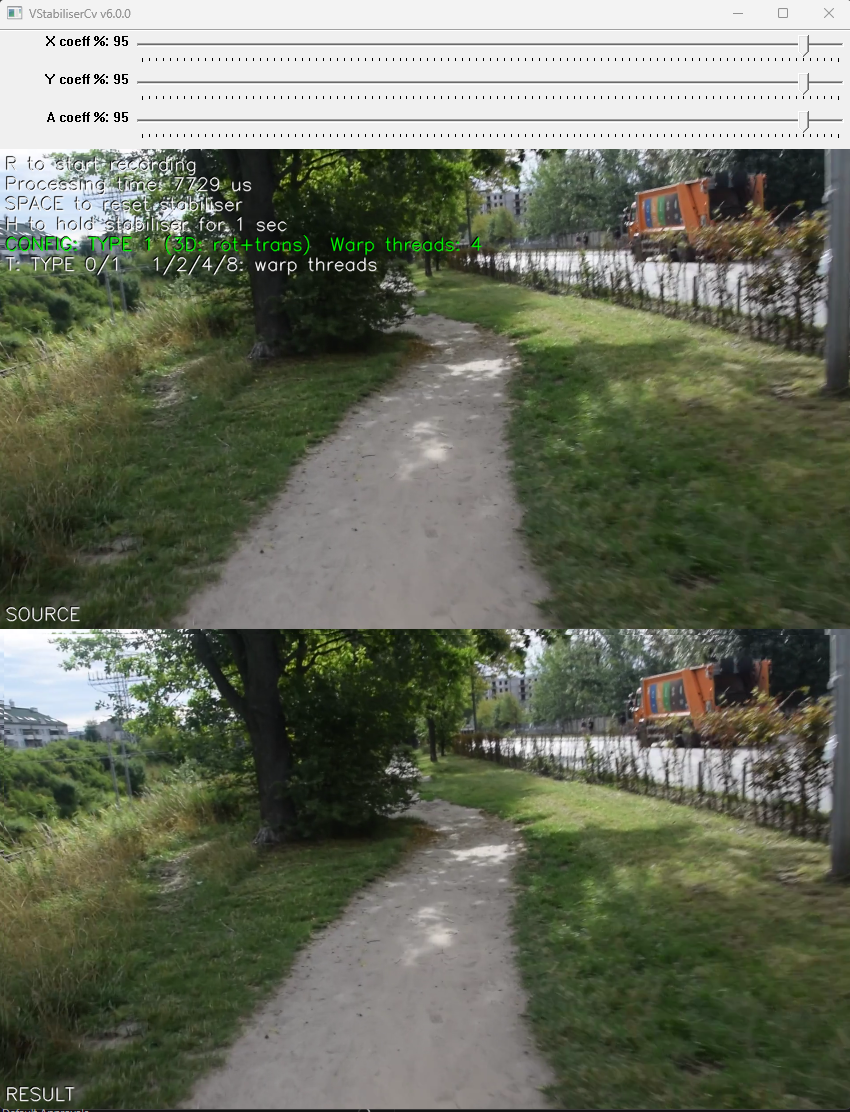
After the source is opened the user will see the user interface. The window shows the original video (top) and the video processed by the stabilisation algorithm (bottom). The upper part of the window shows the processing time of the current video frame, the current algorithm configuration (algorithm type and, for TYPE 1, the warp thread count) and the keyboard hints.
Control
To control the application, it is necessary that the main video display window was active (in focus), and also it is necessary that the English keyboard layout was activated without CapsLock mode. The program is controlled by the keyboard and by three on-screen sliders.
Table 9 - Control buttons.
| Button | Description |
|---|---|
| ESC | Exit the application. If video recording is active, it will be stopped. |
| SPACE | Reset stabilization algorithm. |
| H | Hold (pause) stabilisation for 1 second. Invokes the HOLD_MSEC command with a 1000 ms argument: input frames are passed through unchanged for one second, after which stabilisation resumes automatically. |
| T | Toggle the algorithm type (TYPE) between 0 (2D, translation only) and 1 (3D, rotation + translation via Fourier-Mellin). Switching the type resets the stabiliser. |
| 1/2/4/8 | Set the output-warp thread count (CUSTOM_1) to 1, 2, 4 or 8 threads (OpenMP builds only). |
| R | Start/stop video recording. When video recording is enabled, a files dst_[date and time].avi (result video) and mix_[date and time].avi (combined source and result video) are created in the directory with the application executable file. Recording is performed of what is displayed to the user. To stop the recording, press the R key again. During video recording, the application shows a warning message. |
In addition to the keyboard, the application provides three on-screen sliders (Table 10), attached below the video window.
Table 10 - On-screen sliders.
| Control | Description |
|---|---|
| X coeff % | Slider for the horizontal smoothing coefficient (X_FILTER_COEFF). Integer range 0–100 is scaled to [0..1] and applied to every frame. 0 disables horizontal compensation, 1 is maximum horizontal stabilization. |
| Y coeff % | Slider for the vertical smoothing coefficient (Y_FILTER_COEFF). Integer range 0–100 is scaled to [0..1] and applied to every frame. 0 disables vertical compensation, 1 is maximum vertical stabilization. |
| A coeff % | Slider for the rotation (roll) smoothing coefficient (A_FILTER_COEFF). Integer range 0–100 is scaled to [0..1] and applied to every frame. 0 disables rotation compensation, 1 is maximum rotation stabilization. Has effect only in algorithm TYPE 1 (3D, rotation + translation), which the demo runs by default. |