
DnnOpenVinoDetector C++ library
v1.4.8
Table of contents
- Overview
- Versions
- Library files
- Key features and capabilities
- Supported pixel formats
- Library principles
- DnnOpenVinoDetector class description
- DnnOpenVinoDetector class declaration
- getVersion method
- initObjectDetector method
- setParam method
- getParam method
- getParams method
- executeCommand method
- detect method
- setMask method
- decodeAndExecuteCommand method
- encodeSetParamCommand method of ObjectDetector class
- encodeCommand method of ObjectDetector class
- decodeCommand method of ObjectDetector class
- Data structures
- ObjectDetectorParams class description
- Build and connect to your project
- Portability
- Example
- Benchmark
- Demo application
Overview
The DnnOpenVinoDetector C++ library performs automatic detection of objects in videos through the utilization of neural networks. The library is implemented in the C++17 standard and uses Intel’s OpenVINO™. It is tested with the Ultralytics YOLOv8 neural network model. The library configures the OpenVINO™ runtime, performs frame preprocessing (pixel format conversion and scaling), passes the frame to OpenVINO™ for computation and interprets the results. The library inherits the interface from the ObjectDetector class (provides an interface for object detectors). The library depends on the ImageResizer library for scaling and the FormatConverter library for pixel format conversion. The demo application depends on the SimpleFileDialog library (provides a function to open a video file via file dialog), the SimpleUI library (provides UI and drawing functions), the VSourceFile library (provides a video file reading function) and the VideoRecorderMp4 library (provides a video file recording function). The benchmark application depends on the VSourceFile library (provides a video file reading function). The example application depends on the VSourceFile library (provides a video file reading function) and the SimpleUI library (provides UI and drawing functions).
DnnOpenVinoDetector is general-purpose software: it is not tied to any sector or application, and the developer of a program decides what the program does with it.
Quick start: to build and run the demo application, the example and the benchmark step by step on Windows or WSL / Linux, see GETTING_STARTED.md.
Versions
Table 1 - Library versions.
| Version | Release date | What’s new |
|---|---|---|
| 1.0.0 | 27.09.2023 | First version. |
| 1.0.1 | 04.01.2024 | - Demo application updated. - Documentation updated. |
| 1.1.0 | 09.01.2024 | - Updated with new interface of ObjectDetector with class names in parameters structure. - Added GitHub actions with automatic install of OpenCV and OpenVINO and build on Linux. |
| 1.1.1 | 29.03.2024 | - ObjectDetector class updated. - Image preprocessing updated. - Code structure changes for YOLOv8 support. - Demo application updated. - Documentation updated. |
| 1.2.0 | 15.04.2024 | - Tracker added. Provides unique object ID from frame to frame. - Documentation updated. |
| 1.2.1 | 20.05.2024 | - Submodules updated. - Documentation updated. |
| 1.3.0 | 25.07.2024 | - CMake structure updated. - Implementation folder added. |
| 1.3.1 | 23.04.2025 | - In order to solve ngraph linking issue, CMake file updated. |
| 1.3.2 | 16.05.2025 | - Added model compile option for NPU. |
| 1.3.3 | 20.08.2025 | - Added link instructions for Visual Studio and Qt Creator. |
| 1.3.4 | 04.02.2026 | - Removed outdated links to libraries from OpenVINO. - Fixed minimum detection probability parameter setting. - Fixed mistakes in documentation. |
| 1.4.0 | 20.04.2026 | - Removed OpenCV dependency. - Added ImageResizer and FormatConverter submodules. |
| 1.4.1 | 12.08.2026 | - FormatConverter submodule updated. |
| 1.4.2 | 26.08.2026 | - FormatConverter submodule updated. - ImageResizer submodule updated. |
| 1.4.3 | 02.09.2026 | - FormatConverter submodule updated. |
| 1.4.4 | 12.09.2026 | - ImageResizer submodule updated. |
| 1.4.5 | 05.10.2026 | - Remove OpenCV from all applications. |
| 1.4.6 | 12.10.2026 | - Submodules updated. |
| 1.4.7 | 19.10.2026 | - Sub-repositories removed: the dependency repositories are expected in the same folder as the library repository (see section Build stand alone). - Frames in BGR24 and YUV24 pixel formats are converted to RGB24 before they are passed to the network. - The default values of the detection criteria and the reset criteria are 1 and 10 frames (the values passed to initObjectDetector(…) are not used, as before). - Non-maximum suppression compares only boxes of the same class and processes boxes with equal probabilities in the order of the network output. - Tracks are cleared when the frame size changes; the border of the network input is cleared when the size of the scaled frame changes. - Checks added: init string (format, network size 1 - 8192, model with one input [1, 3, H, W] and one output), video frame (size 32x32 - 8192x8192, data size), network output ([1, 4 + C, N] of float), detection mask (data size), values of setParam(…) (NaN, infinity and out of range values are rejected). Not valid values no longer cause a crash or an exception. - At most 1024 objects per frame; the tracker holds at most 4096 tracks. - The library writes nothing to the console. - One OpenVINO core is used for the whole life of a detector object (the plugins are loaded once, not at every initialization). - Thread safety: detect(…) and initObjectDetector(…) are serialized, the other methods do not wait for detect(…). Race conditions with setMask(…) and setParam(…) fixed. - Hardening compiler and linker options, warning options and CMake options added; example, demo and benchmark applications check the results of the library calls and stop after 10 failed frames. - Documentation corrected. |
| 1.4.8 | 25.10.2026 | - The library links the thread library (CMake target Threads::Threads): programs built on a C library older than glibc 2.34 no longer need -pthread. |
Library files
The library is supplied as source code only. The user is provided with a set of files in the form of a CMake project (repository). The repository structure is shown below:
CMakeLists.txt ----------------------- Main CMake file of the library.
src ---------------------------------- Folder with library source code.
    CMakeLists.txt ------------------- CMake file of the library.
    DnnOpenVinoDetector.cpp ---------- C++ class definition file.
    DnnOpenVinoDetector.h ------------ Main library header file.
    DnnOpenVinoDetectorVersion.h ----- Header file with library version.
    DnnOpenVinoDetectorVersion.h.in -- Service CMake file to generate version header.
    impl
        BoxTracker.h ----------------- Header file of BoxTracker class.
        BoxTracker.cpp --------------- C++ implementation file of BoxTracker class.
        DnnOpenVinoDetectorImpl.h ---- Implementation header file.
        DnnOpenVinoDetectorImpl.cpp -- C++ implementation file.
demo --------------------------------- Folder for demo application.
    CMakeLists.txt ------------------- CMake file for demo application.
    README.md ------------------------ Description of the demo application.
    main.cpp ------------------------- Source C++ file of demo application.
example ------------------------------ Folder for example application.
    CMakeLists.txt ------------------- CMake file of example application.
    main.cpp ------------------------- Source C++ file of example application.
benchmark ---------------------------- Folder with benchmark.
    CMakeLists.txt ------------------- CMake file of benchmark.
    main.cpp ------------------------- Source C++ file of benchmark.
static ------------------------------- Folder with images for the documentation.
Key features and capabilities
Table 2 - Key features and capabilities.
| Parameter and feature | Description |
|---|---|
| Programming language | C++ (standard C++17) using the OpenVINO™ library (built and run with version 2025.4). |
| Supported OS | Compatible with any operating system that supports the C++ compiler (C++17 standard) and the OpenVINO™ library. Built and run on Windows 11 (MSVC) and Ubuntu 24.04 (GCC, Clang), see section Portability. |
| Shape of detected objects | The library is capable of detecting objects of various shapes. The minimum and maximum height and width of the objects to be detected are set by the user in the library parameters. |
| Supported pixel formats | RGB24, BGR24 and YUV24. The library uses the RGB24 format for video processing. If the pixel format of the image is different from RGB24, the library pre-converts the pixel formats to RGB24. |
| Maximum and minimum video frame size | The minimum size of video frames to be processed is 32x32 pixels, and the maximum size is 8192x8192 pixels. The size of the video frames to be processed doesn’t have a significant impact on the computational speed, because input images are resized to input network size (usually 640x640 pixels). |
| Coordinate system | The algorithm uses a window coordinate system with the zero point in the upper left corner of the video frame. |
| Calculation speed | The processing time per video frame depends mostly on loaded neural network model and also on the computing platform used. The processing time per video frame can be estimated with the demo application. |
| Type of algorithm for detection of objects | To detect different objects on current frame, an interface for obtaining neural network model was implemented. This interface relies on OpenVINO™ implementation and utilizes its features such as: pre-processing of input data, reading and launching neural network model and obtaining output results. Output data is cleaned up from overlapping boxes and correct types are assigned to output vector of objects. |
| Discreteness of computation of coordinates | The library utilizes the object bounding box for each detected object. If boxes of the same object type overlap (intersection over union greater than 0.4), only the box with the highest probability is kept. Boxes of different object types are never suppressed. This means the discreteness of library is strongly dependent on the loaded neural network model. |
| Working conditions | The library is designed to function on a variety of devices. It can run the network on a GPU, which is faster than the CPU on most computers. The detector processes each frame independently, so camera movement does not impact the results. |
Supported pixel formats
Frame library (a dependency of DnnOpenVinoDetector library) contains Fourcc enum, which defines supported pixel formats (Frame.h file). DnnOpenVinoDetector library supports BGR24, RGB24 and YUV24 input pixel formats. The library uses the RGB24 format for video processing. If the pixel format of the image is different from RGB24, the library pre-converts the pixel formats to RGB24. A frame in any other pixel format is skipped (see detect method). Fourcc enum declaration:
enum class Fourcc
{
    /// RGB 24bit pixel format.
    RGB24 = MAKE_FOURCC_CODE('R', 'G', 'B', '3'),
    /// BGR 24bit pixel format.
    BGR24 = MAKE_FOURCC_CODE('B', 'G', 'R', '3'),
    /// YUYV 16bits per pixel format.
    YUYV  = MAKE_FOURCC_CODE('Y', 'U', 'Y', 'V'),
    /// UYVY 16bits per pixel format.
    UYVY  = MAKE_FOURCC_CODE('U', 'Y', 'V', 'Y'),
    /// Grayscale 8bit.
    GRAY  = MAKE_FOURCC_CODE('G', 'R', 'A', 'Y'),
    /// YUV 24bit per pixel format.
    YUV24  = MAKE_FOURCC_CODE('Y', 'U', 'V', '3'),
    /// NV12 pixel format.
    NV12  = MAKE_FOURCC_CODE('N', 'V', '1', '2'),
    /// NV21 pixel format.
    NV21  = MAKE_FOURCC_CODE('N', 'V', '2', '1'),
    /// YU12 (YUV420) - Planar pixel format.
    YU12 = MAKE_FOURCC_CODE('Y', 'U', '1', '2'),
    /// YV12 (YVU420) - Planar pixel format.
    YV12 = MAKE_FOURCC_CODE('Y', 'V', '1', '2'),
    /// JPEG compressed format.
    JPEG  = MAKE_FOURCC_CODE('J', 'P', 'E', 'G'),
    /// H264 compressed format.
    H264  = MAKE_FOURCC_CODE('H', '2', '6', '4'),
    /// HEVC compressed format.
    HEVC  = MAKE_FOURCC_CODE('H', 'E', 'V', 'C')
};
Table 3 - Bytes layout of supported pixel formats. Example of 4x4 pixels image.
 RGB24 |  BGR24 |
|---|---|
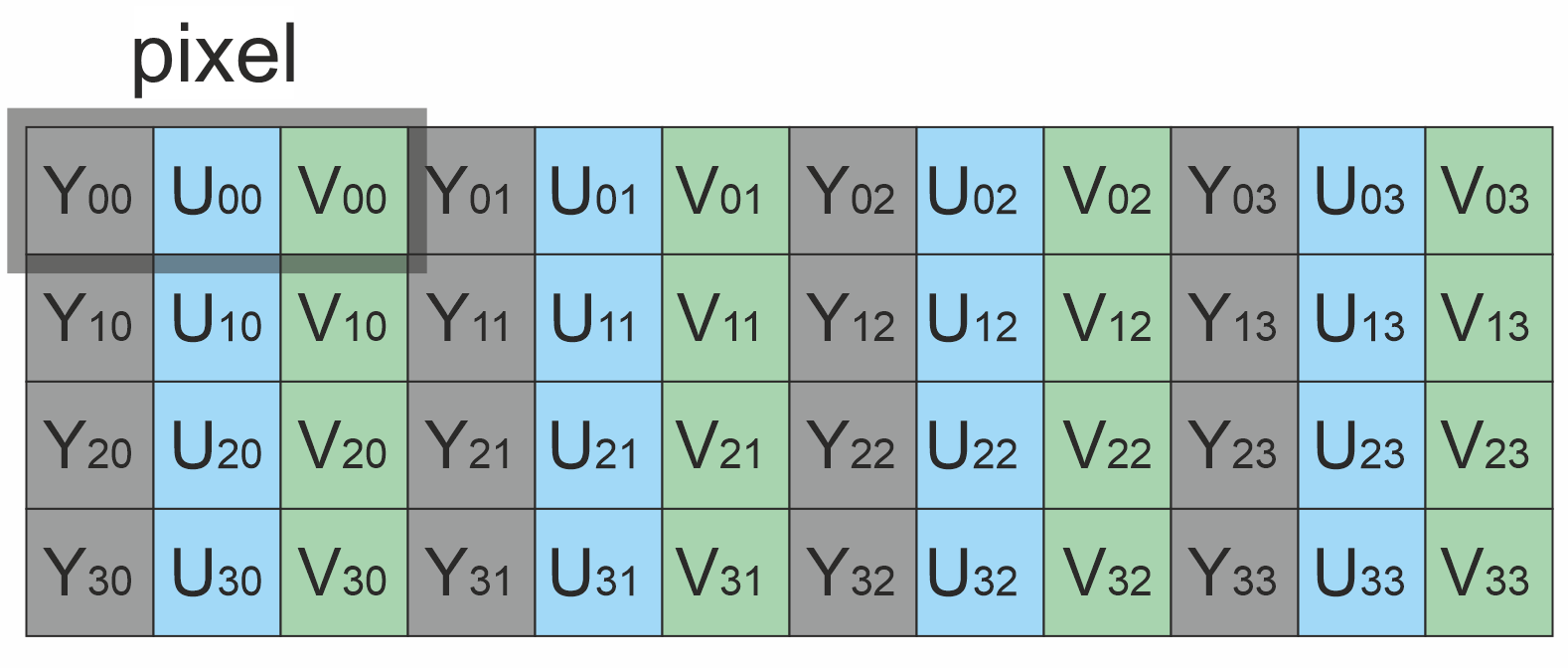 YUV24 |
Library Principles
The library performs object detection based on neural network models with the OpenVINO™ runtime. The algorithm primarily consists of the following steps:
- The library converts the input frame to the input format and size of the neural network model itself, so the caller does not preprocess frames.
- After model compilation, input frames are forwarded directly into the OpenVINO™ pipeline, utilizing neural network models for object detection.
- Computing results in output tensor, which is converted (according to detector parameters) to the final vector of objects.
- Results store not only coordinates but also probability and type - which can be assigned to particular item, according to current network labels.
The library is available as source code only. To utilize the library as source code, developers must include the library’s files into their project. The recommended usage sequence for the library is as follows:
- Integration: Include the library files in your project.
- Initialization: Create an instance of the
DnnOpenVinoDetectorC++ class for each camera or input source you wish to process. The library supports multiple instances for parallel camera processing. - Customization: If needed, you can customize the library’s behavior by using the
setParam()method. This allows you to adapt the library to specific requirements. - Object Detection: Create a
Frameobject to represent the input frame, and prepare a vector to store the detected objects. - Detection Process: Call the
detect(...)method to initiate the object detection process. - Object Retrieval: Retrieve the detected objects by using the
getObjects()method. The library provides a vector ofObjectscontaining information about the detected objects, such as their positions and attributes.
DnnOpenVinoDetector class description
DnnOpenVinoDetector class declaration
DnnOpenVinoDetector.h file contains DnnOpenVinoDetector class declaration. DnnOpenVinoDetector class inherits interface from ObjectDetector interface class. Class declaration:
class DnnOpenVinoDetector : public ObjectDetector
{
public:

    /// Class constructor.
    DnnOpenVinoDetector();

    /// Class destructor.
    ~DnnOpenVinoDetector() override;

    /// Copy and move operations are deleted.
    DnnOpenVinoDetector(const DnnOpenVinoDetector&) = delete;
    DnnOpenVinoDetector(DnnOpenVinoDetector&&) = delete;
    DnnOpenVinoDetector& operator= (const DnnOpenVinoDetector&) = delete;
    DnnOpenVinoDetector& operator= (DnnOpenVinoDetector&&) = delete;

    /// Get string of current library version.
    static std::string getVersion();

    /// Init object detector.
    bool initObjectDetector(ObjectDetectorParams& params) override;

    /// Set object detector param.
    bool setParam(ObjectDetectorParam id, float value) override;

    /// Get object detector param value.
    float getParam(ObjectDetectorParam id) override;

    /// Get object detector params structure.
    void getParams(ObjectDetectorParams& params) override;

    /// Get list of objects.
    std::vector<Object> getObjects() override;

    /// Execute command.
    bool executeCommand(ObjectDetectorCommand id) override;

    /// Perform detection.
    bool detect(rapidpixel::Frame& frame) override;

    /// Set detection mask.
    bool setMask(rapidpixel::Frame mask) override;

    /// Decode command and execute command.
    bool decodeAndExecuteCommand(uint8_t* data, int size) override;
};
Thread safety: initObjectDetector(…) and detect(…) are serialized by the class: a call waits until the previous call of one of these two methods is finished. All the other methods are thread-safe and do not wait for a running detect(…) call. The class does not write to the console or to a file.
getVersion method
The getVersion() method returns string of current version of DnnOpenVinoDetector class. Method declaration:
static std::string getVersion();
Method can be used without DnnOpenVinoDetector class instance. Example:
std::cout << "DnnOpenVinoDetector version: " << rapidpixel::DnnOpenVinoDetector::getVersion() << std::endl;
Console output:
DnnOpenVinoDetector version: 1.4.8
initObjectDetector method
The initObjectDetector(…) method initializes object detector. At the first call (before the first frame of video is processed), the method only checks the initialization string (field initString of ObjectDetectorParams class) is correct and loads the neural network model (checks the validity of the network). If the initialization string is correct and the neural network file is read, the method returns TRUE. When processing the first frame, the method will perform full library initialization (load the neural network and compile it). Compiling a neural network takes a lot of time and this scheme allows us not to wait for the execution of the method. If the method is called after the first frame was processed, it compiles the neural network at once. The initialization string has the format “model;width;height” or “model;weights;width;height”. The model and the weights are paths to files in UTF-8. The width and the height of the network input are decimal numbers from 1 to 8192 without any other characters. The model must have one input with the shape [1, 3, height, width] and one output (see detect method). The initialization string must not contain the null character and must not be longer than 32768 bytes. If the method returns FALSE the detector is not initialized: detect(…) returns FALSE until the method succeeds. A detector that was never initialized uses the initialization string “thermal.onnx;640;640”. Method declaration:
bool initObjectDetector(ObjectDetectorParams& params) override;
| Parameter | Value |
|---|---|
| params | ObjectDetectorParams class object. The library takes into account only following parameters from ObjectDetectorParams class: initString classNames enable minObjectWidth (Value of a new detector 4) maxObjectWidth (Value of a new detector 256) minObjectHeight (Value of a new detector 4) maxObjectHeight (Value of a new detector 256) minDetectionProbability (Value of a new detector 0.5f) type (Value of a new detector 0) If a particular parameter is out of its valid range, the value is ignored and the current value of the parameter stays (see setParam method for the valid ranges). The fields xDetectionCriteria, yDetectionCriteria and resetCriteria are not used by the method: these parameters are set by setParam(…) (the values of a new detector are 1 frame for the detection criteria and 10 frames for the reset criteria). |
Returns: TRUE if the object detector was initialized (initialization params are valid) or FALSE if not (wrong initialization string, the model is not a file, can not be read, has not one input [1, 3, height, width] or has not one output, not enough memory). If FALSE is returned the parameters of the detector are not changed.
setParam method
The setParam(…) method is designed to set new DnnOpenVinoDetector object parameter value. Method declaration:
bool setParam(ObjectDetectorParam id, float value) override;
| Parameter | Description |
|---|---|
| id | Parameter ID according to ObjectDetectorParam enum. The library supports not all parameters from ObjectDetectorParam enum. |
| value | Parameter value. Value depends on parameter ID. The value of an integer parameter is truncated to the integer part. NaN, infinity and values outside of the valid range of the parameter are rejected. |
Returns: TRUE if the parameter was set or FALSE if not (not supported or out of valid range). If FALSE is returned the parameter is not changed.
getParam method
The getParam(…) method is designed to obtain object detector parameter value. Method declaration:
float getParam(ObjectDetectorParam id) override;
| Parameter | Description |
|---|---|
| id | Parameter ID according to ObjectDetectorParam enum. |
Returns: parameter value or -1.0f if the parameter is not supported by DnnOpenVinoDetector.
getParams method
The getParams(…) method is designed to obtain object detector params structures as well as a list of detected objects. Method declaration:
void getParams(ObjectDetectorParams& params) override;
| Parameter | Description |
|---|---|
| params | ObjectDetectorParams class object. The content is not defined if the memory is not available. |
getObjects method
The getObjects() method is designed to obtain list of detected objects. User can obtain list of detected objects via getParams(…) method as well. Method declaration:
std::vector<Object> getObjects() override;
Returns: list of detected objects (see Object structure description). If no objects are detected (or the memory is not available), the list will be empty.
executeCommand method
The executeCommand(…) method is designed to execute object detector command. Method declaration:
bool executeCommand(ObjectDetectorCommand id) override;
| Parameter | Description |
|---|---|
| id | Command ID according to ObjectDetectorCommand enum. |
Returns: TRUE if the command was executed or FALSE if not (only if command ID not valid).
detect method
The detect(…) method is designed to perform detection algorithm. Before transmitting the frame to OpenVINO™, the method scales the frame to match the resolution of the neural network. Method declaration:
bool detect(rapidpixel::Frame& frame) override;
| Parameter | Description |
|---|---|
| frame | Video frame for processing. Object detector processes only BGR24, RGB24 and YUV24 pixel formats (see Frame class description). Size of frame must be from 32x32 to 8192x8192. The pointer to the data of the frame must be valid and the size of the data (field size) must be at least width * height * 3 bytes: the library can not check that the pointer is valid for the size. The frame is not changed. |
The neural network must have one output of the type float with the shape [1, 4 + C, N] (Ultralytics YOLOv8 layout), where C >= 1 is the number of classes and N <= 1048576 is the number of anchors. Rows 0 - 3 of the output hold the center X, the center Y, the width and the height of the box of an anchor in pixels of the network input, the following C rows hold the scores of the classes. Anchors with a not finite box value, a box larger than 1048576 pixels or a box with the width or the height less than 1 pixel are skipped. The first 16384 anchors (in the order of the output) with the best class score >= 0.3 are passed to the non-maximum suppression. The method returns at most 1024 objects (the objects with the highest probabilities). The field type of an object is the zero-based index of the class.
Returns: TRUE if the video frame was processed or FALSE if not (the detector is not initialized, the size or the data of the frame is not valid, the neural network can not be compiled or run, the output of the neural network has not the shape described above, not enough memory). Note: If object detector is disabled (see ObjectDetectorParam enum description), the frame has the size 0 or the pixel format of the frame is not supported, the frame is skipped: the list of objects is cleared and the method returns TRUE. If the size of the frame differs from the size of the previous frame the neural network is compiled again and the tracks of the objects are cleared.
setMask method
The setMask(…) method is designed to set detection mask. The user can disable detection in any areas of the video frame. For this purpose the user can create an image of any size and configuration with GRAY (preferable), NV12, NV21, YV12 or YU12 pixel format. Mask image pixel values equal to 0 prohibit detection of objects in the corresponding place of video frames. Any other mask pixel value other than 0 allows detection of objects at the corresponding location of video frames. The mask is used by the detector to skip objects whose bounding boxes fall on masked-out pixels. The method can be called either before video frame processing or during video frame processing. Method declaration:
bool setMask(rapidpixel::Frame mask) override;
| Parameter | Description |
|---|---|
| mask | Image of detection mask. Should have GRAY (preferable), NV12, NV21, YV12 or YU12 pixel format (see Frame description). Detector omits image segments where detection mask pixel values equal 0. Mask can have any resolution. If the mask resolution (width and height) is not equal to the neural network input resolution, the library will scale this mask to the network input resolution. The size of the data (field size) must be at least width * height bytes. The mask is copied. |
Returns: TRUE if the mask is accepted or FALSE if not (not valid pixel format, empty, the size of the data is less than width * height, not enough memory).
decodeAndExecuteCommand method
The decodeAndExecuteCommand(…) method decodes and executes command which is encoded by encodeSetParamCommand(…) or encodeCommand(…) method of ObjectDetector class. decodeAndExecuteCommand(…) is a thread-safe method. This means that the decodeAndExecuteCommand(…) method can be safely called from any thread. Method declaration:
bool decodeAndExecuteCommand(uint8_t* data, int size) override;
| Parameter | Description |
|---|---|
| data | Pointer to input command. |
| size | Size of command. Must be 11 bytes for SET_PARAM or 7 bytes for COMMAND. |
Returns: TRUE if command decoded (SET_PARAM or COMMAND) and executed (action command or set param command) or FALSE if not (the pointer is nullptr, the size, the version or the ID of the command is not valid, the value of the parameter is rejected by setParam(…)).
encodeSetParamCommand method of ObjectDetector class
The encodeSetParamCommand(…) static method of the ObjectDetector interface designed to encode command to change any parameter for remote object detector (including motion detectors). To control object detector remotely, the developer has to design his own protocol and according to it encode the command and deliver it over the communication channel. To simplify this, the ObjectDetector class contains static methods for encoding the control command. The ObjectDetector class provides two types of commands: a parameter change command (SET_PARAM) and an action command (COMMAND). encodeSetParamCommand(…) designed to encode SET_PARAM command. Method declaration:
static void encodeSetParamCommand(uint8_t* data, int& size, ObjectDetectorParam id, float value);
| Parameter | Description |
|---|---|
| data | Pointer to data buffer for encoded command. Must have size >= 11. |
| size | Size of encoded data. Will be 11 bytes. |
| id | Parameter ID according to ObjectDetectorParam enum. |
| value | Parameter value. Value depends on parameter ID. |
encodeSetParamCommand(…) is static and used without ObjectDetector class instance. This method used on client side (control system). Command encoding example:
// Buffer for encoded data.
uint8_t data[11];
// Size of encoded data.
int size = 0;
// Random parameter value.
float outValue = static_cast<float>(std::rand() % 20);
// Encode command.
rapidpixel::ObjectDetector::encodeSetParamCommand(data, size, rapidpixel::ObjectDetectorParam::MIN_OBJECT_WIDTH, outValue);
encodeCommand method of ObjectDetector class
The encodeCommand(…) static method of the ObjectDetector interface designed to encode command for remote object detector (including motion detectors). To control object detector remotely, the developer has to design his own protocol and according to it encode the command and deliver it over the communication channel. To simplify this, the ObjectDetector class contains static methods for encoding the control command. The ObjectDetector class provides two types of commands: a parameter change command (SET_PARAM) and an action command (COMMAND). encodeCommand(…) designed to encode COMMAND (action command). Method declaration:
static void encodeCommand(uint8_t* data, int& size, ObjectDetectorCommand id);
| Parameter | Description |
|---|---|
| data | Pointer to data buffer for encoded command. Must have size >= 7. |
| size | Size of encoded data. Will be 7 bytes. |
| id | Command ID according to ObjectDetectorCommand enum. |
encodeCommand(…) is static and used without ObjectDetector class instance. This method used on client side (control system). Command encoding example:
// Buffer for encoded data.
uint8_t data[11];
// Size of encoded data.
int size = 0;
// Encode command.
rapidpixel::ObjectDetector::encodeCommand(data, size, rapidpixel::ObjectDetectorCommand::RESET);
decodeCommand method of ObjectDetector class
The decodeCommand(…) static method of the ObjectDetector interface designed to decode command on object detector side (edge device) encoded by encodeSetParamCommand(…) or encodeCommand(…) method of ObjectDetector class. Method declaration:
static int decodeCommand(uint8_t* data, int size, ObjectDetectorParam& paramId, ObjectDetectorCommand& commandId, float& value);
| Parameter | Description |
|---|---|
| data | Pointer to input command. |
| size | Size of command: 11 bytes for SET_PARAM command or 7 bytes for COMMAND. |
| paramId | Parameter ID according to ObjectDetectorParam enum. After decoding SET_PARAM command the method will return parameter ID. |
| commandId | Command ID according to ObjectDetectorCommand enum. After decoding COMMAND the method will return command ID. |
| value | Parameter value (after decoding SET_PARAM command). |
Returns: 0 - in case decoding COMMAND, 1 - in case decoding SET_PARAM command or -1 in case errors.
Data structures
ObjectDetectorCommand enum
Enum declaration:
enum class ObjectDetectorCommand
{
    /// Reset.
    RESET = 1,
    /// Enable.
    ON,
    /// Disable.
    OFF
};
Table 4 - Object detector commands description. Some commands may be unsupported by particular object detector class.
| Command | Description |
|---|---|
| RESET | Reset algorithm. Clears the list of detected objects and resets all internal filters. |
| ON | Enable object detector. If the detector is not activated, frame processing is not performed - the list of detected objects will always be empty. |
| OFF | Disable object detector. If the detector is not activated, frame processing is not performed - the list of detected objects will always be empty. |
ObjectDetectorParam enum
Enum declaration:
enum class ObjectDetectorParam
{
    /// Logging mode. Values: 0 - Disable, 1 - Only file,
    /// 2 - Only terminal (console), 3 - File and terminal (console).
    LOG_MODE = 1,
    /// Frame buffer size. Depends on implementation.
    FRAME_BUFFER_SIZE,
    /// Minimum object width to be detected, pixels. To be detected object's
    /// width must be >= MIN_OBJECT_WIDTH.
    MIN_OBJECT_WIDTH,
    /// Maximum object width to be detected, pixels. To be detected object's
    /// width must be <= MAX_OBJECT_WIDTH.
    MAX_OBJECT_WIDTH,
    /// Minimum object height to be detected, pixels. To be detected object's
    /// height must be >= MIN_OBJECT_HEIGHT.
    MIN_OBJECT_HEIGHT,
    /// Maximum object height to be detected, pixels. To be detected object's
    /// height must be <= MAX_OBJECT_HEIGHT.
    MAX_OBJECT_HEIGHT,
    /// Minimum object's horizontal speed to be detected, pixels/frame. To be
    /// detected object's horizontal speed must be >= MIN_X_SPEED.
    MIN_X_SPEED,
    /// Maximum object's horizontal speed to be detected, pixels/frame. To be
    /// detected object's horizontal speed must be <= MAX_X_SPEED.
    MAX_X_SPEED,
    /// Minimum object's vertical speed to be detected, pixels/frame. To be
    /// detected object's vertical speed must be >= MIN_Y_SPEED.
    MIN_Y_SPEED,
    /// Maximum object's vertical speed to be detected, pixels/frame. To be
    /// detected object's vertical speed must be <= MAX_Y_SPEED.
    MAX_Y_SPEED,
    /// Probability threshold from 0 to 1. To be detected object detection
    /// probability must be >= MIN_DETECTION_PROBABILITY.
    MIN_DETECTION_PROBABILITY,
    /// Horizontal track detection criteria, frames. By default shows how many
    /// frames the objects must move in any(+/-) horizontal direction to be
    /// detected.
    X_DETECTION_CRITERIA,
    /// Vertical track detection criteria, frames. By default shows how many
    /// frames the objects must move in any(+/-) vertical direction to be
    /// detected.
    Y_DETECTION_CRITERIA,
    /// Track reset criteria, frames. By default shows how many
    /// frames the objects should be not detected to be excluded from results.
    RESET_CRITERIA,
    /// Detection sensitivity. Depends on implementation. Default from 0 to 1.
    SENSITIVITY,
    /// Frame scaling factor for processing purposes. Reduce the image size by
    /// scaleFactor times horizontally and vertically for faster processing.
    SCALE_FACTOR,
    /// Num threads. Number of threads for parallel computing.
    NUM_THREADS,
    /// Processing time of last frame in microseconds.
    PROCESSING_TIME_MCS,
    /// Algorithm type. Depends on implementation.
    TYPE,
    /// Mode. Default: 0 - Off, 1 - On.
    MODE,
    /// Custom parameter. Depends on implementation.
    CUSTOM_1,
    /// Custom parameter. Depends on implementation.
    CUSTOM_2,
    /// Custom parameter. Depends on implementation.
    CUSTOM_3
};
Table 5 - DnnOpenVinoDetector class params description (from ObjectDetector interface class). Some params are not supported by DnnOpenVinoDetector class.
| Parameter | Access | Description |
|---|---|---|
| LOG_MODE | not supported | Not used. setParam(…) returns FALSE, getParam(…) returns -1. |
| FRAME_BUFFER_SIZE | not supported | Not used. setParam(…) returns FALSE, getParam(…) returns -1. |
| MIN_OBJECT_WIDTH | read / write | Minimum object width to be detected, pixels. Valid values from 1 to 8192. If it is greater than MAX_OBJECT_WIDTH no objects are detected. To be detected object’s width must be >= MIN_OBJECT_WIDTH. Default value is 4. |
| MAX_OBJECT_WIDTH | read / write | Maximum object width to be detected, pixels. Valid values from 1 to 8192. If it is less than MIN_OBJECT_WIDTH no objects are detected. To be detected object’s width must be <= MAX_OBJECT_WIDTH. Default value is 256. |
| MIN_OBJECT_HEIGHT | read / write | Minimum object height to be detected, pixels. Valid values from 1 to 8192. If it is greater than MAX_OBJECT_HEIGHT no objects are detected. To be detected object’s height must be >= MIN_OBJECT_HEIGHT. Default value is 4. |
| MAX_OBJECT_HEIGHT | read / write | Maximum object height to be detected, pixels. Valid values from 1 to 8192. If it is less than MIN_OBJECT_HEIGHT no objects are detected. To be detected object’s height must be <= MAX_OBJECT_HEIGHT. Default value is 256. |
| MIN_X_SPEED | not supported | Not used. setParam(…) returns FALSE, getParam(…) returns -1. |
| MAX_X_SPEED | not supported | Not used. setParam(…) returns FALSE, getParam(…) returns -1. |
| MIN_Y_SPEED | not supported | Not used. setParam(…) returns FALSE, getParam(…) returns -1. |
| MAX_Y_SPEED | not supported | Not used. setParam(…) returns FALSE, getParam(…) returns -1. |
| MIN_DETECTION_PROBABILITY | read / write | Defines threshold for object detection probability. Only objects with probability greater than MIN_DETECTION_PROBABILITY will be detected. Can have any values from 0 to 1. |
| X_DETECTION_CRITERIA | read / write | The same meaning as Y_DETECTION_CRITERIA. The number of video frames on which the object was detected so that it will be included in the list of detected objects. The library has detection counter for each object. After each detection the library increases detection counter for particular object. When detection counter >= X_DETECTION_CRITERIA, this object will be included into output detected objects list. If object not detected the library decreases detection counter. When user calls setParam(…) for X_DETECTION_CRITERIA, the Y_DETECTION_CRITERIA will be set automatically to the same value. Also method getParam(…) will return same value for X_DETECTION_CRITERIA and Y_DETECTION_CRITERIA. Valid values from 1 to 8192. |
| Y_DETECTION_CRITERIA | read / write | The same meaning as X_DETECTION_CRITERIA. The number of video frames on which the object was detected so that it will be included in the list of detected objects. The library has detection counter for each object. After each detection the library increases detection counter for particular object. When detection counter >= Y_DETECTION_CRITERIA, this object will be included into output detected objects list. If object not detected the library decreases detection counter. When user calls setParam(…) for Y_DETECTION_CRITERIA, the X_DETECTION_CRITERIA will be set automatically to the same value. Also method getParam(…) will return same value for X_DETECTION_CRITERIA and Y_DETECTION_CRITERIA. Valid values from 1 to 8192. |
| RESET_CRITERIA | read / write | The number of consecutive video frames in which the object was not detected, so it will be excluded from the internal object list. The internal object list is used to associate newly detected objects with objects detected in the previous video frame. Internal objects list allows the library to keep static object ID from frame to frame. If the object is not detected during a number of frames < RESET_CRITERIA, the next detection will not change the object ID. Valid values from 1 to 8192. |
| SENSITIVITY | not supported | Not used. setParam(…) returns FALSE, getParam(…) returns -1. |
| SCALE_FACTOR | not supported | Not used. setParam(…) returns FALSE, getParam(…) returns -1. |
| NUM_THREADS | not supported | Not used. setParam(…) returns FALSE, getParam(…) returns -1. |
| PROCESSING_TIME_MCS | read only | Read only. Stores processing time of current frame in microseconds. |
| TYPE | read / write | Type defines kind of device for neural network model computation. Options can be different, depending on particular platform, usually for platforms with one GPU unit there is “GPU” device, but for platforms with two GPU units it will be “GPU.0” for integrated and “GPU.1” for discrete. - 0 - CPU, - 1 - GPU (if there is only one unit) - 2 - GPU.0 (integrated) - 3 - GPU.1 (discrete) - 4 - MULTI mode - both GPUs (MULTI:GPU.1, GPU.0) - 5 - NPU More information - OpenVinoDevices. |
| MODE | read / write | Mode. Default: 0 - Off, 1 - On. If the detector is not activated, frame processing is not performed - the list of detected objects will always be empty. |
| CUSTOM_1 | not supported | Not used. setParam(…) returns FALSE, getParam(…) returns -1. |
| CUSTOM_2 | not supported | Not used. setParam(…) returns FALSE, getParam(…) returns -1. |
| CUSTOM_3 | not supported | Not used. setParam(…) returns FALSE, getParam(…) returns -1. |
Object structure
Object structure is used to describe detected object. Object structure declared in ObjectDetector.h file. Structure declaration:
typedef struct Object
{
    /// Object ID. Must be unique for particular object.
    int id{0};
    /// Frame ID. Must be the same as frame ID of processed video frame.
    int frameId{0};
    /// Object type. Depends on implementation.
    int type{0};
    /// Object rectangle width, pixels.
    int width{0};
    /// Object rectangle height, pixels.
    int height{0};
    /// Object rectangle top-left horizontal coordinate, pixels.
    int x{0};
    /// Object rectangle top-left vertical coordinate, pixels.
    int y{0};
    /// Horizontal component of object velocity, +-pixels/frame.
    float vX{0.0f};
    /// Vertical component of object velocity, +-pixels/frame.
    float vY{0.0f};
    /// Detection probability from 0 (minimum) to 1 (maximum).
    float p{0.0f};
} Object;
Table 6 - Object structure fields description.
| Field | Type | Description |
|---|---|---|
| id | int | Object ID. The library will try to keep the same object ID for particular object from frame to frame. |
| frameId | int | Frame ID. Will be the same as frame ID of processed video frame. |
| type | int | Object type: the zero-based index of the class (the row of the class scores in the output of the neural network). |
| width | int | Object rectangle width, pixels. Must be MIN_OBJECT_WIDTH <= width <= MAX_OBJECT_WIDTH (see ObjectDetectorParam enum description). |
| height | int | Object rectangle height, pixels. Must be MIN_OBJECT_HEIGHT <= height <= MAX_OBJECT_HEIGHT (see ObjectDetectorParam enum description). |
| x | int | Object rectangle top-left horizontal coordinate, pixels. |
| y | int | Object rectangle top-left vertical coordinate, pixels. |
| vX | float | Horizontal velocity of the object, pixels / frame (estimated by the tracker, 0 for a new object). |
| vY | float | Vertical velocity of the object, pixels / frame (estimated by the tracker, 0 for a new object). |
| p | float | Object detection probability (score). |
ObjectDetectorParams class description
ObjectDetectorParams class declaration
ObjectDetectorParams class used for object detector initialization (initObjectDetector(…) method) or to get all actual params (getParams() method) including list of detected objects. Also ObjectDetectorParams provides structure to write/read params from JSON files (JSON_READABLE macro, see ConfigReader class description) and provides methods to encode and decode params. Class declaration:
class ObjectDetectorParams
{
public:
    /// Init string. Depends on implementation. Must not contain the null
    /// character to be serialized by encode(...).
    std::string initString;
    /// Logging mode. Values:
    /// 0 - Disable,
    /// 1 - Only file,
    /// 2 - Only terminal (console),
    /// 3 - File and terminal (console).
    int logMode{0};
    /// Frame buffer size. Depends on implementation.
    int frameBufferSize{1};
    /// Minimum object width to be detected, pixels. To be detected object's
    /// width must be >= minObjectWidth.
    int minObjectWidth{4};
    /// Maximum object width to be detected, pixels. To be detected object's
    /// width must be <= maxObjectWidth.
    int maxObjectWidth{128};
    /// Minimum object height to be detected, pixels. To be detected object's
    /// height must be >= minObjectHeight.
    int minObjectHeight{4};
    /// Maximum object height to be detected, pixels. To be detected object's
    /// height must be <= maxObjectHeight.
    int maxObjectHeight{128};
    /// Minimum object's horizontal speed to be detected, pixels/frame. To be
    /// detected object's horizontal speed must be >= minXSpeed.
    float minXSpeed{0.0f};
    /// Maximum object's horizontal speed to be detected, pixels/frame. To be
    /// detected object's horizontal speed must be <= maxXSpeed.
    float maxXSpeed{30.0f};
    /// Minimum object's vertical speed to be detected, pixels/frame. To be
    /// detected object's vertical speed must be >= minYSpeed.
    float minYSpeed{0.0f};
    /// Maximum object's vertical speed to be detected, pixels/frame. To be
    /// detected object's vertical speed must be <= maxYSpeed.
    float maxYSpeed{30.0f};
    /// Probability threshold from 0 to 1. To be detected object detection
    /// probability must be >= minDetectionProbability.
    float minDetectionProbability{0.5f};
    /// Horizontal track detection criteria, frames. By default shows how many
    /// frames the objects must move in any(+/-) horizontal direction to be
    /// detected.
    int xDetectionCriteria{1};
    /// Vertical track detection criteria, frames. By default shows how many
    /// frames the objects must move in any(+/-) vertical direction to be
    /// detected.
    int yDetectionCriteria{1};
    /// Track reset criteria, frames. By default shows how many
    /// frames the objects should be not detected to be excluded from results.
    int resetCriteria{1};
    /// Detection sensitivity. Depends on implementation. Default from 0 to 1.
    float sensitivity{0.04f};
    /// Frame scaling factor for processing purposes. Reduce the image size by
    /// scaleFactor times horizontally and vertically for faster processing.
    int scaleFactor{1};
    /// Num threads. Number of threads for parallel computing.
    int numThreads{1};
    /// Processing time of last frame in microseconds.
    int processingTimeMcs{0};
    /// Algorithm / backend type. Depends on implementation.
    int type{0};
    /// Mode. Default: false - Off, true - On.
    bool enable{true};
    /// Custom parameter. Depends on implementation.
    float custom1{0.0f};
    /// Custom parameter. Depends on implementation.
    float custom2{0.0f};
    /// Custom parameter. Depends on implementation.
    float custom3{0.0f};
    /// List of detected objects.
    std::vector<Object> objects;
    /// A list of object class names used in detectors that recognize different
    /// object classes (see Table 7).
    std::vector<std::string> classNames{""};

    JSON_READABLE(ObjectDetectorParams, initString, logMode, frameBufferSize,
                  minObjectWidth, maxObjectWidth, minObjectHeight,
                  maxObjectHeight, minXSpeed, maxXSpeed, minYSpeed, maxYSpeed,
                  minDetectionProbability, xDetectionCriteria,
                  yDetectionCriteria, resetCriteria, sensitivity, scaleFactor,
                  numThreads, type, enable, custom1, custom2, custom3,
                  classNames)

    /// Default constructor and copy operations.
    ObjectDetectorParams() = default;
    ObjectDetectorParams(const ObjectDetectorParams& src) = default;
    ObjectDetectorParams& operator= (const ObjectDetectorParams& src) = default;

    /// Encode (serialize) params.
    bool encode(uint8_t* data, int bufferSize, int& size,
                ObjectDetectorParamsMask* mask = nullptr);

    /// Decode (deserialize) params encoded by encode(...) method.
    bool decode(uint8_t* data, int dataSize);
};
Table 7 - ObjectDetectorParams class fields description. Some params may be unsupported by DnnOpenVinoDetector class.
| Field | Type | Description |
|---|---|---|
| initString | string | Has to include path to neural network model that is supported by OpenVINO and has standard one-batch layout. Also has to include dimension (width;height) of neural network input images, everything separated by semicolon. E.g.: “./model.onnx;640;640”. If neural network model consists of 2 files it should be as this example: “./model.xml;./model.bin;256;480”. The width and the height are decimal numbers from 1 to 8192. The model must have one input with the shape [1, 3, height, width] and one output. The init string must not contain the null character and must not be longer than 32768 bytes. |
| logMode | int | Not used. Can have any value. |
| frameBufferSize | int | Not used. Can have any value. |
| minObjectWidth | int | Minimum object width to be detected, pixels. Valid values from 1 to 8192. If it is greater than maxObjectWidth no objects are detected. To be detected object’s width must be >= minObjectWidth. Default value is 4. |
| maxObjectWidth | int | Maximum object width to be detected, pixels. Valid values from 1 to 8192. If it is less than minObjectWidth no objects are detected. To be detected object’s width must be <= maxObjectWidth. Default value is 128. |
| minObjectHeight | int | Minimum object height to be detected, pixels. Valid values from 1 to 8192. If it is greater than maxObjectHeight no objects are detected. To be detected object’s height must be >= minObjectHeight. Default value is 4. |
| maxObjectHeight | int | Maximum object height to be detected, pixels. Valid values from 1 to 8192. If it is less than minObjectHeight no objects are detected. To be detected object’s height must be <= maxObjectHeight. Default value is 128. |
| minXSpeed | float | Not used. Can have any value. |
| maxXSpeed | float | Not used. Can have any value. |
| minYSpeed | float | Not used. Can have any value. |
| maxYSpeed | float | Not used. Can have any value. |
| minDetectionProbability | float | Defines threshold for object detection probability. Only objects with probability greater than MIN_DETECTION_PROBABILITY will be detected. Can have any values from 0 to 1. |
| xDetectionCriteria | int | The same meaning as yDetectionCriteria. The number of video frames on which the object was detected so that it will be included in the list of detected objects. The library has detection counter for each object. After each detection the library increases detection counter for particular object. When detection counter >= xDetectionCriteria, this object will be included into output detected objects list. If object not detected the library decreases detection counter. When user calls setParam(…) for xDetectionCriteria, the yDetectionCriteria will be set automatically to the same value. Also method getParams(…) will return same value for xDetectionCriteria and yDetectionCriteria. Valid values from 1 to 8192. |
| yDetectionCriteria | int | The same meaning as xDetectionCriteria. The number of video frames on which the object was detected so that it will be included in the list of detected objects. The library has detection counter for each object. After each detection the library increases detection counter for particular object. When detection counter >= yDetectionCriteria, this object will be included into output detected objects list. If object not detected the library decreases detection counter. When user calls setParam(…) for yDetectionCriteria, the xDetectionCriteria will be set automatically to the same value. Also method getParams(…) will return same value for xDetectionCriteria and yDetectionCriteria. Valid values from 1 to 8192. |
| resetCriteria | int | The number of consecutive video frames in which the object was not detected, so it will be excluded from the internal object list. The internal object list is used to associate newly detected objects with objects detected in the previous video frame. Internal objects list allows the library to keep static object ID from frame to frame. If the object is not detected during a number of frames < resetCriteria, the next detection will not change the object ID. Valid values from 1 to 8192. |
| sensitivity | float | Not used. Can have any value. |
| scaleFactor | int | Not used. Can have any value. |
| numThreads | int | Not used. Can have any value. |
| processingTimeMcs | int | Read only. Stores processing time of current frame in microseconds. |
| type | int | Type defines kind of device for neural network model computation. Options can be different, depending on particular platform, usually for platforms with one GPU unit there is “GPU” device, but for platforms with two GPU units it will be “GPU.0” for integrated and “GPU.1” for discrete. - 0 - CPU, - 1 - GPU (if there is only one unit) - 2 - GPU.0 (integrated) - 3 - GPU.1 (discrete) - 4 - MULTI mode - both GPUs (MULTI:GPU.1, GPU.0) - 5 - NPU More information - OpenVinoDevices. |
| enable | bool | Mode: false - Off, true - On. If the detector is not activated, frame processing is not performed - the list of detected objects will always be empty. |
| custom1 | float | Not used. Can have any value. |
| custom2 | float | Not used. Can have any value. |
| custom3 | float | Not used. Can have any value. |
| objects | std::vector | List of detected objects. |
| classNames | std::vector | A list of object class names used in detectors that recognize different object classes. Detected objects have an attribute called ‘type.’ If a detector doesn’t support object class recognition or can’t determine the object type, the ‘type’ field must be set to 0. Otherwise, the ‘type’ should correspond to the ordinal number of the class name from the ‘classNames’ list (if the list was set in params), starting from 1 (where the first element in the list has ‘type == 1’). DnnOpenVinoDetector sets the field type of an object to the zero-based index of the class: the class with the index 0 has type 0. |
Note: ObjectDetectorParams class fields listed in Table 7 must reflect params set/get by methods setParam(…) and getParam(…).
Serialize object detector params
ObjectDetectorParams class provides method encode(…) to serialize object detector params (fields of ObjectDetectorParams class, see Table 7). Serialization of object detector params is necessary when you need to send params via communication channels. Method provides options to exclude particular parameters from serialization. To do this, the method inserts a binary mask (4 bytes) where each bit represents a particular parameter and decode(…) method recognizes it. Method declaration:
bool encode(uint8_t* data, int bufferSize, int& size, ObjectDetectorParamsMask* mask = nullptr);
| Parameter | Value |
|---|---|
| data | Pointer to data buffer. Must not be nullptr. The pointer must be valid for bufferSize bytes (the library can not check this). |
| bufferSize | Size of data buffer, bytes. The buffer must hold all selected fields except the objects, the object counter, the init string and all class names with their null terminators: 102 bytes if all fields are selected, there are no objects, the init string is empty and the list of class names is the default list. If the data buffer size is not large enough to serialize all detected objects (40 bytes per object), only the objects which fit are included in the data. |
| size | Size of encoded data, bytes. 102 bytes by default. Set to 0 if the method returns FALSE. |
| mask | Parameters mask - pointer to ObjectDetectorParamsMask structure. ObjectDetectorParamsMask (declared in ObjectDetector.h file) determines flags for each field (parameter) declared in ObjectDetectorParams class. If the user wants to exclude any parameters from serialization, he can put a pointer to the mask. If the user wants to exclude a particular parameter from serialization, he should set the corresponding flag in the ObjectDetectorParamsMask structure to false. If the pointer is nullptr, all fields are encoded. |
Returns: TRUE if params encoded or FALSE if not (data is nullptr, the buffer is too small, the init string or a class name contains the null character, an empty class name is not the last one in the list). If FALSE is returned the content of the buffer is not defined.
ObjectDetectorParamsMask structure declaration:
struct ObjectDetectorParamsMask
{
    bool initString{ true };
    bool logMode{ true };
    bool frameBufferSize{ true };
    bool minObjectWidth{ true };
    bool maxObjectWidth{ true };
    bool minObjectHeight{ true };
    bool maxObjectHeight{ true };
    bool minXSpeed{ true };
    bool maxXSpeed{ true };
    bool minYSpeed{ true };
    bool maxYSpeed{ true };
    bool minDetectionProbability{ true };
    bool xDetectionCriteria{ true };
    bool yDetectionCriteria{ true };
    bool resetCriteria{ true };
    bool sensitivity{ true };
    bool scaleFactor{ true };
    bool numThreads{ true };
    bool processingTimeMcs{ true };
    bool type{ true };
    bool enable{ true };
    bool custom1{ true };
    bool custom2{ true };
    bool custom3{ true };
    bool objects{ true };
    bool classNames{ true };
};
Example without parameters mask:
// Prepare random params.
rapidpixel::ObjectDetectorParams in;
in.logMode = std::rand() % 255;
in.classNames = { "apple", "banana", "orange", "pineapple", "strawberry",
                  "watermelon", "lemon", "peach", "pear", "plum" };
for (int i = 0; i < 5; ++i)
{
    rapidpixel::Object obj;
    obj.id = std::rand() % 255;
    obj.type = std::rand() % 255;
    obj.width = std::rand() % 255;
    obj.height = std::rand() % 255;
    obj.x = std::rand() % 255;
    obj.y = std::rand() % 255;
    obj.vX = static_cast<float>(std::rand() % 255);
    obj.vY = static_cast<float>(std::rand() % 255);
    obj.p = static_cast<float>(std::rand() % 255);
    in.objects.push_back(obj);
}

// Encode data.
uint8_t data[1024];
int size = 0;
if (!in.encode(data, 1024, size))
{
    std::cout << "Can't encode data" << std::endl;
    return false;
}
std::cout << "Encoded data size: " << size << " bytes" << std::endl;
Example with parameters mask:
// Prepare random params.
rapidpixel::ObjectDetectorParams in;
in.logMode = std::rand() % 255;
in.classNames = { "apple", "banana", "orange", "pineapple", "strawberry",
                  "watermelon", "lemon", "peach", "pear", "plum" };
for (int i = 0; i < 5; ++i)
{
    rapidpixel::Object obj;
    obj.id = std::rand() % 255;
    obj.type = std::rand() % 255;
    obj.width = std::rand() % 255;
    obj.height = std::rand() % 255;
    obj.x = std::rand() % 255;
    obj.y = std::rand() % 255;
    obj.vX = static_cast<float>(std::rand() % 255);
    obj.vY = static_cast<float>(std::rand() % 255);
    obj.p = static_cast<float>(std::rand() % 255);
    in.objects.push_back(obj);
}

// Prepare mask.
rapidpixel::ObjectDetectorParamsMask mask;
mask.logMode = false;

// Encode data.
uint8_t data[1024];
int size = 0;
if (!in.encode(data, 1024, size, &mask))
{
    std::cout << "Can't encode data" << std::endl;
    return false;
}
std::cout << "Encoded data size: " << size << " bytes" << std::endl;
Deserialize object detector params
ObjectDetectorParams class provides method decode(…) to deserialize params (fields of ObjectDetectorParams class, see Table 7). Deserialization of params necessary in case when you need to receive params via communication channels. Method automatically recognizes which parameters were serialized by encode(…) method. The method checks the data type, the version, the size of the data before reading each field, the number of objects against the size of the data and that the init string and the class names are null terminated. The data must not have bytes after the last field. Fields which were not serialized are set to zero (empty for the string, the objects and the class names). The values of the fields are not checked against any range. Method declaration:
bool decode(uint8_t* data, int dataSize);
| Parameter | Value |
|---|---|
| data | Pointer to encoded data buffer. Must not be nullptr. The pointer must be valid for dataSize bytes (the library can not check this). |
| dataSize | Size of the encoded data, bytes. |
Returns: TRUE if data decoded (deserialized) or FALSE if not. If FALSE is returned the object is not changed.
Example:
// Prepare random params.
rapidpixel::ObjectDetectorParams in;
in.logMode = std::rand() % 255;
in.classNames = { "apple", "banana", "orange", "pineapple", "strawberry",
                  "watermelon", "lemon", "peach", "pear", "plum" };
for (int i = 0; i < 5; ++i)
{
    rapidpixel::Object obj;
    obj.id = std::rand() % 255;
    obj.type = std::rand() % 255;
    obj.width = std::rand() % 255;
    obj.height = std::rand() % 255;
    obj.x = std::rand() % 255;
    obj.y = std::rand() % 255;
    obj.vX = static_cast<float>(std::rand() % 255);
    obj.vY = static_cast<float>(std::rand() % 255);
    obj.p = static_cast<float>(std::rand() % 255);
    in.objects.push_back(obj);
}

// Encode data.
uint8_t data[1024];
int size = 0;
if (!in.encode(data, 1024, size))
{
    std::cout << "Can't encode data" << std::endl;
    return false;
}
std::cout << "Encoded data size: " << size << " bytes" << std::endl;

// Decode data.
rapidpixel::ObjectDetectorParams out;
if (!out.decode(data, size))
{
    std::cout << "Can't decode data" << std::endl;
    return false;
}
Read params from JSON file and write to JSON file
ObjectDetector library depends on ConfigReader library which provides methods to read params from JSON file and to write params to JSON file. Example of writing and reading params to JSON file:
// Prepare random params.
rapidpixel::ObjectDetectorParams in;
in.logMode = std::rand() % 255;
in.classNames = { "apple", "banana", "orange", "pineapple", "strawberry",
                  "watermelon", "lemon", "peach", "pear", "plum" };
for (int i = 0; i < 5; ++i)
{
    rapidpixel::Object obj;
    obj.id = std::rand() % 255;
    obj.type = std::rand() % 255;
    obj.width = std::rand() % 255;
    obj.height = std::rand() % 255;
    obj.x = std::rand() % 255;
    obj.y = std::rand() % 255;
    obj.vX = static_cast<float>(std::rand() % 255);
    obj.vY = static_cast<float>(std::rand() % 255);
    obj.p = static_cast<float>(std::rand() % 255);
    in.objects.push_back(obj);
}

// Write params to file.
rapidpixel::ConfigReader inConfig;
inConfig.set(in, "ObjectDetectorParams");
if (!inConfig.writeToFile("ObjectDetectorParams.json"))
{
    std::cout << "Can't write config file" << std::endl;
    return false;
}

// Read params from file.
rapidpixel::ConfigReader outConfig;
if (!outConfig.readFromFile("ObjectDetectorParams.json"))
{
    std::cout << "Can't open config file" << std::endl;
    return false;
}

rapidpixel::ObjectDetectorParams out;
if (!outConfig.get(out, "ObjectDetectorParams"))
{
    std::cout << "Can't read params from file" << std::endl;
    return false;
}
ObjectDetectorParams.json will look like:
{
    "ObjectDetectorParams": {
        "classNames": [
            "apple",
            "banana",
            "orange",
            "pineapple",
            "strawberry",
            "watermelon",
            "lemon",
            "peach",
            "pear",
            "plum"
        ],
        "custom1": 57.0,
        "custom2": 244.0,
        "custom3": 68.0,
        "enable": false,
        "frameBufferSize": 200,
        "initString": "sfsfsfsfsf",
        "logMode": 111,
        "maxObjectHeight": 103,
        "maxObjectWidth": 199,
        "maxXSpeed": 104.0,
        "maxYSpeed": 234.0,
        "minDetectionProbability": 53.0,
        "minObjectHeight": 191,
        "minObjectWidth": 149,
        "minXSpeed": 213.0,
        "minYSpeed": 43.0,
        "numThreads": 33,
        "resetCriteria": 62,
        "scaleFactor": 85,
        "sensitivity": 135.0,
        "type": 178,
        "xDetectionCriteria": 224,
        "yDetectionCriteria": 199
    }
}
Build and connect to your project
A necessary step before building DnnOpenVinoDetector library is to download OpenVINO™ runtime library. Go to Get started -> Install OpenVINO section and follow instructions according to your platform and operating system. The runtime can be installed to any folder (for example C:\Program Files (x86)\Intel\openvino on Windows or /opt/intel/openvino_2025 on Linux): the folder is passed to CMake with the CMAKE_PREFIX_PATH option (the folder runtime/cmake of the installation). The executable files need the OpenVINO and TBB dynamic libraries at run time: on Windows add the folders runtime\bin\intel64\Release and runtime\3rdparty\tbb\bin of the installation to the PATH environment variable (or run setupvars.bat), on Linux run setupvars.sh.
Optional: In order to install drivers to run detector on platforms with NPU, follow the instructions - NPU driver
Step by step guide (Windows and WSL / Linux): GETTING_STARTED.md.
Build stand alone
The repository does not contain sub-repositories. The libraries DnnOpenVinoDetector depends on (ObjectDetector, ImageResizer, FormatConverter and the libraries they depend on: Frame, ConfigReader) must be cloned into the same folder as DnnOpenVinoDetector. The demo application, the example and the benchmark use more libraries (VSource, VCodec, VDecoderH264, VDecoderH265, VDecoderJPEG, VSourceFile, SimpleUI, SimpleFileDialog, VideoRecorderMp4, VEncoderJPEG): they are needed only if these applications are built. The folder structure must be:
<work folder>
    DnnOpenVinoDetector
    Frame
    ConfigReader
    ObjectDetector
    ImageResizer
    FormatConverter
    VSource               (demo, example, benchmark)
    VCodec                (demo, example, benchmark)
    VDecoderH264          (demo, example, benchmark)
    VDecoderH265          (demo, example, benchmark)
    VDecoderJPEG          (demo, example, benchmark)
    VSourceFile           (demo, example, benchmark)
    SimpleUI              (demo, example)
    SimpleFileDialog      (demo)
    VideoRecorderMp4      (demo)
    VEncoderJPEG          (demo)
Typical commands to build the library only (use the URLs of the repositories provided to you):
git clone <DnnOpenVinoDetector repository URL>
git clone <Frame repository URL>
git clone <ConfigReader repository URL>
git clone <ObjectDetector repository URL>
git clone <ImageResizer repository URL>
git clone <FormatConverter repository URL>
cd DnnOpenVinoDetector
mkdir build
cd build
cmake .. -D_SUBMODULE_CACHE_OVERWRITE=OFF -D_DNN_OPENVINO_DETECTOR_BENCHMARK=OFF -D_DNN_OPENVINO_DETECTOR_DEMO=OFF -D_DNN_OPENVINO_DETECTOR_EXAMPLE=OFF -D CMAKE_PREFIX_PATH=<OpenVINO folder>/runtime/cmake
make
To build the library, the demo application, the example and the benchmark clone all the repositories listed above and run:
cd DnnOpenVinoDetector
mkdir build
cd build
cmake .. -D CMAKE_PREFIX_PATH=<OpenVINO folder>/runtime/cmake
make
On Windows use cmake --build . --config Release instead of make. On Linux the SimpleUI library uses the X11 library (packages libx11-dev and libxext-dev on Ubuntu). If DnnOpenVinoDetector is the top-level CMake project, the main CMakeLists.txt file adds the folders ../Frame, ../ConfigReader, ../ObjectDetector, ../ImageResizer and ../FormatConverter (in this order) before the library itself, and the folders of the libraries of the demo application, the example and the benchmark before these applications. If a folder does not exist CMake stops with an error.
CMake options
Table 8 - CMake options of the repository. In the options below ${PARENT} is the prefix defined by the top-level project (empty if DnnOpenVinoDetector is the top-level project).
| Option | Default | Description |
|---|---|---|
| ${PARENT}_DNN_OPENVINO_DETECTOR | ON | Build the library. |
| ${PARENT}_DNN_OPENVINO_DETECTOR_BENCHMARK | ON (stand alone), OFF (included in other project) | Build the benchmark. |
| ${PARENT}_DNN_OPENVINO_DETECTOR_DEMO | ON (stand alone), OFF (included in other project) | Build the demo application. |
| ${PARENT}_DNN_OPENVINO_DETECTOR_EXAMPLE | ON (stand alone), OFF (included in other project) | Build the example. |
| ${PARENT}_SUBMODULE_CACHE_OVERWRITE | ON | Forced rewriting of the options above in the CMake cache. With the value ON an option set by -D on the command line is overwritten: set it to OFF to change the options above. The top-level project sets it to OFF when it includes DnnOpenVinoDetector as a sub-repository. |
| CMAKE_BUILD_TYPE | Release (if not specified) | Build type. |
| CMAKE_PREFIX_PATH | not set | Folder runtime/cmake of the OpenVINO installation (see above). |
Connect to your project
If you want to connect DnnOpenVinoDetector library to your CMake project as source code, you can do the following. For example, if your repository has structure:
CMakeLists.txt
src
    CMakeList.txt
    yourLib.h
    yourLib.cpp
Create 3rdparty folder in your repository. Copy the repositories DnnOpenVinoDetector, Frame, ConfigReader, ObjectDetector, ImageResizer and FormatConverter to 3rdparty folder. Remember to specify path to selected OpenVINO runtime build as described above. The new structure of your repository will be as follows:
CMakeLists.txt
src
    CMakeList.txt
    yourLib.h
    yourLib.cpp
3rdparty
    DnnOpenVinoDetector
    Frame
    ConfigReader
    ObjectDetector
    ImageResizer
    FormatConverter
Create CMakeLists.txt file in 3rdparty folder. The libraries must be added in the order of their dependencies: the library DnnOpenVinoDetector does not add its dependencies when it is included in another project. If a dependency is not added by the project, the compilation of the library stops with an error like Cannot open include file: ‘ObjectDetector.h’: No such file or directory. CMakeLists.txt should be containing:
cmake_minimum_required(VERSION 3.13)

################################################################################
## 3RD-PARTY
## dependencies for the project
################################################################################
project(3rdparty LANGUAGES CXX)

################################################################################
## SETTINGS
## basic 3rd-party settings before use
################################################################################
# To inherit the top-level architecture when the project is used as a submodule.
SET(PARENT ${PARENT}_YOUR_PROJECT_3RDPARTY)
# Disable self-overwriting of parameters inside included subdirectories.
SET(${PARENT}_SUBMODULE_CACHE_OVERWRITE OFF CACHE BOOL "" FORCE)

################################################################################
## CONFIGURATION
## 3rd-party submodules configuration
################################################################################
SET(${PARENT}_SUBMODULE_FRAME                           ON  CACHE BOOL "" FORCE)
if (${PARENT}_SUBMODULE_FRAME)
    SET(${PARENT}_FRAME                                 ON  CACHE BOOL "" FORCE)
    SET(${PARENT}_FRAME_TEST                            OFF CACHE BOOL "" FORCE)
endif()

SET(${PARENT}_SUBMODULE_CONFIG_READER                   ON  CACHE BOOL "" FORCE)
if (${PARENT}_SUBMODULE_CONFIG_READER)
    SET(${PARENT}_CONFIG_READER                         ON  CACHE BOOL "" FORCE)
    SET(${PARENT}_CONFIG_READER_EXAMPLES                OFF CACHE BOOL "" FORCE)
    SET(${PARENT}_CONFIG_READER_TESTS                   OFF CACHE BOOL "" FORCE)
endif()

SET(${PARENT}_SUBMODULE_OBJECT_DETECTOR                 ON  CACHE BOOL "" FORCE)
if (${PARENT}_SUBMODULE_OBJECT_DETECTOR)
    SET(${PARENT}_OBJECT_DETECTOR                       ON  CACHE BOOL "" FORCE)
    SET(${PARENT}_OBJECT_DETECTOR_TEST                  OFF CACHE BOOL "" FORCE)
    SET(${PARENT}_OBJECT_DETECTOR_EXAMPLE               OFF CACHE BOOL "" FORCE)
endif()

SET(${PARENT}_SUBMODULE_IMAGE_RESIZER                   ON  CACHE BOOL "" FORCE)
if (${PARENT}_SUBMODULE_IMAGE_RESIZER)
    SET(${PARENT}_IMAGE_RESIZER                         ON  CACHE BOOL "" FORCE)
    SET(${PARENT}_IMAGE_RESIZER_EXAMPLE                 OFF CACHE BOOL "" FORCE)
endif()

SET(${PARENT}_SUBMODULE_FORMAT_CONVERTER                ON  CACHE BOOL "" FORCE)
if (${PARENT}_SUBMODULE_FORMAT_CONVERTER)
    SET(${PARENT}_FORMAT_CONVERTER                      ON  CACHE BOOL "" FORCE)
    SET(${PARENT}_FORMAT_CONVERTER_BENCHMARK            OFF CACHE BOOL "" FORCE)
endif()

SET(${PARENT}_SUBMODULE_DNN_OPENVINO_DETECTOR           ON  CACHE BOOL "" FORCE)
if (${PARENT}_SUBMODULE_DNN_OPENVINO_DETECTOR)
    SET(${PARENT}_DNN_OPENVINO_DETECTOR                 ON  CACHE BOOL "" FORCE)
    SET(${PARENT}_DNN_OPENVINO_DETECTOR_BENCHMARK       OFF CACHE BOOL "" FORCE)
    SET(${PARENT}_DNN_OPENVINO_DETECTOR_DEMO            OFF CACHE BOOL "" FORCE)
    SET(${PARENT}_DNN_OPENVINO_DETECTOR_EXAMPLE         OFF CACHE BOOL "" FORCE)
endif()

################################################################################
## INCLUDING SUBDIRECTORIES
## Adding subdirectories according to the 3rd-party configuration
################################################################################
if (${PARENT}_SUBMODULE_FRAME)
    add_subdirectory(Frame)
endif()

if (${PARENT}_SUBMODULE_CONFIG_READER)
    add_subdirectory(ConfigReader)
endif()

if (${PARENT}_SUBMODULE_OBJECT_DETECTOR)
    add_subdirectory(ObjectDetector)
endif()

if (${PARENT}_SUBMODULE_IMAGE_RESIZER)
    add_subdirectory(ImageResizer)
endif()

if (${PARENT}_SUBMODULE_FORMAT_CONVERTER)
    add_subdirectory(FormatConverter)
endif()

if (${PARENT}_SUBMODULE_DNN_OPENVINO_DETECTOR)
    add_subdirectory(DnnOpenVinoDetector)
endif()
File 3rdparty/CMakeLists.txt adds the libraries to your project and excludes test applications and examples from compiling (by default test applications and examples are excluded from compiling if a library is included as sub-repository). The new structure of your repository:
CMakeLists.txt
src
    CMakeList.txt
    yourLib.h
    yourLib.cpp
3rdparty
    CMakeLists.txt
    DnnOpenVinoDetector
    Frame
    ConfigReader
    ObjectDetector
    ImageResizer
    FormatConverter
Next, you need to include the ‘3rdparty’ folder in the main CMakeLists.txt file of your repository. Add the following string at the end of your main CMakeLists.txt:
add_subdirectory(3rdparty)
Next, you have to include DnnOpenVinoDetector library in your src/CMakeLists.txt file:
target_link_libraries(${PROJECT_NAME} DnnOpenVinoDetector)
Done!
Link OpenVINO in a VisualStudio project on Windows
-
In Properties, go to VC++ Directories -> General -> Include Directories -> Edit and add the OpenVINO include directory:
C:\Program Files (x86)\Intel\openvino\runtime\include -
In Properties, go to VC++ Directories -> General -> Library Directories -> Edit and add the OpenVINO lib directory:
Debug configuration: C:\Program Files (x86)\Intel\openvino\runtime\lib\intel64\Debug Release configuration: C:\Program Files (x86)\Intel\openvino\runtime\lib\intel64\Release -
In Properties, go to Linker -> Input -> Additional Dependencies -> Edit and add lib files, depending on your current project configuration:
Debug configuration:
openvinod.lib
Release configuration:
openvino.lib
Link OpenVINO in a Qt Creator project on Windows
-
To include headers, edit the YourProject.pro file by adding:
INCLUDEPATH += C:\Program Files (x86)\Intel\openvino\runtime\include (Example) -
Specify lib files:
Debug
{
    LIBS += C:\Program Files (x86)\Intel\openvino\runtime\lib\intel64\Debug\openvinod.lib
}

Release
{
    LIBS += C:\Program Files (x86)\Intel\openvino\runtime\lib\intel64\Release\openvino.lib
}
Portability
The library, the example, the benchmark and the demo application were built without warnings with the options of the CMake files (warning level 4 for MSVC, the warning options listed in the CMake files for GCC and Clang) and run on:
- Windows 11, x86-64, MSVC 19.51 (Visual Studio Build Tools 2026), OpenVINO 2025.4.2;
- Ubuntu 24.04, x86-64, GCC 13.3 and Clang 18.1, OpenVINO 2025.4.1.
The library was run with the CPU, the integrated GPU, the discrete GPU and the MULTI device (two GPUs) on Windows (values 0 - 4 of the TYPE parameter). The NPU (value 5) was not tested: the platform has no NPU, so the neural network can not be compiled and detect(…) returns FALSE. Other platforms (32-bit, ARM) were not built.
The encoded params and commands store the integer and float values (4 bytes, checked by the compiler) in the byte order of the host: the encoded data can be exchanged between hosts of the same byte order only. The library itself has no CPU specific code: the libraries ImageResizer and FormatConverter select the SIMD instructions at run time.
Example
A simple application shows how to use the DnnOpenVinoDetector library. The application opens a video file “test.mp4” (it must be in the working directory; the repository does not contain a video: save your video file under this name) and copies the video frame data into an object of the Frame class and performs object detection. The model “thermal.onnx” must be in the working directory too. The repository does not contain a model: save your ONNX model with the output layout described in detect method under this name. The application checks the result of every call of the libraries: it ends with an error message if the video file can not be opened, the detector can not be initialized or 10 frames in a row can not be captured or processed. The application ends when the ESC key is pressed or the window is closed.
#include <iostream>
#include <string>
#include <vector>
#include "DnnOpenVinoDetector.h"
#include "SimpleUi.h"
#include "VSourceFile.h"


/// Maximum number of consecutive frames that can not be captured or
/// processed. The example stops after that: a broken video file or model does
/// not make it wait forever.
constexpr int MAX_FAILURES{10};


int main()
{
    // Open video file "test.mp4" (playback is looped by the video source).
    rapidpixel::VSourceFile videoSource;
    std::string videoFile = "test.mp4";
    if (!videoSource.openVSource(videoFile))
    {
        std::cout << "Can't open video file " << videoFile << std::endl;
        return 1;
    }

    // Create and init detector.
    rapidpixel::DnnOpenVinoDetector detector;
    rapidpixel::ObjectDetectorParams params;
    params.initString = "./thermal.onnx;640;640";
    params.maxObjectHeight = 256;
    params.maxObjectWidth = 256;
    params.minObjectHeight = 4;
    params.minObjectWidth = 4;
    params.type = 0; // 0 - CPU, 1 - GPU.
    if (!detector.initObjectDetector(params))
    {
        std::cout << "Can't init detector" << std::endl;
        return 1;
    }

    // Create window to show video.
    rapidpixel::SimpleUiWindow window("VIDEO");
    window.show();

    // Main loop.
    rapidpixel::VSourceParams videoParams;
    videoSource.getParams(videoParams);
    rapidpixel::Frame frameBgr(videoParams.width, videoParams.height,
                               rapidpixel::Fourcc::BGR24);
    if (frameBgr.data == nullptr)
    {
        std::cout << "Wrong video frame size" << std::endl;
        return 1;
    }
    const rapidpixel::Color red{255, 0, 0};
    int failures = 0;
    while (window.isOpen())
    {
        // Capture next video frame and detect objects.
        frameBgr.fourcc = rapidpixel::Fourcc::BGR24;
        if (!videoSource.getFrame(frameBgr, 1000) ||
            !detector.detect(frameBgr))
        {
            ++failures;
            if (failures >= MAX_FAILURES)
            {
                std::cout << "Can't capture or process video frames" <<
                             std::endl;
                return 1;
            }
            continue;
        }
        failures = 0;

        // Get list of objects.
        std::vector<rapidpixel::Object> objects = detector.getObjects();

        // Draw detected objects.
        for (size_t n = 0; n < objects.size(); ++n)
        {
            rapidpixel::SimpleUiDraw::drawRectangle(frameBgr, objects[n].x,
                objects[n].y, objects[n].x + objects[n].width - 1,
                objects[n].y + objects[n].height - 1, red, 1);
            rapidpixel::SimpleUiDraw::drawText(frameBgr, objects[n].x,
                objects[n].y - 14, std::to_string(objects[n].p), red, 14);
        }

        // Show video. ESC - exit.
        window.render(frameBgr);
        if (window.getKey(1) == 27)
        {
            return 0;
        }
    }

    return 0;
}
Benchmark
Benchmark application located in /benchmark folder and is intended to check performance (processing time per frame) on particular platform. After start user should enter initialization string (see ObjectDetectorParams class description). Benchmark application will load neural network and will open test.mp4 video file (must be placed in the working directory of the benchmark, test.mp4 file located in /static folder). The benchmark application will show number of detected objects and processing time per frame (microseconds) until it is stopped by the user (for example with Ctrl+C). The first frame takes much more time than the others because the neural network is compiled for the frame size. The benchmark ends with an error message if the detector can not be initialized, the video file can not be opened or 10 frames in a row can not be captured or processed. Benchmark output example:
DnnOpenVinoDetector v1.4.8 benchmark

Set init string ('model;width;height'): thermal.onnx;640;640
Set detector type (0 - CPU, 1 - GPU): 0
2 objects detected, time 224291 us
2 objects detected, time 40817 us
2 objects detected, time 31901 us
2 objects detected, time 31505 us
2 objects detected, time 37675 us
2 objects detected, time 34298 us
Demo application
Demo application overview
The demo application is intended to evaluate the performance of the DnnOpenVinoDetector C++ library. The application allows you to evaluate the detection algorithm with chosen video file. It is a console application and can be used as an example of DnnOpenVinoDetector library usage.
Launch and user interface
The demo application does not require installation. The demo application is compiled for Windows OS x64 (Windows 10 and newer) as well as for Linux OS (few distros, to get the demo application for a specific Linux distro send us a request). Table 9 shows the list of files of the demo application.
Table 9 - List of files of demo application (example for Windows OS).
| File | Description |
|---|---|
| DnnOpenVinoDetectorDemo.exe | Demo application executable file for windows OS. |
| DnnOpenVinoDetectorDemo.json | Demo application config file. |
| openvino.dll | OpenVINO library file for Windows x64. |
| tbb.dll | TBB library file from OpenVINO for Windows x64. |
| openvino_intel_cpu_plugin.dll | OpenVINO library file for CPU. |
| openvino_onnx_frontend.dll | OpenVINO library file for loading ONNX models. |
| openvino_paddle_frontend.dll | OpenVINO library file for loading PaddlePaddle models. |
| openvino_tensorflow_frontend.dll | OpenVINO library file for loading TensorFlow models. |
| openvino_intel_gpu_plugin.dll | OpenVINO library file for Intel GPU. |
| openvino_auto_plugin.dll | OpenVINO library file for auto mode. |
| plugins.xml | OpenVINO xml config file. |
| test.mp4 | Video file, not included: put your video here. |
| thermal.onnx | Neural network model (ONNX), not included: put your model here. |
To launch demo application run DnnOpenVinoDetectorDemo.exe executable file on Windows x64 OS or run commands on Linux:
sudo chmod +x DnnOpenVinoDetectorDemo
./DnnOpenVinoDetectorDemo
If a message about missing system libraries appears (on Windows OS) when launching the application, you must install the VC_redist.x64.exe program, which will install the system libraries required for operation. Config file DnnOpenVinoDetectorDemo.json includes video capture params (videoSource section) and object detector parameters (objectDetector section). If the demo application does not find the file after startup, it will create it with default parameters. Config file content:
{
    "Params": {
        "objectDetector": {
            "classNames": [
                "bus",
                "car",
                "person"
            ],
            "custom1": -1.0,
            "custom2": -1.0,
            "custom3": -1.0,
            "enable": true,
            "frameBufferSize": -1,
            "initString": "thermal.onnx;640;640",
            "logMode": 0,
            "maxObjectHeight": 256,
            "maxObjectWidth": 256,
            "maxXSpeed": -1.0,
            "maxYSpeed": -1.0,
            "minDetectionProbability": 0.5,
            "minObjectHeight": 4,
            "minObjectWidth": 4,
            "minXSpeed": -1.0,
            "minYSpeed": -1.0,
            "numThreads": -1,
            "resetCriteria": 10,
            "scaleFactor": -1,
            "sensitivity": -1.0,
            "type": 0,
            "xDetectionCriteria": 1,
            "yDetectionCriteria": 1
        },
        "videoSource": "test.mp4"
    }
}
Table 10 - Parameters description.
| Field | Type | Description |
|---|---|---|
| videoSource | Video source initialization string. If the parameter is set to “file dialog”, then after start the program will offer to select video file via file selection dialog. The parameter can contain a full file name (e.g. “test.mp4”) or an RTP (RTSP) stream string (format “rtsp://username:password@IP:PORT”). You can also specify the camera number in the system (e.g. “0” or “1” or other). When capturing video from a video file, the software plays the video with repetition i.e. when the end of the video file is reached, playback starts again. | |
| classNames | string | A list of object class names used in detectors that recognize different object classes. Detected objects have an attribute called ‘type.’ If a detector doesn’t support object class recognition or can’t determine the object type, the ‘type’ field must be set to 0. Otherwise, the ‘type’ should correspond to the ordinal number of the class name from the ‘classNames’ list (if the list was set in params), starting from 1 (where the first element in the list has ‘type == 1’). In the provided example, classNames are created based on YOLO models layout. DnnOpenVinoDetector sets the field type of an object to the zero-based index of the class: the class with the index 0 has type 0. |
| custom1 | float | Not used. Can have any value. |
| custom2 | float | Not used. Can have any value. |
| custom3 | float | Not used. Can have any value. |
| enable | bool | Enable / disable detector. |
| frameBufferSize | int | Not used. Can have any value. |
| initString | string | In initString, path to neural network model that is supported by OpenVINO and has standard one-batch layout have to be included. Also there should be included dimensions (width;height) of neural network input images, everything separated by semicolon. E.g.: “./model.onnx;640;640”. If neural network model consists of 2 files it should be as this example: “./model.xml;./model.bin;256;480”. |
| logMode | int | Not used. Can have any value. |
| maxObjectHeight | int | Maximum object height to be detected, pixels. To be detected object’s height must be <= maxObjectHeight. Default value 256. |
| maxObjectWidth | int | Maximum object width to be detected, pixels. To be detected object’s width must be <= maxObjectWidth. Default value 256. |
| maxXSpeed | float | Not used. Can have any value. |
| maxYSpeed | float | Not used. Can have any value. |
| minDetectionProbability | float | Defines threshold for object detection probability. Only objects with probability greater than minDetectionProbability will be detected. Can have any values from 0 to 1. |
| minObjectHeight | int | Minimum object height to be detected, pixels. To be detected object’s height must be >= minObjectHeight. Default value 4. |
| minObjectWidth | int | Minimum object width to be detected, pixels. To be detected object’s width must be >= minObjectWidth. Default value 4. |
| minXSpeed | float | Not used. Can have any value. |
| minYSpeed | float | Not used. Can have any value. |
| numThreads | int | Not used. Can have any value. |
| resetCriteria | int | The number of consecutive video frames in which the object was not detected, so it will be excluded from the internal object list. The internal object list is used to associate newly detected objects with objects detected in the previous video frame. Internal objects list allows the library to keep static object ID from frame to frame. If the object is not detected during a number of frames < resetCriteria, the next detection will not change the object ID. Valid values from 1 to 8192. |
| scaleFactor | int | Not used. Can have any value. |
| sensitivity | float | Not used. Can have any value. |
| type | int | Type defines kind of device for neural network model computation. 0 - CPU, 1 - GPU (if there is only one unit), 2 - GPU.0 (integrated), 3 - GPU.1 (discrete), 4 - MULTI mode - both GPUs (MULTI:GPU.1, GPU.0), 5 - NPU. Default value 0. More information - OpenVinoDevices. Step by step guide to select the device in the benchmark, the example and the demo application: step 10 of GETTING_STARTED.md. |
| xDetectionCriteria | int | The same meaning as yDetectionCriteria. The number of video frames on which the object was detected so that it will be included in the list of detected objects. The library has detection counter for each object. After each detection the library increases detection counter for particular object. When detection counter >= xDetectionCriteria, this object will be included into output detected objects list. If object not detected the library decreases detection counter. When user calls setParam(…) for xDetectionCriteria, the yDetectionCriteria will be set automatically to the same value. Also method getParams(…) will return same value for xDetectionCriteria and yDetectionCriteria. Valid values from 1 to 8192. |
| yDetectionCriteria | int | The same meaning as xDetectionCriteria. The number of video frames on which the object was detected so that it will be included in the list of detected objects. The library has detection counter for each object. After each detection the library increases detection counter for particular object. When detection counter >= yDetectionCriteria, this object will be included into output detected objects list. If object not detected the library decreases detection counter. When user calls setParam(…) for yDetectionCriteria, the xDetectionCriteria will be set automatically to the same value. Also method getParams(…) will return same value for xDetectionCriteria and yDetectionCriteria. Valid values from 1 to 8192. |
After starting the application (running the executable file) the user should select the video file in the dialog box (if parameter “videoSource” in config file is set to “file dialog”). After that the user will see the user interface as shown below. The window shows the video with detection results and the sliders of the detection parameters. Each detected object is represented by a red rectangle and metadata above which includes (left to right): detection probability, object ID and class name.
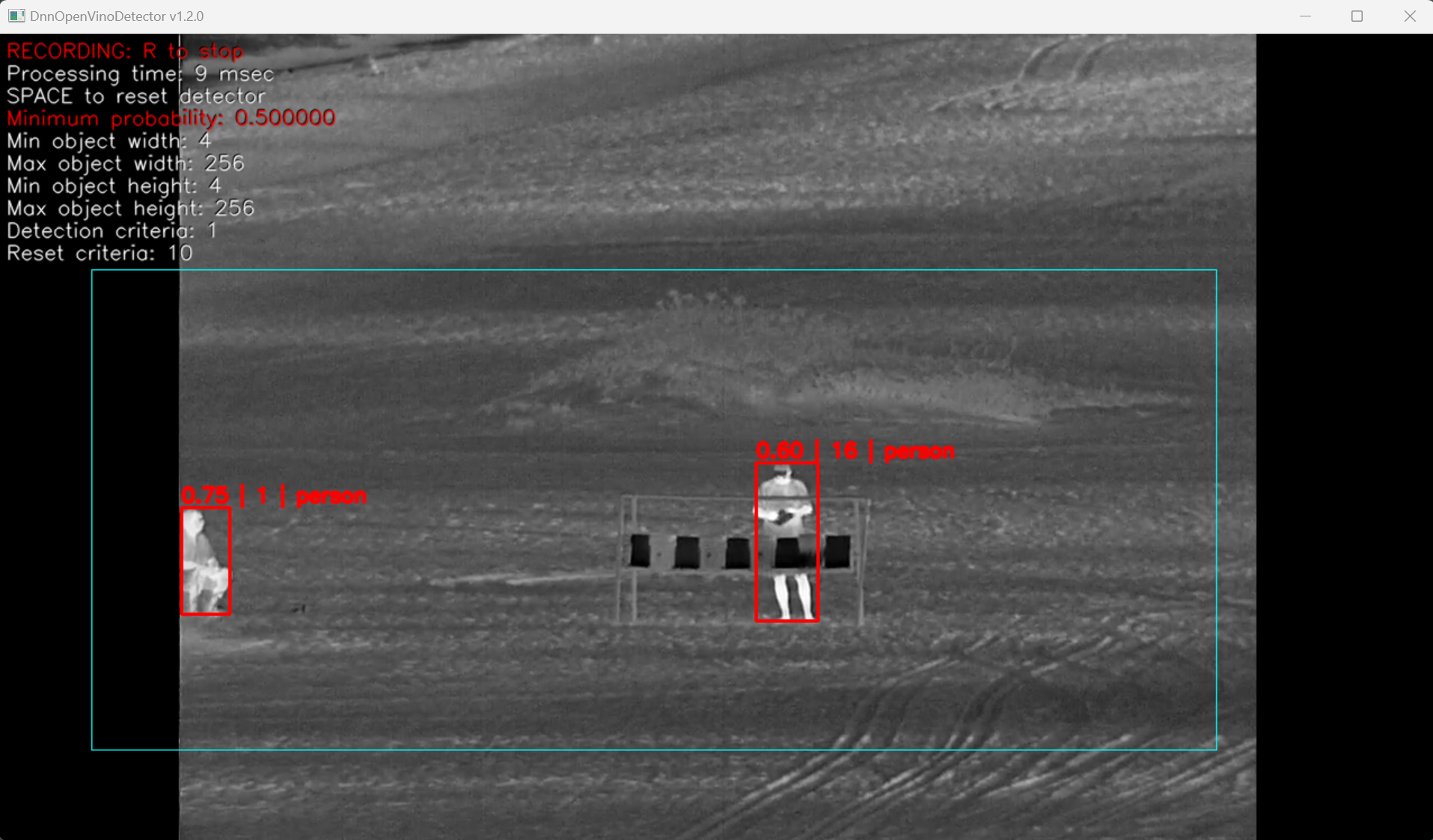
Control
To control the application, the main video display window must be active (in focus), and the English keyboard layout must be activated without CapsLock mode. The program is controlled by the keyboard and mouse (detection ROI control).
Table 11 - Control buttons.
| Button | Description |
|---|---|
| ESC | Exit the application. If video recording is active, it will be stopped. |
| SPACE | Reset object detector. |
| R | Start/stop video recording. When video recording is enabled, a file dst_[date and time].mp4 (result video) is created in the directory with the application executable file. Recording is performed of what is displayed to the user. To stop the recording, press the R key again. During video recording, the application shows a warning message. |
The minimum detection probability, the minimum and maximum object width and height, the detection criteria and the reset criteria are changed with the sliders in the window. The user can set the detection mask (mark a rectangular area where objects are to be detected). In order to set a rectangular detection area it is necessary to draw a line with the mouse with the left button pressed from the left-top corner of the required detection area to the right-bottom corner. The detection area will be marked in blue color as shown in the image.