
FormatConverter C++ library
v1.4.0
Table of contents
- Overview
- Versions
- Library files
- FormatConverter class description
- Multithreading
- Build and connect to your project
Overview
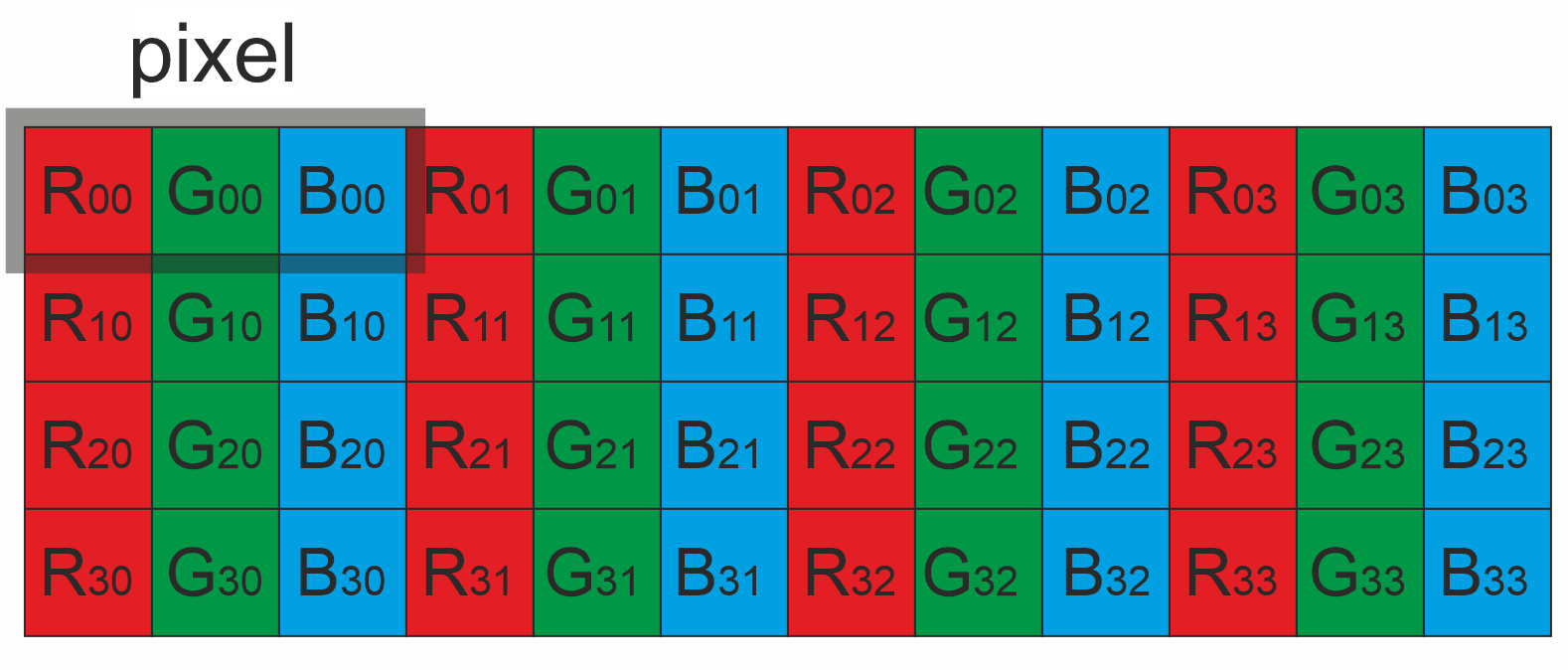
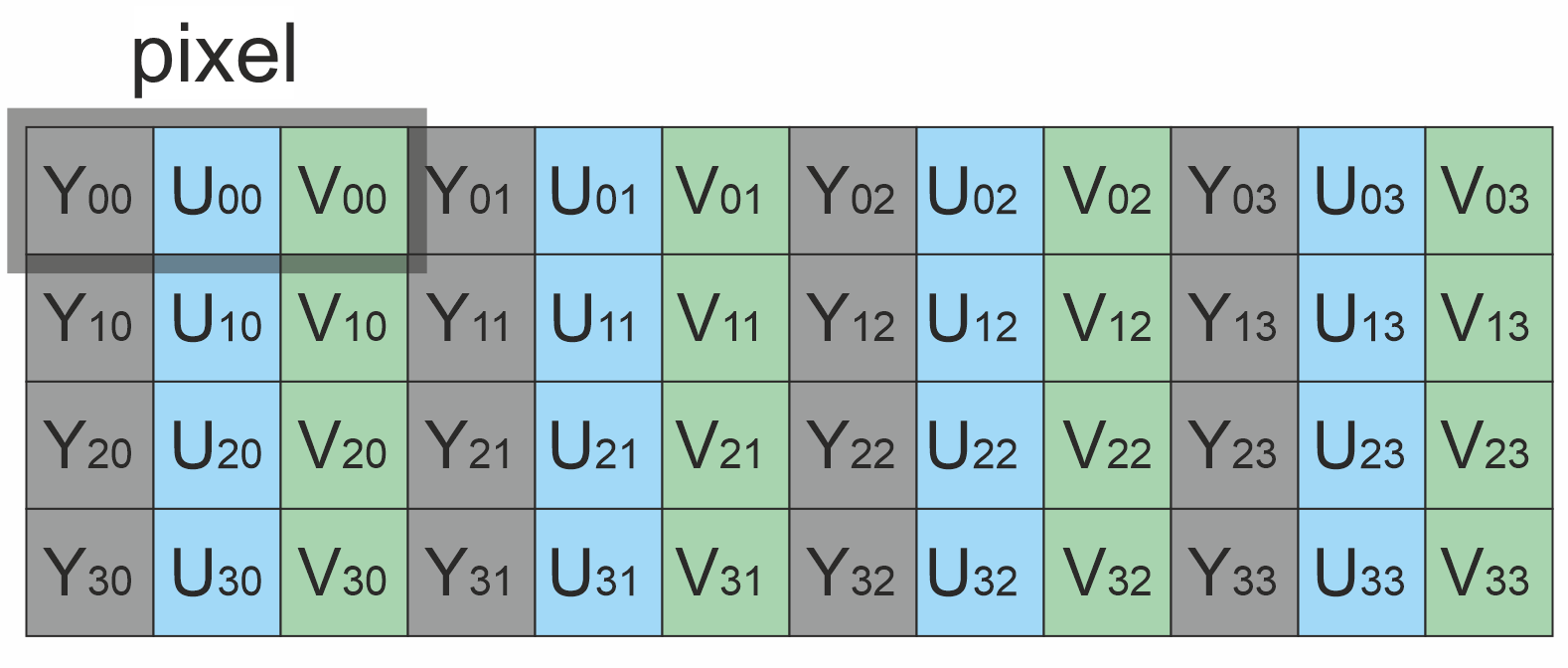
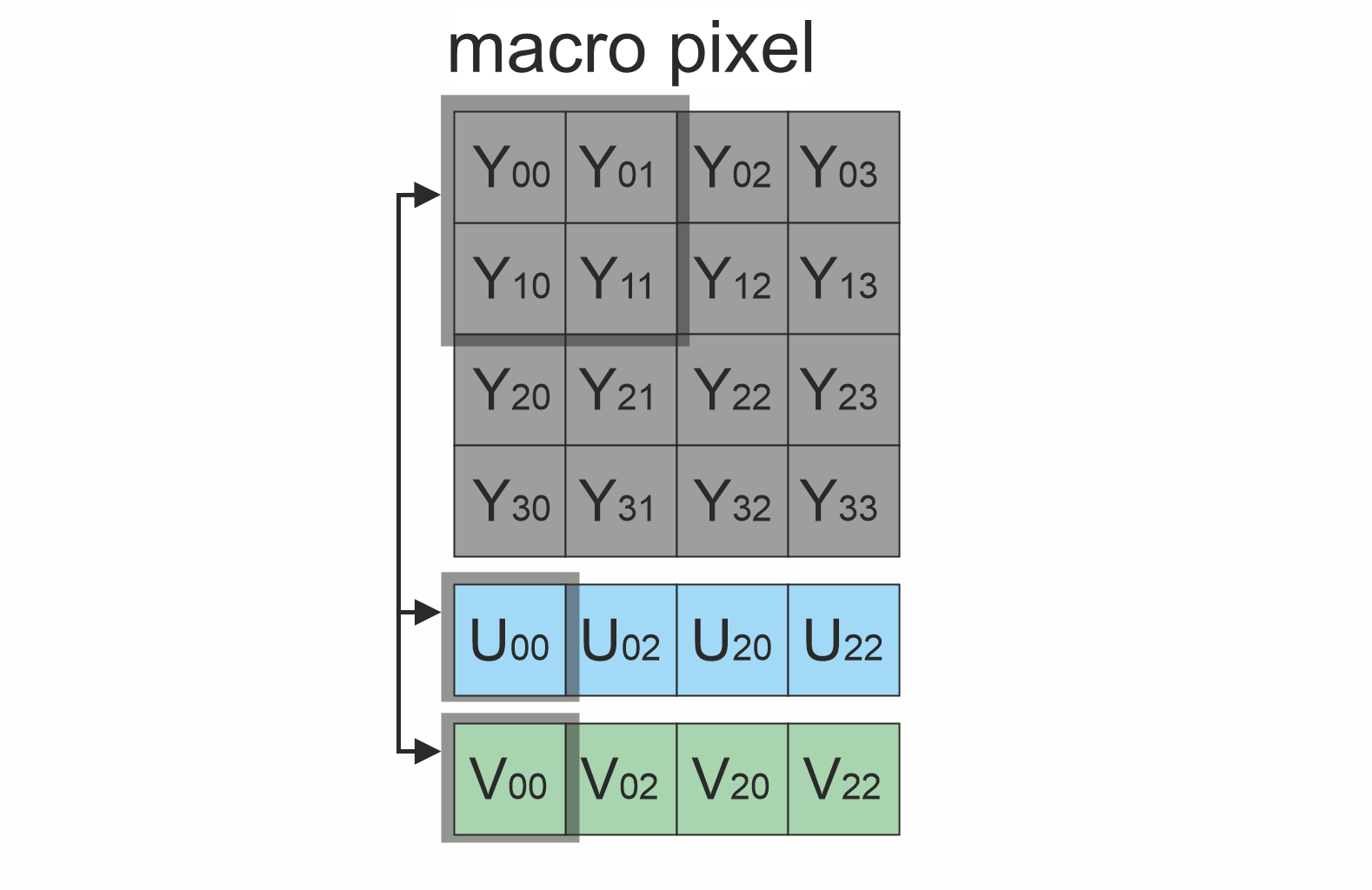
FormatConverter library is designed to convert pixel formats of images between each other. FormatConverter supports all uncompressed pixel formats (conversion between each other) listed in Fourcc enum (RGB24, BGR24, YUYV, UYVY, GRAY, YUV24, NV12, NV21, YU12, YV12) of Frame library (defines video frame object and pixel formats). Conversions run on SIMD kernels (AVX2 / SSE / ARM NEON with a scalar fallback). Conversion is single threaded by default and can optionally be spread over image rows with OpenMP, see Multithreading. Apart from OpenMP (supplied with the compiler) the library doesn’t have third-party dependencies. Main file FormatConverter.h contains declaration of FormatConverter class. The library uses C++17 standard and is compatible with Linux and Windows. The benchmark application has no third-party dependencies either. Pixel formats visualization:
Table 1 - Bytes layout of supported pixel formats. Example of 4x4 pixels image.
 RGB24 RGB24 | 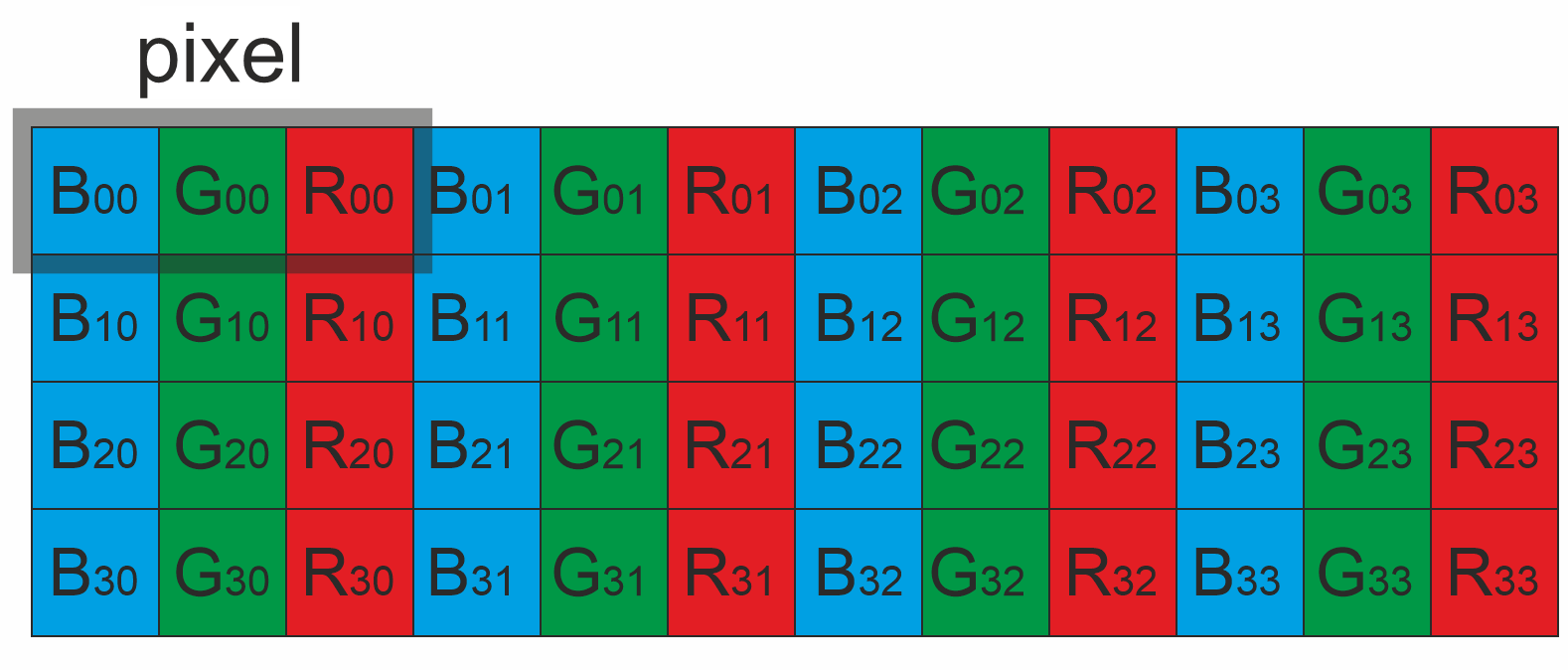 BGR24 BGR24 |
|---|---|
 YUV24 YUV24 | 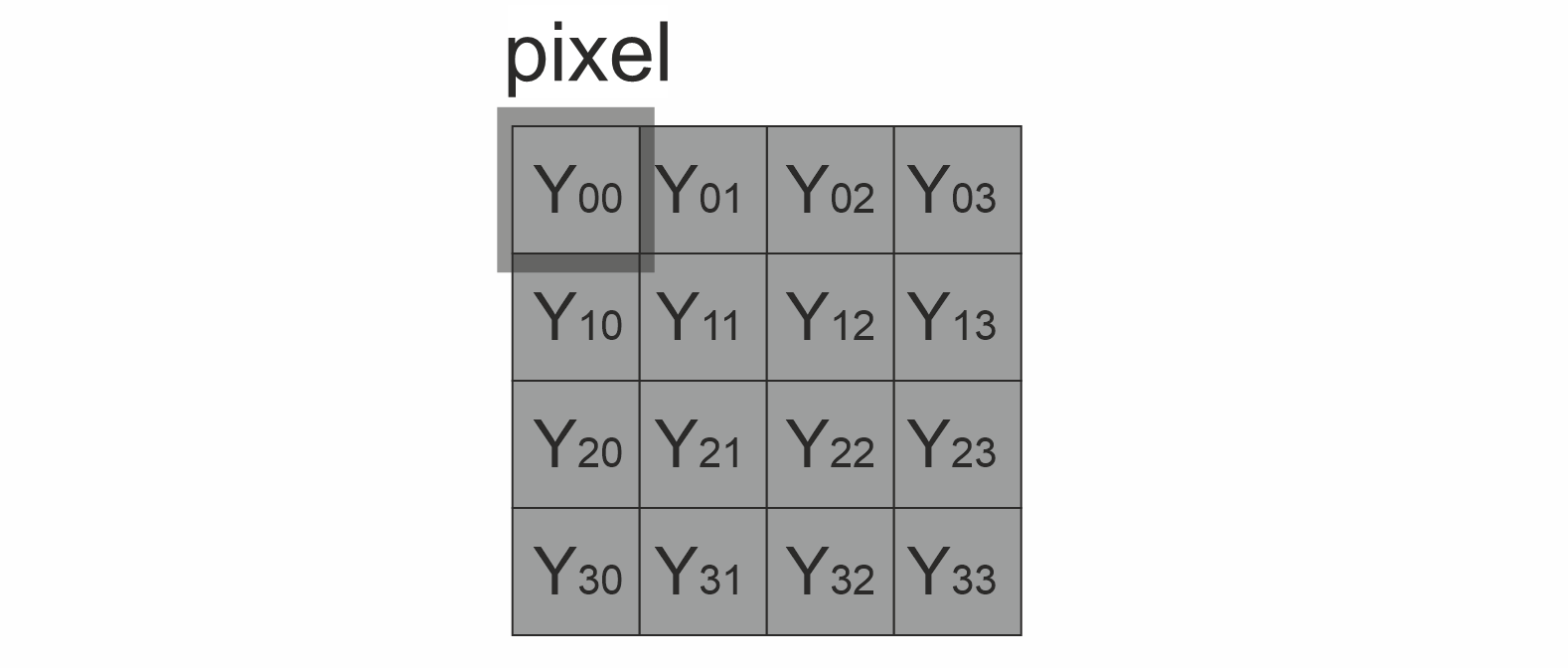 GRAY GRAY |
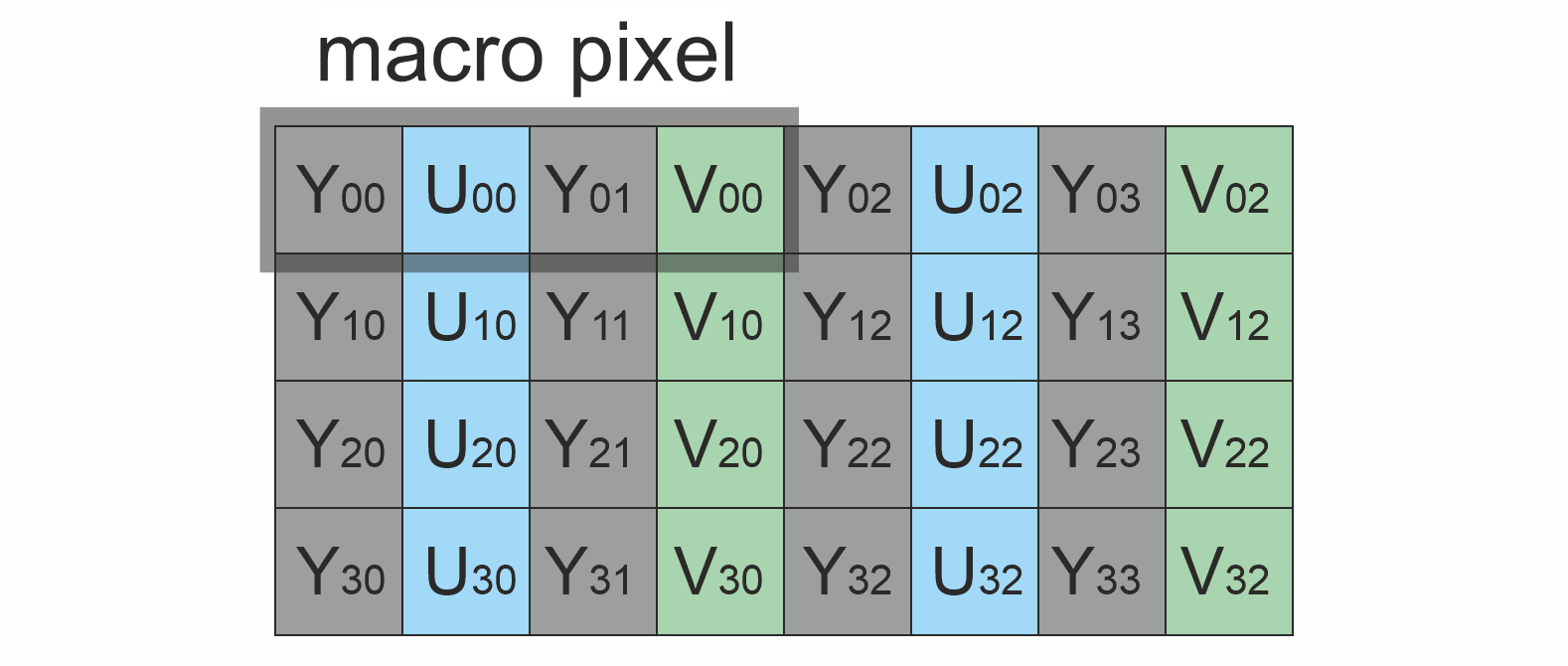 YUYV YUYV | 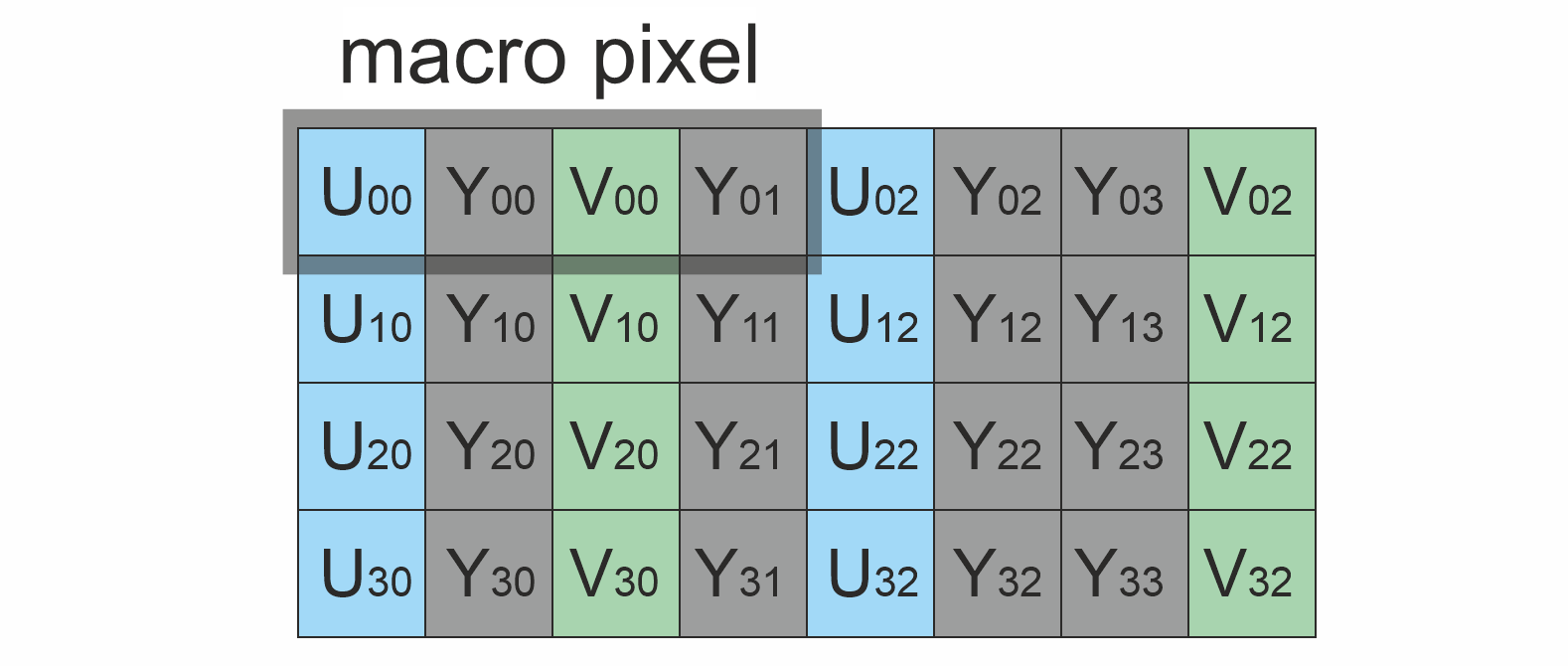 UYVY UYVY |
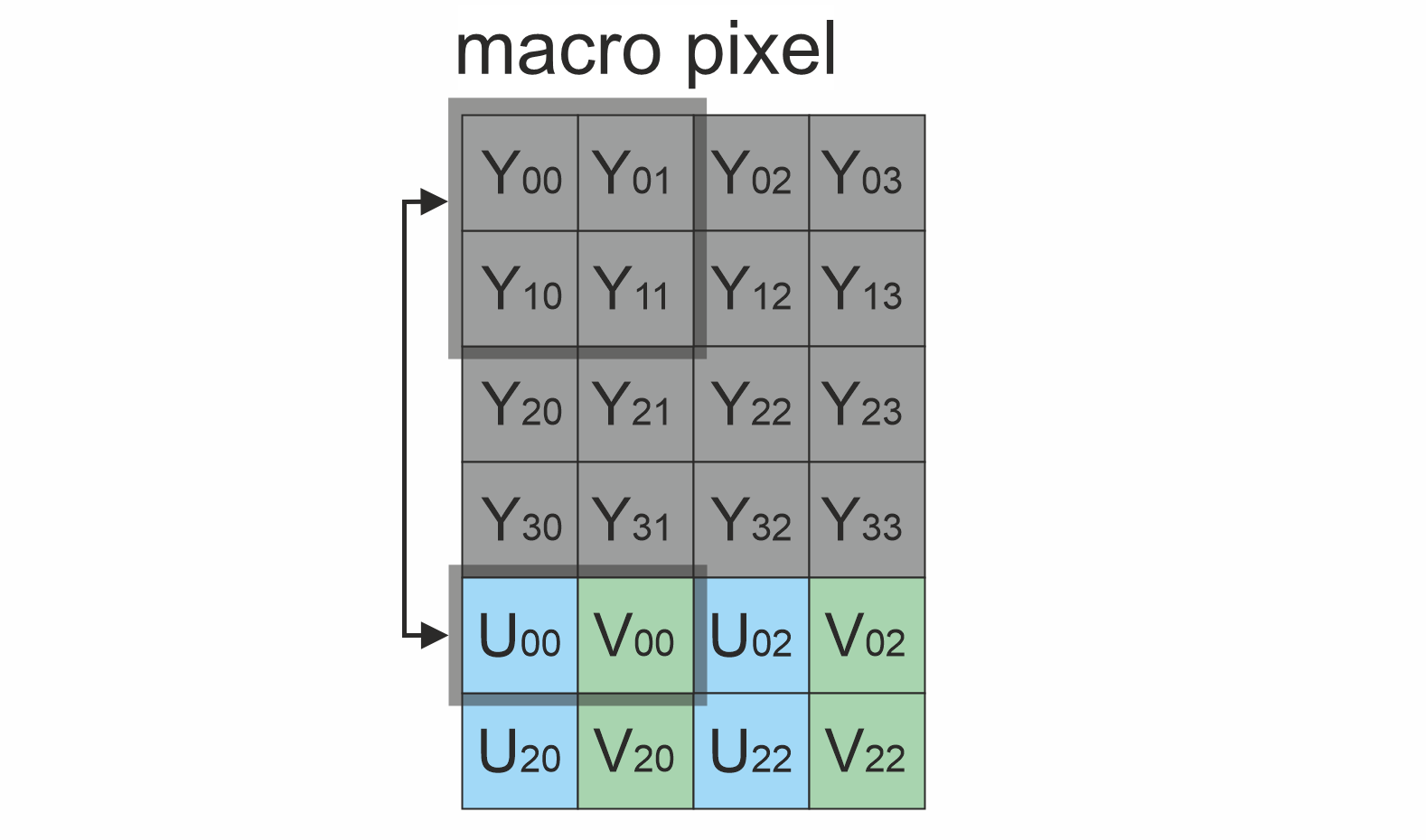 NV12 NV12 | 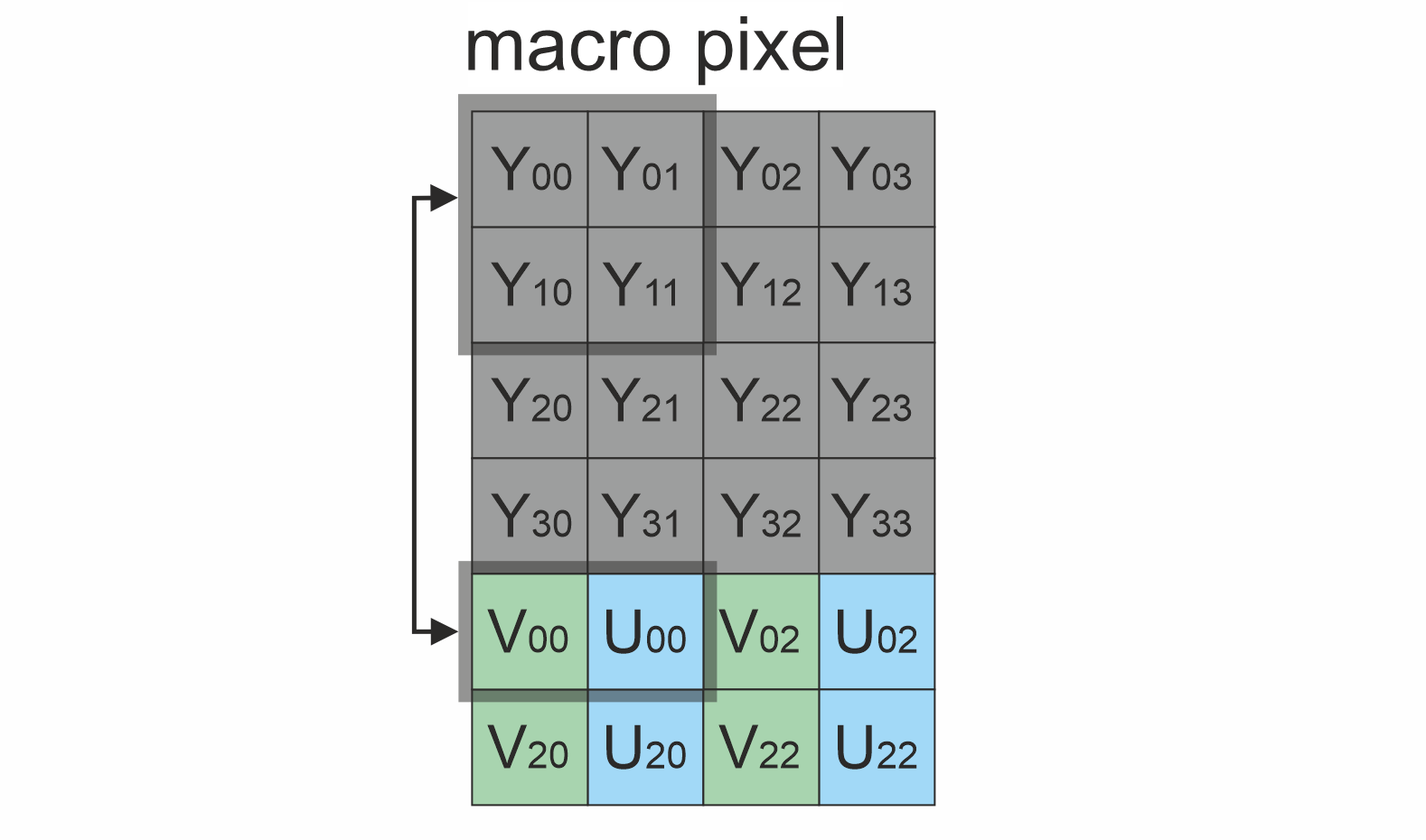 NV21 NV21 |
 YU12 YU12 | 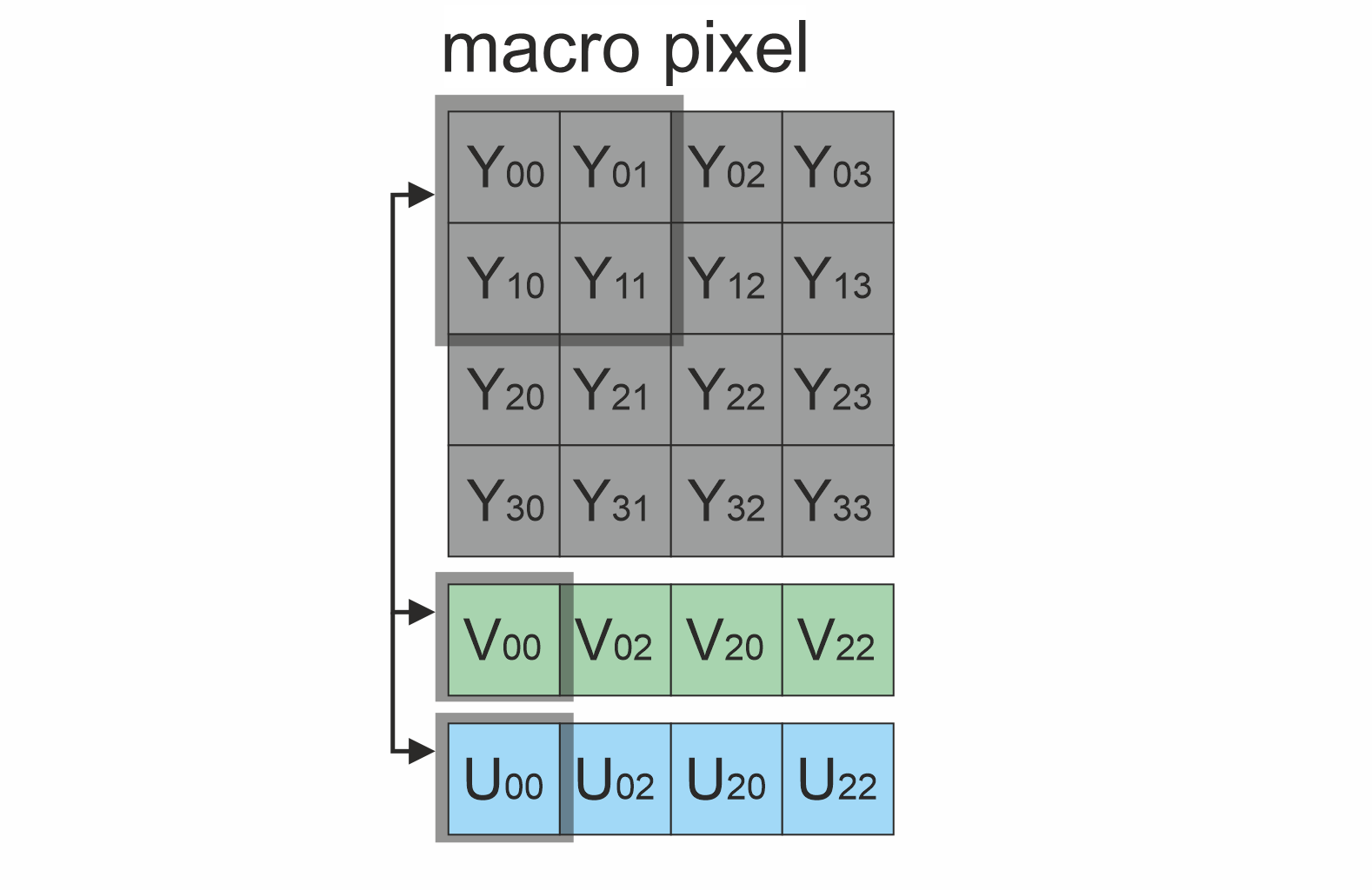 YV12 YV12 |
Versions
Table 2 - Library versions.
| Version | Release date | What’s new |
|---|---|---|
| 1.0.0 | 26.12.2025 | First version. |
| 1.1.0 | 28.03.2026 | - Code optimized for better performance. |
| 1.2.0 | 03.08.2026 | - SIMD (AVX2 / SSE / ARM NEON) conversion kernels added. Results are bit-identical to v1.1.0. |
| 1.3.0 | 23.08.2026 | - Optional OpenMP row-level parallelism added. - Conversion between identical pixel formats is a plain data copy. - Look-up tables left over from v1.1.0 removed together with the class constructor. - Fixed YU12 ↔ YV12 conversion for frame heights that are not a multiple of 4. - convert(…) validates frame geometry. - Test application removed, benchmark application no longer depends on OpenCV. |
| 1.4.0 | 02.09.2026 | - Added parallelism is now opt-in and bounded; conversion results are unchanged and still independent of the team size. - setMaxThreads(…) no longer creates the OpenMP team eagerly. - Every parallel region now carries an if(threads > 1) clause. |
Library files
The library is supplied only by source code. The user is given a set of files in the form of a CMake project (repository). The repository structure is shown below:
CMakeLists.txt ------------------- Main CMake file of the library.
3rdparty ------------------------- Folder with third-party libraries.
    CMakeLists.txt --------------- CMake file to include third-party libraries.
    Frame ------------------------ Folder with Frame library source code.
src ------------------------------ Folder with library source code.
    CMakeLists.txt --------------- CMake file of the library.
    FormatConverter.cpp ---------- C++ implementation file.
    FormatConverter.h ------------ Main library header file.
    FormatConverterSimd.h -------- Internal SIMD conversion kernels.
    FormatConverterVersion.h ----- Header file with library version.
    FormatConverterVersion.h.in -- Service CMake file to generate version file.
benchmark ------------------------ Folder for benchmark application.
    CMakeLists.txt --------------- CMake file of the benchmark application.
    main.cpp --------------------- Source C++ file of the benchmark application.
FormatConverter class description
FormatConverter class declaration
FormatConverter.h file contains FormatConverter class declaration. Class declaration:
namespace cr
{
namespace video
{
/**
 * @brief Frame pixel format converter class.
 */
class FormatConverter
{
public:

    /// Get version string of FormatConverter class.
    static std::string getVersion();

    /// Convert pixel format.
    bool convert(Frame& src, Frame& dst);

    /// Set upper limit for the number of threads used by convert(...).
    void setMaxThreads(int maxThreads);

    /// Get the number of threads convert(...) may use at most.
    int getMaxThreads() const;
};
}
}
The class declares no constructor and holds no conversion tables: the kernels compute the colour transform coefficients inline, so an object is 4 bytes and costs nothing to create. It can be a stack variable of a per-frame function or a long living member, whichever fits the application.
getVersion method
The getVersion() method returns string of current version of FormatConverter class. Method declaration:
static std::string getVersion();
Method can be used without FormatConverter class instance. Example:
std::cout << "FormatConverter class version: " << cr::video::FormatConverter::getVersion();
Console output:
FormatConverter class version: 1.4.0
convert method
The convert(…) method intended to convert Frame class data between pixel formats. The method understands which pixel format to convert from based on the fourcc field of the Frame class objects. Method declaration:
bool convert(Frame& src, Frame& dst);
| Parameter | Description |
|---|---|
| src | Source Frame object. Method doesn’t support H264, HEVC and JPEG pixel formats. Frame width and height must be even and in range [4, 16384], the size field must match the frame geometry and pixel format (this is what the Frame constructors do). |
| dst | Destination Frame object. User must at least initialize fourcc field of destination Frame object. Method doesn’t support H264, HEVC and JPEG pixel formats. If the frame data doesn’t match the source geometry and the destination pixel format the method re-allocates it. |
Returns: TRUE if pixel format converted or FALSE if not (invalid geometry, unsupported pixel format or inconsistent frame size).
If the source and the destination pixel formats are identical the method just copies the frame data, which is the fastest path per byte moved.
By default the method converts the whole frame on the calling thread. Row-level parallelism is enabled with setMaxThreads, see Multithreading.
Example:
// Init frame converter.
FormatConverter converter;

// Init source image filled by 0.
Frame src(640, 480, Fourcc::BGR24);

// Init output image.
Frame dst;
dst.fourcc = Fourcc::YUV24; // Inform converter about destination format.

// Convert.
converter.convert(src, dst);
setMaxThreads method
The setMaxThreads(…) method enables parallel conversion and sets an upper limit for the number of threads that convert(…) may use. Parallel conversion is disabled by default, so this method has to be called to make the converter use more than one thread. Method declaration:
void setMaxThreads(int maxThreads);
| Parameter | Description |
|---|---|
| maxThreads | Maximum number of threads. Value 1 (the default state of the object) keeps conversion single threaded. Values <= 0 mean “as many threads as OpenMP makes available”. The limit is never larger than omp_get_max_threads(). |
Returns: none. The setting belongs to the FormatConverter object and must be applied before conversions start (it is not synchronised with conversions that are already running). The method only records the limit: it does not create the OpenMP team. The team is created by the first conversion that actually asks for more than one thread, so a converter whose limit is never raised never creates one. Read Multithreading before raising the limit in a pipeline that converts every frame - the team costs more than the conversion it accelerates.
Example:
FormatConverter converter;    // single threaded, nothing to configure

converter.setMaxThreads(0);   // use every thread OpenMP offers
converter.setMaxThreads(4);   // never use more than 4 threads
converter.setMaxThreads(1);   // back to single threaded conversion
To keep some CPU cores free for other software, pass the number of cores the converter is allowed to occupy:
#include <thread>

// Leave 2 cores of the machine free.
const int cores = (int)std::thread::hardware_concurrency();
converter.setMaxThreads(cores > 2 ? cores - 2 : 1);
getMaxThreads method
The getMaxThreads() method returns the thread limit that is in effect for the converter. Method declaration:
int getMaxThreads() const;
Returns: the number of threads convert(…) may use at most, after setMaxThreads(…) is applied to the value provided by OpenMP. The value is 1 until setMaxThreads(…) is called and is always >= 1. The team size of a particular conversion can be smaller, because it also depends on the frame size, see Multithreading.
Example:
FormatConverter converter;
std::cout << converter.getMaxThreads() << std::endl;   // 1

converter.setMaxThreads(18);
std::cout << converter.getMaxThreads() << std::endl;   // 18 on a 20 core machine
Multithreading
Parallel conversion is disabled by default. A freshly constructed FormatConverter converts the whole frame on the calling thread and does not create any OpenMP team. Call setMaxThreads to enable row-level parallelism.
convert(…) processes the image row by row. The row loop of every conversion is an OpenMP parallel for with schedule(static), so each thread gets one contiguous band of rows and threads never share output bytes. A conversion between identical pixel formats is a plain data copy, split into cache line aligned chunks over the same number of threads. The result does not depend on the number of threads: the same input always produces byte-identical output whether the conversion runs on 1 thread or on 64.
What a thread team costs
The cost of a team is not the work it does - it is the time it is alive. An OpenMP runtime keeps the workers of a live team spinning after a parallel region ends, so the next region can start without paying a thread wake-up. A converter called once per video frame opens a region far more often than any runtime’s spin window, so the workers never reach their sleep point and the team is charged for the gaps between frames as well as for the conversions themselves.
Table 2 - FullHD (1920x1080) YUYV to YUV24 at 30 fps, one conversion per frame, measured as whole-process CPU over the run. The conversion itself needs under 1 ms of each 33 ms frame.
| Team size | CPU consumed | Conversion time |
|---|---|---|
| 1 (default) | 0.1 core | 2.80 ms |
| 2 | 0.6 core | 0.86 ms |
| 4 | 1.7 cores | 0.60 ms |
| 8 | 6.2 cores | 0.89 ms |
| 12 | 9.3 cores | 0.81 ms |
Four threads buy 2.2 ms of a 33 ms budget and cost 1.6 extra cores to do it. That trade is worth making when the latency of a single conversion is the constraint and the cores are otherwise idle - a batch converter, an offline tool. It is the wrong trade for a steady video pipeline, which is why the default is serial and why callers have to opt in.
The environment can change the picture: OMP_WAIT_POLICY=passive (or, on the Intel runtime, KMP_BLOCKTIME=0) makes workers sleep the moment a region ends and removes the idle cost almost entirely. Do not rely on it. It is a property of the process the library is linked into, not of the library, and a component that only behaves well under a particular environment variable is a component that misbehaves by default.
Thread safety
The library never calls omp_set_num_threads(…) or omp_set_dynamic(…). The team size is passed to every parallel region with the OpenMP num_threads clause, which affects that region only. As a consequence:
- the OpenMP configuration of your application is never modified by the library;
- convert(…) may be called from several threads at the same time, including through one FormatConverter object shared between threads;
- calling convert(…) from inside your own
#pragma omp parallelregion is safe.
Number of threads
For every conversion the team size is calculated as:
threads = min( width * height / 16384,  // one thread per 16384 pixels
               height,                  // cannot exceed the number of rows
               getMaxThreads() )        // limit of the converter
threads = max( threads, 1 )
Since getMaxThreads() returns 1 until setMaxThreads(…) is called, the default converter always ends up with a single thread. After parallelism is enabled the first term keeps small frames single threaded anyway: starting a team of 20 threads costs more than converting a 64x64 image.
Table 3 - Team size on a 20 core machine after setMaxThreads(0).
| Frame size | width * height / 16384 | Threads used | Threads used by default |
|---|---|---|---|
| 64 x 64 | 0 | 1 | 1 |
| 320 x 240 | 4 | 4 | 1 |
| 640 x 480 | 18 | 18 | 1 |
| 1280 x 720 | 56 | 20 | 1 |
| 1920 x 1080 | 126 | 20 | 1 |
| 3840 x 2160 | 506 | 20 | 1 |
Enabling and limiting the number of threads
Table 4 - Ways to control the thread count, from the widest scope to the narrowest.
| Way | Scope | Description |
|---|---|---|
| Build without OpenMP | Whole library | If the compiler is invoked without OpenMP support the library builds and runs single threaded; setMaxThreads(…) is accepted but getMaxThreads() always returns 1. |
| OMP_NUM_THREADS environment variable | Whole process | Standard OpenMP setting. It defines the value returned by omp_get_max_threads(), which is the upper bound of what the converter can request. |
| setMaxThreads(n) | One FormatConverter | Enables parallel conversion and sets a hard upper limit for that converter object. n = 0 means all available threads, n = 1 means single threaded. |
The limit is always at least 1 and never larger than omp_get_max_threads().
Example - a 20 core machine, 2 cores must stay free for other software:
#include <thread>
#include "FormatConverter.h"

cr::video::FormatConverter converter;

const int cores = (int)std::thread::hardware_concurrency();
converter.setMaxThreads(cores > 2 ? cores - 2 : 1);

// 18
std::cout << converter.getMaxThreads() << std::endl;
Example - different converters with different budgets in one application:
cr::video::FormatConverter previewConverter;
previewConverter.setMaxThreads(2);   // low priority preview stream

cr::video::FormatConverter recordConverter;
recordConverter.setMaxThreads(0);    // recording may use the whole machine

cr::video::FormatConverter uiConverter;
                                     // untouched: stays on the calling thread
Example - limiting the whole process from the command line:
OMP_NUM_THREADS=6 ./YourApplication
Build and connect to your project
The library only needs a C++17 compiler with OpenMP support and CMake. Typical install commands for Linux:
sudo apt-get install build-essential cmake
Typical commands to build FormatConverter library:
cd FormatConverter
mkdir build
cd build
cmake ..
make
If you want to connect FormatConverter library to your CMake project as source code, you can do the following. For example, if your repository has structure:
CMakeLists.txt
src
    CMakeLists.txt
    yourLib.h
    yourLib.cpp
Create folder 3rdparty in your repository folder and copy FormatConverter repository folder there. The new structure of your repository will be as follows:
CMakeLists.txt
src
    CMakeList.txt
    yourLib.h
    yourLib.cpp
3rdparty
    FormatConverter
Create a CMakeLists.txt file in the 3rdparty folder. CMakeLists.txt should contain:
cmake_minimum_required(VERSION 3.13)

################################################################################
## 3RD-PARTY
## dependencies for the project
################################################################################
project(3rdparty LANGUAGES CXX)

################################################################################
## SETTINGS
## basic 3rd-party settings before use
################################################################################
# To inherit the top-level architecture when the project is used as a submodule.
SET(PARENT ${PARENT}_YOUR_PROJECT_3RDPARTY)
# Disable self-overwriting of parameters inside included subdirectories.
SET(${PARENT}_SUBMODULE_CACHE_OVERWRITE OFF CACHE BOOL "" FORCE)

################################################################################
## INCLUDING SUBDIRECTORIES
## Adding subdirectories according to the 3rd-party configuration
################################################################################
add_subdirectory(FormatConverter)
File 3rdparty/CMakeLists.txt adds folder FormatConverter to your project and automatically excludes benchmark application from compiling. The new structure of your repository will be:
CMakeLists.txt
src
    CMakeLists.txt
    yourLib.h
    yourLib.cpp
3rdparty
    CMakeLists.txt
    FormatConverter
Next, you need to include the 3rdparty folder in the main CMakeLists.txt file of your repository. Add the following line at the end of your main CMakeLists.txt:
add_subdirectory(3rdparty)
Next, you have to include FormatConverter library in your src/CMakeLists.txt file:
target_link_libraries(${PROJECT_NAME} FormatConverter)
Done!