
MvExtractorLibav C++ library
v1.0.0
Table of contents
- Overview
- Versions
- Library files
- MvExtractorLibav class description
- Build and connect to your project
- Test application
Overview
The MvExtractorLibav C++ library extracts motion vectors from H264 frames on Linux and Windows using FFmpeg. The library is compatible with any hardware that supports FFmpeg. The library depends on the open-source Frame library (source code included, Apache 2.0 license) and the FFmpeg libraries (libavcodec, libavformat, libavutil, libavfilter, libswscale), which are linked at build time. The library uses the C++17 standard. The test application depends on the VCodecLibav library (source code included, Apache 2.0 license) and the SimpleFileDialog library (source code included, Apache 2.0 license), which depends on the open-source Zenity library (only for Linux).
Versions
Table 1 - Library versions.
| Version | Release date | What’s new |
|---|---|---|
| 1.0.0 | 17.04.2026 | First version. |
Library files
The library is supplied as source code only. The user is provided with a set of files in the form of a CMake project (repository). The repository structure is shown below:
CMakeLists.txt -------------------- Main CMake file of the library.
3rdparty -------------------------- Folder with third-party libraries.
    CMakeLists.txt ---------------- CMake file to include third-party libraries.
    Frame ------------------------- Folder with Frame library files.
src ------------------------------- Folder with library source code.
    impl -------------------------- Folder with implementation source code.
        MvExtractorLibavImpl.cpp -- Implementation C++ file.
        MvExtractorLibavImpl.h ---- Implementation header file.
    CMakeLists.txt ---------------- CMake file of the library.
    MvExtractorLibav.cpp ---------- C++ implementation file.
    MvExtractorLibav.h ------------ Main library header file.
    MvExtractorLibavVersion.h ----- Header file with library version.
    MvExtractorLibavVersion.h.in -- File for CMake to generate version header.
test ------------------------------ Folder for test application.
    3rdparty ---------------------- Folder with third-party libraries for test.
        CMakeLists.txt ------------ CMake file to include third-party libraries.
        SimpleFileDialog ---------- Folder with SimpleFileDialog library files.
        VCodecLibav --------------- Folder with VCodecLibav library files.
    CMakeLists.txt ---------------- CMake file for test application.
    main.cpp ---------------------- Source C++ file of test application.
MvExtractorLibav class description
MvExtractorLibav class declaration
The MvExtractorLibav class is declared in the MvExtractorLibav.h file. Class declaration:
namespace cr
{
namespace video
{
class MvExtractorLibav
{
public:

    /// Class constructor, initializes the extractor.
    MvExtractorLibav();

    /// Class destructor, releases all extractor resources.
    ~MvExtractorLibav();

    /// Get string of the current library version.
    static std::string getVersion();

    /// Extracts motion vectors from the given frame.
    bool extract(Frame& frame, int8_t* vectors);
};
}
}
getVersion method
The getVersion() method returns a string of the current version of the MvExtractorLibav class. Method declaration:
static std::string getVersion();
This method can be used without a MvExtractorLibav class instance:
std::cout << "MvExtractorLibav class version: " << MvExtractorLibav::getVersion() << std::endl;
Console output:
MvExtractorLibav class version: 1.0.0
extract method
The extract(…) method is intended to extract motion vectors from frames (Frame class). Method declaration:
bool extract(Frame& frame, int8_t* vectors);
| Parameter | Value |
|---|---|
| frame | Source frame (see Frame class description). To extract motion vectors, the frame must have a compressed pixel format H264. |
| vectors | Output buffer with decoded motion vectors. Size of buffer should be width * height * 3 bytes. Format is: 1. int8_t - is motion vector calculated flag [0 - not calculated, 1 - calculated]. 2. int8_t - motion vector X component. 3. int8_t - motion vector Y component. |
Returns: True if motion vectors were extracted from the frame successfully or false if not.
Build and connect to your project
Before compiling, you must install FFmpeg packages for your system.
Installation on Linux
Example for Linux Ubuntu:
sudo apt-get install -y build-essential cmake ffmpeg libavcodec-dev libavutil-dev libavformat-dev libavdevice-dev libavfilter-dev libcurl4
Installation on Windows
To install the FFmpeg package in Windows, follow these steps:
- Go to the latest build of FFmpeg and download ffmpeg-master-latest-win64-lgpl-shared.zip (64-bit libraries under LGPL license without software encoders/decoders, only hardware encoders/decoders) or download ffmpeg-master-latest-win64-gpl-shared.zip (64-bit libraries under GPL license with software and hardware encoders/decoders).
- Extract the zip file to any folder (recommended path: C:/libs/ffmpeg/ffmpeg-master-latest-win64-lgpl-shared or C:/libs/ffmpeg/ffmpeg-master-latest-win64-gpl-shared). The extracted folder must contain the following folders: bin, include, lib, etc.
- Add the path to FFmpeg libraries to Windows system variables. To do this, go to (Windows 11): Settings -> System -> Advanced system settings -> Environment Variables.
- Create a new variable in the System variables section with the name FFmpeg_DIR and the path to your FFmpeg files (for example, C:/libs/ffmpeg/ffmpeg-master-latest-win64-gpl-shared) and save the changes. If the system variable FFmpeg_DIR is not set, the library will try to find FFmpeg libraries in the C:/libs/ffmpeg/ffmpeg-master-latest-win64-gpl-shared folder.
- Sometimes a Windows reboot is required for the changes to take effect.
Build and connect to project
Typical commands to build the MvExtractorLibav library:
cd MvExtractorLibav
mkdir build
cd build
cmake ..
make
If you want to connect the MvExtractorLibav library to your CMake project as source code, you can follow these steps. For example, if your repository has the following structure:
CMakeLists.txt
src
    CMakeList.txt
    yourLib.h
    yourLib.cpp
Create a 3rdparty folder in your repository and copy the MvExtractorLibav repository folder to the 3rdparty folder. The new structure of your repository:
CMakeLists.txt
src
    CMakeList.txt
    yourLib.h
    yourLib.cpp
3rdparty
    MvExtractorLibav
Create a CMakeLists.txt file in the 3rdparty folder. The CMakeLists.txt should contain:
cmake_minimum_required(VERSION 3.13)

################################################################################
## 3RD-PARTY
## dependencies for the project
################################################################################
project(3rdparty LANGUAGES CXX)

################################################################################
## SETTINGS
## basic 3rd-party settings before use
################################################################################
# To inherit the top-level architecture when the project is used as a submodule.
SET(PARENT ${PARENT}_YOUR_PROJECT_3RDPARTY)
# Disable self-overwriting of parameters inside included subdirectories.
SET(${PARENT}_SUBMODULE_CACHE_OVERWRITE OFF CACHE BOOL "" FORCE)

################################################################################
## INCLUDING SUBDIRECTORIES
## Adding subdirectories according to the 3rd-party configuration
################################################################################
if (${PARENT}_SUBMODULE_MVEXTRACTOR_LIBAV)
    add_subdirectory(MvExtractorLibav)
endif()
The 3rdparty/CMakeLists.txt file adds the MvExtractorLibav folder to your project and excludes the test application (by default, the test application is excluded from compilation if MvExtractorLibav is included as a sub-repository). Your repository’s new structure will be:
CMakeLists.txt
src
    CMakeList.txt
    yourLib.h
    yourLib.cpp
3rdparty
    CMakeLists.txt
    MvExtractorLibav
Next, you need to include the 3rdparty folder in the main CMakeLists.txt file of your repository. Add the following line at the end of your main CMakeLists.txt:
add_subdirectory(3rdparty)
Next, you need to include the MvExtractorLibav library in your src/CMakeLists.txt file:
target_link_libraries(${PROJECT_NAME} MvExtractorLibav)
Done!
Test application
The test application (MvExtractorLibav/test/main.cpp) demonstrates how the MvExtractorLibav library works. The application processes either a user-selected video or a generated artificial video, extracts motion vectors, and displays them in a window. The application shows the extraction time for each video frame at the console. Source code:
#include <iostream>
#include <chrono>
#include <opencv2/opencv.hpp>
#include "SimpleFileDialog.h"
#include "VCodecLibav.h"

#include "MvExtractorLibav.h"


using namespace cr::video;
using namespace cr::utils;
using namespace std::chrono;


int main()
{
    std::cout << "=================================================" << std::endl;
    std::cout << "MvExtractorLibav v" << MvExtractorLibav::getVersion() <<
            " test application" << std::endl;
    std::cout << "=================================================" << std::endl << std::endl;

    std::string source;
    std::cout << "Open video file via dialog? If not, the application will use a generated test source. (y/n) ";
    std::string answer = "y";
    std::cin >> answer;
    bool useGeneratedSource = false;
    if (answer == "y" || answer == "Y")
    {
        source = SimpleFileDialog::dialog();
    }
    else
    {
        std::cout << "The application will use a generated test source." << std::endl;
        useGeneratedSource = true;
    }

    std::cout << "Do you want to open application window? (y/n) ";
    std::cin >> answer;
    bool showWindow = (answer == "y" || answer == "Y");

    cv::VideoCapture videoSource;
    if (!useGeneratedSource)
    {
        // Open video source.
        if (!videoSource.open(source))
        {
            std::cout << "ERROR: Video source not open" << std::endl;
            return -1;
        }
    }

    int generatedWidth = 1280;
    int generatedHeight = 720;

    if (useGeneratedSource)
    {
        std::cout << "Set up generated video size" << std::endl << "Width: ";
        std::cin >> generatedWidth;
        std::cout << "Height: ";
        std::cin >> generatedHeight;
    }

    int width = useGeneratedSource ? generatedWidth : static_cast<int>(videoSource.get(cv::CAP_PROP_FRAME_WIDTH));
    int height = useGeneratedSource ? generatedHeight : static_cast<int>(videoSource.get(cv::CAP_PROP_FRAME_HEIGHT));

    // Params for moving rectangle.
    int objectWidth = 128;
    int objectHeight = 128;
    int directionX = 1;
    int directionY = 1;
    int objectX = width / 4;
    int objectY = height / 2;

    // Init frames.
    Frame srcFrame(width, height, Fourcc::NV12);
    Frame dstFrame(width, height, Fourcc::H264);

    // Create window to show source video.
    if (showWindow)
    {
        cv::namedWindow("Source", cv::WINDOW_AUTOSIZE);
    }

    // Set up codec for encoding to H264.
    VCodecLibav codec;
    codec.setParam(VCodecParam::BITRATE_KBPS, 30000);
    codec.setParam(VCodecParam::BITRATE_MODE, 0); // Constant bitrate.
    codec.setParam(VCodecParam::GOP, 30);
    codec.setParam(VCodecParam::FPS, 30);
    codec.setParam(VCodecParam::H264_PROFILE, 2); // High profile.
    codec.setParam(VCodecParam::TYPE, 1); // Use software encoder.

    MvExtractorLibav extractor;
    while (true)
    {
        cv::Mat bgr;
        cv::Mat nv12;

        // Prepare source frame.
        // First - generate NV12 for encoding data and convert NV12 to BGR for OpenCV visualization.
        if (useGeneratedSource)
        {
            // Fill background.
            for (int i = 0; i < srcFrame.size; ++i)
                srcFrame.data[i] = (2 * i) % 256;
            // Draw moving object.
            for (int y = objectY; y < objectY + objectHeight; ++y)
                memset(&srcFrame.data[y * width + objectX], 255, objectWidth);
            objectX += directionX;
            objectY += directionY;
            if (objectX >= width - objectWidth - 5 || objectX <= objectWidth + 5)
                directionX = -directionX;
            if (objectY >= height - objectHeight - 5 || objectY <= objectHeight + 5)
                directionY = -directionY;

            // Show source frame (NV12 -> BGR).
            nv12 = cv::Mat(height * 3 / 2, width, CV_8UC1, srcFrame.data);
            cv::cvtColor(nv12, bgr, cv::COLOR_YUV2BGR_NV12);
        }
        // Second - read frame from video source as BGR for OpenCV visualization and convert BGR to NV12 for encoding.
        else
        {
            // Read frame from video source.
            videoSource >> bgr;

            // Exit if no more frames.
            if (bgr.empty())
            {
                std::cout << "End of video stream" << std::endl;
                break;
            }

            // BGR -> NV12.
            cv::Mat yuv;
            cv::cvtColor(bgr, yuv, cv::COLOR_BGR2YUV_I420);
            int ySize = width * height;
            // Copy Y plane as-is to Frame.
            memcpy(srcFrame.data, yuv.data, ySize);
            // Interleave U and V planes into NV12 UV plane.
            uint8_t* uPlane = yuv.data + ySize;
            uint8_t* vPlane = yuv.data + ySize + ySize / 4;
            uint8_t* uvDst  = srcFrame.data + ySize;
            for (int i = 0; i < ySize / 4; ++i)
            {
                uvDst[2 * i]     = uPlane[i];
                uvDst[2 * i + 1] = vPlane[i];
            }
        }

        // Encode frame to H264.
        if (!codec.transcode(srcFrame, dstFrame))
        {
            std::cout << "Can't encode frame" << std::endl;
            continue;
        }

        // Allocate buffer for motion vectors.
        int8_t* vectors = new int8_t[dstFrame.width * dstFrame.height * 3];

        // Extract motion vectors.
        time_point<system_clock> start = system_clock::now();
        if (!extractor.extract(dstFrame, vectors))
        {
            std::cout << "Can't extract motion vectors" << std::endl;
            delete[] vectors;
            continue;
        }
        int timeUs = static_cast<int>(duration_cast<microseconds>(system_clock::now() - start).count());

        std::cout << "Frame " << dstFrame.frameId
            << "  " << dstFrame.width << "x" << dstFrame.height
            << "  size=" << dstFrame.size << " bytes"
            << "  extraction time=" << timeUs << " us" << std::endl;

        // Visualize motion vectors. Draw lines from source to destination points.
        // Iterate every 8 pixels to avoid messy visualization.
        for (int x = 0; x < dstFrame.width; x += 8)
        {
            for (int y = 0; y < dstFrame.height; y += 8)
            {
                int idx = (y * dstFrame.width + x) * 3;
                // First byte is motion vector calculated flag.
                if (vectors[idx] == 0)
                    continue;
                // Second and third bytes are motion vector X and Y components.
                int8_t mvX = vectors[idx + 1];
                int8_t mvY = vectors[idx + 2];
                if (mvX == 0 && mvY == 0)
                    continue;

                // Draw line from src to dst.
                cv::Point src(x, y);
                cv::Point dst(x + mvX, y + mvY);
                cv::line(bgr, src, dst, cv::Scalar(0, 0, 255), 1, cv::LINE_AA);
            }
        }

        if (showWindow)
        {
            cv::imshow("Source", bgr);
            // Exit on ESC key.
            if (cv::waitKey(1) == 27)
            {
                delete[] vectors;
                break;
            }
        }
        delete[] vectors;
        srcFrame.frameId++;
    }
}
To run the application, run the following commands on Linux or simply run MvExtractorLibavTest.exe on Windows:
sudo apt install zenity ffmpeg libavcodec-dev libavutil-dev libavformat-dev libavdevice-dev libavfilter-dev
cd <application folder>
chmod +x MvExtractorLibavTest
./MvExtractorLibavTest
After starting, you will see the following output:
=================================================
MvExtractorLibav v1.0.0 test application
=================================================

Open video file via dialog? If not, the application will use a generated test source. (y/n)
Choose a video source: a real video file or one generated by the application. If you choose the generated video stream, the application asks for the size of the video. During processing, the application displays the frame size, data size, and extraction time:
=================================================
MvExtractorLibav v1.0.0 test application
=================================================

Open video file via dialog? If not, the application will use a generated test source. (y/n) n
The application will use a generated test source.
Do you want to open application window? (y/n) n
Set up generated video size
Width: 1280
Height: 720
Frame 0  1280x720  size=11081 bytes  extraction time=1522 us
Frame 1  1280x720  size=2718 bytes  extraction time=1676 us
Frame 2  1280x720  size=420 bytes  extraction time=1096 us
Frame 3  1280x720  size=395 bytes  extraction time=540 us
Frame 4  1280x720  size=20833 bytes  extraction time=1034 us
Frame 5  1280x720  size=20833 bytes  extraction time=643 us
Frame 6  1280x720  size=20834 bytes  extraction time=627 us
Frame 7  1280x720  size=20833 bytes  extraction time=1016 us
Frame 8  1280x720  size=20833 bytes  extraction time=678 us
Frame 9  1280x720  size=20834 bytes  extraction time=534 us
Frame 10  1280x720  size=20833 bytes  extraction time=535 us
Frame 11  1280x720  size=20833 bytes  extraction time=510 us
Frame 12  1280x720  size=20834 bytes  extraction time=572 us
Frame 13  1280x720  size=20833 bytes  extraction time=551 us
Frame 14  1280x720  size=20833 bytes  extraction time=582 us
Frame 15  1280x720  size=20834 bytes  extraction time=633 us
Frame 16  1280x720  size=20833 bytes  extraction time=503 us
Frame 17  1280x720  size=20833 bytes  extraction time=613 us
Frame 18  1280x720  size=20834 bytes  extraction time=1450 us
Frame 19  1280x720  size=20833 bytes  extraction time=627 us
Frame 20  1280x720  size=20833 bytes  extraction time=639 us
Frame 21  1280x720  size=20834 bytes  extraction time=649 us
Frame 22  1280x720  size=20833 bytes  extraction time=596 us
Frame 23  1280x720  size=20833 bytes  extraction time=673 us
Frame 24  1280x720  size=20834 bytes  extraction time=721 us
Frame 25  1280x720  size=20833 bytes  extraction time=565 us
Frame 26  1280x720  size=20833 bytes  extraction time=596 us
Frame 27  1280x720  size=20834 bytes  extraction time=535 us
Frame 28  1280x720  size=20833 bytes  extraction time=528 us
Frame 29  1280x720  size=20833 bytes  extraction time=798 us
Frame 30  1280x720  size=20834 bytes  extraction time=581 us
...
If you choose the option to open the application window, you will see the extraction result:
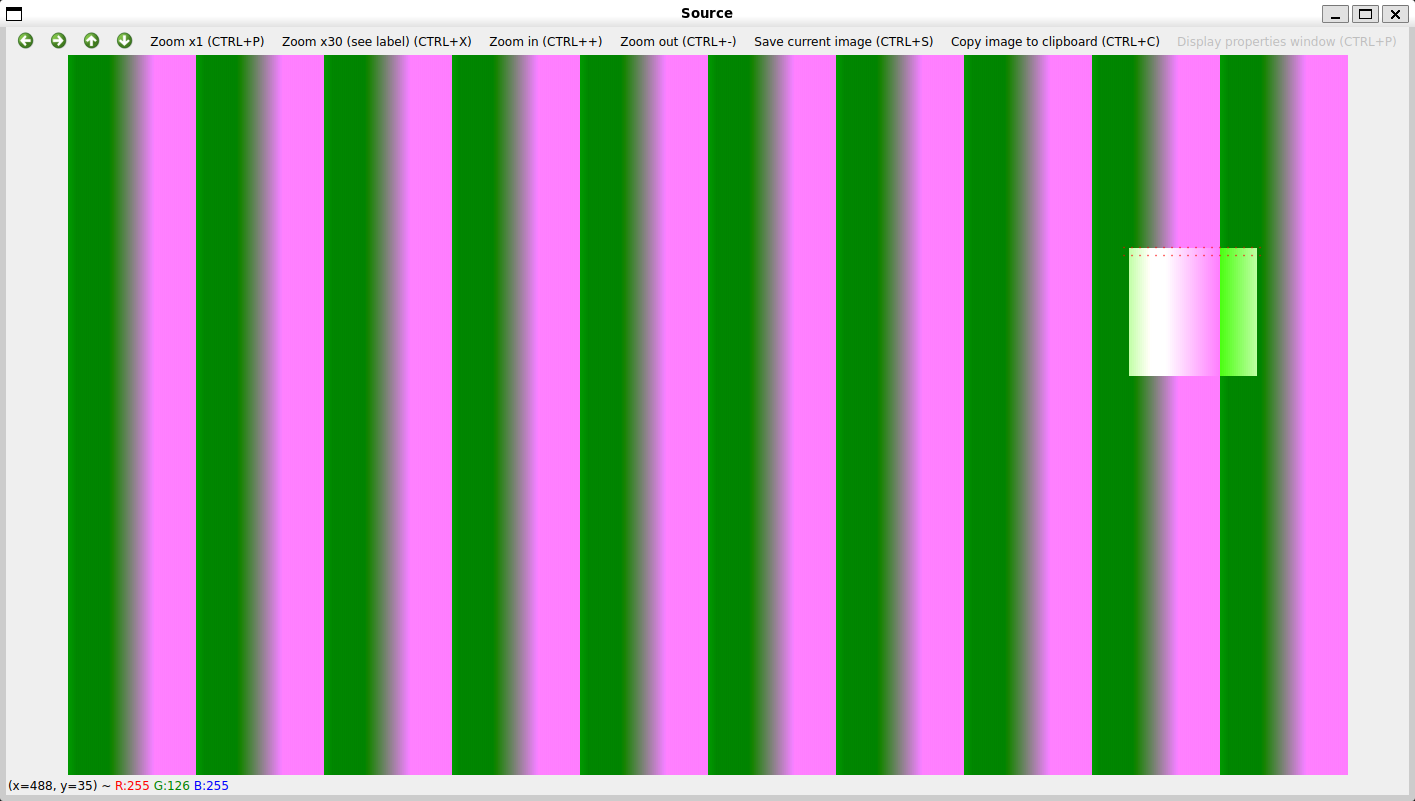
To exit the application, press ESC if the application window is open, or Ctrl+C.