
VOverlaySdl
v1.0.0
Table of contents
- Overview
- Versions
- Library files
- How it works
- VOverlaySdl class description
- Build and connect to your project
- Test application
Overview
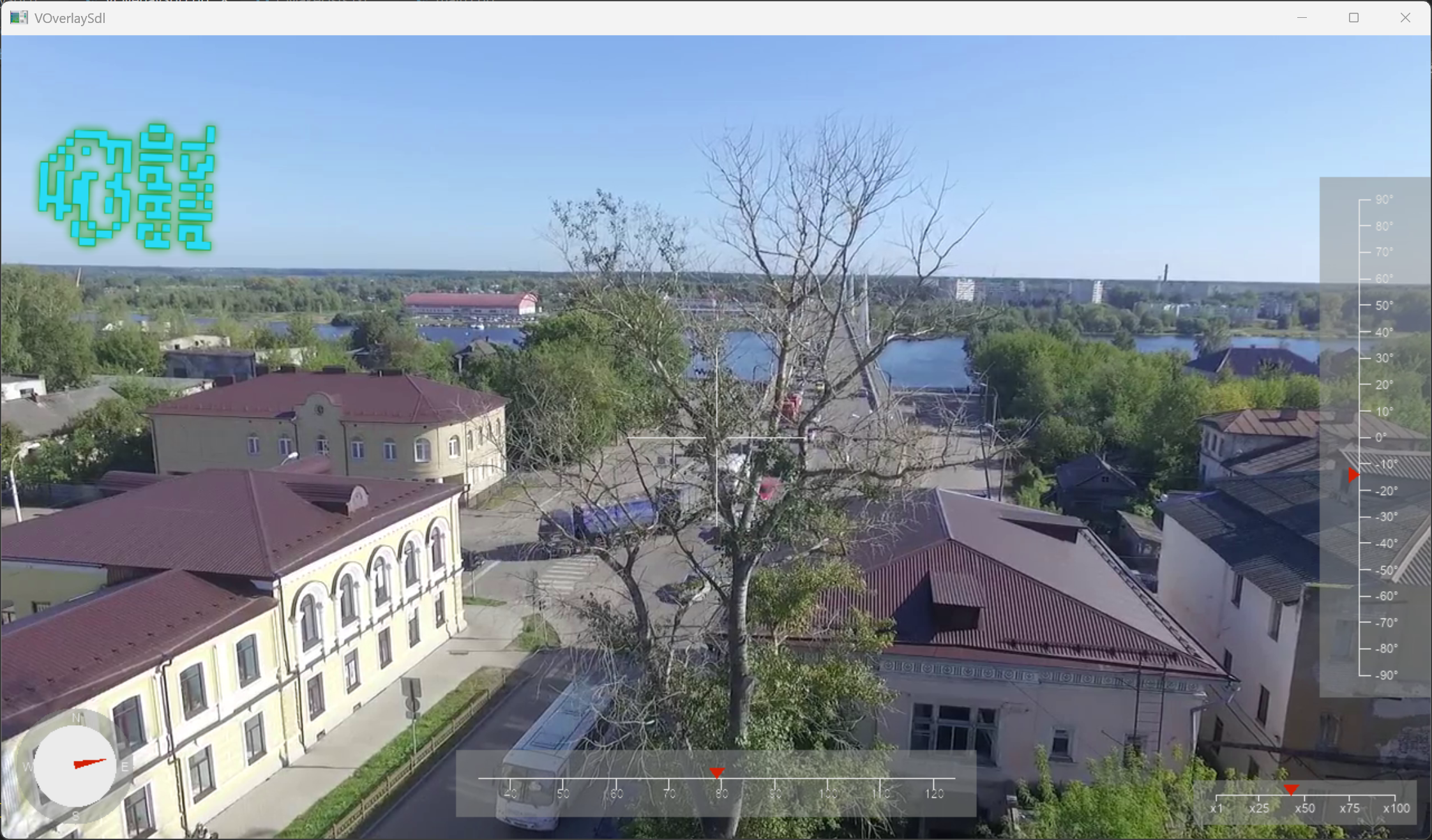
The VOverlaySdl C++ library is an example library that draws an overlay on a YUV24 video stream using the SDL3 library for software rendering and the SDL3_ttf library for text rendering. The library depends on the open-source VOverlay library (source code included, Apache 2.0 license), the SDL3 library (linked, Zlib license) and the SDL3_ttf library (linked, Zlib license). This library can be adapted easily to use hardware-accelerated rendering through SDL3’s GPU API. The library is compatible with video streaming libraries from RapidPixel SDK. The overlay is rendered entirely on the CPU and does not require a window or GPU context — it is meant to be embedded in a video processing pipeline. The widgets drawn by the library are: a pitch ladder on the right edge, a scrolling yaw heading bar at the bottom, an aim crosshair at the centre, a compass disc at the bottom-left, a zoom indicator at the bottom-right, and an optional rotated logo image positioned by the caller. The library uses the C++17 standard. The test application depends on the OpenCV library (linked, Apache 2.0 license).
Versions
Table 1 - Library versions.
| Version | Release date | What’s new |
|---|---|---|
| 1.0.0 | 03.05.2026 | First version. |
Library files
The library is supplied as source code only. The user is provided with a set of files in the form of a CMake project (repository). The repository structure is shown below:
CMakeLists.txt -------------------- Main CMake file of the library.
3rdparty -------------------------- Folder with third-party libraries.
    CMakeLists.txt ---------------- CMake file to include third-party libraries.
    VOverlay ---------------------- Folder with VOverlay library files.
src ------------------------------- Folder with library source code.
    CMakeLists.txt ---------------- CMake file of the library.
    VOverlaySdl.cpp --------------- C++ implementation file.
    VOverlaySdl.h ----------------- Main library header file.
    VOverlaySdlVersion.h ---------- Header file with the library version.
    VOverlaySdlVersion.h.in ------- File for CMake to generate version header.
static ---------------------------- Static files for the library.
    rapid_pixel_logo.png ---------- Rapid Pixel logo shown in the test application.
test ------------------------------ Folder for the test application.
    CMakeLists.txt ---------------- CMake file for the test application.
    main.cpp ---------------------- Source C++ file of the test application.
How it works
This section explains the four design choices that shape the implementation. Read it before treating the library as a starting point for your own overlay — most of the non-obvious code in VOverlaySdl.cpp exists because of one of these mechanisms.
YUV-as-RGB byte aliasing
The frame is in YUV24 (3 bytes per pixel: Y, U, V), but SDL3 has no native YUV24 surface format. The library wraps the frame as if it were SDL_PIXELFORMAT_RGB24 and pre-converts every drawing colour from RGB to YUV via the RGBA32_TO_YUVA32 / RGBA32_TO_YUVA32_U32 macros (BT.601 limited-range coefficients). SDL never interprets pixel values during fill / blit / blend — it only moves bytes around — so the bytes that finally land in the frame are valid YUV. Per-channel alpha blending also works correctly because Y, U and V are blended independently.
When choosing clear colours for transparent scratch surfaces, this aliasing matters: bilinear edges blend two source pixels, so an α=0 clear with a chroma different from the foreground would drag the colour at the rasterized edges. For that reason every scratch in the library is cleared to the foreground colour with α=0 (red for the pointer triangles and compass needle, white for tick marks and the crosshair, grey for widget backdrops).
Caching strategy
For each widget the library distinguishes:
- Static parts (the grey backdrop, scale lines, fixed tick marks, compass discs, the two pointer triangles) — rasterized once into RGBA32 cache surfaces (
m_pitchAngleBackgroundUi,m_yawAngleBackgroundUi,m_compassUi,m_zoomBackgroundUi,m_downTriangleUi,m_rightTriangleUi) on first use. - Per-frame parts (the scrolling yaw ticks, the rotating compass needle, the aim crosshair) — rasterized into short-lived scratch surfaces every call.
When the input frame size changes, overlay() invalidates every cache surface so they are regenerated lazily at the new scale.
Anti-aliasing via 2× supersampling
Every shape (lines, filled discs, filled triangles) is rasterized into a kSupersample-times-larger RGBA32 scratch through the ssBegin / ssRender* / ssEnd helpers and then downscaled into the final cache surface using SDL_BlitSurfaceScaled with SDL_SCALEMODE_LINEAR. The bilinear sample at the edges is what produces the smooth, partially-covered border pixels that look anti-aliased.
The ssRenderHLine / ssRenderVLine helpers draw axis-aligned lines as kSupersample-thick filled rectangles instead of 1-pixel SDL_RenderLine strokes — drawing 1-pixel-thick lines in the supersample buffer would otherwise produce ~50% intensity lines after the 2:1 downscale.
Text is not routed through this pipeline. TTF_RenderText_Blended already produces anti-aliased glyphs with per-pixel alpha, and running them through the supersample-and-downscale step would only soften them further. Functions that draw both shapes and labels (the pitch / yaw / zoom backgrounds, drawYawAngle) therefore split into two passes: shapes through the SS pipeline, then labels stamped at native scale.
Frame coordinate scaling
The HUD geometry was designed for a 1920×1080 frame. For any other frame size the per-axis coefficients m_widthCoef = frame.width / 1920 and m_heightCoef = frame.height / 1080 stretch the geometry along each axis independently. Elements that must stay round (the compass) and the font size use min(widthCoef, heightCoef) so they shrink uniformly without overflowing on either axis.
VOverlaySdl class description
VOverlaySdl class declaration
The VOverlaySdl class is declared in the VOverlaySdl.h file. Class declaration:
namespace cr
{
namespace video
{
/// Parameters for VOverlaySdl, passed via the `data` pointer
/// of the VOverlaySdl::overlay() method.
class VOverlaySdlParams
{
public:

    /// Pitch angle in degrees.
    float pitchAngle{0.0f};

    /// Yaw angle in degrees.
    float yawAngle{0.0f};

    /// Size of the crosshair in pixels.
    int crosshairSize{80};

    /// Zoom value.
    float zoomValue{1.0f};

    /// Path to the logo image.
    std::string logoPath;

    /// Width of the logo in pixels, derived from the loaded image.
    int logoWidth{0};

    /// Height of the logo in pixels, derived from the loaded image.
    int logoHeight{0};

    /// Logo position X coordinate in pixels.
    int logoPosX{20};

    /// Logo position Y coordinate in pixels.
    int logoPosY{20};

    /// Angle of the logo in degrees.
    float logoAngle{0.0f};
};


/// VOverlaySdl is an implementation of the VOverlay interface that uses
/// SDL for drawing the overlay.
class VOverlaySdl : public VOverlay
{
public:

    /// Class constructor.
    VOverlaySdl() = default;

    /// Class destructor. Cleans up SDL resources.
    ~VOverlaySdl();

    /// Get string of the current class version.
    static std::string getVersion();

    /// Overlay information on the video.
    bool overlay(cr::video::Frame& frame, void* data = nullptr) override;

private:

    /// Current frame width in pixels.
    int m_frameWidth{0};

    /// Current frame height in pixels.
    int m_frameHeight{0};

    /// Coefficient to scale UI elements by the frame width.
    float m_widthCoef{1.0f};

    /// Coefficient to scale UI elements by the frame height.
    float m_heightCoef{1.0f};

    /// It is static part of the pitch angle widget,
    /// drawn once and then blitted every frame.
    SDL_Surface*  m_pitchAngleBackgroundUi{nullptr};

    /// Length of the vertical line in the pitch angle widget,
    /// used to map the angle value to a position on the line.
    float         m_pitchAngleVerticalLineLength{0.0f};

    /// It is static part of the yaw angle widget (grey pad + horizontal
    /// line only; ticks and labels are redrawn each frame because they scroll
    /// with the current heading).
    SDL_Surface*  m_yawAngleBackgroundUi{nullptr};
    /// Length of the horizontal line in the yaw angle widget,
    /// used to map the angle value to a position on the line.
    float         m_yawAngleHorizontalLineLength{0.0f};

    /// It is static part of the compass widget,
    /// drawn once and then blitted every frame.
    SDL_Surface*  m_compassUi{nullptr};

    /// Radius of the white inner disc of the compass, used by drawCompass
    /// to size the rotating arrow (tip and tail lengths are derived from it).
    float         m_compassRadius{0.0f};

    /// It is static part of the zoom widget, drawn once and then blitted every frame.
    SDL_Surface*  m_zoomBackgroundUi{nullptr};

    /// Length of the horizontal line in the zoom widget,
    /// used to map the zoom value to a position on the line.
    float         m_zoomHorizontalLineLength{0.0f};

    /// Cached red pointer triangle pointing down; tip is at the bottom
    /// centre of the surface. Reused as the position indicator on horizontal
    /// scales (yaw, zoom). Rendered once on first use.
    SDL_Surface*  m_downTriangleUi{nullptr};

    /// Cached red pointer triangle pointing right; tip is at the right
    /// centre of the surface. Reused as the position indicator on the pitch
    /// scale. Rendered once on first use.
    SDL_Surface*  m_rightTriangleUi{nullptr};

    /// Cached source image for drawImage at its native size (PNG loaded
    /// from disk and converted to YUVA bytes so it composites correctly onto
    /// the YUV frame). Reloaded only when the requested path changes.
    SDL_Surface*  m_imageSource{nullptr};

    /// Cached size-derived version of m_imageSource, scaled to the most
    /// recently requested (width, height). Regenerated when path or size
    /// changes; this is what gets rotated + blitted each frame.
    SDL_Surface*  m_imageUi{nullptr};

    /// Path of the currently cached image, used to detect reloads.
    std::string   m_imagePath;

    /// Width of the cached resized image (m_imageUi), used to detect
    /// size changes. 0 means "no cache yet".
    int           m_imageWidth{0};

    /// Height of the cached resized image (m_imageUi), used to detect
    /// size changes. 0 means "no cache yet".
    int           m_imageHeight{0};

    /// Font used for drawing text in the widgets.
    TTF_Font*     m_font{nullptr};

    /// Tracks whether this instance initialized SDL_ttf so the destructor
    /// can call TTF_Quit even when no font candidate ended up being opened.
    bool          m_ttfInited{false};

    /// Destroy the cached surfaces for the widgets and image, if they
    /// exist. The backgrounds are recreated lazily on next use.
    void destroyCachedSurfaces();

    /// Load and cache the font used for drawing text in the widgets.
    bool ensureFont();

    /// Destroy the cached font and quit SDL_ttf if it was initialized by this instance.
    void destroyFont();

    /// Draw text on the given surface at the specified position.
    void drawText(SDL_Surface* surface, const char* text, int x, int y);

    /// Composite the cached red downward-pointing triangle onto the
    /// target surface. The tip (sharp bottom point) lands at (tipX, tipY); the
    /// base sits above it. Used as a position indicator on horizontal scales
    /// (yaw, zoom). The triangle surface is created lazily on first call.
    void drawDownTriangle(SDL_Surface* target, int tipX, int tipY);

    /// Composite the cached red right-pointing triangle onto the target
    /// surface. The tip (sharp right point) lands at (tipX, tipY); the base
    /// sits to the left of it. Used as the position indicator on the pitch
    /// scale. The triangle surface is created lazily on first call.
    void drawRightTriangle(SDL_Surface* target, int tipX, int tipY);

    /// Draw the user interface on the given surface.
    void drawUi(SDL_Surface* surface, VOverlaySdlParams* params);

    /// Draw the pitch angle widget on the given surface.
    void drawPitchAngle(SDL_Surface* surface, float angle=0.0f);

    /// Draw the pitch angle widget background, which is cached and blitted every frame.
    void drawPitchAngleBackground();

    /// Draw the yaw angle widget on the given surface.
    void drawYawAngle(SDL_Surface* surface, float angle=0.0f);

    /// Draw the yaw angle widget background, which is cached and blitted every frame.
    void drawYawAngleBackground();

    /// Draw the crosshair on the given surface.
    void drawCrosshair(SDL_Surface* surface, int size=100);

    /// Draw the compass on the given surface.
    void drawCompass(SDL_Surface* surface, float angle=0.0f);

    /// Draw the compass widget background, which is cached and blitted every frame.
    void drawCompassBackground();

    /// Draw the zoom widget on the given surface.
    void drawZoom(SDL_Surface* surface, float value=1.0f);

    /// Draw the zoom widget background, which is cached and blitted every frame.
    void drawZoomBackground();

    /// Load a PNG from disk, optionally resize it to (width, height),
    /// rotate it by `angle` degrees, and composite it at (posX, posY) on the
    /// target surface (top-left corner of the unrotated image). The native-
    /// size image and its resized version are cached separately; a repeated
    /// call with the same path and size only pays for rotation + blit. Pass
    /// width/height ≤ 0 to keep the source image's native size. RGB pixels
    /// are converted to YUV bytes on load so the image matches the surrounding
    /// YUV-in-RGB24 frame convention.
    void drawImage(SDL_Surface* surface, const std::string& path, float angle,
                   int width, int height, int posX, int posY);
};
}
}
getVersion method
The getVersion() method returns the version string of the VOverlaySdl class. Method declaration:
static std::string getVersion();
This method can be used without a VOverlaySdl class instance:
std::cout << "VOverlaySdl class version: " << VOverlaySdl::getVersion() << std::endl;
Console output:
VOverlaySdl class version: 1.0.0
overlay method
The overlay(…) method draws the overlay on a video frame. Method declaration:
bool overlay(cr::video::Frame& frame, void* data = nullptr);
| Parameter | Description |
|---|---|
| frame | Video Frame on which to draw the overlay. Must be in YUV24 format; the method writes the rasterized overlay back into frame.data in place. |
| data | Pointer to a VOverlaySdlParams object that supplies the overlay parameters. May be nullptr, in which case the static parts of the HUD are still drawn using sensible defaults. |
Returns: true if the overlay was drawn successfully, false if the frame is null, the FOURCC is not YUV24, or the font could not be loaded after a frame-size change.
The first call (and any call where the frame size changes) is more expensive than subsequent calls because every cached widget surface and the font are regenerated to match the new dimensions.
Build and connect to your project
Before compiling, you must either install SDL3 and SDL3_ttf as system packages, or download their source code.
Installation on Linux
Installation on Ubuntu 25.04 and higher
Execute the command:
sudo apt install libsdl3-dev libsdl3-ttf-dev
Installation on Ubuntu 24.04 and older
On these systems libsdl3-dev is not available as a package, so SDL3 and SDL3_ttf must be built from source as part of the project. By default, the build expects the source trees to sit alongside the VOverlaySdl repository — that is, in ../SDL and ../SDL_ttf relative to the VOverlaySdl root. Clone them with the following commands (run from the parent directory of VOverlaySdl):
git clone --recurse-submodules https://github.com/libsdl-org/SDL.git SDL
git clone --recurse-submodules https://github.com/libsdl-org/SDL_ttf.git SDL_ttf
If you want to keep the sources somewhere else, set the SDL_LOCAL_SRC and SDL_TTF_LOCAL_SRC environment variables to the absolute paths of the SDL and SDL_ttf source trees before running CMake. When the variables are not set, the build falls back to the default sibling paths described above.
| Environment variable | Purpose | Default value |
|---|---|---|
| SDL_LOCAL_SRC | Path to the SDL3 source tree. | ../SDL (relative to VOverlaySdl) |
| SDL_TTF_LOCAL_SRC | Path to the SDL3_ttf source tree. | ../SDL_ttf (relative to VOverlaySdl) |
Installation on Windows
-
Download the latest SDL3 release archive for your toolchain:
- SDL3-devel-#.#.#-mingw.zip - for the MinGW toolchain.
- SDL3-devel-#.#.#-VC.zip - for the MSVC toolchain.
-
Unpack the archive to a directory of your choice, for example
C:/libs/SDL3/latest. The extracted folder must contain the cmake, include, lib subfolders, etc. -
Download the latest SDL3_ttf release archive for your toolchain:
- SDL3_ttf-devel-#.#.#-mingw.zip - for the MinGW toolchain.
- SDL3_ttf-devel-#.#.#-VC.zip - for the MSVC toolchain.
-
Add the paths to the SDL3 and SDL3_ttf libraries to the Windows system variables. To do this, go to (Windows 11): Settings -> System -> Advanced system settings -> Environment Variables.
-
In the System variables section, create a variable named SDL_DIR pointing to your SDL3 files (for example, C:/libs/SDL3/latest), and a variable named SDL_TTF_DIR pointing to your SDL3_ttf files (for example, C:/libs/SDL3_ttf/latest), and save the changes. If SDL_DIR is not set, the library will look for SDL3 in C:/libs/SDL3/latest; the same fallback applies to SDL_TTF_DIR (it defaults to C:/libs/SDL3_ttf/latest).
-
Sometimes a Windows reboot is required for the changes to take effect.
Build and connect to project
Typical commands to build the VOverlaySdl library:
cd VOverlaySdl
mkdir build
cd build
cmake ..
make
If you want to connect the VOverlaySdl library to your CMake project as source code, you can follow these steps. For example, if your repository has the following structure:
CMakeLists.txt
src
    CMakeList.txt
    yourLib.h
    yourLib.cpp
Create a 3rdparty folder in your repository and copy the VOverlaySdl repository folder to the 3rdparty folder. The new structure of your repository:
CMakeLists.txt
src
    CMakeList.txt
    yourLib.h
    yourLib.cpp
3rdparty
    VOverlaySdl
Create a CMakeLists.txt file in the 3rdparty folder. The CMakeLists.txt should contain:
cmake_minimum_required(VERSION 3.13)

################################################################################
## 3RD-PARTY
## dependencies for the project
################################################################################
project(3rdparty LANGUAGES CXX)

################################################################################
## SETTINGS
## basic 3rd-party settings before use
################################################################################
# To inherit the top-level architecture when the project is used as a submodule.
SET(PARENT ${PARENT}_YOUR_PROJECT_3RDPARTY)
# Disable self-overwriting of parameters inside included subdirectories.
SET(${PARENT}_SUBMODULE_CACHE_OVERWRITE OFF CACHE BOOL "" FORCE)

################################################################################
## INCLUDING SUBDIRECTORIES
## Adding subdirectories according to the 3rd-party configuration
################################################################################
if (${PARENT}_SUBMODULE_VOVERLAYSDL)
    add_subdirectory(VOverlaySdl)
endif()
The 3rdparty/CMakeLists.txt file adds the VOverlaySdl folder to your project and excludes the test application (by default, the test application is excluded from compilation if VOverlaySdl is included as a sub-repository). Your repository’s new structure will be:
CMakeLists.txt
src
    CMakeList.txt
    yourLib.h
    yourLib.cpp
3rdparty
    CMakeLists.txt
    VOverlaySdl
Next, you need to include the 3rdparty folder in the main CMakeLists.txt file of your repository. Add the following line at the end of your main CMakeLists.txt:
add_subdirectory(3rdparty)
Next, you need to include the VOverlaySdl library in your src/CMakeLists.txt file:
target_link_libraries(${PROJECT_NAME} VOverlaySdl)
Done!
Test application
The test application (VOverlaySdl/test/main.cpp) demonstrates how the VOverlaySdl library works. The application draws the overlay on every video frame using configurable parameters. Source code:
#include <chrono>
#include <cstring>
#include <iostream>
#include <opencv2/opencv.hpp>
#include "VOverlaySdl.h"
using namespace cv;
using namespace std;
using namespace cr::video;
int main()
{
cout << "VOverlaySdl v" << VOverlaySdl::getVersion() << " test" << endl;
// Open video file.
VideoCapture cap("video.mp4");
if (!cap.isOpened())
{
cerr << "Failed to open video file: video.mp4" << endl;
return 1;
}
// Get video size.
const int width = static_cast<int>(cap.get(CAP_PROP_FRAME_WIDTH));
const int height = static_cast<int>(cap.get(CAP_PROP_FRAME_HEIGHT));
// Overlay object.
VOverlaySdl overlay;
// Overlay parameters.
VOverlaySdlParams params;
// Video frame for overlay.
Frame frameYuv(width, height, Fourcc::YUV24);
// OpenCV Bgr frame for display.
Mat bgr;
// Flags for animation.
float pitchAdd = 1.0;
float zoomAdd = 1.0;
// Main loop.
size_t i = 1;
while (true)
{
// Capture BGR frame.
if (!cap.read(bgr) || bgr.empty())
break;
// Convert BGR to YUV24 (packed) for the overlay.
Mat yuv(height, width, CV_8UC3, frameYuv.data);
cvtColor(bgr, yuv, COLOR_BGR2YUV);
// Overlay.
const auto startTime = chrono::steady_clock::now();
overlay.overlay(frameYuv, ¶ms);
const auto stopTime = chrono::steady_clock::now();
// Print processing time.
cout << i++ << ": overlay process: " << chrono::duration<double, milli>(stopTime - startTime).count() << " ms" << endl;
// Convert back to BGR to display.
cvtColor(yuv, bgr, COLOR_YUV2BGR);
// Show results.
imshow("VOverlaySdl", bgr);
const int key = waitKey(30);
if (key == 'q' || key == 27)
break;
// Update overlay parameters for animation.
params.pitchAngle += pitchAdd;
if (abs(params.pitchAngle) >= 90.0f)
pitchAdd = -pitchAdd;
params.yawAngle++;
params.zoomValue += zoomAdd;
if (params.zoomValue >= 100.0f || params.zoomValue <= 10.0f)
zoomAdd = -zoomAdd;
params.logoAngle += 2.0f;
params.logoAngle = fmod(params.logoAngle, 360.0f);
}
return 0;
}
To run the application on Linux, execute the following commands. On Windows, simply run VOverlaySdlTest.exe:
sudo apt install libopencv-dev
cd <application folder>
chmod +x VOverlaySdlTest
./VOverlaySdlTest
After starting, the application automatically opens video.mp4 video file and starts working. The application processes every frame and draws the overlay. During processing, the application prints the time spent drawing the overlay for each frame:
VOverlaySdl v1.0.0 test
1: overlay process: 6.0457 ms
2: overlay process: 1.576 ms
3: overlay process: 1.5143 ms
4: overlay process: 1.556 ms
5: overlay process: 1.7155 ms
6: overlay process: 1.9213 ms
7: overlay process: 1.5787 ms
8: overlay process: 1.4516 ms
9: overlay process: 1.9045 ms
10: overlay process: 2.134 ms
While the application is running, you will see the overlay result:
To exit the application, press ESC or Q.