VCodecContour C++ library
v1.0.0
Table of contents
- Overview
- Versions
- Library files
- How it works
- Data format
- VCodecContour class description
- Build and connect to your project
- Portability
- Simple example
- Test application
- Demo application
Overview
The VCodecContour C++ library is a contour video codec for very narrow channels such as serial ports and radio modems: a FullHD video becomes a stream of a few kilobits per second (for example 19200 bits per second). Instead of pixels the encoder sends vector contours (polylines) of the picture, the camera motion and the colors of a coarse grid of cells (color layer); the decoder draws the contours over the colors. The VCodecContour class implements the interface of the VCodec library (video codec interface) and uses the Frame library (video frame class).
VCodecContour is general-purpose software: it is not tied to any sector or application, and the developer of a program decides what the program does with it.
- Encoding: NV12 frames -> contour packets. The Y plane of a frame is scaled down inside the codec to a size which the codec chooses from the bitrate, the edges of the picture are linked into contours and only the camera motion and the changes of the contours are sent; the color layer sends the colors of the cells which are new or changed. The destination frame gets the FOURCC code H264: it marks compressed data, the packets are not an H.264 stream.
- Decoding: contour packets (FOURCC code H264) -> NV12 frames of the size of the source video: white lines with a dark outline over the colors of the color layer, white lines on black without it.
- Only the bitrate is set. The size of the coded picture, the grid of the color layer, the life time of the contours and the interval of the stream descriptions are chosen by the codec from the bitrate and the frame rate.
- Color layer: a grid of cells (20 x 11 for 16:9 video at 19200 bit/s) with a color code each (16 levels of Y, 31 levels of U and of V) moves with the camera like the contours. The encoder sends the new and the changed cells and every visible cell again within 5 seconds in at most 20% of the bits of the changes; the contours get the rest. The decoder interpolates the colors over the frame (sky, clouds, fields, water) and draws the lines over them: white with a dark outline, so they stand out over light and dark parts of the picture. Parameter TYPE: 1 - contours and the color layer (default), 0 - contours only.
- Ready for byte streams. Every packet starts with the marker ‘C’ and the version of the format, has a CRC-16 and ends with a zero byte which never occurs inside a packet. The decoder accepts the bytes in pieces of any size, splits packets which came together and rejects damaged packets. The packets carry the size of the source video, so the decoded frames get their size without any other data.
- Made for a serial line: every packet leaves a channel of the bitrate before the next packet is made, so the decoder gets the packets evenly and its picture does not lag behind the video; a new scene is sent in parts over several frames. The bits of the packets of any 1 second window never exceed the bitrate.
- Bit exact decoding: the encoder keeps an exact copy of the state of the decoder; the state is computed with integer arithmetic only and is the same on all platforms.
- Encoding in three threads: the encoder makes its work in parts in the calling thread and in two threads of its own; every part writes its own data and the parts are joined in a fixed order, so the packets are the same bit for bit as in one thread, on any number of processor cores.
- Smooth picture: new contours fade in, deleted ones fade out, moved ones glide, a changed color of the color layer is shown gradually, a frame period without a packet continues with the camera motion; the camera shake can be removed (stabilization).
Encoding and decoding time of VCodecContour for a FullHD video (1920 x 1080, 30 frames per second; Intel Core i7-13700H, Windows 11, MSVC Release build; the encoding in three threads includes the scaling of the planes, the decoding in one thread includes the drawing of the 1920 x 1080 NV12 frame), with the color layer (TYPE 1, default) and without it (TYPE 0):
| Bitrate, bit/s | Coded picture (TYPE 1) | Encoding, msec (average / max) | Decoding, msec | Coded picture (TYPE 0) | Encoding, msec (average / max) | Decoding, msec |
|---|---|---|---|---|---|---|
| 4800 | 296 x 167 | 1.1 / 3.2 | 1.9 | 360 x 203 | 1.5 / 3.7 | 1.0 |
| 9600 | 496 x 279 | 3.3 / 6.1 | 2.4 | 560 x 315 | 2.5 / 4.1 | 1.0 |
| 19200 | 723 x 407 | 4.1 / 6.7 | 3.6 | 800 x 450 | 5.1 / 8.0 | 1.5 |
| 38400 | 1017 x 572 | 6.7 / 11.6 | 5.1 | 1120 x 630 | 7.1 / 13.8 | 1.9 |
| 76800 | 1228 x 691 | 9.3 / 19.6 | 7.2 | 1280 x 720 | 9.2 / 15.4 | 2.5 |
On this processor the encoding of a frame takes less than a frame period of 30 frames per second (33 ms) at all these bitrates. The threads of the encoder wait for their work spinning for up to 0.2 ms before they sleep: the encoding takes more processor time than in one thread (about 1.3 times at 19200 and 76800 bit/s, about 2.2 times at 4800 bit/s without the color layer). With the color layer the drawing of the colors and of the outlined lines takes the most of the decoding time.
Versions
Table 1 - Library versions.
| Version | Release date | What’s new |
|---|---|---|
| 1.0.0 | 10.11.2026 | First version. |
Library files
The library is supplied as source code only. The user is provided with a set of files in the form of a CMake project (repository). The repository structure is shown below:
CMakeLists.txt ------------------ Main CMake file of the library.
README.md ----------------------- Documentation of the library.
demo ---------------------------- Folder with the demo application.
    CMakeLists.txt -------------- CMake file of the demo application.
    main.cpp -------------------- Source code of the demo application.
example ------------------------- Folder with a simple example.
    CMakeLists.txt -------------- CMake file of the example.
    main.cpp -------------------- Source code of the example.
static -------------------------- Folder with static project resources.
    vcodeccontour_web_logo.png -- Web logo used in README.
    vcodeccontour_demo.jpg ------ Screenshot of the demo application.
test ---------------------------- Folder with the test application.
    CMakeLists.txt -------------- CMake file of the test application.
    main.cpp -------------------- Source code of the test application.
src ----------------------------- Folder with the source code of the library.
    CMakeLists.txt -------------- CMake file of the library.
    VCodecContour.h ------------- Header file with the VCodecContour class declaration.
    VCodecContour.cpp ----------- C++ implementation file of the public class.
    VCodecContourVersion.h ------ Header file with the version of the library.
    VCodecContourVersion.h.in --- CMake service file to generate the version file.
    impl ------------------------ Internal implementation.
        VCodecContourImpl.h / .cpp  Parameters, commands, scaling, byte stream.
        ContourEncoder.h / .cpp - Encoder: decisions, rate control, packets.
        ContourDecoder.h / .cpp - Decoder and drawing of the NV12 frames.
        PacketFraming.h / .cpp -- Packets of the byte stream: CRC, COBS, receiver.
        ArithmeticCoder.h ------- Binary adaptive arithmetic coder.
        Syntax.h / .cpp --------- Syntax of the payload, contexts, parser.
        ContourState.h / .cpp --- State of the decoder (integer arithmetic).
        ContourDisplay.h / .cpp - Displayed picture (fading, gliding, stabilization).
        ColorLayer.h / .cpp ----- Color layer: cells, canvas, choice of the cells, drawing.
        ContourTypes.h ---------- Contour and point types.
        EdgeDetector.h / .cpp --- Edge detection with regional thresholds.
        ContourTracer.h / .cpp -- Linking of the edges, polylines.
        MotionEstimator.h / .cpp  Global affine motion (image pyramid).
        FieldEstimator.h / .cpp - Motion correction field.
        Raster.h / .cpp --------- Scaling, distance transform, masks, lines.
        TaskWorker.h / .cpp ----- Thread for the parts of the encoding.
How it works
Encoder
Every NV12 frame gives one packet or none (at a low bitrate a packet is made every few frames, see Rate control).
- Scaling. The Y plane is scaled down to the size of the coded picture by area averaging (every pixel of the coded picture is the mean of the part of the frame it covers; integer arithmetic). The chroma planes are used only by the color layer (step 8).
- Edges. Gaussian blur (sigma 1.5 pixels), Sobel gradient, non-maximum suppression. The high threshold of the hysteresis is set in each of 6 x 4 tiles so that the strongest maxima of the tile make 3% of its pixels, never below a contrast of 8 gray levels; the thresholds of the tiles are interpolated bilinearly and smoothed over the frames. A road on a dark field is found next to bright clouds. Dark bars at the borders of the frame (black frame, letterbox, black corners of an electronically stabilized video) are not a part of the scene: a band from a border which is dark (40 gray levels or less), flat (within 3 gray levels of its border pixel), less deep than a fifth of the frame and has a straight inner boundary (the depth changes by at most 1 pixel from one row or column to the next along at least an eighth of the border) gets no edges, also within 5 pixels of its boundary. A dark part of the scene has a ragged boundary and keeps its edges.
- Camera motion. An image pyramid: exhaustive search of the translation on the smallest level around the motion of the previous frame, then inverse compositional Lucas-Kanade alignment (translation, similarity, affine) with Tukey weights and compensation of the brightness. The motion is quantized (1/8 pixel, 2^-12 for the linear part) in a closed loop: the quantization error is sent with the next frame, so it does not add up.
- State of the decoder. The copy of the state of the decoder is moved with the quantized motion (integer arithmetic); contours older than their life time or outside the frame are removed, exactly as in the decoder.
- Correction field. The points of the contours of the state are matched with the nearest edges of the frame; the displacements of 5 x 4 field nodes (bilinear between them) are fitted by robust least squares with smoothness. The field (1/2 pixel) corrects the lens distortion and the parallax of a moving camera for all contours at once.
- Check of the contours. Every contour is checked against the edges of the frame: if less than half of its points are within 2 pixels of an edge, a shift of up to 4 pixels is searched (moving object). A contour not confirmed for 3 frames is deleted. If most contours are gone at once (new scene) the picture is cleared with one flag.
- New contours. The edges far (3 pixels) from the kept contours are linked into chains, the ends of a chain are extended along the edges to join the kept contours, chains shorter than 20 pixels are dropped and the others are simplified (Ramer-Douglas-Peucker, 1.2 pixels). The contours near the end of their life time do not count as kept: they are sent again before they expire. Every new contour gets a strength level (0 - 3) from its local contrast and a priority: value (length^1.2 x contrast) per estimated bit.
- Color layer (parameter TYPE 1). The cells of a grid (Table 2) lie on a canvas of 3 x 3 grids which moves with the quantized camera motion like the contours (integer arithmetic: the canvas is a point and two steps). The Y plane of the coded picture and the U and V planes of the frame are scaled to 4 x 4 pixels per cell; the mean around the center of a cell is its color: Y in 16 levels (16 gray levels each), U and V in 31 levels (8 levels each). The encoder sends first the cells without a color (new parts of the picture; the longest waiting first), then the cells whose color is more than 3/4 of a level away from the frame (the hysteresis keeps a cell from flickering; the largest error first), then the cells near the end of their life time (5 seconds, like the contours), as many as fit into 20% of the bits of the changes of the packet (the bits are counted while the cells are coded). The cells are coded as spans along a row or down a column of the canvas (a gap of up to 2 cells with a color is sent again: cheaper than a new span), every level as the difference to the previous cell. Before the picture comes near the border of the canvas or the steps of the canvas change by more than 30% (zoom) the encoder re-anchors the canvas: a flag of the packet; the encoder and the decoder interpolate the colors onto the nominal canvas.
- Packet. Header, the cells of the color layer, deletions, moves and the new contours of the highest priority which fit in the budget of the rate control are coded with a binary adaptive arithmetic coder. The exact size is known while coding: a list which does not fit is shortened.
The encoder has two threads of its own besides the calling thread. The scaling of the Y plane is made in blocks of rows and the edge detector in three bands of rows by the three threads; the hysteresis of the edges, the scaling of the color planes and the distance transform of the edges (steps 5 - 7) are made by one thread while the other two estimate the camera motion (the translation search, the warps, the weights, the median and the normal equations are split into parts). Every part writes its own data, the results of the parts are joined in a fixed order and the sums of floating point values keep the order of one thread, so the packets are the same bit for bit as in one thread. With one hardware thread all the work is made in the calling thread.
Size of the coded picture
More bits carry more detail, but the edges of a bigger picture cost more bits: for every bitrate there is a size of the coded picture which shows the most detail. The sizes were chosen on 8 aerial videos (FullHD and 1280 x 960, 300 frames each): the decoded contours were matched against the edges of the source video at 1280 pixels of width (recall: part of the edge pixels within 6 pixels of a decoded line; precision: part of the decoded line points within 6 pixels of an edge), and for every bitrate the smallest width whose recall was within 2% of the best one was taken. For example, at 19200 bit/s 640 x 360 gave a recall of 0.57 and a precision of 0.87, 720 x 405 gave 0.61 and 0.89, 800 x 450 gave 0.63 and 0.91, 960 x 540 (1.44 times the pixels to encode) gave 0.61 and 0.95. At 9600 bit/s 480 x 270 and 560 x 315 gave the same recall within 2% (0.36 and 0.35): 560 x 315 was taken for its precision (0.88 against 0.84).
With the color layer (TYPE 1) the size of the coded picture is chosen for the bits of the contours, 80% of the bitrate (at 19200 bit/s 723 x 407: with the color layer 723, 760 and 800 pixels of width gave the same recall, 0.57). The grid of the color layer was chosen in the same way: the tone of the decoded picture (PSNR of the luma blurred with a sigma of 4 pixels at 640 pixels of width, against the source) for grids of 6 … 64 columns, and the smallest grid within 0.2 dB of the best one: 10, 14, 20, 28 and 40 columns of a 16:9 grid at 4800, 9600, 19200, 38400 and 76800 bit/s, so the grid has 20 x sqrt(bitrate / 19200) columns (8 … 40) and other aspect ratios get the same number of cells. A finer grid has more cells without a color when the camera moves fast: at 19200 bit/s 32 columns gave 0.8 dB less than 20 columns. With these grids 0.02% of the visible cells had no color at 19200 bit/s and more (the new parts of the picture), 4% at 4800 and 9600 bit/s. The tone of the decoded picture at 19200 bit/s was 24.0 dB with the color layer and 6.1 dB without it (white lines on black).
Table 2 - Size of the coded picture of 16:9 video, the grid of the color layer and the quality of the contours of this version (mean over the 8 videos; the 4:3 videos get the same number of pixels and of cells), without the color layer (TYPE 0) and with it (TYPE 1, part of the bits of the packets which the color layer used).
| Bitrate, bit/s | TYPE 0: coded picture | Recall | Precision | TYPE 1: coded picture | Grid | Recall | Precision | Bits of the color layer |
|---|---|---|---|---|---|---|---|---|
| 4800 | 360 x 203 | 0.24 | 0.76 | 296 x 167 | 10 x 6 | 0.20 | 0.72 | 9% |
| 9600 | 560 x 315 | 0.35 | 0.88 | 496 x 279 | 14 x 8 | 0.31 | 0.86 | 8% |
| 19200 | 800 x 450 | 0.63 | 0.91 | 723 x 407 | 20 x 11 | 0.57 | 0.90 | 12% |
| 38400 | 1120 x 630 | 0.82 | 0.95 | 1017 x 572 | 28 x 16 | 0.78 | 0.94 | 14% |
| 76800 | 1280 x 720 | 0.92 | 0.96 | 1228 x 691 | 40 x 23 | 0.90 | 0.96 | 17% |
Between the points of the table the width is interpolated linearly in log2 of the bitrate (of the bits of the contours); below 4800 bit/s it decreases further down to 160 pixels, above 76800 bit/s it stays 1280 pixels (with the color layer from 96000 bit/s). Other aspect ratios get the same number of pixels (for example 693 x 520 for 4:3 video at 19200 bit/s). The coded picture is never larger than the source video and has at least 64 x 32 pixels. A higher edge density or shorter contours were also measured: they trade precision for recall, so the codec keeps 3% and 20 pixels.
The life time of the contours is 5 seconds (5 x FPS frames, 16 … 255 frames). The stream description is sent every second (round(FPS) frames) or every GOP frames if the parameter is set.
Decoder
The decoder parses a payload completely before it changes its state (a damaged payload does not change the picture). Then:
- A stream description with the reset flag (or the first description, or other sizes, life time or grid of the color layer) starts an empty picture. The decoder ignores payloads before the first description.
- For every frame without a packet (gap of the 8 bit frame counter: a frame which the encoder skipped or a lost packet) the contours are moved with the extrapolation motion: the mean motion per frame of the last packet interval (the frames without a packet before the last packet moved with the extrapolation motion before it, then the last packet), the 6 parameters rounded half away from zero; a packet with a stream description sets it to its own motion, so a decoder which starts with this packet has the same one. The canvas of the color layer moves in the same way. The encoder moves its copy of the state in the same way. A gap of more than 15 frames clears the picture.
- The contours are moved with the motion of the frame and the correction field; old contours and contours outside the frame are removed. The canvas of the color layer is moved with the motion of the frame; colors older than the life time are removed.
- The color layer: the re-anchoring of the canvas (flag), the canvas of a stream description (a decoder which starts with it gets the canvas of the encoder) and the colors of the cells of the packet.
- Deletions, shifts and new contours are applied.
The picture is drawn into an NV12 frame of the size of the source video (BT.601 limited range). With the color layer the background is the colors of the cells interpolated bilinearly (8 x 8 pixels per cell, then scaled to the frame); a cell without a color yet (a new part of the picture) shows the mean color of its neighbors up to 8 cells away, farther the background is black; a changed color is shown gradually (35% of the difference per frame). The antialiased lines (1 pixel thick per 640 pixels of width) are white with a black outline on each side (half of the thickness, at least 1 pixel), without color: they stand out over light and dark parts of the picture; strong contours (horizon, roads, buildings) are thicker than texture. Without the color layer (or with TYPE 0 in the decoder) the lines are white on black (Y 16 … 235, U and V 128); strong contours are brighter and thicker than texture. The displayed picture follows the decoded state smoothly without changing it: a new contour fades in during 4 frames, a removed one fades out during 6 frames while it keeps moving with the camera, a shifted contour glides to its new place during 6 frames, and a frame period without a packet continues with the extrapolation motion (up to 15 frames; the next packet takes over without a jump); the background moves with the displayed contours. With the stabilization (parameter CUSTOM_1) the picture follows a smoothed camera trajectory: in every frame a straight line is fitted to the camera trajectory of the last frames by least squares with Gaussian weights (a width of 10.5 frames for the shift, 7.5 frames for the rotation), and its value at the frame is the shown position. A steady pan is shown without lag and the shake above about 1.5 Hz (at 30 frames per second) is removed. The camera trajectory is kept as it is, only the shown picture is limited: it is shifted by at most 2.5% of the frame size and rotated by at most 1.5 degrees against the real camera view.
Rate control
The rate control models a channel of a constant bitrate (a serial line which carries bitrate / FPS bits in every frame period; the unused time of the line is lost) and keeps these limits:
- Pacing: the changes of the contours and of the color layer of a packet fit in what the channel carries until the next packet is made. The channel is empty when the next packet comes: every packet arrives within its packet interval, the decoder gets the packets evenly and its picture does not lag behind the video. Only the header of a packet (motion, correction field, stream description) may take one interval more. A new scene is sent in parts over the next frames, the most valuable contours first.
- Packet interval: a packet is made for every frame if a frame period of the channel has at least 320 bits (9600 bit/s and more at 30 frames per second). A lower bitrate gets a packet every 2 … 8 frames (round(320 x FPS / bitrate)): the header (motion and framing, about 15 bytes) takes a smaller part of the channel. Between the packets the decoder continues the picture with the camera motion.
- Window: the bits of the packets (all bytes of the packets in the byte stream) of any window of round(FPS) frames never exceed bitrate x round(FPS) / FPS.
For every packet the encoder computes three budgets: the hard limit, a budget for the header (keeps the room for the smallest packets of the next packets) and a budget for the changes (keeps the room for the usual headers of the next packets). The motion, the correction field and the stream description are postponed if there is no room for them; if there is no room even for the smallest packet, the frame has no packet and the decoder moves the picture with the extrapolation motion. The smallest packet with a stream description always fits into an empty channel, so a stream starts at any bitrate. The color layer takes at most 20% of the bits of the changes of a packet (after the header); the contours get the rest, also the bits which the color layer does not use. A stream description of a stream with the color layer is 20 bytes longer (the canvas of the color layer): at 4800 bit/s such a packet arrives up to 3 frame periods after its frame.
Table 3 - Packets on a simulated serial line with the color layer (8 aerial videos, 450 frames each, the line of the demo application: bitrate / FPS bits per frame period). Delay: frame periods from the encoding of a frame to the arrival of the last byte of its packet. Jerk: second difference of the positions of the displayed contours (RMS of the motion of the whole picture, pixels of the coded picture). Precision and recall of the displayed picture against the edges of the current frame of the video (3 pixels at 1280 pixels of width).
| Bitrate, bit/s | Packet interval | Delay, frames (average / max) | Largest packet, bytes | Jerk, pixels | Precision | Recall |
|---|---|---|---|---|---|---|
| 4800 | 2 | 0.93 / 3 | 57 | 0.88 | 0.49 | 0.12 |
| 9600 | 1 | 0.01 / 1 | 56 | 0.56 | 0.69 | 0.22 |
| 19200 | 1 | 0 / 0 | 85 | 0.79 | 0.77 | 0.42 |
| 38400 | 1 | 0 / 0 | 171 | 1.08 | 0.84 | 0.63 |
| 76800 | 1 | 0 / 0 | 341 | 1.30 | 0.87 | 0.76 |
At 4800 … 38400 bit/s the packets use 89 … 94% of the channel (a contour does not fit into the rest of a packet); at 76800 bit/s some of the videos have fewer changes than the channel carries. Without the color layer (TYPE 0, a larger coded picture: Table 2) the delay is 0.98 / 1 frames at 4800 bit/s and 0 / 0 at 9600 bit/s and more, the largest packets have 42, 42, 85, 171 and 342 bytes, the jerk is 0.94, 0.62, 0.86, 1.18 and 1.35 pixels, the precision 0.53, 0.72, 0.80, 0.86 and 0.87, the recall 0.15, 0.25, 0.47, 0.68 and 0.78 at 4800, 9600, 19200, 38400 and 76800 bit/s. Measured on the same videos at the same bitrates, no window of 1 second exceeded its limit (for example 18656 bits of 19225 at 19200 bit/s and 29.96 frames per second).
Lost and damaged data
- Every packet can be decoded alone: the contexts of the arithmetic coder start with the same trained values in every packet.
- The contours are referenced by the frame of their birth and their index in that frame, not by a position in a list: a lost packet does not shift the references.
- A lost packet loses its changes: the missing contours come with the next sending (all visible contours are sent again within their life time of 5 seconds), the lost frame moves with the extrapolation motion.
- The cells of the color layer are given by their row and column in the canvas, the colors are coded from the previous cell of the same packet: a lost packet does not shift them, and its colors come again within the life time (every visible cell is sent again before 5 seconds). The stream descriptions carry the canvas: the canvas of a decoder which lost packets is corrected with the next description.
- The CRC rejects damaged packets; the parser checks all values and limits (record counts, coordinates, code lengths, bits read after the end of the data). A rejected packet does not change the picture.
- A decoder that starts in the middle of a stream begins with the next stream description (at most 1 second); the picture (the contours and the colors) is complete after the life time of the contours.
Data format
Packet
The encoder output (dst.data, dst.size bytes) is one packet of the byte stream. Before the COBS coding a packet is:
Table 4 - Packet before the COBS coding.
| Offset | Size, bytes | Field |
|---|---|---|
| 0 | 1 | Marker of the data of the codec: 0x43 (‘C’). |
| 1 | 1 | Version of the format: 0x02. |
| 2 | N | Payload: frame counter and arithmetic coded part (N = 1 … 65536). |
| 2 + N | 2 | CRC-16/CCITT-FALSE of the bytes 0 … N + 1 (polynomial 0x1021, initial value 0xFFFF, no reflection, no final XOR; most significant byte first). The CRC of the ASCII string “123456789” is 0x29B1. |
These bytes are coded with COBS (Consistent Overhead Byte Stuffing) and a zero byte (0x00) is added: it ends the packet. COBS removes the zero bytes from the packet: the data is split at every zero byte into blocks, and every block gets a code byte in front of it (the number of its bytes plus one); a block of 254 bytes without a zero after it has the code 0xFF. To decode, read a code byte c, copy the next c - 1 bytes, and add a zero byte if c < 0xFF and the block is not the last one. The zero byte at the end therefore marks the end of a packet without doubt, and the length of a packet is not needed.
A packet has 6 bytes more than its payload (one more byte for every 254 bytes): with a packet in every frame of 30 frames per second this is 1440 bit/s, which the rate control counts. The size of the source video and of the coded picture are in the stream descriptions of the payload (Table 5).
Payload
The payload is a frame counter byte (frame counter modulo 256) and an arithmetic coded part (binary adaptive contexts, 12 bit probabilities, adaptation 1/16, 2 bits of termination, zero padding to whole bytes):
Table 5 - Elements of the arithmetic coded part.
| Element | Coding |
|---|---|
| Stream description flag | If set: reset flag, width - 1 and height - 1 of the coded picture (12 bits each), width - 1 and height - 1 of the source video (13 bits each), life time of the contours (8 bits), color layer flag (1 bit); with the color layer: columns - 1 and rows - 1 of the grid (6 bits each, 4 … 64), the canvas: x and y of the center of the cell (0, 0) (1/256 pixel), x and y of the step to the next column and of the step to the next row (2^-12 pixel), 24 bits each (offset 2^23). The first packet of a stream and every round(FPS) or GOP frames. |
| Clear flag | Delete all contours before the changes of the packet. |
| Camera motion | Translation flag, x and y (1/8 pixel, signed Exp-Golomb), linear flag, similarity / affine flag, 2 or 4 linear parameters (2^-12). Affine transform of the coordinates centered at the center of the coded picture. |
| Correction field | Flag; x and y of 5 x 4 nodes (1/2 pixel). |
| Color layer | Only in a stream with the color layer: re-anchoring flag; list of spans (flag before every span) ordered by their first cell: row and column of the first cell (the first span relative to the first visible cell of the nominal canvas, the next spans to the previous one), direction (row or column), number of cells - 1, the levels of the cells - Y (0 … 15), U and V (-15 … 15) - as differences to the previous cell (signed Exp-Golomb). The canvas has 3 x 3 grids of cells. |
| Deletions | List (flag before every record): references sorted by age and index, coded as differences. |
| Moves | List: reference, shift x and y (pixels). |
| New contours | List sorted by the vertical start: start y (difference to the previous contour), start x (fixed bits), number of segments, segments (x and y steps), strength level (2 bits). |
All coordinates of the state of the decoder are kept in 1/256 pixel of the coded picture (the steps of the canvas of the color layer in 2^-12 pixel); the motion and the field are applied with 64 bit integer arithmetic and rounding which is defined for negative values.
Transmission over a serial port
- Transmitter: write the bytes of every packet (dst.data, dst.size) to the port as they are, one packet after another. A frame without a packet (dst.size is 0) sends nothing.
- Receiver: once per frame period, read the bytes which came from the port and give them to transcode(…) (also 0 bytes). The bytes can be any part of the stream: a packet split between two reads is joined, several packets of one read are all decoded, the bytes before the first zero byte of a stream which started in the middle of a packet are dropped. A frame period without a decoded packet continues the picture with the camera motion, so call the method once per frame period even if no byte came.
- Errors: a damaged packet is rejected (CRC) and the decoder continues with the next zero byte; the contours and the colors of a lost packet come again within 5 seconds. Bytes without a zero byte after them are joined with the next packet: line noise between two packets costs the next packet. Data without a zero byte for more than 65799 bytes is dropped up to the next zero byte.
- Bitrate: BITRATE_KBPS counts the bytes of the packets (8 bits per byte). A UART sends more bits per byte: 10 with 8N1 framing (start bit, 8 data bits, stop bit). For a line of 19200 baud with 8N1 set BITRATE_KBPS to 15.36 (19200 x 8 / 10) or less; also count the overhead of a radio modem if it has one.
- Delay: a packet leaves a line of the bitrate before the next packet is made (rate control): the picture of the decoder is at most one packet interval behind the video (Table 3); a new scene is sent in parts over several frames. The line must carry the bitrate: if it is slower (see Bitrate), the bytes wait in the line and the delay grows.
/// Serial port read of the application: copies the bytes which came since the
/// last call into the buffer (at most capacity bytes) and returns their number.
int readPort(uint8_t* buffer, int capacity);

/// Receiver: one call of transcode(...) per frame period with the bytes which
/// came from the port.
void receive(const bool& running)
{
    rapidpixel::VCodecContour decoder;
    rapidpixel::Frame bytes(1920, 1080, rapidpixel::Fourcc::H264);
    rapidpixel::Frame picture;
    if (bytes.data == nullptr)
    {
        return;
    }
    while (running)
    {
        bytes.size = readPort(bytes.data, 1920 * 1080 * 4);
        if (!decoder.transcode(bytes, picture))
        {
            // Only damaged or foreign data in this frame period.
        }
        if (picture.size > 0)
        {
            // picture: NV12 frame of the size of the source video.
        }
        // Wait for the next frame period.
    }
}
VCodecContour class description
VCodecContour class declaration
The VCodecContour class is declared in the VCodecContour.h file. The methods are thread-safe: calls from several threads are serialized. A frame that is passed to a method must not be accessed by another thread until the method returns. One object can encode a stream and decode another one at the same time. An object which encodes has two threads of its own: they are started with the first encoded frame, wait for their work spinning for up to 0.2 ms and then sleep, and are stopped by the destructor. The constructor throws std::bad_alloc if memory is not available. The copy and the move operations of the class are deleted. The library does not write a log, does not read environment variables and does not start other programs. Class declaration:
class VCodecContour : public VCodec
{
public:

    /// Get library version.
    static std::string getVersion();

    /// Class constructor.
    VCodecContour();

    /// Class destructor.
    ~VCodecContour() override;

    /// Copy and move operations are deleted.
    VCodecContour(const VCodecContour&) = delete;
    VCodecContour(VCodecContour&&) = delete;
    VCodecContour& operator=(const VCodecContour&) = delete;
    VCodecContour& operator=(VCodecContour&&) = delete;

    /// Encode (NV12 source) or decode (H264 source) a video frame.
    bool transcode(Frame& src, Frame& dst) override;

    /// Set parameter value.
    bool setParam(VCodecParam id, float value) override;

    /// Get parameter value.
    float getParam(VCodecParam id) override;

    /// Execute command.
    bool executeCommand(VCodecCommand id) override;

private:

    /// Implementation of the codec.
    std::unique_ptr<VCodecContourImpl> m_impl{nullptr};
};
getVersion method
The getVersion() method returns a string of the current version of the VCodecContour class. Method declaration:
static std::string getVersion();
The method can be used without a VCodecContour class instance:
std::cout << "VCodecContour class version: " << rapidpixel::VCodecContour::getVersion() << std::endl;
Console output:
VCodecContour class version: 1.0.0
transcode method
The transcode(…) method encodes and decodes video frames (Frame class). The direction is chosen by the pixel format of src: NV12 - encoding, H264 - decoding; other formats are rejected. Method declaration:
bool transcode(Frame& src, Frame& dst);
| Parameter | Value |
|---|---|
| src | Source frame. Encoding: pixel format NV12, data must be not nullptr, width and height must be even, width 64 … 8192 and height 32 … 8192 pixels, the frame must not have more than 8192 x 4320 pixels and size must be not less than width * height * 3 / 2. A new size of the frames starts a new stream. Decoding: pixel format H264: the bytes received from the channel in one frame period (call the method once per frame period). size is the number of bytes (0 or more, data can be nullptr if size is 0). The width and the height of the frame are not used. |
| dst | Destination frame. Encoding: gets the FOURCC code H264, the width and the height of src and the packet (size bytes, 0 if the rate control skipped the frame: nothing is sent then). Decoding: gets the pixel format NV12 and the size of the source video (from the stream description) and the picture (size = width * height * 3 / 2); size is 0 until the first stream description is received. A frame with another pixel format or size is reallocated; a frame that is not reallocated must have a buffer of the size that the Frame constructor allocates for its size and pixel format. frameId and sourceId are copied from src. |
Returns: TRUE if the frame was processed or FALSE if not: the frame is not valid, memory is not available, or (decoding) the bytes hold complete packets and all of them are rejected (not contour data or damaged). In the last case dst still gets the picture of the frame period; otherwise the content of dst is not defined. The library cannot check that a non-nullptr data pointer is valid for size bytes: the pointer must be valid. Bytes of an incomplete packet are kept for the next call (at most 65799 bytes).
setParam method
The setParam(…) method sets a parameter of the codec. Method declaration:
bool setParam(VCodecParam id, float value);
| Parameter | Description |
|---|---|
| id | Parameter ID according to the VCodecParam enum. |
| value | Parameter value. |
Returns: TRUE if the parameter was set or FALSE if not. An unknown ID, a read only parameter, NaN, infinity and a value outside of the range of the parameter (Table 6) are rejected: the parameter is not changed. The fractional part of the value of an integer parameter is cut off.
The VCodec.h file of the VCodec library defines the IDs of the parameters (VCodecParam enum) and of the commands (VCodecCommand enum). VCodecParam declaration:
namespace rapidpixel
{
enum class VCodecParam
{
    /// [read/write] Log level: 0 - Disable, 1 - Console, 2 - File,
    /// 3 - Console and file.
    LOG_LEVEL = 1,
    /// [read/write] Bitrate, kbps. For H264 and H265 codecs.
    BITRATE_KBPS,
    /// [read/write] Minimum bitrate, kbps. For variable bitrate mode.
    MIN_BITRATE_KBPS,
    /// [read/write] Maximum bitrate, kbps. For variable bitrate mode.
    MAX_BITRATE_KBPS,
    /// [read/write] Bitrate mode: 0 - constant bitrate, 1 - variable bitrate.
    BITRATE_MODE,
    /// [read/write] Quality 0-100%. For JPEG codecs.
    QUALITY,
    /// [read/write] FPS. For H264 and H265 codecs.
    FPS,
    /// [read/write] GOP size. For H264 and H265 codecs.
    GOP,
    /// [read/write] H264 profile: 0 - Baseline, 1 - Main, 2 - High.
    H264_PROFILE,
    /// [read/write] Codec type. Depends on implementation.
    TYPE,
    /// [read/write] Custom parameter 1. Depends on implementation.
    CUSTOM_1,
    /// [read/write] Custom parameter 2. Depends on implementation.
    CUSTOM_2,
    /// [read/write] Custom parameter 3. Depends on implementation.
    CUSTOM_3
};
}
Table 6 - Parameters of VCodecContour.
| Parameter | Access | Description |
|---|---|---|
| LOG_LEVEL | read / write | Log level: 0 - Disable, 1 - Console, 2 - File, 3 - Console and file. Range: 0 - 3. Default: 0. The library does not write a log: the value is only stored. |
| BITRATE_KBPS | read / write | Bitrate of the channel, kbps (fractional values are used: 19.2 is 19200 bits per second). Range: 1 - 10000. Default: 19.2. The packets are paced for a line of this bitrate: a packet leaves the line before the next packet is made, at less than 9.6 kbps (30 frames per second) a packet is made every few frames. The bytes of the packets (8 bits per byte) of any window of round(FPS) frames never exceed BITRATE_KBPS x 1000 x round(FPS) / FPS bits. The size of the coded picture and the grid of the color layer are chosen from it (Table 2). A new value applies with the next frame; a new size of the coded picture starts a new stream. |
| MIN_BITRATE_KBPS | read / write | Range: 0 - 10000. Default: 0. The value is only stored. |
| MAX_BITRATE_KBPS | read / write | Range: 1 - 10000. Default: 19.2. The value is only stored: the bitrate is always the limit of the channel. |
| BITRATE_MODE | read / write | 0 or 1. Default: 0. The value is only stored: the bitrate is always the limit of the channel. |
| QUALITY | read / write | Range: 1 - 100. Default: 80. The value is only stored. |
| FPS | read / write | Frame rate of the video, frames per second (fractional values are used, e.g. 29.97). Range: 1 - 240. Default: 30. Must be the frame rate of the encoded video: the rate control gives every frame period bitrate / FPS bits of the channel. It also sets the life time of the contours and of the colors (5 seconds) and the interval of the stream descriptions (1 second). A new life time starts a new stream. |
| GOP | read / write | Interval of the stream descriptions, frames: a decoder which starts in the middle of a stream begins with the next description. Range: 0 - 1000 (0 - one second, round(FPS) frames). Default: 0. |
| H264_PROFILE | read / write | Range: 0 - 2. Default: 0. The value is only stored. |
| TYPE | read / write | Picture: 1 - contours and the color layer, 0 - contours only (other values are rejected). Default: 1. Encoder: with 1 the stream has the color layer and the size of the coded picture is chosen for 80% of the bitrate (Table 2); a new value starts a new stream with the next frame. Decoder: with 0 the lines are drawn white on black also if the stream has a color layer. |
| CUSTOM_1 | read / write | Stabilization of the decoded picture: 0 - off, 1 - on (other values are rejected). Default: 0. The stabilized picture may be shifted by up to 2.5% of the frame size and rotated by up to 1.5 degrees against the camera view. |
| CUSTOM_2 | read only | Width of the coded picture of the last transcode(…) call (encoding: the scaled picture; decoding: the stream), 0 before. setParam rejects it. |
| CUSTOM_3 | read only | Height of the coded picture of the last transcode(…) call, 0 before. setParam rejects it. |
getParam method
The getParam(…) method returns the value of a parameter. Method declaration:
float getParam(VCodecParam id);
| Parameter | Description |
|---|---|
| id | Parameter ID according to the VCodecParam enum (see Table 6). |
Returns: Parameter value or -1 if the parameter is not supported.
executeCommand method
The executeCommand(…) method executes a command of the codec. Method declaration:
bool executeCommand(VCodecCommand id);
| Parameter | Description |
|---|---|
| id | Command ID according to the VCodecCommand enum. |
Returns: TRUE if the command was accepted or FALSE if not (an unknown ID is rejected).
VCodecCommand declaration (VCodec.h file):
enum class VCodecCommand
{
    /// Reset.
    RESET = 1,
    /// Generate key frame. For H264 and H265 codecs.
    MAKE_KEY_FRAME
};
Table 7 - Commands of VCodecContour.
| Command | Description |
|---|---|
| RESET | Encoder: the next packet starts a new stream (reset packet). Decoder: deletes the picture and the bytes of an incomplete packet and waits for the next stream description. |
| MAKE_KEY_FRAME | The next packet is a reset packet: a decoder deletes its picture and the encoder sends the whole picture again over the next packets, the most valuable contours first. A decoder which joins the stream can start with it. |
Build and connect to your project
The library needs a C++17 compiler and CMake 3.13 or higher. It was built and tested with MSVC 19.36 (Visual Studio 2022) on Windows and with GCC 12 / 13 and Clang 15 / 18 on Linux (x86-64, aarch64 cross build).
Build stand alone
The repository does not contain sub-repositories. The libraries VCodecContour depends on (Frame and VCodec) must be placed in the same folder as VCodecContour: copy their folders, for example from the folder modules of the RapidPixel SDK. The demo application also needs the folders of ConfigReader, VSource, VDecoderH264, VDecoderH265, VDecoderJPEG, FormatConverter, VSourceFile (video files), SimpleUI (window) and SimpleFileDialog (file dialog); without them switch the demo off (see CMake options). The folder structure must be:
<work folder>
    VCodecContour
    Frame
    VCodec
    ConfigReader       (demo only)
    VSource            (demo only)
    VDecoderH264       (demo only)
    VDecoderH265       (demo only)
    VDecoderJPEG       (demo only)
    FormatConverter    (demo only)
    VSourceFile        (demo only)
    SimpleUI           (demo only)
    SimpleFileDialog   (demo only)
Typical commands to build the library, the test application, the example and the demo:
cd VCodecContour
cmake -B build -DCMAKE_BUILD_TYPE=Release
cmake --build build --config Release
If VCodecContour is the top-level CMake project, the main CMakeLists.txt file adds the folders ../Frame and ../VCodec (in this order) before the library itself, and the folders of the demo libraries (in the order of the list above) before the demo. If a folder does not exist CMake stops with an error. The applications are in build/bin (build/bin/Release with Visual Studio).
CMake options
Table 8 - CMake options of the repository. In the options below ${PARENT} is the prefix defined by the top-level project (empty if VCodecContour is the top-level project).
| Option | Default | Description |
|---|---|---|
| ${PARENT}_VCODECCONTOUR | ON | Build the library. |
| ${PARENT}_VCODECCONTOUR_TEST | ON (stand alone), OFF (included in other project) | Build the test application. |
| ${PARENT}_VCODECCONTOUR_EXAMPLE | ON (stand alone), OFF (included in other project) | Build the example. |
| ${PARENT}_VCODECCONTOUR_DEMO | ON (stand alone), OFF (included in other project) | Build the demo application. |
| ${PARENT}_SUBMODULE_CACHE_OVERWRITE | ON | Forced rewriting of the options above in the CMake cache. The top-level project sets it to OFF when it includes VCodecContour as a sub-repository. While it is ON the options above can’t be changed on the command line. |
| CMAKE_BUILD_TYPE | Release (if not specified) | Build type. |
To build a stand alone repository without the demo application: cmake -B build -D_SUBMODULE_CACHE_OVERWRITE=OFF -D_VCODECCONTOUR_DEMO=OFF (the prefix ${PARENT} is empty, so the names of the options start with an underscore).
Connect to your project
If you want to connect the VCodecContour library to your CMake project as source code, you can follow these steps. VCodecContour does not add its dependencies (Frame and VCodec) when it is included in another project: your project must add them before it links the library. For example, if your repository has the following structure:
CMakeLists.txt
src
    CMakeLists.txt
    yourLib.h
    yourLib.cpp
Create folder 3rdparty in your repository and copy the folders of the libraries Frame, VCodec and VCodecContour there (for example from the folder modules of the RapidPixel SDK). The new structure of your repository:
CMakeLists.txt
src
    CMakeLists.txt
    yourLib.h
    yourLib.cpp
3rdparty
    Frame
    VCodec
    VCodecContour
Create a CMakeLists.txt file in the 3rdparty folder. The CMakeLists.txt should contain (the libraries are added in the order of their dependencies: Frame, VCodec, VCodecContour):
cmake_minimum_required(VERSION 3.13)

################################################################################
## 3RD-PARTY
## dependencies for the project
################################################################################
project(3rdparty LANGUAGES CXX)

################################################################################
## SETTINGS
## basic 3rd-party settings before use
################################################################################
# To inherit the top-level architecture when the project is used as a submodule.
SET(PARENT ${PARENT}_YOUR_PROJECT_3RDPARTY)
# Disable self-overwriting of parameters inside included subdirectories.
SET(${PARENT}_SUBMODULE_CACHE_OVERWRITE OFF CACHE BOOL "" FORCE)

################################################################################
## CONFIGURATION
## 3rd-party submodules configuration
################################################################################
SET(${PARENT}_SUBMODULE_FRAME                           ON  CACHE BOOL "" FORCE)
if (${PARENT}_SUBMODULE_FRAME)
    SET(${PARENT}_FRAME                                 ON  CACHE BOOL "" FORCE)
    SET(${PARENT}_FRAME_TEST                            OFF CACHE BOOL "" FORCE)
endif()

SET(${PARENT}_SUBMODULE_VCODEC                          ON  CACHE BOOL "" FORCE)
if (${PARENT}_SUBMODULE_VCODEC)
    SET(${PARENT}_VCODEC                                ON  CACHE BOOL "" FORCE)
endif()

SET(${PARENT}_SUBMODULE_VCODECCONTOUR                   ON  CACHE BOOL "" FORCE)
if (${PARENT}_SUBMODULE_VCODECCONTOUR)
    SET(${PARENT}_VCODECCONTOUR                         ON  CACHE BOOL "" FORCE)
    SET(${PARENT}_VCODECCONTOUR_TEST                    OFF CACHE BOOL "" FORCE)
    SET(${PARENT}_VCODECCONTOUR_EXAMPLE                 OFF CACHE BOOL "" FORCE)
    SET(${PARENT}_VCODECCONTOUR_DEMO                    OFF CACHE BOOL "" FORCE)
endif()

################################################################################
## INCLUDING SUBDIRECTORIES
## Adding subdirectories according to the 3rd-party configuration
################################################################################
if (${PARENT}_SUBMODULE_FRAME)
    add_subdirectory(Frame)
endif()

if (${PARENT}_SUBMODULE_VCODEC)
    add_subdirectory(VCodec)
endif()

if (${PARENT}_SUBMODULE_VCODECCONTOUR)
    add_subdirectory(VCodecContour)
endif()
The file 3rdparty/CMakeLists.txt adds the folders Frame, VCodec and VCodecContour to your project and excludes the test application, the example and the demo from compiling. Your repository’s new structure will be:
CMakeLists.txt
src
    CMakeLists.txt
    yourLib.h
    yourLib.cpp
3rdparty
    CMakeLists.txt
    Frame
    VCodec
    VCodecContour
Next, you need to include the folder 3rdparty in the main CMakeLists.txt file of your repository. Add this string at the end of your main CMakeLists.txt:
add_subdirectory(3rdparty)
Next, you have to include the VCodecContour library in your src/CMakeLists.txt file:
target_link_libraries(${PROJECT_NAME} VCodecContour)
Done! If a project does not add Frame and VCodec, its build stops with the error that VCodec.h can’t be found.
Portability
The library is plain C++17 without compiler extensions, SIMD intrinsics or CPU specific options; it does not depend on the operating system. The threads of the encoder are threads of the standard library (std::thread; CMake links the library with the thread library of the platform); if the processor has one hardware thread or a thread can’t be created, the encoder makes all its work in the calling thread with the same packets. The packets are defined byte by byte (the CRC is written most significant byte first): they do not depend on the byte order of the CPU. The state of the decoder (the contours and the color layer) is computed with integer arithmetic only, so a stream gives the same picture on all platforms. The decisions of the encoder use floating point arithmetic; the library is compiled without fused multiply-add contraction (-ffp-contract=off with GCC and Clang), elements of equal priority are sorted in a defined order (not in the order of the standard library), and the same frames gave the same packets with MSVC (x64), GCC and Clang (x86-64) and GCC (aarch64, emulated) at 4800, 19200 and 10000000 bit/s, also with frames without a packet, with dark bars at the borders and with the color layer (also the decoded state and the drawn frames were the same).
Simple example
The example encodes synthetic NV12 frames (1280 x 720, 30 frames per second) at 19200 bit/s, writes the packets into a simulated serial channel one after another and decodes the bytes in pieces of random size, one piece per frame period. Every call that can fail is checked:
#include <algorithm>
#include <cstddef>
#include <cstdint>
#include <cstdlib>
#include <cstring>
#include <iostream>
#include <vector>
#include "VCodecContour.h"


namespace
{
/// Width of the frames of the source video, pixels. The size must be even.
constexpr int FRAME_WIDTH{1280};
/// Height of the frames of the source video, pixels. The size must be even.
constexpr int FRAME_HEIGHT{720};
/// Number of frames to encode.
constexpr int FRAMES_NUMBER{300};
/// Frame rate, frames per second.
constexpr float FPS{30.0f};
/// Channel bitrate, kbps (19200 bits per second).
constexpr float BITRATE_KBPS{19.2f};
/// Largest number of bytes the receiver reads in one frame period.
constexpr uint32_t MAX_READ_SIZE{200};
/// Neutral chroma of the NV12 frames.
constexpr uint8_t NEUTRAL_CHROMA{128};
/// State of the generator of the read sizes. The example uses its own
/// deterministic generator: the output is the same on all platforms.
uint32_t g_randomState{20261110U};


/// Get the next random number in [0, limit].
uint32_t randomValue(uint32_t limit)
{
    g_randomState = g_randomState * 1664525U + 1013904223U;
    return (g_randomState >> 8) % (limit + 1U);
}


/// Draw the Y plane of a synthetic aerial frame: sky, fields, a road and
/// houses, moving with the camera.
void drawFrame(uint8_t* luma, int frameNumber)
{
    const int shiftX{2 * frameNumber};
    const int horizon{FRAME_HEIGHT / 4 + frameNumber % 40};
    for (int y = 0; y < FRAME_HEIGHT; ++y)
    {
        for (int x = 0; x < FRAME_WIDTH; ++x)
        {
            const int sceneX{x + shiftX};
            uint8_t value{200};
            if (y > horizon)
            {
                // Fields of different brightness, a road and houses.
                value = static_cast<uint8_t>(70 + ((sceneX / 160 + y / 120) % 3) * 30);
                if (std::abs(sceneX - 2 * y) % 900 < 24)
                {
                    value = 220;
                }
                if (sceneX % 300 < 60 && y % 200 > 120 && y % 200 < 170)
                {
                    value = 30;
                }
            }
            luma[static_cast<size_t>(y) * FRAME_WIDTH + static_cast<size_t>(x)] = value;
        }
    }
}
}


int main()
{
    std::cout << "VCodecContour v" << rapidpixel::VCodecContour::getVersion() << " example" << std::endl;

    // Transmitter and receiver. Only the bitrate and the frame rate are set:
    // the codec chooses the size of the coded picture by itself.
    rapidpixel::VCodecContour encoder;
    rapidpixel::VCodecContour decoder;
    if (!encoder.setParam(rapidpixel::VCodecParam::BITRATE_KBPS, BITRATE_KBPS) ||
        !encoder.setParam(rapidpixel::VCodecParam::FPS, FPS))
    {
        std::cout << "Cannot set codec parameters" << std::endl;
        return 1;
    }

    // Source frame (NV12), packet, bytes received in a frame period and the
    // decoded picture. A frame has no data if memory is not available.
    rapidpixel::Frame frame(FRAME_WIDTH, FRAME_HEIGHT, rapidpixel::Fourcc::NV12);
    rapidpixel::Frame packet;
    rapidpixel::Frame received(FRAME_WIDTH, FRAME_HEIGHT, rapidpixel::Fourcc::H264);
    rapidpixel::Frame picture;
    if (frame.data == nullptr || received.data == nullptr)
    {
        std::cout << "Cannot create frames" << std::endl;
        return 1;
    }
    std::memset(frame.data + static_cast<size_t>(FRAME_WIDTH) * FRAME_HEIGHT, NEUTRAL_CHROMA,
                static_cast<size_t>(FRAME_WIDTH) * FRAME_HEIGHT / 2);

    // Bytes in the channel (a serial port): the packets one after another.
    std::vector<uint8_t> channel;
    size_t sentBytes{0};
    int pictures{0};
    int rejected{0};
    for (int n = 0; n < FRAMES_NUMBER; ++n)
    {
        // Transmitter: encode the frame and write the packet into the
        // channel as it is (an empty packet: nothing to send).
        drawFrame(frame.data, n);
        if (!encoder.transcode(frame, packet))
        {
            std::cout << "Cannot encode frame " << n << std::endl;
            return 1;
        }
        channel.insert(channel.end(), packet.data, packet.data + packet.size);
        sentBytes += static_cast<size_t>(packet.size);

        // Receiver: once per frame period it decodes the bytes which came,
        // here a random part of the channel (packets come split and glued).
        const size_t count{std::min(channel.size(), static_cast<size_t>(randomValue(MAX_READ_SIZE)))};
        std::copy(channel.begin(), channel.begin() + static_cast<std::ptrdiff_t>(count), received.data);
        received.size = static_cast<int>(count);
        channel.erase(channel.begin(), channel.begin() + static_cast<std::ptrdiff_t>(count));
        if (!decoder.transcode(received, picture))
        {
            ++rejected;
        }
        if (picture.size > 0)
        {
            ++pictures;
        }
    }

    std::cout << "Coded picture: " << encoder.getParam(rapidpixel::VCodecParam::CUSTOM_2) << "x"
              << encoder.getParam(rapidpixel::VCodecParam::CUSTOM_3) << std::endl;
    std::cout << "Average bitrate: " << static_cast<double>(sentBytes) * 8.0 * static_cast<double>(FPS) / FRAMES_NUMBER
              << " bits per second" << std::endl;
    std::cout << "Decoded pictures: " << pictures << " of " << FRAMES_NUMBER << ", " << picture.width << "x"
              << picture.height << " NV12, rejected data: " << rejected << std::endl;
    return pictures > 0 && rejected == 0 ? 0 : 1;
}
Console output:
VCodecContour v2.1.0 example
Coded picture: 723x407
Average bitrate: 9711.2 bits per second
Decoded pictures: 300 of 300, 1280x720 NV12, rejected data: 0
The synthetic scene has few edges: the codec sends all of them and uses less than the bitrate.
Test application
The test application (VCodecContourTest, test/main.cpp) checks the library with synthetic video and needs no files: version, parameters and commands (defaults, ranges, NaN and infinity, read only and unknown IDs), the packets of the byte stream (CRC check value, COBS round trips of payloads of all sizes, every split of the bytes, glued packets, garbage, foreign and too long data, every single and double bit error), invalid source frames, encoding (format of the destination frame, framing of every packet, 1 second window, the same packets from two encoders), the rate control (every window at 2400 … 19200 bit/s and 29.97 frames per second with new scenes), the packets on a simulated serial line (every packet arrives within its packet interval at 4800, 19200 and 76800 bit/s with new scenes), the motion of the frames without a packet (the extrapolation motion; a steady picture with a packet every second frame; a decoder which joins the stream moves its contours exactly like the encoder), the stabilization of the decoded picture (a steady pan shown without lag, a shake of 5 Hz reduced, the correction of a jump of the camera within its limit), the dark bars at the borders (no edges in a black frame and in letterbox bars, a dark part of the scene keeps its edges, no lines along the borders of the decoded picture), the size of the coded picture for bitrates and source sizes with and without the color layer, bit exact decoding (the state of the decoder - the contours and the color layer - equals the copy of the encoder after every packet, the byte stream comes in random pieces), the color layer (the layer of the decoder equals the copy of the encoder after every packet; a decoder which joins the stream and a decoder which lost 20% of the packets of 60 frames have the colors of the encoder after the life time; the layer takes less than 20% of the bits; the decoded colors follow the colors of the source; the lines over the colors are white with a dark outline; TYPE 0 sends and draws no colors), decoding (NV12 frame of the source size, limited range, lines only with TYPE 0, frame periods without data, invalid frames, H.264 and random data, a stream of another size, RESET), lost packets (10% loss and a gap of 40 frames), a campaign of 20000 damaged pieces of the stream (the result is the same for the same data) and threads (calls from several threads; four encoders in four threads at once give the same packets as one encoder alone). The application returns 0 if all checks passed, 1 if a check failed and 2 if the argument is unknown (no argument or --all: all tests). The tests write no files: the application checks that the run folder is not changed. To run the application:
cd build/bin/Release
./VCodecContourTest
Console output (Windows, MSVC Release build; the times depend on the computer):
VCodecContour v2.1.0 test

Version:
  Version 2.1.0
OK (0.0 s)

Parameters and commands:
OK (0.0 s)

Framing (CRC, COBS, receiver):
OK (0.0 s)

Invalid source frames:
OK (0.0 s)

Encoding:
  Average 15570 bits/s, max of a 1 s window 18584 bits, coded picture 723x407
OK (1.7 s)

Rate control:
  2.4 kbps: average 2187 bits/s, max window 2400 of 2402 bits
  4.8 kbps: average 4581 bits/s, max window 4680 of 4804 bits
  9.6 kbps: average 9077 bits/s, max window 9280 of 9609 bits
  19.2 kbps: average 13916 bits/s, max window 15840 of 19219 bits
OK (2.3 s)

Serial line: packets come evenly:
  4.8 kbps: 150 packets, delay average 1.04, max 2 frames, largest 51 bytes, periods without a packet 49.8%
  19.2 kbps: 300 packets, delay average 0.00, max 0 frames, largest 81 bytes, periods without a packet 0.0%
  76.8 kbps: 300 packets, delay average 0.00, max 0 frames, largest 319 bytes, periods without a packet 0.0%
OK (8.1 s)

Motion between the packets:
  Packet every 2nd frame: picture speed -0.852 px per frame, deviation 0.083 px (largest 0.384 px, 150 frames)
  Decoder joined at frame 60: 70 contours, 0 differ from the encoder
OK (0.7 s)

Stabilization of the decoded picture:
  Steady pan: 0.000 px off; shake of 5 Hz shown: 0.20 of the shift, 0.28 of the rotation; jump of 40 px: correction up to 16.0 px (limit 16.0)
OK (0.0 s)

Dark bars at the borders:
  Edges near the borders: scene 310, black frame 0, letterbox 0, ragged dark region 904
  Black frame of 24 pixels: 6.3% of the decoded lines near the borders
OK (0.8 s)

Size of the coded picture:
OK (0.5 s)

Bit exact decoding of the byte stream:
  4.8 kbps: 90 packets, 42 contours and 98 colored cells at the end, 0 mismatches
  19.2 kbps: 180 packets, 231 contours and 314 colored cells at the end, 0 mismatches
  76.8 kbps: 180 packets, 571 contours and 1125 colored cells at the end, 0 mismatches
OK (4.0 s)

Color layer:
  19.2 kbps: grid 20x11, the layer takes 17.0% of the bits, 0 mismatches of the decoder
  Decoder joined at frame 60: 0 of 220 visible cells differ; 11 packets lost in frames 60 - 119: 0 of 220 differ
  Lines over the colors: 4772 of 4898 pixels of strong lines white, 2013 of 2048 over light parts with a dark outline
  TYPE 1: chroma error 7.4 levels (U + V), colored blocks 77.7%
  TYPE 0: chroma error 24.0 levels (U + V), colored blocks 0.0%
OK (4.1 s)

Decoding:
  Lines cover 6.9% of the picture
OK (0.8 s)

Lost packets:
  Pictures: 600 of 600
OK (2.2 s)

Damaged data:
  20000 samples, signature b241efa876dae48f
OK (16.9 s)

Threads:
  Encoders in 4 threads at once: the same packets as one encoder alone
OK (2.5 s)

ALL TESTS PASSED
Demo application
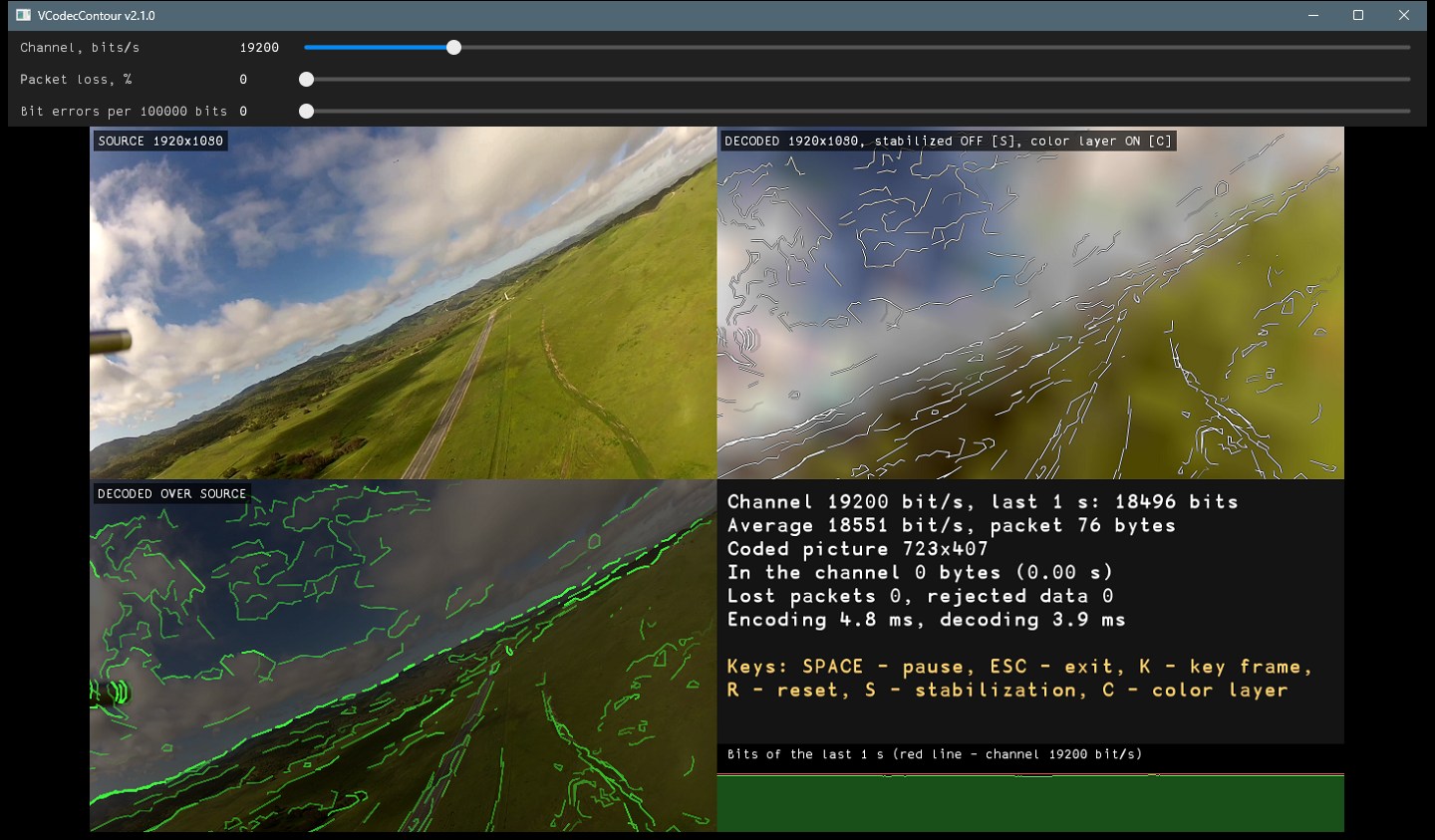
The demo application (VCodecContourDemo) shows the whole chain: video file -> encoder -> serial channel -> decoder.
VCodecContourDemo [video file]
Without an argument a file dialog asks for the video file. The video is read with VSourceFile as NV12 frames (H.264, H.265 and JPEG video in mp4, mov, m4v, avi files or raw streams; the file is played in a loop at its frame rate) and encoded at the frame rate of the file. Other codecs can be converted with ffmpeg:
ffmpeg -i input.mov -an -c:v libx264 -preset veryfast -crf 20 -pix_fmt yuv420p output.mp4
The packets go through a simulated serial line: the bytes come at the channel bitrate (packets are split between the frame periods), packets can be lost and bits can be damaged. The receiver decodes the bytes of every frame period. The window shows the source frame, the decoded picture in color (the size of the source video), the decoded lines over the source frame (a second decoder of the same bytes draws only the lines, TYPE 0), and the panel of the statistics: bits of the last second, average bitrate, size of the packet, size of the coded picture, bytes waiting in the channel, lost packets, calls with rejected data, encoding and decoding time, the keys and the graph of the bits of the last second over the width of the panel (red line: the bitrate). Sliders: channel bitrate, packet loss, bit errors. Keys: ESC - exit, SPACE - pause, K - key frame (MAKE_KEY_FRAME), R - RESET of the encoder and the decoder, S - stabilization of the decoded picture on / off, C - color layer on / off (the encoder starts a new stream).