
SimpleUI C++ library
v1.1.0
Table of contents
- Overview
- Versions
- Library files
- SimpleUiWindow class description
- SimpleUiDraw class description
- Build and connect to your project
- Portability
- Test application
- Tools
- Third-party components
Overview
The SimpleUI C++ library provides the functions to draw on frames in BGR24, RGB24 and YUV24 formats and to render these frames in a window. SimpleUI depends on the Frame library (describes the video frame data structure), which is a separate repository: it has to be placed next to the SimpleUI repository (see Build and connect to your project). Text is drawn with the built-in APL386 Unicode font. On Windows, the window uses only the WinAPI and doesn’t require other libraries. On Linux, the window uses the Xlib (X11) and libXext system libraries if available; if X11 development libraries are not present (or on headless embedded/ARM platforms), the library automatically falls back to an internal headless/stub window backend requiring no system libraries (only standard C++17, cmake and build-essential). The library uses the C++17 standard.
SimpleUI is general-purpose software: it is not tied to any sector or application, and the developer of a program decides what the program does with it.
Versions
Table 1 - Library versions.
| Version | Release date | What’s new |
|---|---|---|
| 1.0.0 | 30.09.2026 | First version. |
| 1.0.1 | 15.10.2026 | - The Frame library is not a sub-repository any more: it is taken from the folder next to the library when the library is the top-level project (see Build and connect to your project). - Frames are checked without integer overflow in the drawing functions and in the windows: a frame whose sizes don’t fit its data throws std::runtime_error(“Invalid frame”). The headless window checks frames in the same way. - Fixed integer overflows of the slider panel (wide slider ranges, a wheel turn that is not a number) and of the text width. - Compiler warnings, hardening options (stack protector, RELRO, control flow protection) and -ffp-contract=off (no fused multiply-add) in the CMake files. - The SimpleUiWindow constructor is explicit. - The test application has the –selftest mode with automatic tests. - The font generator checks the offsets of the font file, the font header starts with #pragma once. |
| 1.1.0 | 28.10.2026 | - The isKeyDown(…) method: checks if a key is held down now, e.g. to move something while the key is held. On Linux the auto-repeat of a held key doesn’t release it (XKB detectable auto-repeat). |
Library files
The library is supplied as source code only. The user is given a set of files in the form of a CMake project (repository). The repository structure is shown below:
CMakeLists.txt ------------------------ Main CMake file of the library.
README.md ----------------------------- Description of the library (this file).
src ----------------------------------- Folder with library source code.
    CMakeLists.txt -------------------- CMake file for library classes.
    SimpleUi.h ------------------------ Main library header file.
    SimpleUiDraw.cpp ------------------ C++ implementation file of draw functions.
    SimpleUiDraw.h -------------------- Compatibility header, includes SimpleUi.h.
    SimpleUiVersion.h ----------------- Header file with library version.
    SimpleUiVersion.h.in -------------- CMake service file to generate the version file.
    SimpleUiWindow.cpp ---------------- C++ implementation file of the window.
    SimpleUiWindow.h ------------------ Compatibility header, includes SimpleUi.h.
    font ------------------------------ Folder with the built-in font.
        APL386Unicode.h --------------- Glyphs of the APL386 Unicode font, generated by the font generator.
        SimpleUiFont.h ---------------- Header file with the font structures.
    headlessImpl ---------------------- Folder with the headless (stub) window.
        WindowImpl.cpp ---------------- C++ implementation file of the headless window.
        WindowImpl.h ------------------ Header file of the headless window.
    interfaces ------------------------ Folder with the window interface.
        IWindow.h --------------------- Header file of the window interface.
    linuxImpl ------------------------- Folder with the Linux (X11) window.
        WindowImpl.cpp ---------------- C++ implementation file of the Linux window.
        WindowImpl.h ------------------ Header file of the Linux window.
    pixelWriters ---------------------- Folder with the pixel writers of the frame formats.
        Bgr24Writer.h ----------------- Header file of the BGR24 pixel writer.
        Rgb24Writer.h ----------------- Header file of the RGB24 pixel writer.
        Yuv24Writer.h ----------------- Header file of the YUV24 pixel writer.
    widgets --------------------------- Folder with the sliders panel.
        SliderPanel.cpp --------------- C++ implementation file of the sliders panel.
        SliderPanel.h ----------------- Header file of the sliders panel.
    winImpl --------------------------- Folder with the Windows window.
        WindowImpl.cpp ---------------- C++ implementation file of the Windows window.
        WindowImpl.h ------------------ Header file of the Windows window.
static -------------------------------- Folder with the images of this file.
test ---------------------------------- Folder with the test application.
    CMakeLists.txt -------------------- CMake file of the test application.
    main.cpp -------------------------- Source C++ file of the test application.
tools --------------------------------- Folder with the library tools.
    fontGenerator --------------------- Folder with the font generator application.
The Frame library is a separate repository, it is not a part of the SimpleUI repository (see Build stand alone).
SimpleUiWindow class description
SimpleUiWindow class declaration
The SimpleUi.h file contains the SimpleUiWindow class declaration. Class declaration:
namespace rapidpixel
{
/// Window to show frames with sliders, keyboard and mouse.
class SimpleUiWindow
{
public:

    /// Class constructor. Creates the window, hidden until show(). Throws
    /// std::runtime_error if the window can't be created.
    explicit SimpleUiWindow(const std::string& title);

    /// Class destructor. Closes the window.
    ~SimpleUiWindow();

    /// Copy and move are deleted: a window can't be copied or moved.
    SimpleUiWindow(const SimpleUiWindow&) = delete;
    SimpleUiWindow& operator=(const SimpleUiWindow&) = delete;
    SimpleUiWindow(SimpleUiWindow&&) = delete;
    SimpleUiWindow& operator=(SimpleUiWindow&&) = delete;

    /// Get a string with the current library version.
    static std::string getVersion();

    /// Show the window.
    void show();

    /// Check if the window is open.
    bool isOpen() const;

    /// Block until the window is closed.
    void wait();

    /// Close the window and wait until it is closed.
    void close();

    /// Render the frame in the window. The frame is copied.
    void render(const rapidpixel::Frame& frame);

    /// Wait until the key is pressed.
    bool waitKey(int key, int timeoutMs = 0);

    /// Wait until any key is pressed.
    int getKey(int timeoutMs = 0);

    /// Check if the key is held down now.
    bool isKeyDown(int key) const;

    /// Set the mouse callback.
    void setMouseCallback(
        std::function<void(const MouseEvent&)> onMouse);

    /// Add a slider to the panel above the frame.
    int addSlider(const std::string& name, int minValue, int maxValue,
                  int value,
                  std::function<void(int)> onChange = nullptr);

    /// Add a slider bound to a variable.
    int addSlider(const std::string& name, int minValue, int maxValue,
                  int* variable,
                  std::function<void(int)> onChange = nullptr);

    /// Get the slider value.
    int sliderValue(int id) const;

    /// Set the slider value.
    void setSliderValue(int id, int value);
};
}
The window lives in an internal thread. The constructor takes the window title (each char is one character, so use ASCII) and throws std::runtime_error if the window can’t be created (e.g. there is no X display, or the default visual of the X display isn’t 24-bit TrueColor with 32 bits per pixel). The methods are thread-safe: they can be called from different threads at the same time. The destructor must not run while another thread calls a method. The callbacks are called in the thread that calls waitKey(…) or getKey(…).
getVersion method
The getVersion() method returns a string with the current version of the SimpleUI library. Method declaration:
static std::string getVersion();
The method can be used without a SimpleUiWindow class instance. Example:
std::cout << "SimpleUi library version: " << rapidpixel::SimpleUiWindow::getVersion();
Console output:
SimpleUi library version: 1.0.1
show method
The show() method shows the window. The window is hidden until the first call. Method declaration:
void show();
isOpen method
The isOpen() method checks if the window is open. Method declaration:
bool isOpen() const;
Returns: TRUE if the window is open, otherwise FALSE.
wait method
The wait() method blocks the calling thread until the window is closed. Unlike waitKey(…), it doesn’t call the callbacks or sync the bound variables. Method declaration:
void wait();
close method
The close() method closes the window and blocks the calling thread until it is closed. Method declaration:
void close();
render method
The render(…) method renders a frame in the window. Method declaration:
void render(const rapidpixel::Frame& frame);
| Parameter | Value |
|---|---|
| frame | A frame to render (see Frame class description). The frame is copied. Supported formats: - BGR24. - RGB24. - YUV24 (BT.601 limited range). The method throws std::runtime_error(“Unsupported frame format”) for another format and std::runtime_error(“Invalid frame”) for a frame without data, with a width or height that isn’t positive or with a data size smaller than width * height * 3 bytes. |
waitKey method
The waitKey(…) method blocks the calling thread until the key is pressed or the timeout expires. Keys pressed before the call count too (the last 32): the ones before the key are dropped, the ones after it stay queued. The slider and mouse callbacks are called from it, in the calling thread, also for the mouse events queued before the key. They are called in passes over the work queued when a pass starts: a pass may run past the timeout (e.g. with slow callbacks), and the work queued later waits for the next call. Method declaration:
bool waitKey(int key, int timeoutMs = 0);
| Parameter | Value |
|---|---|
| key | Key to wait for: - 27 - ESC. - 13 - Enter. - ‘ ‘ (space). - ‘a’..’z’ and ‘A’..’Z’. - ‘0’..’9’. |
| timeoutMs | Timeout in milliseconds. Value <= 0 means waiting forever. |
Returns: TRUE if the key is pressed, or FALSE on timeout or if the window is closed.
getKey method
The getKey(…) method blocks the calling thread until any key is pressed or the timeout expires. Keys pressed before the call count too (the last 32): the first one is taken, the ones after it stay queued for the next call. Keys other than the ones waitKey(…) takes are dropped. The slider and mouse callbacks are called from it as from waitKey(…). Method declaration:
int getKey(int timeoutMs = 0);
| Parameter | Value |
|---|---|
| timeoutMs | Timeout in milliseconds. Value <= 0 means waiting forever. |
Returns: key code: 27 - ESC, 13 - Enter, ‘ ‘ (space), ‘a’..’z’, ‘0’..’9’, or -1 on timeout or if the window is closed.
isKeyDown method
The isKeyDown(…) method checks if the key is held down now, e.g. to move something while the key is held: getKey(…) gives the press of the key, this method gives its release. The auto-repeat of a held key doesn’t release it. The keys are released when the window loses the keyboard focus or is closed. The headless window has no held keys. The method doesn’t wait. Method declaration:
bool isKeyDown(int key) const;
| Parameter | Value |
|---|---|
| key | Key: 27 - ESC, 13 - Enter, ‘ ‘ (space), ‘a’..’z’, ‘0’..’9’. |
Returns: TRUE if the key is held down or FALSE otherwise.
setMouseCallback method
The setMouseCallback(…) method sets the mouse callback. Up to 256 events wait for waitKey(…), older ones are dropped. A move replaces the move queued just before it if the same buttons, Shift and Ctrl are held and no key was pressed in between. The old callback isn’t called once the method returns: a call running in another thread is waited for, unless the method is called from a mouse callback of any window of this copy of the library (not of a copy linked into another DLL or shared library). So don’t call it holding a lock that the running callback takes, or from a thread that the callback waits for. The captures of the old callback may use the window in their destructors. Method declaration:
void setMouseCallback(std::function<void(const MouseEvent&)> onMouse);
| Parameter | Value |
|---|---|
| onMouse | Mouse callback. Passing nullptr stops the events. It is a function (e.g. a lambda) that receives MouseEvent as an argument. |
The library defines the MouseEvent structure. Structure declaration:
struct MouseEvent
{
    /// Event type.
    MouseEventType type{MouseEventType::MOVE};
    /// Horizontal position (pixels).
    int x{0};
    /// Vertical position (pixels).
    int y{0};
    /// Wheel turn in notches, positive away from the user.
    float wheel{0.0f};
    /// Left button is held.
    bool leftButton{false};
    /// Right button is held.
    bool rightButton{false};
    /// Middle button is held.
    bool middleButton{false};
    /// Shift key is held.
    bool shift{false};
    /// Ctrl key is held.
    bool ctrl{false};
};
Table 2 - Description of structure fields.
| Field | Description |
|---|---|
| type | Event type (see MouseEventType). |
| x | Horizontal position (pixels). |
| y | Vertical position (pixels). |
| wheel | Wheel turn in notches, positive away from the user. |
| leftButton | Left button is held. |
| rightButton | Right button is held. |
| middleButton | Middle button is held. |
| shift | Shift key is held. |
| ctrl | Ctrl key is held. |
The library defines the MouseEventType enumeration. Enumeration declaration:
enum class MouseEventType
{
    /// Mouse moved.
    MOVE,
    /// Left button pressed.
    LEFT_DOWN,
    /// Left button released.
    LEFT_UP,
    /// Right button pressed.
    RIGHT_DOWN,
    /// Right button released.
    RIGHT_UP,
    /// Middle button pressed.
    MIDDLE_DOWN,
    /// Middle button released.
    MIDDLE_UP,
    /// Wheel turned.
    WHEEL
};
Table 3 - Description of enumeration values.
| Value | Description |
|---|---|
| MOVE | Mouse moved. |
| LEFT_DOWN | Left button pressed. |
| LEFT_UP | Left button released. |
| RIGHT_DOWN | Right button pressed. |
| RIGHT_UP | Right button released. |
| MIDDLE_DOWN | Middle button pressed. |
| MIDDLE_UP | Middle button released. |
| WHEEL | Wheel turned. |
addSlider method
The addSlider(…) method adds a slider to the panel above the frame. Method declaration:
int addSlider(const std::string& name, int minValue, int maxValue,
              int value,
              std::function<void(int)> onChange = nullptr);

int addSlider(const std::string& name, int minValue, int maxValue,
              int* variable,
              std::function<void(int)> onChange = nullptr);
| Parameter | Value |
|---|---|
| name | Slider name, which is shown on the left side of the slider on one line: ‘\n’ is shown as a space. Names wider than 40% of the panel, or leaving less than 60 pixels to the slider tracks, are cut with “…” at the end. |
| minValue | Slider minimum value. It is swapped with maxValue if greater. |
| maxValue | Slider maximum value. |
| value | For the first declaration only. Initial value, clamped to the range. |
| variable | For the second declaration only. Pointer to the variable to bind. It has to live while waitKey(…) and getKey(…) are called. The variable is clamped to the range right away and the slider starts from it. In waitKey(…) and getKey(…) a moved slider sets the variable and a changed variable moves the slider (clamped to the range and written back), the slider wins if both changed. If nullptr, the slider starts from minValue and works like the first declaration. |
| onChange | Callback that receives the new value. It is called from waitKey(…) and getKey(…) in the calling thread, once with the last value if the value changed several times, also when the variable moves the slider. |
Returns: ID of the slider.
sliderValue method
The sliderValue(…) method returns the current value of the slider. Method declaration:
int sliderValue(int id) const;
| Parameter | Value |
|---|---|
| id | Slider ID. An unknown ID throws std::out_of_range. |
Returns: Current value of the slider.
setSliderValue method
The setSliderValue(…) method sets a new value of the slider. Method declaration:
void setSliderValue(int id, int value);
| Parameter | Value |
|---|---|
| id | Slider ID. An unknown ID throws std::out_of_range. |
| value | New value, clamped to the slider range. If it changed, the slider callback is called and the bound variable is set in the next waitKey(…) or getKey(…). |
SimpleUiDraw class description
SimpleUiDraw class declaration
The SimpleUi.h file contains the SimpleUiDraw class declaration. Class declaration:
namespace rapidpixel
{

class SimpleUiDraw
{
public:

    /// Draw a line from (x1, y1) to (x2, y2), both ends included. Thick lines have round caps.
    static void drawLine(rapidpixel::Frame& frame, int x1, int y1,
                         int x2, int y2, const Color& color,
                         int thickness = 1, bool antialiasing = true);

    /// Draw a rectangle outline by the opposite corners (x1, y1) and (x2, y2), e.g. top left and bottom right. Thickness grows inwards.
    static void drawRectangle(rapidpixel::Frame& frame, int x1, int y1,
                              int x2, int y2, const Color& color,
                              int thickness = 1);

    /// Fill a rectangle by the opposite corners (x1, y1) and (x2, y2), e.g. top left and bottom right.
    static void fillRectangle(rapidpixel::Frame& frame, int x1, int y1,
                              int x2, int y2, const Color& color);

    /// Fill a circle with the center (cx, cy).
    static void fillCircle(rapidpixel::Frame& frame, int cx, int cy,
                           int radius, const Color& color,
                           bool antialiasing = true);

    /// Draw a ring with the center (cx, cy). Thickness grows inwards.
    static void drawRing(rapidpixel::Frame& frame, int cx, int cy, int radius,
                         const Color& color, int thickness = 1,
                         bool antialiasing = true);

    /// Draw a triangle outline by three points. Thickness grows inwards. With thickness 1 the edges are covered in the same way as lines of thickness 1 drawn by drawLine() with the same antialiasing.
    static void drawTriangle(rapidpixel::Frame& frame, int x1, int y1,
                             int x2, int y2, int x3, int y3,
                             const Color& color, int thickness = 1,
                             bool antialiasing = true);

    /// Fill a triangle by three points. Its edges are covered in the same way as lines of thickness 1 through the points drawn by drawLine() with the same antialiasing.
    static void fillTriangle(rapidpixel::Frame& frame, int x1, int y1,
                             int x2, int y2, int x3, int y3,
                             const Color& color, bool antialiasing = true);

    /// Draw text with the top left corner at (x, y).
    static void drawText(rapidpixel::Frame& frame, int x, int y,
                         const std::string& text, const Color& color,
                         int size = 16);

    /// Measure the text.
    static void measureText(const std::string& text, int size,
                            int& width, int& height);
};

}
Supported frame formats: BGR24, RGB24 and YUV24 (BT.601 limited range). The methods throw std::runtime_error(“Unsupported frame format”) for another format and std::runtime_error(“Invalid frame”) for a frame without data, with a width or height that isn’t positive or with a data size smaller than width * height * 3 bytes. The shapes are clipped to the frame: any coordinates and sizes are allowed, the pixels outside the frame are skipped. The methods have no shared state: they can be called from different threads for different frames, but not for the same frame.
drawLine method
The drawLine(…) method draws a line from (x1, y1) to (x2, y2), both ends included. Thick lines have round caps. Method declaration:
static void drawLine(rapidpixel::Frame& frame, int x1, int y1,
                     int x2, int y2, const Color& color,
                     int thickness = 1, bool antialiasing = true);
| Parameter | Value |
|---|---|
| frame | Frame to draw on. |
| x1 | Horizontal position of the start point (pixels). |
| y1 | Vertical position of the start point (pixels). |
| x2 | Horizontal position of the end point (pixels). |
| y2 | Vertical position of the end point (pixels). |
| color | Line color (see Color). |
| thickness | Line thickness (pixels), values below 1 are treated as 1. Without antialiasing a thickness above 1 draws the pixels within thickness / 2 of the line: horizontal and vertical lines of even thickness are one pixel thicker. |
| antialiasing | TRUE to smooth the edges, FALSE otherwise. |
drawRectangle method
The drawRectangle(…) method draws a rectangle outline by the opposite corners (x1, y1) and (x2, y2), e.g. top left and bottom right. Thickness grows inwards.
static void drawRectangle(rapidpixel::Frame& frame, int x1, int y1,
                          int x2, int y2, const Color& color,
                          int thickness = 1);
| Parameter | Value |
|---|---|
| frame | Frame to draw on. |
| x1 | Horizontal position of the first corner (pixels). |
| y1 | Vertical position of the first corner (pixels). |
| x2 | Horizontal position of the second corner (pixels). |
| y2 | Vertical position of the second corner (pixels). |
| color | Outline color (see Color). |
| thickness | Outline thickness (pixels), values below 1 are treated as 1. |
fillRectangle method
The fillRectangle(…) method fills a rectangle by the opposite corners (x1, y1) and (x2, y2), e.g. top left and bottom right.
static void fillRectangle(rapidpixel::Frame& frame, int x1, int y1,
                          int x2, int y2, const Color& color);
| Parameter | Value |
|---|---|
| frame | Frame to draw on. |
| x1 | Horizontal position of the first corner (pixels). |
| y1 | Vertical position of the first corner (pixels). |
| x2 | Horizontal position of the second corner (pixels). |
| y2 | Vertical position of the second corner (pixels). |
| color | Fill color (see Color). |
fillCircle method
The fillCircle(…) method fills a circle with the center (cx, cy).
static void fillCircle(rapidpixel::Frame& frame, int cx, int cy,
                       int radius, const Color& color,
                       bool antialiasing = true);
| Parameter | Value |
|---|---|
| frame | Frame to draw on. |
| cx | Horizontal position of the center (pixels). |
| cy | Vertical position of the center (pixels). |
| radius | Radius (pixels), negative values draw nothing. |
| color | Fill color (see Color). |
| antialiasing | TRUE to smooth the edges, FALSE otherwise. |
drawRing method
The drawRing(…) method draws a ring with the center (cx, cy). Thickness grows inwards.
static void drawRing(rapidpixel::Frame& frame, int cx, int cy, int radius,
                     const Color& color, int thickness = 1,
                     bool antialiasing = true);
| Parameter | Value |
|---|---|
| frame | Frame to draw on. |
| cx | Horizontal position of the center (pixels). |
| cy | Vertical position of the center (pixels). |
| radius | Radius (pixels), negative values draw nothing. |
| color | Outline color (see Color). |
| thickness | Outline thickness (pixels), values below 1 are treated as 1. |
| antialiasing | TRUE to smooth the edges, FALSE otherwise. |
drawTriangle method
The drawTriangle(…) method draws a triangle outline by three points. Thickness grows inwards. With thickness 1 the edges are covered in the same way as lines of thickness 1 drawn by drawLine(…) with the same antialiasing.
static void drawTriangle(rapidpixel::Frame& frame, int x1, int y1,
                         int x2, int y2, int x3, int y3,
                         const Color& color, int thickness = 1,
                         bool antialiasing = true);
| Parameter | Value |
|---|---|
| frame | Frame to draw on. |
| x1 | Horizontal position of the first point (pixels). |
| y1 | Vertical position of the first point (pixels). |
| x2 | Horizontal position of the second point (pixels). |
| y2 | Vertical position of the second point (pixels). |
| x3 | Horizontal position of the third point (pixels). |
| y3 | Vertical position of the third point (pixels). |
| color | Outline color (see Color). |
| thickness | Outline thickness (pixels), values below 1 are treated as 1. |
| antialiasing | TRUE to smooth the edges, FALSE otherwise. |
fillTriangle method
The fillTriangle(…) method fills a triangle by three points. Its edges are covered in the same way as lines of thickness 1 through the points drawn by drawLine(…) with the same antialiasing.
static void fillTriangle(rapidpixel::Frame& frame, int x1, int y1,
                         int x2, int y2, int x3, int y3,
                         const Color& color, bool antialiasing = true);
| Parameter | Value |
|---|---|
| frame | Frame to draw on. |
| x1 | Horizontal position of the first point (pixels). |
| y1 | Vertical position of the first point (pixels). |
| x2 | Horizontal position of the second point (pixels). |
| y2 | Vertical position of the second point (pixels). |
| x3 | Horizontal position of the third point (pixels). |
| y3 | Vertical position of the third point (pixels). |
| color | Fill color (see Color). |
| antialiasing | TRUE to smooth the edges, FALSE otherwise. |
drawText method
The drawText(…) method draws text with the top left corner at (x, y).
static void drawText(rapidpixel::Frame& frame, int x, int y,
                     const std::string& text, const Color& color,
                     int size = 16);
| Parameter | Value |
|---|---|
| frame | Frame to draw on. |
| x | Horizontal position of the top left corner (pixels). |
| y | Vertical position of the top left corner (pixels). |
| text | Text in ASCII or UTF-8, ‘\n’ starts a new line. Printable ASCII characters are drawn as is, any other character is drawn as a single ‘?’. |
| color | Text color (see Color). |
| size | Line height (pixels), values <= 0 draw nothing. |
measureText method
The measureText(…) method measures the size of the text drawn with the given line height.
static void measureText(const std::string& text, int size,
                        int& width, int& height);
| Parameter | Value |
|---|---|
| text | Text in ASCII or UTF-8, ‘\n’ starts a new line. |
| size | Line height (pixels), values <= 0 give 0 x 0. |
| width | Output text width (pixels), at most INT_MAX. |
| height | Output text height (pixels): number of lines * size, at most INT_MAX. |
Color structure declaration
The SimpleUi.h file contains the Color structure declaration. Structure declaration:
namespace rapidpixel
{
/// RGB color with opacity.
struct Color
{
    /// Red component.
    uint8_t r{0};
    /// Green component.
    uint8_t g{0};
    /// Blue component.
    uint8_t b{0};
    /// Opacity: 0 - transparent, 255 - opaque.
    uint8_t a{255};
};
}
Table 4 - Description of structure fields.
| Field | Description |
|---|---|
| r | Red component. |
| g | Green component. |
| b | Blue component. |
| a | Opacity: 0 - transparent, 255 - opaque. |
Build and connect to your project
Prerequisites
- C++17 compatible compiler (see Portability for the compilers the library was built and tested with).
- CMake version 3.13 or higher.
- The Frame library: a separate repository, which has to be placed next to the SimpleUI repository (see Build stand alone).
- No system libraries are required by default: on Windows the window uses the Win32 API, on Linux the library builds the headless window if the X11 development packages are not installed. The library links the threads library (
Threads::Threads) and, with the X11 window, libX11 and libXext; the Windows window uses user32 and gdi32, which CMake links by default. A program that links the library needs these libraries too; CMake adds them to targets that link SimpleUI.
Linux window backends
- X11 GUI Window: If the development packages
libx11-devandlibxext-devare installed, CMake automatically enables the native X11 window backend:sudo apt install libx11-dev libxext-dev - Headless / Stub Window (Automatic Fallback): If
libx11-devorlibxext-devare not installed (common on minimal ARM boards, headless servers, Docker containers, or CI/CD pipelines), CMake automatically compiles the built-in headless/stub window backend. No packages need to be installed. The headless window shows nothing and gets no keys or mouse events: isOpen() is TRUE from show() until close(), waitKey(…) returns FALSE and getKey(…) returns -1 when the timeout expires or the window is closed, isKeyDown(…) returns FALSE. timeoutMs = 0 doesn’t wait in the headless window, a negative value waits until the window is closed. The sliders, the callbacks and the bound variables work as in the other windows, render(…) only checks the frame. - Forcing Headless Mode: You can explicitly force the headless window backend on any platform by passing
-DSIMPLE_UI_FORCE_HEADLESS=ONduring CMake configuration:cmake -B build -DSIMPLE_UI_FORCE_HEADLESS=ON
Build stand alone
The repository does not contain sub-repositories. The Frame library the SimpleUI library depends on must be cloned into the same folder as SimpleUI. The folder structure must be:
<work folder>
    SimpleUI
    Frame
Typical commands to build the library and the test application (use the URLs of the repositories provided to you). The font generator is not built together with the library, see Tools:
git clone <SimpleUI repository URL>
git clone <Frame repository URL>
cd SimpleUI
mkdir build
cd build
cmake ..
make
On Windows use cmake --build . --config Release instead of make. If SimpleUI is the top-level CMake project, the main CMakeLists.txt file adds the folder ../Frame before the library itself. If the folder doesn’t exist CMake stops with an error.
CMake options
Table 5 - CMake options of the repository. In the options below ${PARENT} is the prefix defined by the top-level project (empty if SimpleUI is the top-level project).
| Option | Default | Description |
|---|---|---|
| ${PARENT}_SIMPLE_UI | ON | Build the library. |
| ${PARENT}_SIMPLE_UI_TEST | ON (stand alone), OFF (included in other project) | Build the test application. |
| ${PARENT}_SUBMODULE_CACHE_OVERWRITE | ON | Forced rewriting of the options above in the CMake cache. The top-level project sets it to OFF when it includes SimpleUI as a sub-repository. |
| SIMPLE_UI_FORCE_HEADLESS | OFF | Build the headless/stub window on any platform (see Linux window backends). |
| CMAKE_BUILD_TYPE | Release (if not specified) | Build type. |
CMake defines the macro SIMPLE_UI_HEADLESS for the library sources when the headless window is built.
Connect to your project
If you want to connect the SimpleUI library to your CMake project as source code, you can follow these steps. The Frame library has to be connected too: the library doesn’t add its dependency when it is included in another project, the project has to add Frame before SimpleUI. For example, if your repository has the following structure:
CMakeLists.txt
src
    CMakeLists.txt
    yourLib.h
    yourLib.cpp
Create a 3rdparty folder in your repository and copy the Frame and SimpleUI repository folders to the 3rdparty folder. The new structure of your repository:
CMakeLists.txt
src
    CMakeLists.txt
    yourLib.h
    yourLib.cpp
3rdparty
    Frame
    SimpleUI
Create a CMakeLists.txt file in the 3rdparty folder. The CMakeLists.txt should contain (Frame is added before SimpleUI):
cmake_minimum_required(VERSION 3.13)

################################################################################
## 3RD-PARTY
## dependencies for the project
################################################################################
project(3rdparty LANGUAGES CXX)

################################################################################
## SETTINGS
## basic 3rd-party settings before use
################################################################################
# To inherit the top-level architecture when the project is used as a submodule.
SET(PARENT ${PARENT}_YOUR_PROJECT_3RDPARTY)
# Disable self-overwriting of parameters inside included subdirectories.
SET(${PARENT}_SUBMODULE_CACHE_OVERWRITE OFF CACHE BOOL "" FORCE)

################################################################################
## CONFIGURATION
## 3rd-party submodules configuration
################################################################################
SET(${PARENT}_SUBMODULE_FRAME                           ON  CACHE BOOL "" FORCE)
if (${PARENT}_SUBMODULE_FRAME)
    SET(${PARENT}_FRAME                                 ON  CACHE BOOL "" FORCE)
    SET(${PARENT}_FRAME_TEST                            OFF CACHE BOOL "" FORCE)
endif()

SET(${PARENT}_SUBMODULE_SIMPLE_UI                       ON  CACHE BOOL "" FORCE)
if (${PARENT}_SUBMODULE_SIMPLE_UI)
    SET(${PARENT}_SIMPLE_UI                             ON  CACHE BOOL "" FORCE)
    SET(${PARENT}_SIMPLE_UI_TEST                        OFF CACHE BOOL "" FORCE)
endif()

################################################################################
## INCLUDING SUBDIRECTORIES
## Adding subdirectories according to the 3rd-party configuration
################################################################################
if (${PARENT}_SUBMODULE_FRAME)
    add_subdirectory(Frame)
endif()

if (${PARENT}_SUBMODULE_SIMPLE_UI)
    add_subdirectory(SimpleUI)
endif()
The 3rdparty/CMakeLists.txt file adds the Frame and SimpleUI folders to your project. By default, the test applications are excluded from compilation when the libraries are included as submodules. Your repository’s new structure will be:
CMakeLists.txt
src
    CMakeLists.txt
    yourLib.h
    yourLib.cpp
3rdparty
    CMakeLists.txt
    Frame
    SimpleUI
Next, you need to include the 3rdparty folder in the main CMakeLists.txt file of your repository. Add the following line at the end of your main CMakeLists.txt:
add_subdirectory(3rdparty)
Next, you need to include the SimpleUI library in your src/CMakeLists.txt file:
target_link_libraries(${PROJECT_NAME} SimpleUI)
If Frame isn’t added by your project, the build stops with the error “Frame.h: No such file or directory” (SimpleUI adds its dependency only when it is the top-level project).
Done!
Portability
The library is written in standard C++17 and has no SIMD code and no inline assembly. It was built and run with MSVC 2022 (Windows, x86-64, Win32 window), GCC 12 and 13 and Clang 15 and 18 (Linux, x86-64, X11 and headless windows) and GCC 13 and Clang 18 for AArch64 (Linux, headless window, run in an emulator). The drawing functions give the same pixels in all these builds: CMake passes -ffp-contract=off to GCC and Clang, so multiply-add is not fused, and the MSVC build for x86-64 with the default options doesn’t use it. The drawing functions work with bytes and don’t depend on the byte order. The Linux window uses 32-bit pixels in the byte order of the host (Xlib converts the image if the X server has another byte order); it was run only on little-endian hosts.
Test application
The test application (test/main.cpp) for the SimpleUI C++ library demonstrates how the library works. The test application generates artificial video frames and draws an animation on them. The test application demonstrates all the library features. To run the application, execute the following commands on Linux:
cd <application folder>
chmod +x SimpleUiTest
./SimpleUiTest
After starting, you will see the following output:
Frame format:
  1 - BGR24
  2 - RGB24
  3 - YUV24
Choose 1-3 [1]:
Choose the frame format (1 - BGR24, 2 - RGB24, 3 - YUV24). The default is BGR24. After that, you will see the following image:
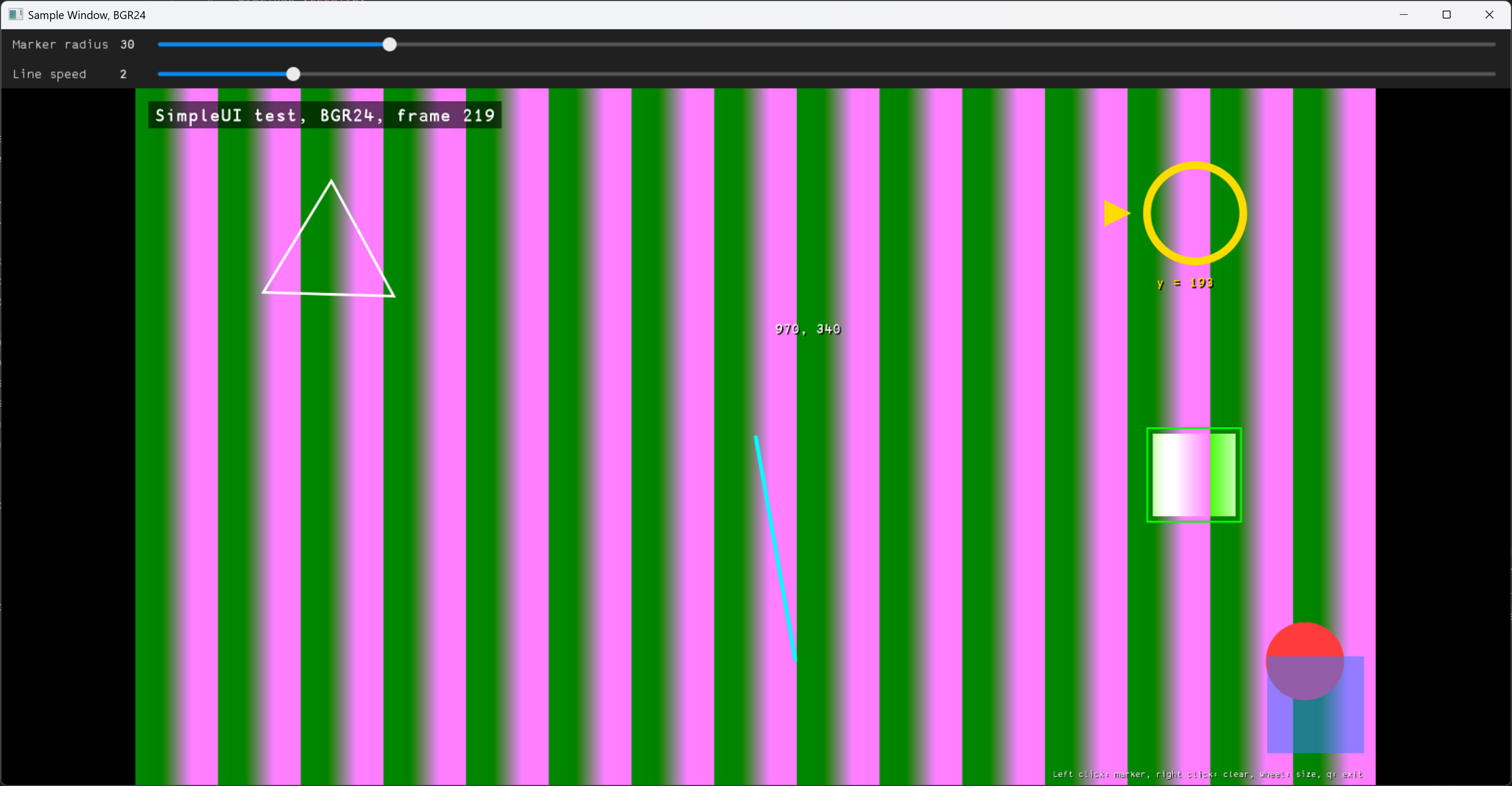
The –selftest command line parameter starts the automatic tests instead of the demonstration:
./SimpleUiTest --selftest
The tests check the drawing functions for all frame formats (pixels, clipping, rejected frames, 72000 random calls with guard bytes around the frame), the sliders panel and the window (sliders, callbacks, rendering, keys, calls from several threads). The application prints a block per test (OK or ERROR) and returns 0 if all tests passed or 1 otherwise. The window tests need a display if the X11 window is built on Linux (e.g. run the application with xvfb-run): a test whose window can’t be created is printed as SKIPPED, and the numbers of the failed and skipped tests are printed at the end. The tests write no files. Other command line parameters print the usage and return 1.
Tools
Font generator
The fontGenerator application (tools/fontGenerator folder) renders the printable ASCII characters (‘ ‘..’~’) of a TrueType font into a C++ header file with 8-bit coverage bitmaps of the glyphs. The library draws text with the glyphs from the src/font/APL386Unicode.h header generated by this application from the APL386 Unicode font, which is in the public domain. The application isn’t built together with the library, it is needed only to regenerate the font of the library, e.g. to add a new text size. On Windows, the glyphs are rendered by GDI (WinAPI). On Linux, the glyphs are rendered by the FreeType library in the same way as GDI does. The detailed description of the application is in tools/fontGenerator/README.md.
On Linux, the development package of the FreeType library is required to build the application, otherwise CMake stops with an error. Install it on Ubuntu:
sudo apt install libfreetype-dev
Typical commands to build the application on Linux:
cd SimpleUI/tools/fontGenerator
mkdir build
cd build
cmake ..
make
On Windows, the application uses only the WinAPI and can be built with MSVC or MinGW. Typical commands to build the application with Visual Studio:
cd SimpleUI\tools\fontGenerator
mkdir build
cd build
cmake ..
cmake --build . --config Release
Visual Studio puts the application in the build\Release folder, other generators (e.g. Ninja or MinGW Makefiles) put it in the build folder.
The application takes the font file, the output file and one or more sizes. Command line:
fontGenerator <font.ttf> <output.h> <size> [<size> ...]
Table 6 - Command line parameters of the font generator.
| Parameter | Value |
|---|---|
| font.ttf | TrueType font file. |
| output.h | Header file to write. An existing file is overwritten. |
| size | Line height (pixels). The header contains all given sizes. |
Text of other sizes is scaled from the nearest larger size, or from the largest size for text above it, so add a size (e.g. 64) for large sharp text.
To regenerate the font of the library on Linux, run the application from the build folder:
./fontGenerator ../APL386.ttf ../../../src/font/APL386Unicode.h 16 32
On Windows, run the application from the build folder:
Release\fontGenerator.exe ..\APL386.ttf ..\..\..\src\font\APL386Unicode.h 16 32
Console output:
Rendered size 16
Rendered size 32
Written ../../../src/font/APL386Unicode.h
After that, rebuild the library. The src/font/APL386Unicode.h file of the library is generated on Linux. On Windows, some glyphs may differ from the Linux output in a few edge pixels, so generate the header on one system to keep its diffs small. The names of the constants in the header come from the font family name, e.g. APL386_UNICODE for APL386 Unicode. To use another font, change the included header and the name of the constants in the src/SimpleUiDraw.cpp file.
Third-party components
Table 7 - Third-party components.
| Component | Where | License |
|---|---|---|
| APL386 Unicode font by Adám Brudzewsky, based on the APL385 Unicode font by Adrian Smith | tools/fontGenerator/APL386.ttf; the glyph bitmaps generated from it (src/font/APL386Unicode.h) are compiled into the library | The Unlicense: the font is dedicated to the public domain; the copyright field of the font file says “Public Domain”. APL385 Unicode is “freely placed into the public domain” by its author (apl385.com). |
The Unlicense lets anyone copy, modify, publish, use, compile, sell and distribute the font and works made from it, in source or binary form, for any purpose, commercial or non-commercial. It requires no attribution and no license text in a distribution; the font is provided without any warranty. So the font, and the library that contains its glyphs, can be distributed freely.