VOverlayTemplate
v1.0.0
Table of contents
- Overview
- Versions
- Library files
- How it works
- VOverlayTemplate class description
- Build and connect to your project
- Test application
Overview
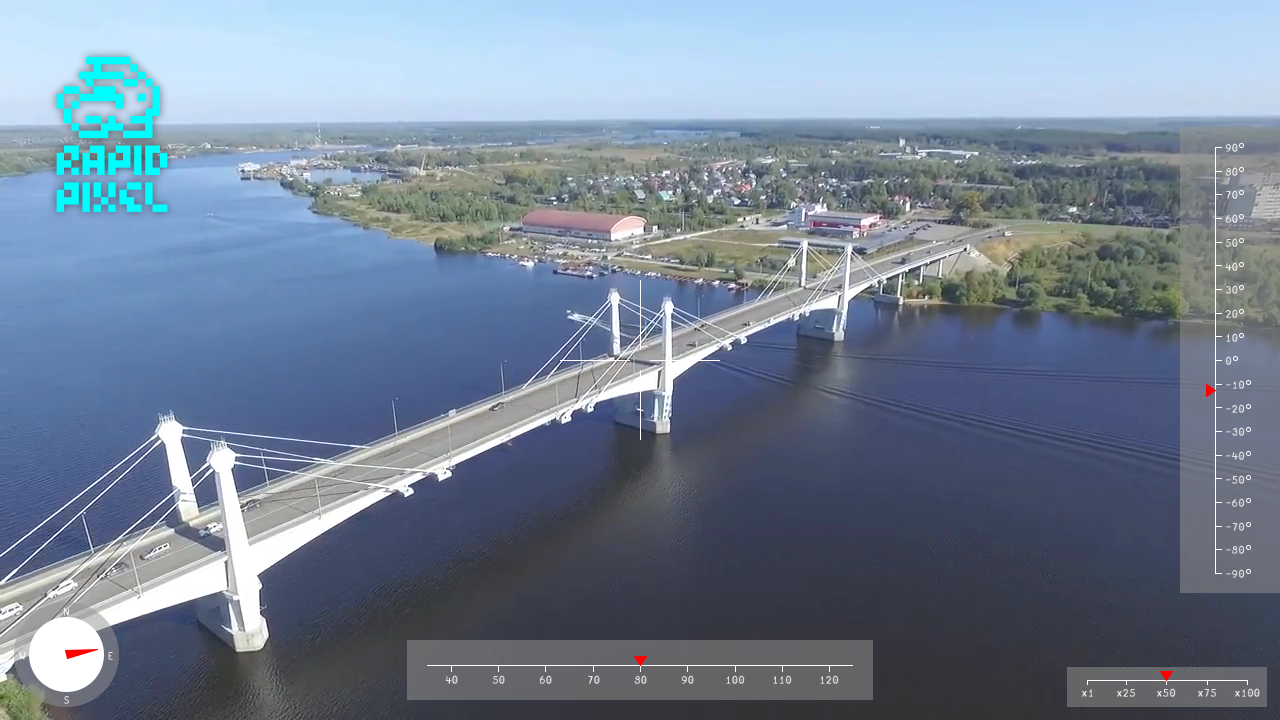
The VOverlayTemplate C++ library is an example library that draws an overlay on YUV24 video frames using the drawing functions of the SimpleUI library. The library inherits its interface from the VOverlay interface class and uses the Frame class to describe video frames. The overlay is drawn entirely on the CPU directly in the frame buffer: the library does not need a window, a GPU, a graphics framework or any image or font files except the optional logo file. It is meant to be embedded in a video processing pipeline and to be used as a starting point for your own overlay. The widgets drawn by the library are: a pitch scale on the right edge, a scrolling yaw scale at the bottom, a crosshair at the center, a compass at the bottom left corner, a zoom scale at the bottom right corner and an optional rotated logo image positioned by the caller. The library uses the C++17 standard. The test application reads a video file with the VSourceFile library and shows the frames with the SimpleUiWindow class of the SimpleUI library.
VOverlayTemplate is general-purpose software: it is not tied to any sector or application, and the developer of a program decides what the program does with it.
Versions
Table 1 - Library versions.
| Version | Release date | What’s new |
|---|---|---|
| 1.0.0 | 23.10.2026 | First version. |
Library files
The library is supplied as source code only and is built together with the RapidPixel SDK. The user is provided with a set of files in the form of a CMake project. The structure of the project is shown below:
CMakeLists.txt -------------------- Main CMake file of the example.
src ------------------------------- Folder with library source code.
    CMakeLists.txt ---------------- CMake file of the library.
    OverlayImage.cpp -------------- C++ implementation file of the logo image.
    OverlayImage.h ---------------- Header file of the logo image class.
    VOverlayTemplate.cpp ---------- C++ implementation file.
    VOverlayTemplate.h ------------ Main library header file.
    VOverlayTemplateVersion.h ----- Header file with the library version.
    VOverlayTemplateVersion.h.in -- File for CMake to generate version header.
static ---------------------------- Static files for the library.
    rapid_pixel_logo.rgba --------- Logo shown in the test application.
    voverlaytemplate_screenshot.png - Result of the overlay.
    voverlaytemplate_web_logo.png - Image for this document.
test ------------------------------ Folder for the test application.
    CMakeLists.txt ---------------- CMake file for the test application.
    main.cpp ---------------------- Source C++ file of the test application.
How it works
This section explains the design choices that shape the implementation. Read it before using the library as a starting point for your own overlay.
Drawing on YUV24 frames
The frame is in YUV24 format (3 bytes per pixel: Y, U, V, BT.601 limited range). The SimpleUiDraw class of the SimpleUI library draws lines, rectangles, circles, triangles and text directly on such frames: the colors are set as RGB values with an opacity (0 - 255) and are converted to YUV by the drawing functions. The semi-transparent grey backdrops of the scales (opacity 128) let the video show through; the white lines, the text and the red pointers are opaque. The drawing functions clip all shapes to the frame, so the widgets can be partly or completely outside of it.
The library has no per-frame buffers: every call of the overlay(…) method draws the widgets in the order pitch scale, yaw scale, crosshair, compass, zoom scale, logo. The only state kept between the calls is the logo (see Logo image).
Frame coordinate scaling
The layout is designed for a frame of 1920 x 1080 pixels. For any other frame size the coefficients frame.width / 1920 and frame.height / 1080 stretch the geometry along each axis independently. The elements that must stay round or keep their proportions (the compass, the pointers, the text) use the smaller of the two coefficients, so they shrink uniformly without overflowing on either axis. The pitch scale is 100 pixels wide and the yaw scale is 60 pixels high on any frame size.
Integer coordinates and anti-aliasing
The drawing functions take integer coordinates, so the positions that depend on the angles and on the scale are rounded to pixels. Horizontal and vertical lines (scale lines, ticks, crosshair) are one pixel thick and are drawn without anti-aliasing, so they stay sharp. The edges of the triangles (pointers, compass needle) and of the compass discs are anti-aliased.
Text and the degree sign
The text is drawn with the built-in font of the SimpleUI library, which has printable ASCII characters only. The height of the text line is 19 * min(widthCoef, heightCoef) pixels. The labels of the yaw and zoom scales are centered on their ticks using the measured width of the text. The degree sign is not in the font, so the labels of the pitch scale draw it as a small ring after the digits.
Logo image
The logo is read from a file in the raw RGBA format (Table 2), because the library has no image decoder. The file is read once for a path: if the path in the parameters changes, the file is read again. A file that can’t be read or is not valid is not an error: the logo is not drawn and the file is not read again until the path changes. The loader checks the size of the file against the header before it allocates any memory, and accepts images up to 4096 x 4096 pixels.
Table 2 - Raw RGBA file format.
| Offset | Size | Description |
|---|---|---|
| 0 | 4 bytes | Image width in pixels, unsigned 32-bit little-endian. |
| 4 | 4 bytes | Image height in pixels, unsigned 32-bit little-endian. |
| 8 | width x height x 4 bytes | Pixels row by row from the top left one: red, green, blue, alpha (0 is transparent, 255 is opaque). |
The file size must be exactly 8 + width x height x 4 bytes. The static/rapid_pixel_logo.rgba file can be made from any image that ffmpeg reads (the width and the height of the image are passed to the second command):
ffmpeg -i logo.png -f rawvideo -pix_fmt rgba logo.raw
python3 -c "import struct,sys; open('logo.rgba','wb').write(struct.pack('<II',int(sys.argv[1]),int(sys.argv[2]))+open('logo.raw','rb').read())" 288 378
When the logo is loaded, its pixels are converted to YUV and multiplied by their opacity. The image is scaled to logoWidth x logoHeight with bilinear filtering once for every size and is kept for the next frames. For every frame the image is rotated by logoAngle around its center (bilinear filtering, transparent edges) and blended on the frame. The center of the logo stays at the center of the unrotated image placed at logoPosX, logoPosY, so the logo does not jump when the angle changes.
VOverlayTemplate class description
VOverlayTemplate class declaration
The class is declared in the VOverlayTemplate.h file together with the VOverlayTemplateParams class that is passed to the overlay(…) method:
#pragma once
#include <memory>
#include <string>
#include "VOverlay.h"


namespace rapidpixel
{
/// Image of the logo, internal class of the library (OverlayImage.h).
class OverlayImage;


/**
 * @brief Parameters for VOverlayTemplate, passed via the data pointer of the
 * overlay() method.
 */
class VOverlayTemplateParams
{
public:

    /// Pitch angle (degrees). The scale shows -90 - 90 degrees, other values
    /// move the pointer out of the scale. A value that is not a number is 0.
    float pitchAngle{30.0f};
    /// Yaw angle (degrees), the compass shows the same angle. A value that is
    /// not a number is 0.
    float yawAngle{123.0f};
    /// Size of the crosshair (pixels). A value <= 0 hides the crosshair.
    int crosshairSize{42};
    /// Zoom value. The scale shows 1 - 100, other values are limited to it. A
    /// value that is not a number is 1.
    float zoomValue{10};
    /// Path to the logo file in the raw RGBA format (see OverlayImage). An
    /// empty path hides the logo.
    std::string logoPath{"rapid_pixel_logo.rgba"};
    /// Width of the logo (pixels). A value <= 0 means the width of the file.
    int logoWidth{288 / 2};
    /// Height of the logo (pixels). A value <= 0 means the height of the file.
    int logoHeight{378 / 2};
    /// Horizontal position of the top left corner of the logo (pixels).
    int logoPosX{40};
    /// Vertical position of the top left corner of the logo (pixels).
    int logoPosY{40};
    /// Rotation angle of the logo around its center (degrees), clockwise. A
    /// value that is not a number is 0.
    float logoAngle{0.0f};
};


/**
 * @brief Implementation of the VOverlay interface that draws a head-up
 * display on YUV24 video frames with the SimpleUI library: pitch scale, yaw
 * scale, crosshair, compass, zoom scale and a logo image.
 *
 * The layout is made for a frame of 1920 x 1080 pixels and is scaled to the
 * size of the frame. Shapes are drawn with integer coordinates, so their
 * positions are rounded to pixels. The logo is loaded from a file once and
 * scaled once for every size.
 *
 * @note The methods are not thread-safe: use one object per thread or lock
 * the calls. Different objects can be used in different threads.
 */
class VOverlayTemplate : public VOverlay
{
public:

    /**
     * @brief Default constructor.
     * @note The constructor can throw std::bad_alloc.
     */
    VOverlayTemplate();

    /**
     * @brief Class destructor.
     */
    ~VOverlayTemplate() override;

    /**
     * @brief Copy constructor. Copies the settings and the loaded logo.
     * @param src Source object.
     * @note The constructor can throw std::bad_alloc.
     */
    VOverlayTemplate(const VOverlayTemplate& src);

    /**
     * @brief Move constructor. The source object stays usable.
     * @param src Source object.
     * @note The constructor can throw std::bad_alloc.
     */
    VOverlayTemplate(VOverlayTemplate&& src);

    /**
     * @brief Copy assignment. Copies the settings and the loaded logo.
     * @param src Source object.
     * @return Reference to this object.
     */
    VOverlayTemplate& operator=(const VOverlayTemplate& src);

    /**
     * @brief Move assignment. The source object stays usable.
     * @param src Source object.
     * @return Reference to this object.
     */
    VOverlayTemplate& operator=(VOverlayTemplate&& src) noexcept;

    /**
     * @brief Get string of the current class version.
     * @return String of the current class version "Major.Minor.Patch".
     */
    static std::string getVersion();

    /**
     * @brief Draw the head-up display on the frame.
     * @param frame YUV24 frame with data of at least width * height * 3
     * bytes. The frame is changed in place, also if the method fails in the
     * middle of drawing.
     * @param data Pointer to VOverlayTemplateParams or nullptr. With nullptr
     * the angles are 0, the zoom is 1, the crosshair is 80 pixels and there
     * is no logo. The pointer type can't be checked: the pointer must point
     * to an object of VOverlayTemplateParams. The object must not be changed
     * during the call.
     * @return TRUE if the display is drawn or FALSE if the frame is not valid
     * or the drawing failed. A logo that can't be loaded is not an error: it
     * is not drawn and the file is not read again until the path changes.
     * The time of a call grows with the size of the logo: a logo of
     * 4096 x 4096 pixels takes much longer than a small one.
     */
    bool overlay(rapidpixel::Frame& frame, void* data = nullptr) override;

private:

    /**
     * @brief Draw the pitch scale at the right edge of the frame.
     * @param frame Frame to draw on.
     * @param angle Pitch angle (degrees).
     */
    void drawPitchAngle(rapidpixel::Frame& frame, float angle) const;

    /**
     * @brief Draw the yaw scale at the bottom center of the frame.
     * @param frame Frame to draw on.
     * @param angle Yaw angle (degrees), from -360 to 360.
     */
    void drawYawAngle(rapidpixel::Frame& frame, float angle) const;

    /**
     * @brief Draw the crosshair at the center of the frame.
     * @param frame Frame to draw on.
     * @param size Size of the crosshair (pixels).
     */
    static void drawCrosshair(rapidpixel::Frame& frame, int size);

    /**
     * @brief Draw the compass at the bottom left corner of the frame.
     * @param frame Frame to draw on.
     * @param angle Heading (degrees), 0 is north, clockwise.
     */
    void drawCompass(rapidpixel::Frame& frame, float angle) const;

    /**
     * @brief Draw the zoom scale at the bottom right corner of the frame.
     * @param frame Frame to draw on.
     * @param value Zoom value.
     */
    void drawZoom(rapidpixel::Frame& frame, float value) const;

    /**
     * @brief Draw the logo, load it and scale it if needed.
     * @param frame Frame to draw on.
     * @param params Parameters with the logo settings.
     */
    void drawLogo(rapidpixel::Frame& frame,
                  const VOverlayTemplateParams& params);

    /**
     * @brief Draw the red triangle that points down.
     * @param frame Frame to draw on.
     * @param tipX Horizontal position of the tip (pixels).
     * @param tipY Vertical position of the tip (pixels).
     */
    void drawDownTriangle(rapidpixel::Frame& frame, int tipX, int tipY) const;

    /**
     * @brief Draw the red triangle that points right.
     * @param frame Frame to draw on.
     * @param tipX Horizontal position of the tip (pixels).
     * @param tipY Vertical position of the tip (pixels).
     */
    void drawRightTriangle(rapidpixel::Frame& frame, int tipX, int tipY) const;

    /**
     * @brief Draw a white text with the top left corner at the position.
     * @param frame Frame to draw on.
     * @param x Horizontal position of the left side (pixels).
     * @param y Vertical position of the top (pixels).
     * @param text Text in ASCII.
     */
    void drawText(rapidpixel::Frame& frame, int x, int y,
                  const std::string& text) const;

    /**
     * @brief Draw a white text with the horizontal center at the position.
     * @param frame Frame to draw on.
     * @param centerX Horizontal position of the center (pixels).
     * @param y Vertical position of the top (pixels).
     * @param text Text in ASCII.
     */
    void drawCenteredText(rapidpixel::Frame& frame, int centerX, int y,
                          const std::string& text) const;

    /**
     * @brief Draw a white number with the degree sign. The font has no degree
     * sign, so it is drawn as a small ring.
     * @param frame Frame to draw on.
     * @param x Horizontal position of the left side (pixels).
     * @param y Vertical position of the top (pixels).
     * @param value Number to draw.
     */
    void drawDegrees(rapidpixel::Frame& frame, int x, int y, int value) const;

    /// Frame width divided by the width of the layout.
    float m_widthCoef{1.0f};
    /// Frame height divided by the height of the layout.
    float m_heightCoef{1.0f};
    /// The smaller of m_widthCoef and m_heightCoef.
    float m_scale{1.0f};
    /// Height of the text line (pixels).
    int m_fontSize{1};
    /// Logo file as loaded, empty if it can't be loaded.
    std::unique_ptr<OverlayImage> m_logoSource;
    /// Logo scaled to m_logoWidth x m_logoHeight.
    std::unique_ptr<OverlayImage> m_logoScaled;
    /// Path of the logo file that m_logoSource was loaded from.
    std::string m_logoPath;
    /// Width of m_logoScaled (pixels), 0 if there is no scaled logo.
    int m_logoWidth{0};
    /// Height of m_logoScaled (pixels), 0 if there is no scaled logo.
    int m_logoHeight{0};
};

}
VOverlayTemplateParams class description
Table 3 - VOverlayTemplateParams class fields description.
| Field | Type | Description |
|---|---|---|
| pitchAngle | float | Pitch angle in degrees. The scale shows -90 - 90 degrees, other values move the pointer out of the scale. A value that is not a number is 0. Default value: 30. |
| yawAngle | float | Yaw angle in degrees, the compass shows the same angle. A value that is not a number is 0. Default value: 123. |
| crosshairSize | int | Size of the crosshair in pixels. A value <= 0 hides the crosshair. Default value: 42. |
| zoomValue | float | Zoom value. The scale shows 1 - 100, other values are limited to it. A value that is not a number is 1. Default value: 10. |
| logoPath | std::string | Path to the logo file in the raw RGBA format (Table 2). An empty path hides the logo. Default value: “rapid_pixel_logo.rgba”. |
| logoWidth | int | Width of the logo in pixels. A value <= 0 means the width of the file. Default value: 144. |
| logoHeight | int | Height of the logo in pixels. A value <= 0 means the height of the file. Default value: 189. |
| logoPosX | int | Horizontal position of the top left corner of the logo in pixels. Default value: 40. |
| logoPosY | int | Vertical position of the top left corner of the logo in pixels. Default value: 40. |
| logoAngle | float | Rotation angle of the logo around its center in degrees, clockwise. A value that is not a number is 0. Default value: 0. |
The sizes and positions are limited to +-1000000 pixels. A logo bigger than 4096 x 4096 pixels is not drawn.
getVersion method
The getVersion() method returns the version string of the VOverlayTemplate class. Method declaration:
static std::string getVersion();
This method can be used without a VOverlayTemplate class instance:
std::cout << "VOverlayTemplate class version: " << rapidpixel::VOverlayTemplate::getVersion() << std::endl;
Console output:
VOverlayTemplate class version: 1.0.0
overlay method
The overlay(…) method draws the overlay on a video frame. Method declaration:
bool overlay(rapidpixel::Frame& frame, void* data = nullptr) override;
| Parameter | Description |
|---|---|
| frame | Video Frame on which to draw the overlay. Must be in YUV24 format with data of at least width x height x 3 bytes; the method draws in frame.data in place. The frame is changed also if the method fails in the middle of drawing. |
| data | Pointer to a VOverlayTemplateParams object that supplies the overlay parameters. The type of the pointer can’t be checked, and the object must not be changed during the call. May be nullptr: in this case the angles are 0, the zoom is 1, the crosshair is 80 pixels and there is no logo. |
Returns: true if the overlay is drawn, false if the frame has no data, is not in YUV24 format, has a size that is not positive or has less data than its size needs, or if the drawing fails. A logo that can’t be loaded is not an error.
The method is not thread-safe: use one VOverlayTemplate object per thread or lock the calls. Different objects can be used in different threads. The first call with a logo path and every change of the logo size are more expensive than the other calls because the file is read and the logo is scaled.
Build and connect to your project
Build with the SDK
The example is built from the root of the RapidPixel SDK: the SDK CMake file passes the list of available libraries to the example, and the example links the RapidPixel library that contains the VOverlay, SimpleUI, VSourceFile and Frame libraries. The ExamplesTemplates/VOverlayTemplate entry in the list of examples of the SDK CMakeLists.txt switches the example on and off. Typical commands (from the root of the SDK):
cmake -S . -B build
cmake --build build --target VOverlayTemplateTest
The test application is placed in the build/bin folder, the logo is copied next to it; put a video file video.mp4 next to it or pass the path to a video file as the first argument. On Linux the window of the SimpleUI library needs the libx11-dev and libxext-dev packages: without them the library uses a stub window that shows nothing. On Windows no additional packages are needed.
Connect to your project
To use the overlay in your own project, copy the OverlayImage.cpp, OverlayImage.h, VOverlayTemplate.cpp, VOverlayTemplate.h and VOverlayTemplateVersion.h files to your sources and link the RapidPixel library. The src/CMakeLists.txt file of the example is a complete example of such a library:
add_library(VOverlayTemplate OverlayImage.cpp VOverlayTemplate.cpp)
target_include_directories(VOverlayTemplate PUBLIC ${CMAKE_CURRENT_SOURCE_DIR})
target_link_libraries(VOverlayTemplate PUBLIC RapidPixel)
Then call the library from your code:
rapidpixel::VOverlayTemplate overlay;
rapidpixel::VOverlayTemplateParams params;
params.yawAngle = 45.0f;
if (!overlay.overlay(frame, ¶ms))
{
std::cerr << "Overlay failed" << std::endl;
}
Done!
Test application
The test application (VOverlayTemplate/test/main.cpp) demonstrates how the VOverlayTemplate library works. The application reads the video file with the VSourceFile library in YUV24 format, draws the overlay on every frame with parameters that change from frame to frame, and shows the result in the window of the SimpleUiWindow class. The application takes two optional arguments: the path to the video file (default video.mp4 in the working directory; the repository does not contain a video) and the number of frames to show (default 0: until the window is closed). To exit the application, press ESC or q (lower case) or close the window. Source code:
#include <chrono>
#include <cmath>
#include <cstdlib>
#include <exception>
#include <iostream>
#include <ratio>
#include <string>
#include "Frame.h"
#include "SimpleUi.h"
#include "VOverlayTemplate.h"
#include "VSource.h"
#include "VSourceFile.h"
/// Name of the video file if it is not set in the arguments.
constexpr const char* VIDEO_FILE{"video.mp4"};
/// Time to wait for a video frame, milliseconds.
constexpr int FRAME_TIMEOUT_MSEC{1000};
/// Number of failed attempts to get a frame in a row before the test stops.
constexpr int MAX_FAILED_CALLS{10};
/// Number of frames between two lines with the processing time.
constexpr int PRINT_PERIOD{25};
/// Key code of ESC.
constexpr int KEY_ESC{27};
/// Largest pitch angle of the animation, degrees.
constexpr float PITCH_LIMIT{90.0f};
/// Smallest zoom of the animation.
constexpr float ZOOM_MIN{10.0f};
/// Largest zoom of the animation.
constexpr float ZOOM_MAX{100.0f};
/// Number of degrees in a full turn.
constexpr float FULL_TURN_DEG{360.0f};
/// Rotation of the logo per frame, degrees.
constexpr float LOGO_STEP{2.0f};
/// Entry point: the test takes the path to a video file and the number of
/// frames to show (0 - until the file ends or the window is closed).
int main(int argc, char* argv[])
{
std::cout << "VOverlayTemplate v"
<< rapidpixel::VOverlayTemplate::getVersion() << " test"
<< std::endl;
std::string videoFile = argc > 1 ? argv[1] : VIDEO_FILE;
long maxFrames = 0;
if (argc > 2)
{
char* end = nullptr;
maxFrames = std::strtol(argv[2], &end, 10);
if (end == argv[2] || *end != '\0' || maxFrames < 0)
{
std::cerr << "Usage: " << argv[0] << " [video file] [frames]"
<< std::endl;
return 1;
}
}
rapidpixel::VSourceFile source;
if (!source.openVSource(videoFile))
{
std::cerr << "Can't open video file " << videoFile << std::endl;
return 1;
}
rapidpixel::VSourceParams sourceParams;
source.getParams(sourceParams);
try
{
rapidpixel::SimpleUiWindow window("VOverlayTemplate");
window.show();
rapidpixel::VOverlayTemplate overlay;
rapidpixel::VOverlayTemplateParams params;
rapidpixel::Frame frame(sourceParams.width, sourceParams.height,
rapidpixel::Fourcc::YUV24);
float pitchStep = 1.0f;
float zoomStep = 1.0f;
int failedCalls = 0;
long shown = 0;
while (window.isOpen() && (maxFrames == 0 || shown < maxFrames))
{
// The frame object keeps its memory between the calls.
frame.fourcc = rapidpixel::Fourcc::YUV24;
if (!source.getFrame(frame, FRAME_TIMEOUT_MSEC))
{
if (++failedCalls >= MAX_FAILED_CALLS)
{
std::cerr << "Can't get video frames" << std::endl;
return 1;
}
continue;
}
failedCalls = 0;
const auto start = std::chrono::steady_clock::now();
if (!overlay.overlay(frame, ¶ms))
{
std::cerr << "Overlay failed" << std::endl;
return 1;
}
const auto stop = std::chrono::steady_clock::now();
if (shown % PRINT_PERIOD == 0)
{
std::cout << shown << ": overlay process: "
<< std::chrono::duration<double, std::milli>(
stop - start).count()
<< " ms" << std::endl;
}
++shown;
window.render(frame);
const int key = window.getKey(1);
if (key == KEY_ESC || key == 'q')
{
break;
}
// Move the indicators.
params.pitchAngle += pitchStep;
if (std::fabs(params.pitchAngle) >= PITCH_LIMIT)
{
pitchStep = -pitchStep;
}
params.yawAngle =
std::fmod(params.yawAngle + 1.0f, FULL_TURN_DEG);
params.zoomValue += zoomStep;
if (params.zoomValue >= ZOOM_MAX || params.zoomValue <= ZOOM_MIN)
{
zoomStep = -zoomStep;
}
params.logoAngle =
std::fmod(params.logoAngle + LOGO_STEP, FULL_TURN_DEG);
}
}
catch (const std::exception& error)
{
std::cerr << "Error: " << error.what() << std::endl;
return 1;
}
return 0;
}
While the application is running, you will see the overlay result: