
PanTiltSynchronizer C++ library
v1.0.1
Table of contents
- Overview
- Versions
- Library files
- Key features and capabilities
- Supported pixel formats
- How it works
- PanTiltSynchronizer class description
- Data structures
- Build and connect to your project
- Portability
- Example
- Test application
Overview
PanTiltSynchronizer is a C++ library that measures the latency between a video stream and a stream of Pan/Tilt measurements with an ID, from any angle source. Video frames and measurements are added from their own threads. The library compares the motion of the picture with the change of the pan and the tilt, finds the time shift at which the two match best, and keeps measuring it while it runs. It reports how much later the video shows a turn than the measurements report it, and the ID of the measurement whose arrival time, corrected by the measured latency, is nearest to the arrival time of the last frame.
PanTiltSynchronizer is general-purpose software: it is not tied to any sector or application, and the developer of a program decides what the program does with it.
Frames and measurements can reach the library with different delays, so a frame and a measurement that arrive at the same moment do not necessarily describe the same instant. Both streams are timestamped on arrival on one monotonic clock, and the library measures the difference itself. All processing is indexed by time, not by frame number, so neither the frame rate nor the measurement rate has to be constant. The library outputs no angles and changes no measurement.
The library depends only on the Frame library (class rapidpixel::Frame). It uses the C++17 standard and needs CMake 3.13 or newer to build. There is nothing to configure: the internal parameters are fixed (see Fixed parameters) and the latency is measured automatically on a worker thread.
Versions
Table 1 - Library versions.
| Version | Release date | What’s new |
|---|---|---|
| 1.0.0 | 29.10.2026 | - First release. |
| 1.0.1 | 30.10.2026 | - The frame rate estimate starts again after reset() and after a change of the frame size or the pixel format. - The confidence is limited to the range 0 to 1 also with extreme frame motions. - The API mode of the test application also calls the methods from several threads. - The limits of the input are described in the method descriptions. - Documentation corrected. |
Library files
The library is supplied as source code only. The user receives a set of files in the form of a CMake project (repository). PanTiltSynchronizer.h is the header an application includes; it includes Frame.h of the Frame library. CMake generates src/PanTiltSynchronizerVersion.h from src/PanTiltSynchronizerVersion.h.in with the version of the project() command in src/CMakeLists.txt. The folder src/impl is internal implementation and is not part of the API. The repository structure is shown below:
CMakeLists.txt ------------------------ Main CMake file of the library.
README.md ----------------------------- Documentation of the library.
src ----------------------------------- Folder with library source code.
    CMakeLists.txt -------------------- CMake file of the library.
    PanTiltSynchronizer.h ------------- Main library header file.
    PanTiltSynchronizerVersion.h ------ Header file with library version (generated).
    PanTiltSynchronizerVersion.h.in --- File for CMake to generate version header.
    PanTiltSynchronizer.cpp ----------- C++ implementation file of the PanTiltSynchronizer class.
    impl ------------------------------ Folder with internal implementation (not part of the API).
        PanTiltSynchronizerImpl.h ----- Header file of the implementation class.
        PanTiltSynchronizerImpl.cpp --- C++ implementation file of the algorithm.
        CustomFft.h ------------------- Header-only 2D FFT used for the frame motion.
example ------------------------------- Folder with example application.
    CMakeLists.txt -------------------- CMake file of the example.
    main.cpp -------------------------- Source C++ file of the example.
    Common.h -------------------------- Test data and panel of the example.
test ---------------------------------- Folder with test application.
    CMakeLists.txt -------------------- CMake file of the test application.
    main.cpp -------------------------- Source C++ file of the test application.
    Common.h -------------------------- Test data, sliders and panels of the test application.
static -------------------------------- Folder with images of the documentation and the test video.
    test.mp4 -------------------------- Test video of the example and the test application.
Key features and capabilities
Table 2 - Key features and capabilities.
| Parameter and feature | Description |
|---|---|
| Programming language | C++17. The library depends only on the Frame library. |
| Supported OS | Linux and Windows. The library uses only the C++ standard library and no operating system API, see Portability. |
| Configuration | No parameters to set. All internal parameters are fixed, see Fixed parameters. |
| Automatic measurement | The latency between the streams is measured on a worker thread and updated while the library runs. |
| Input | Video frames, and Pan/Tilt measurements in degrees with an ID chosen by the caller, at any rate, also irregular. |
| Output | The latency and its confidence, and the ID of the measurement whose arrival time, corrected by the measured latency, is nearest to the arrival time of the last frame. |
| Thread safety | The methods can be called from different threads at the same time without external locking, for example addMeasurement(…) from the thread of the angle source and addFrame(…) from the capture thread. addFrame(…) must not be called from two threads at once. |
| Supported pixel formats | All uncompressed formats of Frame: RGB24, BGR24, GRAY, YUV24, YUYV, UYVY, NV12, NV21, YV12 and YU12, see Supported pixel formats. Frames must be at least 256×256 pixels. |
| Latency range | ±200 ms, positive when the video is later than the measurements. |
| Comparison window | The last 5 s of frame motion and measurements. A measurement pass runs every 0.15 s of frame time. |
| Time to READY | With continuous pan and tilt, about 2 s after the start at the earliest, see Measurement worker. |
Supported pixel formats
The Frame library contains the Fourcc enum, which defines the pixel formats (Frame.h file). PanTiltSynchronizer supports all uncompressed formats listed below. Only the brightness is used: it is sampled directly from the frame buffer into a 32×32 image (see Frame reduction). No format conversion is done, and the frame is neither changed nor kept.
Table 3 - Supported pixel formats.
| Pixel format | Brightness taken from |
|---|---|
| GRAY | The pixel bytes. |
| NV12, NV21, YU12, YV12 | The Y plane. |
| YUV24 | The Y byte of each pixel. |
| YUYV, UYVY | The Y bytes. |
| RGB24, BGR24 | The mean of the three channels. |
The compressed formats (JPEG, H264, HEVC) are refused by addFrame(…), and so are frames smaller than 256×256 pixels, frames with no data and frames whose buffer is smaller than the luma rows the library reads (row bytes × height, computed in 64 bits). For the planar formats only the Y plane is checked and read.
How it works
Data flow
The library has two inputs and three outputs:
- Input: video frames. addFrame(…) is called for every frame from the thread that receives the frames. The library samples the brightness and returns; the frame is neither changed nor kept.
- Input: Pan/Tilt measurements with an ID. addMeasurement(…) is called for every measurement from the thread that receives the measurements. Pan is the turn about the camera’s vertical axis, positive to the right; tilt is the turn about the camera’s horizontal axis, positive up. Both are absolute angles in degrees. The ID is chosen by the caller and not interpreted.
- Output: latency. getLatency(…) returns the last measured latency and its confidence.
- Output: measurement ID. getMeasurementId() returns the ID of the measurement whose arrival time, corrected by the measured latency, is nearest to the arrival time of the last frame. The ID is the caller’s own; the library keeps no other data of the measurement.
- Output: status. getStatus() returns the state of the measurement.
Timestamps are not part of the interface: both streams are stamped on arrival, inside addFrame(…) and addMeasurement(…), in microseconds on one monotonic clock (std::chrono::steady_clock). The latency the library measures is therefore the difference between the arrival times at the library: every delay before the call is part of it, and jitter of the calls becomes jitter of the timestamps.
Inside the library
The library works on three threads: the measurement thread of the caller, the capture thread of the caller (frame reduction) and its own worker thread.
Measurement thread: addMeasurement(…) stamps the measurement and stores its time, ID, pan and tilt in the history of the last 5.2 s.
Capture thread: addFrame(…) stamps the frame, reduces it to a 32×32 brightness image and queues it for the worker.
Worker thread (see Measurement worker):
- Frame motion measures the motion of the picture against the previous frame: an FFT cross-correlation, then a Lucas–Kanade refinement.
- The comparison window keeps the last 5 s of the change of pan and tilt between measurements.
- The measurement pass correlates the frame motion with the change of the angles at every lag within ±200 ms and publishes the best lag as the latency.
getLatency(…) and getMeasurementId(…) do not wait for a measurement pass: they use the last published latency while the worker computes a new one. The threads share the measurement history and the published latency, each protected by its own mutex.
Frame reduction
addFrame(…) reduces every frame to a 32×32 brightness image for the FFT (resizeToSquare()). Frames that cannot be used are refused (see Supported pixel formats and addFrame method). The steps:
- Sampling grid. A 40×40 grid of points is spread evenly over the whole frame, with a step of width / 40 horizontally and height / 40 vertically, so a 16:9 frame is squeezed into the square. Only the central 32×32 points are used: the central 80 % of the frame.
- Area average. Each point is the mean of 4×4 bilinear samples over its cell, read directly from the source frame and normalized to 0..1. With one sample per point, a thin line would appear or disappear as it passes between the points (aliasing); the mean changes smoothly instead.
- Mean removal. The mean of the 32×32 points is subtracted, so the correlation has no false peak at zero shift.
- Hann window. A copy is multiplied by a window that is 1 in the center and 0 at the edges, so the FFT sees no hard border. The refinement of the frame motion uses the values without the window (see Frame motion).
The step in each axis is stored with the reduced frame (stepX, stepY: source pixels per reduced pixel) to convert the measured motion back into source pixels.
Measurement worker
The worker thread takes the reduced frames from the queue in order. Steps 1 and 2 run for every frame. Steps 3 to 5 form a measurement pass, which runs when 0.15 s of frame time has passed since the previous pass. The pass stops at the first of the steps 3 and 4 that fails.
Table 4 - Measurement steps.
| Step | Function | Description |
|---|---|---|
| 1. Frame motion | measureFrameMotion(), refineMotion() | The shift of the picture since the previous frame: an FFT cross-correlation gives a rough shift, then a least-squares fit to the brightness of every pixel refines the shift together with the rotation of the picture, so that a rotation does not read as a shift (see Frame motion). The rotation is used for nothing else. The shift is kept as a speed in source pixels per second (X right, Y down), stamped at the middle of the frame interval. A frame whose normalized correlation with the previous frame is below 0.5 is not measured, and a motion across a dropped frame is not kept. |
| 2. Comparison window | windowMeasurements() | A window of the last 5 s with one point per measurement: the change of pan and of tilt since the earlier measurement nearest to one frame interval before, stamped at the middle of the two (see Comparison window). |
| 3. Motion gate | motionGate() | Checks that each half of the window holds at least 1 s of points with motion (pan and tilt together turning faster than 3°/s). If not, the pass stops and the published latency stays as it is. |
| 4. Latency | estimateLag() | Finds the lag within ±200 ms at which the frame motion and the change of the angles correlate best: steps of 5 ms over the whole range, steps of 1 ms within ±5 ms of the best, then a parabola through the best step and its two neighbors for a value finer than 1 ms. The best lag is the latency, its correlation the confidence. A best 5 ms step on the edge of the range is refused. |
| 5. Publish | publish(), filterLatency() | Publishes the latency and sets the status. An estimate with a confidence below 0.5 is not published. While the status is not READY, the estimate is taken as it is. In READY, the median of the last 5 estimates is published if it differs from the current latency by more than 0.5 ms; a smaller change is treated as jitter. Nothing is published if reset() or recalibrate() was called while the pass was running. |
The latency starts at 0 ms. Every pass that gets past the motion gate estimates the latency again. The status becomes READY when the confidence is at least 0.5, and RECALIBRATING when a later estimate has a lower confidence (see PanTiltSynchronizerStatus enum). If later passes stop at the motion gate, for example because the camera does not move, the status and the published latency stay as they are.
With continuous pan and tilt, the first READY comes about 2 s after the start at the earliest: until each half of the window holds 1 s of motion.
Frame motion
Step 1 of Table 4 measures how far the picture moved between two reduced frames: the shift (dX, dY). The FFT cross-correlation finds the shift (the integer peak within ±12 reduced pixels, then a sub-pixel fit of a 2D Gaussian to the 5×5 values around the peak), but it reads a rotation of the picture about its center as a false shift. The FFT shift is therefore only the starting point: a Lucas–Kanade refinement (refineMotion()) fits the shift and the rotation together in 3 iterations:
- Rough shift. The FFT shift (sx, sy) is right to within a pixel. The rotation a starts at 0.
-
Warp. Each pixel (x, y) of the current frame, counted from the center, is matched with the previous frame where it came from, so only a small motion is left between them:
previous position = (x - (sx - a·y), y - (sy + a·x)) -
Brightness change = slope × motion. A pixel moved by a small (u, v) changes its brightness by about the slope there (gx, gy, from the neighboring pixels) times the motion:
change = current - previous ≈ -(gx·u + gy·v) -
Shift and rotation. Every pixel moves by the shift, the same for all of them, plus the rotation, which grows with the distance from the center:
u = sx - a·y v = sy + a·xSo each pixel gives one equation in sx, sy and a. The ~900 pixels together, weighted by the Hann window, are solved by least squares for the corrections of sx, sy and a, which are added to them.
The shift is converted to source pixels with the reduction step (see Frame reduction). If the refinement fails (less than half of the pixels overlap, or the fit is singular) or its result is too far from the FFT shift (more than one reduced pixel, or a rotation over 0.2 rad), the FFT shift is used.
Comparison window
The window holds one point per measurement: the change of pan and of tilt from an earlier measurement to this one, taken the short way around 360°. The earlier one is the measurement nearest to one frame interval before, so the change covers about the time a frame motion covers. Measurements are only subtracted from each other: they are not interpolated, shifted or rotated. Two measurements more than 0.25 s apart are not compared.
To score a lag, each point is paired with the frame shift over the same interval one lag later: the speed of the picture at the middle of the interval plus the lag, interpolated between the two frame motions around that time, times the length of the interval. A point whose time falls across a dropped frame (a gap of more than 1.5 frame intervals) is not used. Both sides are stamped at the middle of their interval, so they stay in step whatever the measurement rate.
A pan to the right moves the picture left and a tilt up moves it down, so the score compares −pan with dX and tilt with dY. Each axis is scored by its normalized correlation, with the means removed: its covariance divided by the product of the spreads of its two series. The axes are added with their spreads as weights:
score = (cov(-pan, dX) + cov(tilt, dY)) / (spread(-pan)·spread(dX) + spread(tilt)·spread(dY))
The score is 1 for a perfect match. It does not depend on how many pixels a degree of turn moves the picture on either axis: the library needs no relation between angles and pixels. An axis that does not turn adds nothing. The mean removal is part of the score only: nothing about it is kept.
The frame motion between two frames can be measured only once the second frame has arrived, so the newest points of the window are paired one frame later.
Fixed parameters
The parameters of the algorithm are constants of the library.
Table 5 - Fixed parameters.
| Parameter | Value |
|---|---|
| Reduced image | 32×32 points: the central part of a 40×40 grid over the frame (80 % of the width and height). |
| Samples per reduced point | 4×4 bilinear samples. |
| Smallest frame | 256×256 pixels. |
| Peak search of the FFT shift | ±12 reduced pixels (about 30 % of the frame width and height). |
| Lowest match quality of a frame motion | 0.5 (normalized correlation peak). |
| Lucas–Kanade refinement | 3 iterations. At most 1 reduced pixel from the FFT shift and 0.2 rad of rotation. |
| Comparison window | 5 s. |
| Longest time between two compared measurements | 0.25 s. |
| Time between measurement passes | 0.15 s of frame time. |
| Slowest turn that counts as motion | 3°/s. |
| Motion needed for a pass | 1 s of points with motion in each half of the window. |
| Latency search | ±200 ms, steps of 5 ms, then steps of 1 ms. |
| Confidence for READY | 0.5. |
| Latency filter in READY | Median of the last 5 estimates, dead band 0.5 ms. |
| Gap that marks a dropped frame | 1.5 frame intervals. |
| Frame rate until it is measured | 60 fps. |
Requirements and limitations
- Motion. The measurement needs pan or tilt faster than 3°/s for at least 1 s in each half of the 5 s window. Without enough motion, the passes stop at the motion gate and the published latency stays as it is.
- Angles. Pan and tilt must be given in the camera’s axes, with the signs described in addMeasurement method. Angles about other axes, or with the wrong sign, lower the confidence.
- Picture. The motion between two frames can be measured up to about 30 % of the frame size (±12 reduced pixels), and consecutive frames must look alike (match quality of at least 0.5). A picture without contrast gives no frame motion. The library measures one shift of the central 80 % of the picture, so objects that move in the picture are measured as camera motion.
- Measurement rate. Any rate, also irregular. Two measurements more than 0.25 s apart are not compared, so at least about 4 measurements per second are needed.
- Latency. The latency is searched within ±200 ms. It is the difference between the arrival times at the library (see Data flow).
- Status. The status does not go back to NO_DATA when a stream stops: the library does not detect a stopped stream. Only reset() sets NO_DATA.
PanTiltSynchronizer class description
PanTiltSynchronizer class declaration
The PanTiltSynchronizer class is declared in the PanTiltSynchronizer.h file. Class declaration:
namespace rapidpixel
{
class PanTiltSynchronizer
{
public:

    /// Class constructor. Starts the worker thread.
    PanTiltSynchronizer();

    /// Class destructor. Stops the worker thread.
    ~PanTiltSynchronizer();

    /// Copy and move are deleted: the object owns a thread.
    PanTiltSynchronizer(const PanTiltSynchronizer&) = delete;
    PanTiltSynchronizer(PanTiltSynchronizer&&) = delete;
    PanTiltSynchronizer& operator=(const PanTiltSynchronizer&) = delete;
    PanTiltSynchronizer& operator=(PanTiltSynchronizer&&) = delete;

    /// Get string of current class version.
    static std::string getVersion();

    /// Add video frame.
    void addFrame(const rapidpixel::Frame& frame);

    /// Add one Pan/Tilt measurement.
    void addMeasurement(uint64_t id, float pan, float tilt);

    /// Get the ID of the measurement whose arrival time, corrected by the
    /// measured latency, is nearest to the arrival time of the last frame.
    bool getMeasurementId(uint64_t& id);

    /// Get the last measured latency.
    bool getLatency(float& latencyMs, float& confidence);

    /// Get detailed status.
    PanTiltSynchronizerStatus getStatus();

    /// Drop all history and start over.
    bool reset();

    /// Measure the latency again from the buffered data.
    bool recalibrate();
};
}
Creating the object starts the worker thread; destroying it stops the thread and waits for it to end. Only the constructor can throw: std::bad_alloc if memory cannot be allocated and std::system_error if the thread cannot be started. If memory runs out inside another method, the data of that call is ignored. The object can be neither copied nor moved. Its methods can be called from different threads at the same time (see Key features and capabilities), but the object must not be destroyed while another thread is inside one of its methods. The object can be created on the stack or on the heap, for example with std::make_unique:
std::unique_ptr<rapidpixel::PanTiltSynchronizer> synchronizer =
    std::make_unique<rapidpixel::PanTiltSynchronizer>();
getVersion method
The getVersion() method returns the version of the PanTiltSynchronizer class as a string. Method declaration:
static std::string getVersion();
The method can be used without a PanTiltSynchronizer class instance. Example:
std::cout << "PanTiltSynchronizer version: " << rapidpixel::PanTiltSynchronizer::getVersion();
Console output:
PanTiltSynchronizer version: 1.0.1
addFrame method
The addFrame(…) method adds a video frame. Call it once per captured frame, from the capture thread. The frame is reduced to a 32×32 copy and is not kept, so it can be reused as soon as the method returns. Method declaration:
void addFrame(const rapidpixel::Frame& frame);
| Parameter | Description |
|---|---|
| frame | Source video frame (Frame class object). Frames with no data, smaller than 256×256, in a compressed format, or with a buffer smaller than the frame are ignored. |
The frame is stamped inside the method, on arrival. Two threads may not call addFrame(…) at the same time. The method does not report an error: a refused frame is simply not used, also when memory for it cannot be had. The library cannot check that data points to size bytes: that is the contract of the caller. If the worker thread cannot keep up with the frame rate, up to 120 reduced frames (under 1 MB) wait for it and later frames are refused until it catches up. The work and the memory of a call do not depend on the size of the frame: the same 40×40 cells of 4×4 samples are read, and the frame is not copied.
addMeasurement method
The addMeasurement(…) method adds one Pan/Tilt measurement. Call it once per measurement, from the thread that receives the measurements, at any rate, also irregularly. The measurement is stamped on arrival. Method declaration:
void addMeasurement(uint64_t id, float pan, float tilt);
| Parameter | Description |
|---|---|
| id | Measurement ID, chosen by the caller. The library does not interpret it and returns it as given by getMeasurementId(…). |
| pan | Absolute pan angle, degrees: the turn about the camera’s vertical axis. Positive turns the view right. |
| tilt | Absolute tilt angle, degrees: the turn about the camera’s horizontal axis. Positive turns the view up. |
The angles can be in [−180, 180) or in [0, 360): the change from one measurement to the next is taken the short way around 360°, so a pan that steps from 179° to −179° is a 2° turn, not −358°. A measurement with an angle that is not a finite number (NaN or infinity) is ignored. The method can be called from several threads: each measurement is stamped under a lock, so the history stays in time order. The method does not report an error: a refused measurement is simply not used, also when memory for it cannot be had. The measurements of the last 5.2 s are kept, and at most 52 000: the oldest are dropped, so a caller faster than 10 kHz cannot make the memory grow.
getMeasurementId method
getMeasurementId() returns the ID of the measurement whose arrival time, corrected by the measured latency, is nearest to the arrival time of the last frame. The ID is the caller’s own; the library keeps no other data of the measurement. Method declaration:
bool getMeasurementId(uint64_t& id);
| Parameter | Description |
|---|---|
| id | Output: measurement ID, as given to addMeasurement(…). Not changed if FALSE is returned. |
Returns: TRUE if an ID was returned, FALSE until at least one frame and one measurement have arrived (since the start or reset()).
The nearest measurement is picked: nothing is interpolated. Until a latency is measured, the latency is 0. If the latency is negative (the video is earlier than the measurements), the ID of the newest measurement is returned. The last frame is the last one that addFrame(…) accepted.
getLatency method
The getLatency(…) method returns the last measured latency and its confidence. Method declaration:
bool getLatency(float& latencyMs, float& confidence);
| Parameter | Description |
|---|---|
| latencyMs | Output: latency, milliseconds. Positive — the video is later than the measurements. Not changed if FALSE is returned. |
| confidence | Output: confidence of the latency, 0 to 1: the score of the latency (see Comparison window). Not changed if FALSE is returned. |
Returns: TRUE if a latency was returned, FALSE until a latency has been measured (since the start or reset()).
After recalibrate(), and while the status is RECALIBRATING, the last latency measured with enough confidence is returned, with its confidence, until a new one is measured.
getStatus method
The getStatus() method returns the state of the measurement. The latency can be trusted when the status is READY. Method declaration:
PanTiltSynchronizerStatus getStatus();
Returns: PanTiltSynchronizerStatus enum value.
reset method
The reset() method drops all history and starts over: measurements, queued frames, frame motion, comparison window and latency. The next frame has no previous frame to be matched to, so it is not measured. A new frame size or pixel format restarts the frame side the same way. Use it for a stream discontinuity — a seek, a source switch, a camera restart — where the history describes a stream that has ended. Method declaration:
bool reset();
Returns: TRUE if the reset was performed. The status goes back to NO_DATA, and the latency to 0 (not measured): getLatency(…) and getMeasurementId(…) return FALSE until there is new data. A measurement pass that is running at that moment does not publish its result.
recalibrate method
The recalibrate() method keeps the buffered data and measures the latency again from it. Use it when the system changed but the streams did not. It is faster than reset(), which throws the history away. Method declaration:
bool recalibrate();
Returns: TRUE if the recalibration was started. The status goes to CALIBRATING, and the latency in use stays until a new one is measured. A measurement pass that is running at that moment does not publish its result.
Data structures
PanTiltSynchronizerStatus enum
Enum declaration:
namespace rapidpixel
{
enum class PanTiltSynchronizerStatus
{
    /// No data yet: the state after the start and after reset().
    NO_DATA = 0,
    /// A frame or a measurement has arrived, not enough history yet.
    COLLECTING,
    /// Measurement passes run, no latency is measured yet (also after
    /// recalibrate()).
    CALIBRATING,
    /// Latency measured with a confidence of at least 0.5.
    READY,
    /// Latency measured, but the confidence of the last estimate is below
    /// 0.5: the last latency measured with enough confidence stays in use.
    RECALIBRATING
};
}
Table 6 - PanTiltSynchronizerStatus values.
| Status | Meaning | Latency available |
|---|---|---|
| NO_DATA | No data yet: the state after the start and after reset(). | No |
| COLLECTING | A frame or a measurement has arrived, not enough history yet. | No |
| CALIBRATING | Measurement passes run, no latency is measured yet. Also after recalibrate(), when the last latency stays in use. | No, or the last one after recalibrate() |
| READY | Latency measured with a confidence of at least 0.5. | Yes |
| RECALIBRATING | Latency measured, but the confidence of the last estimate is below 0.5. The last latency measured with enough confidence stays in use. | Yes, the last good one |
Build and connect to your project
The library itself depends only on Frame. The example and the test application also use VSourceFile (reads the video file) with the libraries it depends on (VSource, ConfigReader, VCodec, VDecoderH264, VDecoderH265, VDecoderJPEG and FormatConverter), and SimpleUI (shows the window). The repository does not contain any of these libraries. On Linux the window needs libx11-dev and libxext-dev; without them SimpleUI builds without a window. When the project is built stand alone, the example and the test application are enabled; when it is included in another project, both are disabled.
Build stand alone
The libraries that PanTiltSynchronizer depends on must be cloned into the same folder as PanTiltSynchronizer. The folder structure must be:
<work folder>
    PanTiltSynchronizer
    Frame
    ConfigReader
    VSource
    VCodec
    VDecoderH264
    VDecoderH265
    VDecoderJPEG
    FormatConverter
    VSourceFile
    SimpleUI
Typical commands to build the library, the test application and the example (use the URLs of the repositories provided to you):
git clone <PanTiltSynchronizer repository URL>
git clone <Frame repository URL>
git clone <ConfigReader repository URL>
git clone <VSource repository URL>
git clone <VCodec repository URL>
git clone <VDecoderH264 repository URL>
git clone <VDecoderH265 repository URL>
git clone <VDecoderJPEG repository URL>
git clone <FormatConverter repository URL>
git clone <VSourceFile repository URL>
git clone <SimpleUI repository URL>
cd PanTiltSynchronizer
mkdir build
cd build
cmake -DCMAKE_BUILD_TYPE=Release ..
cmake --build . --config Release
If PanTiltSynchronizer is the top-level CMake project, the main CMakeLists.txt file adds the folders ../Frame (before the library), and ../ConfigReader, ../VSource, ../VCodec, ../VDecoderH264, ../VDecoderH265, ../VDecoderJPEG, ../FormatConverter, ../VSourceFile and ../SimpleUI (in this order, before the example and the test application). If a folder does not exist CMake stops with an error.
To build only the library, only Frame is needed. Switch the example and the test application off (see CMake options):
cmake -DCMAKE_BUILD_TYPE=Release -D_SUBMODULE_CACHE_OVERWRITE=OFF -D_PAN_TILT_SYNCHRONIZER_TEST=OFF -D_PAN_TILT_SYNCHRONIZER_EXAMPLE=OFF ..
cmake --build . --target PanTiltSynchronizer
CMake options
Table 7 - CMake options of the repository. In the options below ${PARENT} is the prefix defined by the top-level project (empty if PanTiltSynchronizer is the top-level project, so the options are then written -D_PAN_TILT_SYNCHRONIZER_TEST=OFF).
| Option | Default | Description |
|---|---|---|
| ${PARENT}_PAN_TILT_SYNCHRONIZER | ON | Build the library. |
| ${PARENT}_PAN_TILT_SYNCHRONIZER_TEST | ON (stand alone), OFF (included in other project) | Build the test application. |
| ${PARENT}_PAN_TILT_SYNCHRONIZER_EXAMPLE | ON (stand alone), OFF (included in other project) | Build the example. |
| ${PARENT}_SUBMODULE_CACHE_OVERWRITE | ON | Forced rewriting of the options above in the CMake cache. Set it to OFF to change them from the command line. The top-level project sets it to OFF when it includes PanTiltSynchronizer as a sub-repository. |
| CMAKE_BUILD_TYPE | Release (if not specified) | Build type. |
The library has no option that changes its code.
Connect to your project
To connect PanTiltSynchronizer to your CMake project as a sub-repository:
- Copy or add the repositories PanTiltSynchronizer and Frame to the
3rdparty/folder of your project. - Create the file
3rdparty/CMakeLists.txt, which adds Frame first and then PanTiltSynchronizer:
cmake_minimum_required(VERSION 3.13)

################################################################################
## 3RD-PARTY
## dependencies for the project
################################################################################
project(3rdparty LANGUAGES CXX)

################################################################################
## SETTINGS
## basic 3rd-party settings before use
################################################################################
# To inherit the top-level architecture when the project is used as a submodule.
SET(PARENT ${PARENT}_YOUR_PROJECT_3RDPARTY)
# Disable self-overwriting of parameters inside included subdirectories.
SET(${PARENT}_SUBMODULE_CACHE_OVERWRITE OFF CACHE BOOL "" FORCE)

################################################################################
## CONFIGURATION
## 3rd-party submodules configuration
################################################################################
SET(${PARENT}_SUBMODULE_FRAME                           ON  CACHE BOOL "" FORCE)
if (${PARENT}_SUBMODULE_FRAME)
    SET(${PARENT}_FRAME                                 ON  CACHE BOOL "" FORCE)
    SET(${PARENT}_FRAME_TEST                            OFF CACHE BOOL "" FORCE)
endif()

SET(${PARENT}_SUBMODULE_PAN_TILT_SYNCHRONIZER           ON  CACHE BOOL "" FORCE)
if (${PARENT}_SUBMODULE_PAN_TILT_SYNCHRONIZER)
    SET(${PARENT}_PAN_TILT_SYNCHRONIZER                 ON  CACHE BOOL "" FORCE)
    SET(${PARENT}_PAN_TILT_SYNCHRONIZER_TEST            OFF CACHE BOOL "" FORCE)
    SET(${PARENT}_PAN_TILT_SYNCHRONIZER_EXAMPLE         OFF CACHE BOOL "" FORCE)
endif()

################################################################################
## INCLUDING SUBDIRECTORIES
## Adding subdirectories according to the 3rd-party configuration
################################################################################
if (${PARENT}_SUBMODULE_FRAME)
    add_subdirectory(Frame)
endif()

if (${PARENT}_SUBMODULE_PAN_TILT_SYNCHRONIZER)
    add_subdirectory(PanTiltSynchronizer)
endif()
- Add
add_subdirectory(3rdparty)to the mainCMakeLists.txtof your project. - Link the library to your target in its
CMakeLists.txt:
target_link_libraries(${PROJECT_NAME} PanTiltSynchronizer)
When PanTiltSynchronizer is included in another project it does not add its dependencies: the project must add Frame, as above. The order does not matter for the library, but Frame has to be added somewhere in the project. Without it the build stops with the error Frame.h: No such file or directory.
Portability
The library stores no serialized data, so it does not depend on the byte order of the host. Times come from std::chrono::steady_clock. The only processor-specific code is the FFT in src/impl/CustomFft.h. Its instruction set is chosen at compile time from the macros the compiler predefines:
- NEON on ARM64, and on 32-bit ARM when NEON is enabled;
- AVX2 when the build enables it (for example with
-mavx2for GCC and Clang). With MSVC, already/arch:AVXselects this version, and the program then needs a processor with AVX2; - SSE2 on other x86-64 builds and on 32-bit x86 builds with SSE2;
- plain C++ on any other processor.
The CMake files add no instruction set option, so the default x86-64 build uses SSE2 and runs on every x86-64 processor. The versions perform the same operations, but the results can differ in the last bits between compilers, compiler options and processors, for example when the compiler fuses multiplication and addition.
The library, the example and the test application build without warnings, in the Release and the Debug configuration, with MSVC (Visual Studio 2026 Build Tools) on Windows 11 x86-64, with GCC 12 and 13 and Clang 15 and 18 on Linux x86-64 (Ubuntu 24.04), and with the cross compilers GCC 13 and Clang 18 for Linux ARM64. The API mode and the auto mode pass on Windows and on Linux x86-64; on Linux ARM64 the API mode passes (run under qemu-user). The API mode also passes with AddressSanitizer, UndefinedBehaviorSanitizer and ThreadSanitizer (GCC 13 and Clang 18). The FFT gives the same result with SSE2, AVX2, plain C++ and NEON (checked against a double precision DFT, the difference is below 4e-6), and a binary built for the default x86-64 level runs on processors without AVX2. The example and the test application use SimpleUI for the window and VSourceFile to read the video.
Example
The example plays a test video and feeds Pan/Tilt measurements that turn with it, a known latency ahead. The synchronizer gets only the frames and the measurements and measures the latency on its own. A panel next to the video shows the measured latency against the true one, its confidence, the status and the measurement ID returned for the last frame. No camera or angle source is needed.
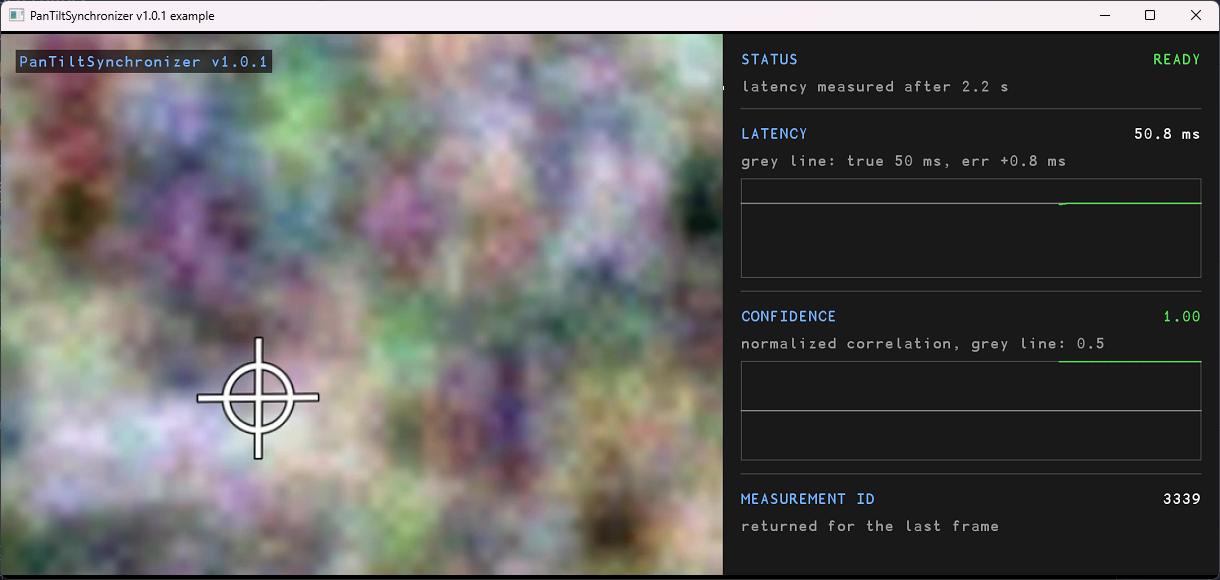
The files in example/:
main.cpp- the use of the library: the measurement thread and the frame loop.Common.h- the test data (true values and camera turn) and the drawing of the panel.
The test video is static/test.mp4. It is read with VSourceFile, and the window is shown with SimpleUI.
Test data. static/test.mp4 is 640×480 pixels, 30 frames per second and 20 s long, and it plays in a loop. A camera turns over a textured scene with a white cross in the middle. Frame k is at time t = k / 30 s and shows the camera turned by cameraTurn(t) (in Common.h). The camera pans and tilts all the time; in some segments the picture also turns about its center, which the measurements do not report. The library name and version are shown at the top left of the video. The measurements give the pan and the tilt of the same turn at 400 Hz, 50 ms ahead of the video, with an ID that counts up from 0.
Run. From the project root:
./build/bin/PanTiltSynchronizerExample
The video is shown as high as the panel next to it. The window opens at 800×600 and fits the picture in it: drag its edge or maximize it to make it bigger. ESC or closing the window stops the example.
Table 8 - Example panel.
| Section | Line | Meaning |
|---|---|---|
| STATUS | value | Status of the synchronizer (see PanTiltSynchronizerStatus enum) and, below it, what it means. READY also shows how long it took. |
| LATENCY | value | The measured latency (getLatency(…)), and below it the true 50 ms and the difference. |
| chart | The measured latency over the last 20 s (green) and the true latency (grey). | |
| CONFIDENCE | value | The confidence of the latency, 0 to 1. Green at 0.5 or more. |
| chart | The confidence over the last 20 s (green) and 0.5 (grey). | |
| MEASUREMENT ID | value | The ID returned by getMeasurementId(…) for the last frame. |
A typical run is READY after about 2 s, with a confidence of about 0.98 or more. The measurements are timed from the first frame, and the video is paced by its file reader and slowed by the drawing of the window: the frames reach the library later than their time, by about 10 to 25 ms in our runs, depending most on the first frames while the window opens. The latency measured is the one between the arrivals, so it is that much more than the 50 ms the panel compares against. When a frame comes late, for example while the window is dragged, the video stays behind by that much. At the end the result is printed, for example after 15 s:
status:     READY
latency:    57.866 ms (true 50)
confidence: 0.998372
The parts of main.cpp that use the library are shown below.
1. Create the synchronizer.
rapidpixel::PanTiltSynchronizer synchronizer;
2. Measurement thread: add each measurement. Each measurement is added with addMeasurement(…), with its own ID.
uint64_t id = 0;
float pan = 0.0f;                           // from the angle source, degrees
float tilt = 0.0f;
synchronizer.addMeasurement(id++, pan, tilt);
3. Frame loop: add the frame and read the result.
rapidpixel::Frame frame;                     // the frame that was just read
synchronizer.addFrame(frame);

const rapidpixel::PanTiltSynchronizerStatus status = synchronizer.getStatus();
float latencyMs = 0.0f;
float confidence = 0.0f;
if (synchronizer.getLatency(latencyMs, confidence))
{
    std::cout << "latency " << latencyMs << " ms, confidence " << confidence << std::endl;
}
uint64_t measurementId = 0;
if (synchronizer.getMeasurementId(measurementId))
{
    std::cout << "measurement ID " << measurementId << std::endl;
}
std::cout << "READY: " << (status == rapidpixel::PanTiltSynchronizerStatus::READY) << std::endl;
Test application
The test application in test/ is the Example with the true values set by the user. It plays the video of the example, static/test.mp4, and feeds generated Pan/Tilt measurements. It has three modes: the window mode with sliders, and the auto mode and the API mode without a window.
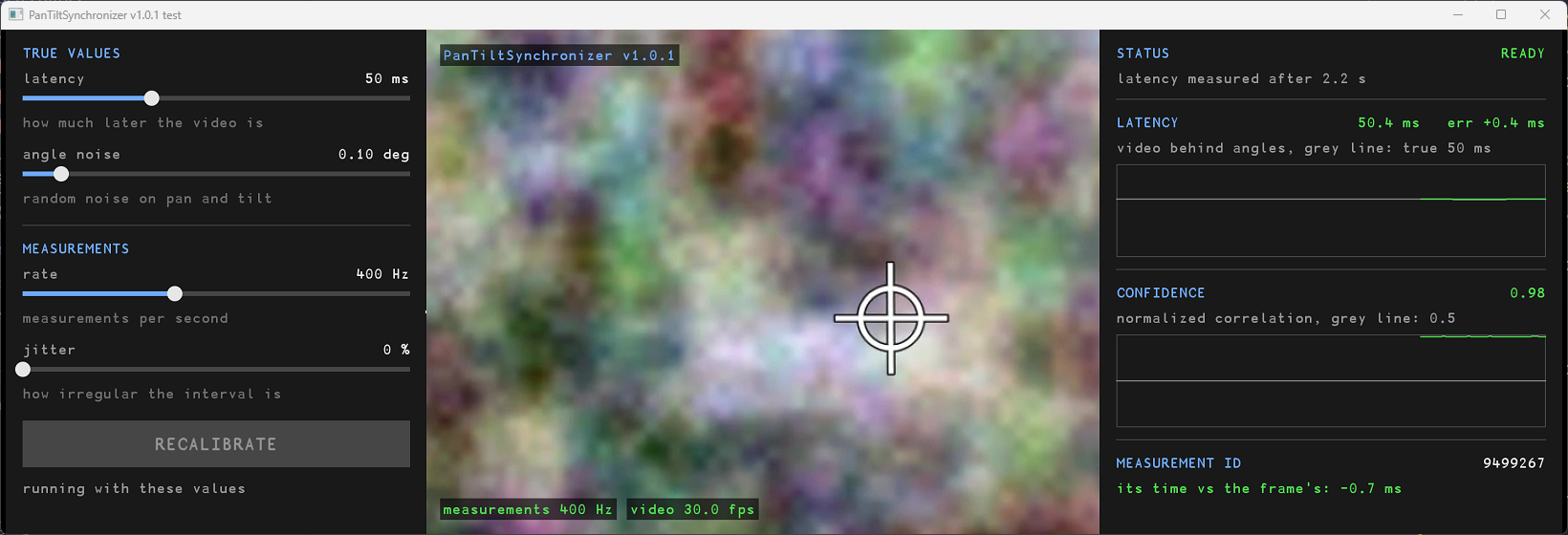
The generator, in Common.h:
- gives the pan and the tilt of the video’s turn (
cameraTurn(t), see Example), the latency set ahead of the video. The pan is reported 178° off, wrapped to [−180, 180), so it crosses from 180° to −180° and back all the time; - adds random noise to every angle. The noise starts from the same seed on every run;
- gives each measurement the time of the video it describes, in microseconds, as its ID. The time of the video that the returned ID describes, minus the time of the last frame, is the error of the returned ID;
- follows the video’s timeline: the time each frame comes at, smoothed over about 20 frames. One late frame moves the timeline a little only, and if the video file reader goes on from a late frame, the timeline follows within a second.
Window mode
Run it from the project root:
./build/bin/PanTiltSynchronizerTest
The window has three parts: the settings panel with the sliders (left), the video (middle) and the result panel (right). The canvas is wide: maximize the window to see it well.
- Drag a slider, or click on its track, to set a value.
- Press START, or Enter: the values go to the generator, the synchronizer is created, and the measurements start.
- To try other values while it runs, move the sliders: a value that differs from the one in use turns yellow, and the button turns into a green RECALIBRATE. Press it, or Enter: the new values go to the generator and the test calls recalibrate(), so the synchronizer keeps its buffered data and measures again (see recalibrate method). The status shows how many times it was recalibrated.
- ESC or closing the window stops the test and prints the result.
Table 9 - Test settings.
| Slider | Range | Default | Meaning |
|---|---|---|---|
| latency | 0 to 150 ms | 50 ms | How much later the video is than the measurements. |
| angle noise | 0 to 1.00° | 0.10° | Standard deviation of the random noise on every angle. |
| rate | 10 to 1000 Hz | 400 Hz | Measurements per second. |
| jitter | 0 to 90 % | 0 % | How irregular the time between two measurements is: each one is longer or shorter at random by up to this share. |
Table 10 - Result panel.
| Section | Meaning |
|---|---|
| STATUS | Status of the synchronizer, and how many times it was recalibrated. |
| LATENCY | The measured latency and its difference from the value set. Chart: the measured latency over the last 20 s (green) and the value set (grey). |
| CONFIDENCE | The confidence of the latency. Chart: the confidence over the last 20 s (green) and 0.5 (grey). |
| MEASUREMENT ID | The ID returned for the last frame, and the time of the video it describes minus the time of the frame. Green within 10 ms. |
On the video, the bottom line shows the measurement rate and the frame rate of the last second, and how many frames came late.
Auto mode
With --auto the test runs without a window, so it can run in CI:
./build/bin/PanTiltSynchronizerTest --auto
It runs the scenarios of Table 11 one after the other, each with a new synchronizer. It prints each new status as it happens, and each second after READY the latency, the confidence and the ID error. It then runs 10 s more after READY and checks the result over the last 3 s:
- READY within 30 s;
- the latency, averaged, is within 10 ms of the value set;
- the confidence, averaged, is at least 0.5;
- the time of the video that the returned ID describes is within 10 ms of the time of the frame, plus half the longest time between two measurements over the checked time (the nearest measurement can be that far; the sleeps of the generator can make it longer than the rate set), plus the spread of the frame offsets over the checked time (the ID is picked by the arrival of the frame, so a frame added earlier or later than the others moves it by as much).
It also prints, without checking it, how far off the video’s timeline the frames reached the library on average, the latency between the arrivals of the two streams that follows from it, and the latency error against that. The test returns 0 if all scenarios passed, 1 if not.
Table 11 - Auto mode scenarios.
| Scenario | Latency | Angle noise | Rate | Jitter |
|---|---|---|---|---|
| 1. example values | 50 ms | 0.1° | 400 Hz | 0 % |
| 2. 90 ms | 90 ms | 0.1° | 400 Hz | 0 % |
| 3. 20 ms | 20 ms | 0.1° | 400 Hz | 0 % |
| 4. 120 ms, more noise | 120 ms | 0.2° | 400 Hz | 0 % |
| 5. no latency | 0 ms | 0.1° | 400 Hz | 0 % |
| 6. 100 Hz | 50 ms | 0.1° | 100 Hz | 0 % |
| 7. 30 Hz, irregular | 70 ms | 0.1° | 30 Hz | 50 % |
| 8. 10 Hz | 40 ms | 0.1° | 10 Hz | 0 % |
The output of one scenario, and the summary:
=== Scenario 1 / 8: example values
  true values: latency 50 ms, noise 0.1 deg, rate 400 Hz, jitter 0 %
    0.0 s  COLLECTING
    0.2 s  CALIBRATING
    2.2 s  READY
    2.2 s  latency   50.6 ms   confidence 0.98   ID error   -0.5 ms
    3.0 s  latency   50.6 ms   confidence 0.98   ID error   -1.2 ms
    ...
   12.0 s  latency   50.6 ms   confidence 0.98   ID error   +0.7 ms
  check READY                        after 2.2 s                        PASS
  check latency within 10 ms         50.6 ms (true 50, err +0.6)        PASS
  info  frames +0.0 ms off the video's timeline on average: latency between arrivals 50.0 ms, err +0.6 ms
  check confidence at least 0.5      0.98                               PASS
  check ID error within 14 ms        largest 2.7 ms                     PASS
  => PASS
...
=== Summary
  PASS  1. example values
  PASS  2. 90 ms
  PASS  3. 20 ms
  PASS  4. 120 ms, more noise
  PASS  5. no latency
  PASS  6. 100 Hz
  PASS  7. 30 Hz, irregular
  PASS  8. 10 Hz
  8 of 8 passed
On the test video the latency is measured within 2 ms of the value set in all the scenarios, on Windows and on Linux. The numbers differ slightly from run to run, because the video and the measurements are paced by the clock.
API mode
With --api the test needs no video and opens no window. It calls the library with invalid and random data and checks the status, the latency and the ID after each call: frames with a wrong size, geometry, data pointer or pixel format; measurements with angles that are not finite or far outside [−180, 360); the ID nearest to the frame; IDs returned as given, also 0 and the largest value; the state after reset() and recalibrate(); 20 000 random calls; and, for one second, calls of every method from four threads at the same time. It prints one line for each group of checks and returns 0 if all passed, 1 if not. If the whole project is built with a sanitizer (for example -DCMAKE_CXX_FLAGS=-fsanitize=address,undefined), the test also finds memory errors and undefined behavior in these calls.
./build/bin/PanTiltSynchronizerTest --api
refused frames and accepted frames: OK
measurements: OK
state after each call: OK
random calls: OK
calls from several threads: OK
All API tests passed