
PtzEmulator C++ library
v1.0.1
Table of contents
- Overview
- Versions
- Library files
- PtzEmulator class description
- PtzEmulator class declaration
- getVersion method
- openLens method
- openCamera method
- openPanTilt method
- openVSource method
- initLens method
- initCamera method
- initPanTilt method
- initVSource method
- closeLens method
- closeCamera method
- closePanTilt method
- closeVSource method
- isLensOpen method
- isCameraOpen method
- isPanTiltOpen method
- isVSourceOpen method
- isLensConnected method
- isCameraConnected method
- isPanTiltConnected method
- setParam method
- getParam method
- getParams method
- executeCommand method
- addVideoFrame method
- getFrame method
- decodeAndExecuteCommand method
- Data structures
- Build and connect to your project
- Application
Overview
The PtzEmulator C++ library is a software emulator, which emulates camera, lens, pan-tilt control and video source. The PtzEmulator library inherits from the Lens, Camera, VSource and PanTilt interfaces, so the library has a set of four different interfaces to control camera, lens, and pan-tilt and to get video frames. It depends on libraries: Lens (provides interface and data structures to control lenses), PanTilt (provides interface and data structures to control pan-tilt units), Camera (provides interface and data structures to control cameras), VSource (provides interface and data structures for video capture), Frame (video frame class) and SimpleUI (drawing on the video frames and the window of the application). The PtzEmulator library provides a simple interface to be integrated into any C++ projects. The library repository (folder) is provided as source code. The libraries listed above (and the libraries they depend on) are separate repositories, see Build and connect to your project; the standalone application depends on X11 for Linux. It is developed with the C++17 standard and is compatible with Linux and Windows.
PtzEmulator is general-purpose software: it is not tied to any sector or application, and the developer of a program decides what the program does with it.
Versions
Table 1 - Library versions.
| Version | Release date | What’s new |
|---|---|---|
| 1.0.0 | 27.10.2026 | - First version of the library. |
| 1.0.1 | 02.11.2026 | - Public header without internal headers: the state of the emulator is moved to the implementation class (PtzEmulator::Impl). |
Library files
The library is provided as source code only. Users are given a set of files in the form of a CMake project (repository). The libraries which PtzEmulator depends on are separate repositories (see Build and connect to your project). The repository structure is outlined below:
CMakeLists.txt --------------------- Main CMake file of the library.
README.md -------------------------- Documentation of the library.
src -------------------------------- Folder with source code of the library.
    CMakeLists.txt ----------------- CMake file of the library.
    PtzEmulator.cpp ---------------- Source code file of the library.
    PtzEmulator.h ------------------ Header file which includes PtzEmulator class declaration.
    PtzEmulatorVersion.h ----------- Header file which includes version of the library.
    PtzEmulatorVersion.h.in -------- CMake service file to generate version file.
    impl --------------------------- Folder with implementation classes of the library.
        CameraIsp.cpp -------------- C++ implementation file of the image processing (brightness).
        CameraIsp.h ---------------- Header file of the image processing class.
        CameraOsd.cpp -------------- C++ implementation file of the on-screen display.
        CameraOsd.h ---------------- Header file of the on-screen display class.
        LensAxis.cpp --------------- C++ implementation file of the zoom and focus axis.
        LensAxis.h ----------------- Header file of the zoom and focus axis class.
        PanTiltAxis.cpp ------------ C++ implementation file of the pan and tilt axis (kinematics).
        PanTiltAxis.h -------------- Header file of the pan and tilt axis class.
        PtzEmulatorImpl.h ---------- Header file of the implementation class (state of the emulator).
        SphereRenderer.cpp --------- C++ implementation file of the virtual sphere renderer.
        SphereRenderer.h ----------- Header file of the virtual sphere renderer class.
app -------------------------------- Folder with standalone application.
    CMakeLists.txt ----------------- CMake file for standalone application.
    main.cpp ----------------------- Source code file of standalone application.
static ----------------------------- Folder with images of the documentation.
    ptzemulator_web_logo.png ------- Logo of the library.
    ptzemulator_web_screenshot.png - Screenshot of the application.
PtzEmulator class description
PtzEmulator class declaration
PtzEmulator class declared in PtzEmulator.h file. The PtzEmulator class includes Lens, Camera, VSource and PanTilt interfaces. Class declaration:
class PtzEmulator : public rapidpixel::Camera,
                    public rapidpixel::Lens,
                    public rapidpixel::VSource,
                    public rapidpixel::PanTilt
{
public:

    /// Class constructor.
    PtzEmulator();

    /// Class destructor.
    ~PtzEmulator() override;

    /// Copy constructor is deleted: the class owns mutexes.
    PtzEmulator(const PtzEmulator&) = delete;

    /// Move constructor is deleted: the class owns mutexes.
    PtzEmulator(PtzEmulator&&) = delete;

    /// Copy assignment operator is deleted: the class owns mutexes.
    PtzEmulator& operator= (const PtzEmulator&) = delete;

    /// Move assignment operator is deleted: the class owns mutexes.
    PtzEmulator& operator= (PtzEmulator&&) = delete;

    /// Get class version.
    static std::string getVersion();

    // #######################################
    // CAMERA CONTROL INTERFACE
    // #######################################

    /// Open camera. Always returns TRUE.
    bool openCamera(std::string initString) override;

    /// Init camera by parameters structure. Does nothing.
    bool initCamera(rapidpixel::CameraParams& params) override;

    /// Close camera. Does nothing.
    void closeCamera() override;

    /// Get camera open status. Always TRUE.
    bool isCameraOpen() override;

    /// Get camera connection status. Always TRUE.
    bool isCameraConnected() override;

    /// Set the camera parameter: brightness, brightness mode and display mode.
    bool setParam(rapidpixel::CameraParam id, float value) override;

    /// Get the camera parameter.
    float getParam(rapidpixel::CameraParam id) override;

    /// Get the camera params.
    void getParams(rapidpixel::CameraParams& params) override;

    /// Execute camera command. Not supported.
    bool executeCommand(rapidpixel::CameraCommand id) override;

    // #######################################
    // LENS CONTROL INTERFACE
    // #######################################

    /// Open lens. Always returns TRUE.
    bool openLens(std::string initString) override;

    /// Init lens by parameters structure: hardware limits, maximum hardware
    /// speeds and FOV table.
    bool initLens(rapidpixel::LensParams& params) override;

    /// Close lens. Does nothing.
    void closeLens() override;

    /// Get lens open status. Always TRUE.
    bool isLensOpen() override;

    /// Get lens connection status. Always TRUE.
    bool isLensConnected() override;

    /// Set lens parameter: zoom and focus.
    bool setParam(rapidpixel::LensParam id, float value) override;

    /// Get lens parameter.
    float getParam(rapidpixel::LensParam id) override;

    /// Get the lens parameters.
    void getParams(rapidpixel::LensParams& params) override;

    /// Execute lens command: zoom and focus.
    bool executeCommand(rapidpixel::LensCommand id, float arg = 0) override;

    /// Add video frame for auto focus purposes. Not supported.
    void addVideoFrame(rapidpixel::Frame& frame) override;

    // #######################################
    // VIDEO SOURCE INTERFACE
    // #######################################

    /// Open video source. Always returns TRUE.
    bool openVSource(std::string& initString) override;

    /// Init video source by parameters structure: frame width, height and FPS.
    bool initVSource(rapidpixel::VSourceParams& params) override;

    /// Get video source open status. Always TRUE.
    bool isVSourceOpen() override;

    /// Close video source. Does nothing.
    void closeVSource() override;

    /// Get new video frame (YUV24) with the emulated scene.
    bool getFrame(rapidpixel::Frame& frame, int32_t timeoutMsec = 0) override;

    /// Set video source parameter. Not supported.
    bool setParam(rapidpixel::VSourceParam id, float value) override;

    /// Get video source parameter. Not supported.
    float getParam(rapidpixel::VSourceParam id) override;

    /// Get video source parameters. Not supported.
    void getParams(rapidpixel::VSourceParams& params) override;

    /// Execute video source command. Not supported.
    bool executeCommand(rapidpixel::VSourceCommand id) override;

    // #######################################
    // PANTILT CONTROL INTERFACE
    // #######################################

    /// Open pan-tilt device. Always returns TRUE.
    bool openPanTilt(std::string initString) override;

    /// Init pan-tilt device with parameters structure. Does nothing.
    bool initPanTilt(rapidpixel::PanTiltParams& params) override;

    /// Close pan-tilt controller connection. Does nothing.
    void closePanTilt() override;

    /// Get pan-tilt controller open status. Always TRUE.
    bool isPanTiltOpen() override;

    /// Get pan-tilt controller connection status. Always TRUE.
    bool isPanTiltConnected() override;

    /// Set pan-tilt parameter: angles, motor speeds, maximum rotation speed.
    bool setParam(rapidpixel::PanTiltParam id, float value) override;

    /// Get pan-tilt parameter.
    float getParam(rapidpixel::PanTiltParam id) override;

    /// Get the pan-tilt parameters.
    void getParams(rapidpixel::PanTiltParams& params) override;

    /// Execute a pan-tilt command.
    bool executeCommand(rapidpixel::PanTiltCommand id,
                        float arg1 = 0.0f, float arg2 = 0.0f) override;

    // #######################################
    // CAMERA & LENS & VIDEO SOURCE & PAN-TILT CONTROL INTERFACE
    // #######################################

    /// Decode and execute command.
    bool decodeAndExecuteCommand(uint8_t* data, int size) override;

    // #######################################
    // SPHERE KINEMATICS
    // #######################################

    /// Set sphere kinematics parameter: radius, mass, motor torques.
    bool setParam(rapidpixel::PtzEmulatorParam id, float value);

    /// Get sphere kinematics parameter.
    float getParam(rapidpixel::PtzEmulatorParam id);
};
getVersion method
The getVersion() returns string of PtzEmulator class version. Method declaration:
static std::string getVersion();
Method can be used without PtzEmulator class instance:
std::cout << "PtzEmulator class version: " << rapidpixel::PtzEmulator::getVersion();
Console output:
PtzEmulator class version: 1.0.0
openLens method
The openLens(…) does nothing: the emulator doesn’t need to be opened (Lens interface). Method declaration:
bool openLens(std::string initString) override;
| Parameter | Value |
|---|---|
| initString | Initialization string. Not used. |
Returns: always TRUE.
openCamera method
The openCamera(…) does nothing: the emulator doesn’t need to be opened (Camera interface). Method declaration:
bool openCamera(std::string initString) override;
| Parameter | Value |
|---|---|
| initString | Initialization string. Not used. |
Returns: always TRUE.
openPanTilt method
The openPanTilt(…) does nothing: the emulator doesn’t need to be opened (PanTilt interface). Method declaration:
bool openPanTilt(std::string initString) override;
| Parameter | Value |
|---|---|
| initString | Initialization string. Not used. |
Returns: always TRUE.
openVSource method
The openVSource(…) does nothing: the emulator doesn’t need to be opened (VSource interface). Method declaration:
bool openVSource(std::string& initString) override;
| Parameter | Value |
|---|---|
| initString | Initialization string. Not used. |
Returns: always TRUE.
initLens method
The initLens(…) sets the hardware parameters of the emulated lens: hardware limits of zoom and focus (zoomHwWideLimit, zoomHwTeleLimit, focusHwNearLimit, focusHwFarLimit: 0 - 65535, the limits of an axis can’t be equal), maximum hardware speeds (zoomHwMaxSpeed, focusHwMaxSpeed: 1 - 65535) and the FOV table fovPoints (xFovDeg and yFovDeg from 0.01 to less than 360 degrees; empty table - default 32x lens, horizontal FOV from 64 to 2 degrees). Points with the same hardware zoom position make a step of FOV at it: the point given first is used below the position, the point given last at and above it. Other parameters are ignored. If a value is not valid nothing is changed. The method is thread-safe. Method declaration:
bool initLens(rapidpixel::LensParams& params) override;
| Parameter | Value |
|---|---|
| params | LensParams class object. |
Returns: TRUE if the parameters are set or FALSE if a value is not valid or the memory for the FOV table can’t be allocated (nothing is changed then).
initCamera method
The initCamera(…) does nothing: the size of the video frames is set by initVSource(…). Method declaration:
bool initCamera(rapidpixel::CameraParams& params) override;
| Parameter | Value |
|---|---|
| params | CameraParams class object. Not used. |
Returns: always TRUE.
initPanTilt method
The initPanTilt(…) does nothing. Method declaration:
bool initPanTilt(rapidpixel::PanTiltParams& params) override;
| Parameter | Value |
|---|---|
| params | PanTiltParams class object. Not used. |
Returns: always TRUE.
initVSource method
The initVSource(…) sets the size of the video frames: width and height fields (1 - 16384 pixels), and the frame rate: fps field (0 - a new frame on each call of getFrame(…), 0.01 - 1000 - frames per second). The frames start again from the first one. Other parameters are ignored. If a value is not valid nothing is changed. The method is thread-safe. Method declaration:
bool initVSource(rapidpixel::VSourceParams& params) override;
| Parameter | Value |
|---|---|
| params | VSourceParams class object. |
Returns: TRUE if the parameters are set or FALSE if the width, the height or the FPS is not valid.
closeLens method
The closeLens() does nothing. Method declaration:
void closeLens() override;
closeCamera method
The closeCamera() does nothing. Method declaration:
void closeCamera() override;
closePanTilt method
The closePanTilt() does nothing. Method declaration:
void closePanTilt() override;
closeVSource method
The closeVSource() does nothing. Method declaration:
void closeVSource() override;
isLensOpen method
The isLensOpen() returns the open status. The emulator is always open. Method declaration:
bool isLensOpen() override;
Returns: always TRUE.
isCameraOpen method
The isCameraOpen() returns the open status. The emulator is always open. Method declaration:
bool isCameraOpen() override;
Returns: always TRUE.
isPanTiltOpen method
The isPanTiltOpen() returns the open status. The emulator is always open. Method declaration:
bool isPanTiltOpen() override;
Returns: always TRUE.
isVSourceOpen method
The isVSourceOpen() returns the open status. The emulator is always open. Method declaration:
bool isVSourceOpen() override;
Returns: always TRUE.
isLensConnected method
The isLensConnected() returns the connection status. The emulator is always connected. Method declaration:
bool isLensConnected() override;
Returns: always TRUE.
isCameraConnected method
The isCameraConnected() returns the connection status. The emulator is always connected. Method declaration:
bool isCameraConnected() override;
Returns: always TRUE.
isPanTiltConnected method
The isPanTiltConnected() returns the connection status. The emulator is always connected. Method declaration:
bool isPanTiltConnected() override;
Returns: always TRUE.
setParam method
The setParam(…) is overloaded method. The method sets Camera, Lens, PanTilt or VSource parameter value or sphere kinematics parameter value. The supported parameters and their values are described in the tables of the parameters: LensParam, CameraParam, PanTiltParam, VSourceParam and PtzEmulatorParam. The method is thread-safe. Method declaration:
bool setParam(rapidpixel::CameraParam id, float value) override;
bool setParam(rapidpixel::LensParam id, float value) override;
bool setParam(rapidpixel::PanTiltParam id, float value) override;
bool setParam(rapidpixel::VSourceParam id, float value) override;
bool setParam(rapidpixel::PtzEmulatorParam id, float value);
| Parameter | Description |
|---|---|
| id | Lens parameter ID according to LensParam, camera parameter ID according to CameraParam, pan-tilt parameter ID according to PanTiltParam, video source parameter ID according to VSourceParam or sphere kinematics parameter ID according to PtzEmulatorParam. |
| value | Parameter value. Valid values depend on parameter ID (see the tables of the parameters). NaN and infinity are rejected. Values of the lens parameters, except ZOOM_POS and FOCUS_POS, out of range 0 - 65535 are rejected. |
Returns: TRUE if the parameter is set or FALSE if the parameter is not supported or the value is not valid.
getParam method
The getParam(…) is overloaded method. The method returns Camera, Lens, PanTilt or VSource parameter value or sphere kinematics parameter value. The supported parameters are described in the tables of the parameters: LensParam, CameraParam, PanTiltParam, VSourceParam and PtzEmulatorParam. The method is thread-safe. Method declaration:
float getParam(rapidpixel::CameraParam id) override;
float getParam(rapidpixel::LensParam id) override;
float getParam(rapidpixel::PanTiltParam id) override;
float getParam(rapidpixel::VSourceParam id) override;
float getParam(rapidpixel::PtzEmulatorParam id);
| Parameter | Description |
|---|---|
| id | Lens parameter ID according to LensParam, camera parameter ID according to CameraParam, pan-tilt parameter ID according to PanTiltParam, video source parameter ID according to VSourceParam or sphere kinematics parameter ID according to PtzEmulatorParam. |
Returns: parameter value or -1 if the parameter is not supported.
getParams method
The getParams(…) is overloaded method. The method fills Camera, Lens, PanTilt or VSource parameters structure with the current values, the filled fields are listed in Table 2. The field has the value of the parameter with the same name (see the tables of the parameters: LensParam, CameraParam and PanTiltParam). The method is thread-safe. If the memory for the FOV table (fovPoints) can’t be allocated, the method throws std::bad_alloc and the LensParams structure is not changed. Method declaration:
void getParams(rapidpixel::CameraParams& params) override;
void getParams(rapidpixel::LensParams& params) override;
void getParams(rapidpixel::PanTiltParams& params) override;
void getParams(rapidpixel::VSourceParams& params) override;
| Parameter | Description |
|---|---|
| params | Reference to CameraParams, LensParams, PanTiltParams or VSourceParams class object. |
Table 2 - Filled fields of the parameters structures.
| Structure | Filled fields |
|---|---|
| CameraParams | width, height, brightnessMode, brightness and displayMode. Other fields are not changed. |
| LensParams | zoomPos, zoomHwPos, zoomSpeed, zoomHwSpeed, zoomHwMaxSpeed, zoomHwTeleLimit, zoomHwWideLimit, focusPos, focusHwPos, focusSpeed, focusHwSpeed, focusHwMaxSpeed, focusHwFarLimit, focusHwNearLimit, focusFactor (always -1), xFovDeg, yFovDeg and fovPoints. Other fields are not changed. |
| PanTiltParams | panAngle, tiltAngle, panMotorSpeed, tiltMotorSpeed and custom1 (maximum rotation speed). Other fields are not changed. |
| VSourceParams | Not supported by PtzEmulator library. The structure is not changed. |
executeCommand method
The executeCommand(…) is overloaded method. The method executes Camera, Lens, PanTilt or VSource command. The supported commands and their arguments are described in the tables of the commands: LensCommand, CameraCommand, PanTiltCommand and VSourceCommand. The pan-tilt commands rotate the sphere: the motors accelerate and brake it with the angular accelerations of their torques (see PtzEmulatorParam enum) up to the maximum rotation speed (PanTiltParam::CUSTOM_1). The method doesn’t wait for the end of the movement. The method is thread-safe. Method declaration:
bool executeCommand(rapidpixel::CameraCommand id) override;
bool executeCommand(rapidpixel::LensCommand id, float arg = 0) override;
bool executeCommand(rapidpixel::PanTiltCommand id,
                    float arg1 = 0.0f, float arg2 = 0.0f) override;
bool executeCommand(rapidpixel::VSourceCommand id) override;
| Parameter | Description |
|---|---|
| id | Lens command ID according to LensCommand, camera command ID according to CameraCommand, pan-tilt command ID according to PanTiltCommand or video source command ID according to VSourceCommand. |
| arg | Only for lens interface. Lens command argument. Valid values depend on command ID (see LensCommand enum). |
| arg1 | Only for pan-tilt interface. PanTilt command argument. Valid values depend on command ID (see PanTiltCommand enum). |
| arg2 | Only for pan-tilt interface. PanTilt command argument. Valid values depend on command ID (see PanTiltCommand enum). |
Returns: TRUE if the command is executed or FALSE if the command is not supported or an argument is NaN or infinity.
addVideoFrame method
The addVideoFrame(…) is intended to pass video frames for autofocus. It does nothing: autofocus is not supported. Method declaration:
void addVideoFrame(rapidpixel::Frame& frame) override;
| Parameter | Description |
|---|---|
| frame | Frame class object. Not used. |
getFrame method
The getFrame(…) renders a new video frame: YUV24 frame of the size set by initVSource(…) (default 1280x720) with the circles of the virtual sphere in the camera direction. The image depends on pan and tilt angles, zoom (FOV), focus (blur), brightness and display mode. Two circles near the home direction move back and forth along sinusoidal trajectories: the white one horizontally (±22 degrees in 8 s), the cyan one vertically (±10 degrees in 6 s). If the FPS is set by initVSource(…), the frames come with this rate: the method waits for the time of the next frame, the frames which are not taken in time are dropped. With FPS 0 (default) the method renders a new frame on each call without waiting. The method is thread-safe. Method declaration:
bool getFrame(rapidpixel::Frame& frame, int32_t timeoutMsec = 0) override;
| Parameter | Description |
|---|---|
| frame | Frame class object to put the new frame to. |
| timeoutMsec | Timeout to wait for a new frame (milliseconds), used if the FPS is set: -1 - wait until the next frame, 0 - only check if a new frame is due, > 0 - wait up to the timeout. |
Returns: TRUE if a new frame is rendered or FALSE if there is no new frame within the timeout or the memory for the frame can’t be allocated. The frame is not changed if the method returns FALSE.
decodeAndExecuteCommand method
The decodeAndExecuteCommand(…) decodes and executes the command encoded by the encodeCommand(…) or encodeSetParamCommand(…) methods of Lens, Camera, PanTilt and VSource interface classes. The data is decoded as a lens command, then as a camera command, then as a pan-tilt command and then as a video source command: the encoded data includes the version of the library of the interface, so the decoders of the other interfaces reject it. The decoded command is executed by executeCommand(…) or setParam(…). The method is thread-safe. Method declaration:
bool decodeAndExecuteCommand(uint8_t* data, int size) override;
| Parameter | Description |
|---|---|
| data | Pointer to command data. nullptr is rejected. The data must be valid for size bytes: the method can’t check it. |
| size | Size of command data, bytes: 11 bytes for SET_PARAM commands of all interfaces and for lens COMMAND, 7 bytes for camera and video source COMMAND, 15 bytes for pan-tilt COMMAND. Data of another size is rejected. |
Returns: TRUE if the command is decoded and executed or FALSE if data is nullptr, the data is not a valid command or the command is rejected by setParam(…) or executeCommand(…).
Data structures
LensCommand enum
Enum declaration:
enum class LensCommand
{
    /// Move zoom tele (in). Command doesn't have arguments. User should be able
    /// to set zoom movement speed via lens parameters.
    ZOOM_TELE = 1,
    /// Move zoom wide (out). Command doesn't have arguments. User should be
    /// able to set zoom movement speed via lens parameters.
    ZOOM_WIDE,
    /// Move zoom to position. Lens controller should have zoom range from
    /// 0 (full wide) to 65535 (full tele) regardless of the hardware value of
    /// the zoom position. If the minimum and maximum zoom position limits are
    /// set by the user in the lens parameters, the range of the hardware zoom
    /// position must be scaled to the user space 0-65535 range.
    /// Command argument: zoom position 0-65535. User should be able to set zoom
    /// movement speed via lens parameters.
    ZOOM_TO_POS,
    /// Stop zoom moving including stop zoom to position command.
    ZOOM_STOP,
    /// Move focus far. Command doesn't have arguments. User should be able to
    /// set focus movement speed via lens parameters.
    FOCUS_FAR,
    /// Move focus near. Command doesn't have arguments. User should be able to
    /// set focus movement speed via lens parameters.
    FOCUS_NEAR,
    /// Move focus to position. Lens controller should have focus range from 0
    /// (full near) to 65535 (full far) regardless of the hardware value of the
    /// focus position. If the minimum and maximum focus position limits are
    /// set by the user in the lens parameters, the range of the hardware focus
    /// position must be scaled to the 0-65535 user space range.
    /// Command argument: focus position 0-65535. User should be able to set
    /// focus movement speed via lens parameters.
    FOCUS_TO_POS,
    /// Stop focus moving including stop focus to position command.
    FOCUS_STOP,
    /// Move iris open. Command doesn't have arguments. User should be able to
    /// set iris movement speed via lens parameters.
    IRIS_OPEN,
    /// Move iris close. Command doesn't have arguments. User should be able
    /// to set iris movement speed via lens parameters.
    IRIS_CLOSE,
    /// Move iris to position. Lens controller should have iris range
    /// from 0 (full close) to 65535 (full far) regardless of the hardware
    /// value of the iris position. If the minimum and maximum iris position
    /// limits are set by the user in the lens parameters, the range of the
    /// hardware iris position must be scaled to the 0-65535 user space range.
    /// Command argument: iris position 0-65535. User should be able to set
    /// iris movement speed via lens parameters.
    IRIS_TO_POS,
    /// Stop iris moving including stop iris to position command.
    /// Command doesn't have arguments.
    IRIS_STOP,
    /// Start autofocus.  Command doesn't have arguments.
    AF_START,
    /// Stop autofocus.  Command doesn't have arguments.
    AF_STOP,
    /// Restart lens controller.
    RESTART,
    /// Detect zoom and focus hardware ranges. After execution this command the
    /// lens controller should automatically set at least parameters
    /// (LensParam enum): ZOOM_HW_TELE_LIMIT, ZOOM_HW_WIDE_LIMIT,
    /// FOCUS_HW_FAR_LIMIT and FOCUS_HW_NEAR_LIMIT.
    DETECT_HW_RANGES
};
Table 3 - Lens commands description.
| Command | Description |
|---|---|
| ZOOM_TELE | Move zoom to the tele limit with the zoom hardware speed. Command doesn’t have arguments. |
| ZOOM_WIDE | Move zoom to the wide limit with the zoom hardware speed. Command doesn’t have arguments. |
| ZOOM_TO_POS | Move zoom to the position with the zoom hardware speed. Argument: position 0 (wide limit) - 65535 (tele limit), values out of the range are limited. |
| ZOOM_STOP | Stop zoom moving. |
| FOCUS_FAR | Move focus to the far limit with the focus hardware speed. Command doesn’t have arguments. |
| FOCUS_NEAR | Move focus to the near limit with the focus hardware speed. Command doesn’t have arguments. |
| FOCUS_TO_POS | Move focus to the position with the focus hardware speed. Argument: position 0 (near limit) - 65535 (far limit), values out of the range are limited. |
| FOCUS_STOP | Stop focus moving. |
| IRIS_OPEN | Not supported by PtzEmulator library. |
| IRIS_CLOSE | Not supported by PtzEmulator library. |
| IRIS_TO_POS | Not supported by PtzEmulator library. |
| IRIS_STOP | Not supported by PtzEmulator library. |
| AF_START | Not supported by PtzEmulator library. |
| AF_STOP | Not supported by PtzEmulator library. |
| RESTART | Not supported by PtzEmulator library. |
| DETECT_HW_RANGES | Not supported by PtzEmulator library. |
CameraCommand enum
Enum declaration:
enum class CameraCommand
{
    /// Restart camera controller.
    RESTART = 1,
    /// Do NUC.
    NUC,
    /// Apply settings.
    APPLY_PARAMS,
    /// Save params.
    SAVE_PARAMS,
    /// Menu on.
    MENU_ON,
    /// Menu off.
    MENU_OFF,
    /// Menu set.
    MENU_SET,
    /// Menu up.
    MENU_UP,
    /// Menu down.
    MENU_DOWN,
    /// Menu left.
    MENU_LEFT,
    /// Menu right.
    MENU_RIGHT,
    /// Freeze image.
    FREEZE,
    /// Disable freeze. The last value of the enum.
    DEFREEZE
};
Table 4 - Camera commands description.
| Command | Description |
|---|---|
| RESTART | Not supported by PtzEmulator library. |
| NUC | Not supported by PtzEmulator library. |
| APPLY_PARAMS | Not supported by PtzEmulator library. |
| SAVE_PARAMS | Not supported by PtzEmulator library. |
| MENU_ON | Not supported by PtzEmulator library. |
| MENU_OFF | Not supported by PtzEmulator library. |
| MENU_SET | Not supported by PtzEmulator library. |
| MENU_UP | Not supported by PtzEmulator library. |
| MENU_DOWN | Not supported by PtzEmulator library. |
| MENU_LEFT | Not supported by PtzEmulator library. |
| MENU_RIGHT | Not supported by PtzEmulator library. |
| FREEZE | Not supported by PtzEmulator library. |
| DEFREEZE | Not supported by PtzEmulator library. |
PanTiltCommand enum
Enum declaration:
enum class PanTiltCommand
{
    /// Restart Pan-Tilt device.
    RESTART = 1,
    /// Stop Pan-Tilt device, block all running commands and left device in
    /// current state.
    STOP,
    /// Go to given pan motor position.
    GO_TO_PAN_POSITION,
    /// Go to given tilt motor position.
    GO_TO_TILT_POSITION,
    /// Go to given pan and tilt motor position.
    GO_TO_PAN_TILT_POSITION,
    /// Go to given pan angle.
    GO_TO_PAN_ANGLE,
    /// Go to given tilt angle.
    GO_TO_TILT_ANGLE,
    /// Go to given pan and tilt angle.
    GO_TO_PAN_TILT_ANGLE,
    /// Go to home position.
    GO_TO_HOME,
    /// Move pan motor with given speed. Positive speed is clockwise,
    /// negative is counterclockwise.
    MOVE_PAN,
    /// Move tilt motor with given speed. Positive speed is clockwise,
    /// negative is counterclockwise.
    MOVE_TILT,
    /// Move pan and tilt motors with given speed. Positive speed is
    /// clockwise, negative is counterclockwise. First argument is pan speed,
    /// second is tilt speed.
    MOVE_PAN_TILT
};
Table 5 - PanTilt commands description.
| Command | Description |
|---|---|
| RESTART | Emergency stop: the sphere stops at once without braking, the target angles and the motor speeds are reset. The angles don’t change. Command doesn’t have arguments. |
| STOP | The motors brake the sphere until it stops, the target angles and the motor speeds are reset. Command doesn’t have arguments. |
| GO_TO_PAN_POSITION | Not supported by PtzEmulator library. |
| GO_TO_TILT_POSITION | Not supported by PtzEmulator library. |
| GO_TO_PAN_TILT_POSITION | Not supported by PtzEmulator library. |
| GO_TO_PAN_ANGLE | Rotate pan to the angle by the shortest way and stop at it. Argument: pan angle (degrees), it is reduced to range [-180, 180). The pan motor speed is reset. |
| GO_TO_TILT_ANGLE | Rotate tilt to the angle and stop at it. Argument: tilt angle -90 - 90 degrees, values out of the range are limited. The tilt motor speed is reset. |
| GO_TO_PAN_TILT_ANGLE | Rotate pan and tilt as GO_TO_PAN_ANGLE and GO_TO_TILT_ANGLE. First argument is pan angle, second is tilt angle. |
| GO_TO_HOME | Rotate pan and tilt to 0 degrees. Command doesn’t have arguments. |
| MOVE_PAN | Rotate pan with the motor speed. Argument: -100 - 100 % of the maximum rotation speed, values out of the range are limited. Positive speed turns the camera right. Pan rotates without limits. The target pan angle is reset. |
| MOVE_TILT | Rotate tilt with the motor speed. Argument: -100 - 100 % of the maximum rotation speed, values out of the range are limited. Positive speed turns the camera up. Tilt brakes to stop at -90 and 90 degrees. The target tilt angle is reset. |
| MOVE_PAN_TILT | Rotate pan and tilt as MOVE_PAN and MOVE_TILT. First argument is pan speed, second is tilt speed. |
VSourceCommand enum
Enum declaration:
enum class VSourceCommand
{
    /// Restart.
    RESTART = 1
};
Table 6 - Video source commands description.
| Command | Description |
|---|---|
| RESTART | Not supported by PtzEmulator library. |
LensParam enum
Enum declaration:
enum class LensParam
{
    /// Zoom position. Setting a parameter is equivalent to the command
    /// ZOOM_TO_POS. Lens controller should have zoom range from 0 (full wide)
    /// to 65535 (full tele) regardless of the hardware value of the zoom
    /// position. If the minimum and maximum zoom position limits are set by
    /// the user in the lens parameters, the range of the hardware zoom position
    /// must be scaled to the user space 0-65535 range. Parameter value: zoom
    /// position 0-65535. User should be able to set zoom movement speed via
    /// lens parameters.
    ZOOM_POS = 1,
    /// Hardware zoom position. Parameter value depends on implementation and
    /// lens hardware.
    ZOOM_HW_POS,
    /// Focus position. Setting a parameter is equivalent to the command
    /// FOCUS_TO_POS. Lens controller should have focus range from 0 (full near)
    /// to 65535 (full far) regardless of the hardware value of the focus
    /// position. If the minimum and maximum focus position limits are set by
    /// the user in the lens parameters, the range of the hardware focus
    /// position must be scaled to the 0-65535 user space range. Parameter
    /// value: focus position 0-65535. User should be able to set focus movement
    /// speed via lens parameters.
    FOCUS_POS,
    /// Hardware focus position. Parameter value depends on implementation and
    /// lens hardware.
    FOCUS_HW_POS,
    /// Iris position. Setting a parameter is equivalent to the command
    /// IRIS_TO_POS. Lens controller should have iris range from 0 (full close)
    /// to 65535 (full far) regardless of the hardware value of the iris
    /// position. If the minimum and maximum iris position limits are set by the
    /// user in the lens parameters, the range of the hardware iris position
    /// must be scaled to the 0-65535 user space range. Parameter value: iris
    /// position 0-65535. User should be able to set iris movement speed via
    /// lens parameters.
    IRIS_POS,
    /// Hardware iris position. Parameter value depends on particular lens
    /// controller.
    IRIS_HW_POS,
    /// Focus mode. Parameter value depends on implementation but it is
    /// recommended to keep default values: 0 - Manual focus control,
    /// 1 - Auto focus control.
    FOCUS_MODE,
    /// Filter mode. Parameter value depends on implementation but it is
    /// recommended to keep default values: 0 - Filter on, 1 - Filter off.
    FILTER_MODE,
    /// Autofocus ROI top-left corner horizontal position in pixels.
    /// Autofocus ROI is rectangle.
    AF_ROI_X0,
    /// Autofocus ROI top-left corner vertical position in pixels.
    /// Autofocus ROI is rectangle.
    AF_ROI_Y0,
    /// Autofocus ROI bottom-right corner horizontal position in pixels.
    /// Autofocus ROI is rectangle.
    AF_ROI_X1,
    /// Autofocus ROI bottom-right corner vertical position in pixels.
    /// Autofocus ROI is rectangle.
    AF_ROI_Y1,
    /// Zoom speed. Lens controller should have zoom speed range from 0 to
    /// 100% of max hardware zoom speed (parameter ZOOM_HW_MAX_SPEED).
    /// If the user sets a new parameter value of the ZOOM_HW_SPEED the
    /// parameter ZOOM_SPEED must be updated automatically. Formula for
    /// calculating speed:
    /// ZOOM_SPEED = ( ZOOM_HW_SPEED / ZOOM_HW_MAX_SPEED) * 100.
    ZOOM_SPEED,
    /// Zoom hardware speed. Value depends on implementation and lens hardware.
    /// The value of the parameters must be <= ZOOM_HW_MAX_SPEED parameter.
    /// If the user sets a new parameter value of the ZOOM_SPEED parameter
    /// the parameter ZOOM_HW_SPEED must be updated automatically.
    /// Formula for calculating hardware speed:
    /// ZOOM_HW_SPEED = ( ZOOM_SPEED / 100 ) * ZOOM_HW_MAX_SPEED.
    ZOOM_HW_SPEED,
    /// Maximum zoom hardware speed. Value depends on implementation.
    /// If user sets new ZOOM_HW_MAX_SPEED value the parameters
    /// ZOOM_SPEED must be updated automatically. If new value of
    /// ZOOM_HW_MAX_SPEED parameter will be less than ZOOM_HW_SPEED the
    /// parameter ZOOM_HW_SPEED must be reduced automatically.
    ZOOM_HW_MAX_SPEED,
    /// Focus speed. Lens controller should have focus speed range from 0 to
    /// 100% of max hardware focus speed (parameter FOCUS_HW_MAX_SPEED).
    /// If the user sets a new parameter value of the FOCUS_HW_SPEED the
    /// parameter FOCUS_SPEED must be updated automatically. Formula for
    /// calculating speed: FOCUS_SPEED = ( FOCUS_HW_SPEED / FOCUS_HW_MAX_SPEED)
    /// * 100.
    FOCUS_SPEED,
    /// Focus hardware speed. Value depends on on implementation and lens
    /// hardware. The value of the parameters must be <= FOCUS_HW_MAX_SPEED
    /// parameter. If the user sets a new parameter value of the FOCUS_SPEED
    /// parameter the parameter FOCUS_HW_SPEED must be updated automatically.
    /// Formula for calculating hardware speed:
    /// FOCUS_HW_SPEED = ( FOCUS_SPEED / 100 ) * FOCUS_HW_MAX_SPEED.
    FOCUS_HW_SPEED,
    /// Maximum focus hardware speed. Value depends on implementation.
    /// If user sets new FOCUS_HW_MAX_SPEED value the parameters
    /// FOCUS_SPEED and FOCUS_HW_SPEED must be updated by lens controller
    /// automatically. If new value of FOCUS_HW_MAX_SPEED parameter will be
    /// less than FOCUS_HW_SPEED the parameter FOCUS_HW_SPEED must be reduced
    /// automatically.
    FOCUS_HW_MAX_SPEED,
    /// Iris speed. Lens controller should have iris speed range from 0 to 100%
    /// of max hardware iris speed (parameter IRIS_HW_MAX_SPEED). If the user
    /// sets a new parameter value of the IRIS_HW_SPEED the parameter IRIS_SPEED
    /// must be updated automatically. Formula for calculating speed:
    /// IRIS_SPEED = ( IRIS_HW_SPEED / IRIS_HW_MAX_SPEED) * 100.
    IRIS_SPEED,
    /// Iris hardware speed. Value depends on implementation and lens hardware.
    /// The value of the parameters must be <= IRIS_HW_MAX_SPEED parameter.
    /// If the user sets a new parameter value of the IRIS_SPEED parameter
    /// the parameter IRIS_HW_SPEED must be updated automatically. Formula
    /// for calculating hardware speed:
    /// IRIS_HW_SPEED = ( IRIS_SPEED / 100 ) * IRIS_HW_MAX_SPEED.
    IRIS_HW_SPEED,
    /// Maximum iris hardware speed. Value depends on implementation. If user
    /// sets new IRIS_HW_MAX_SPEED value the parameters IRIS_SPEED and
    /// IRIS_HW_SPEED must be updated automatically. If new value of
    /// IRIS_HW_MAX_SPEED parameter will be less than IRIS_HW_SPEED the
    /// parameter IRIS_HW_SPEED must be reduced automatically.
    IRIS_HW_MAX_SPEED,
    /// Zoom hardware tele limit. Value depends on implementation and lens
    /// hardware. Lens controller should control zoom position. Lens controller
    /// should stop zoom moving if hardware zoom position will be out of limits.
    ZOOM_HW_TELE_LIMIT,
    /// Zoom hardware wide limit. Value depends on implementation and lens
    /// hardware. Lens controller should control zoom position. Lens controller
    /// should stop zoom moving if hardware zoom position will be out of limits.
    ZOOM_HW_WIDE_LIMIT,
    /// Focus hardware far limit. Value depends on on implementation and lens
    /// hardware. Lens controller should control focus position. Lens controller
    /// should stop focus moving if hardware focus position will be out of
    /// limits.
    FOCUS_HW_FAR_LIMIT,
    /// Focus hardware near limit. Value depends on implementation and lens
    /// hardware. Lens controller should control focus position. Lens controller
    /// should stop focus moving if hardware focus position will be out of
    /// limits.
    FOCUS_HW_NEAR_LIMIT,
    /// Iris hardware open limit. Value depends on implementation and lens
    /// hardware. Lens controller should control iris position. Lens controller
    /// should stop iris moving if hardware iris position will be out of limits.
    IRIS_HW_OPEN_LIMIT,
    /// Iris hardware close limit. Value depends on implementation and lens
    /// hardware. Lens controller should control iris position. Lens controller
    /// should stop iris moving if hardware iris position will be out of limits.
    IRIS_HW_CLOSE_LIMIT,
    /// Focus factor if it was calculated. If not calculated must be -1.
    /// Value depends on particular lens controller.
    FOCUS_FACTOR,
    /// Lens connection status. Connection status shows if the lens controller
    /// has data exchange with lens equipment. For example, if lens has serial
    /// port lens controller connects to serial port
    /// (opens serial port file in OS) but lens can be not active (no power).
    /// In this case connection status shows that lens controller doesn't have
    /// data exchange with lens equipment (the value is 0). If lens controller
    /// has data exchange with lens equipment the value is 1. If lens controller
    /// not initialize the connection status always FALSE. Value: 0 - not
    /// connected. 1 - connected.
    IS_CONNECTED,
    /// Focus hardware speed in autofocus mode. Value depends on implementation
    /// and lens hardware.
    FOCUS_HW_AF_SPEED,
    /// Threshold for changes of focus factor to start refocus. Value:
    /// 0% - no check, 100% - changing x2.
    FOCUS_FACTOR_THRESHOLD,
    /// Timeout for automatic refocus in seconds. Value:
    /// 0 - no automatic refocus, 100000 - maximum value.
    REFOCUS_TIMEOUT_SEC,
    /// Flag about active autofocus algorithm. Value: 0 - autofocus not working,
    /// 1 - working.
    AF_IS_ACTIVE,
    /// Iris mode. Value depends on implementation but it is recommended to keep
    /// default values: 0 - manual iris control, 1 - auto iris control.
    IRIS_MODE,
    /// ROI width (pixels) for autofocus algorithm when lens controller detects
    /// ROI position automatically. Value: from 8 to (video frame width -
    /// AUTO_AF_ROI_BORDER * 2).
    AUTO_AF_ROI_WIDTH,
    /// ROI height (pixels) for autofocus algorithm when lens controller
    /// detects ROI position automatically. Value: from 8 to
    /// (video frame height - AUTO_AF_ROI_BORDER * 2).
    AUTO_AF_ROI_HEIGHT,
    /// Video frame border size (along vertical and horizontal axes).
    /// Value: border size from 0 to video frame
    /// min(video frame width/height) / 2.
    AUTO_AF_ROI_BORDER,
    /// AF ROI mode (write/read). Value: 0 - Manual position, 1 - Auto position.
    AF_ROI_MODE,
    /// Lens extender mode. Value depends on implementation but it is
    /// recommended to keep default values: 0 - no extender, 1 - x2 extender.
    EXTENDER_MODE,
    /// Lens stabilization mode. Value depends on implementation but it is
    /// recommended to keep default values: 0 - no stabilization,
    /// 1 - stabilization.
    STABILIZER_MODE,
    /// Autofocus range. Value depends on implementation.
    AF_RANGE,
    /// Current horizontal Field of view, degree. Field of view calculated by
    /// lens controller according to initial params or by reading directly from
    /// lens hardware.
    X_FOV_DEG,
    /// Current vertical Field of view, degree. Field of view calculated by lens
    /// controller according to initial params or by reading directly from lens
    /// hardware.
    Y_FOV_DEG,
    /// Logging mode. Values: 0 - Disable, 1 - Only file, 2 - Only terminal,
    /// 3 - File and terminal.
    LOG_MODE,
    /// Lens temperature, degree.
    TEMPERATURE,
    /// Lens controller initialization status. Open status shows if the lens
    /// controller initialized or not but doesn't show if lens controller has
    /// communication with lens equipment. For example, if lens has serial port
    /// lens controller connects to serial port (opens serial port file in OS)
    /// but lens can be not active (no power). In this case open status just
    /// shows that lens controller has opened serial port. Values: 0 - not open
    /// (not initialized), 1 - open (initialized).
    IS_OPEN,
    /// Lens type. Value depends on implementation. Type allows to lens
    /// initialize necessary parameters for particular lens hardware.
    TYPE,
    /// Lens custom parameter. Value depends on particular lens controller.
    /// Custom parameters used when particular lens equipment has specific
    /// unusual parameter.
    CUSTOM_1,
    /// Lens custom parameter. Value depends on particular lens controller.
    /// Custom parameters used when particular lens equipment has specific
    /// unusual parameter.
    CUSTOM_2,
    /// Lens custom parameter. Value depends on particular lens controller.
    /// Custom parameters used when particular lens equipment has specific
    /// unusual parameter.
    CUSTOM_3
};
Table 7 - Lens params description.
| Parameter | Access | Description |
|---|---|---|
| ZOOM_POS | read / write | Zoom position 0 (wide limit) - 65535 (tele limit). Setting the parameter is equivalent to the command ZOOM_TO_POS: values out of the range are limited. Reading returns the current position. |
| ZOOM_HW_POS | read / write | Hardware zoom position 0 - 65535. Setting moves zoom to the position, limited by the hardware limits, with the zoom hardware speed. Reading returns the current hardware position. |
| FOCUS_POS | read / write | Focus position 0 (near limit) - 65535 (far limit). Setting the parameter is equivalent to the command FOCUS_TO_POS: values out of the range are limited. Reading returns the current position. |
| FOCUS_HW_POS | read / write | Hardware focus position 0 - 65535. Setting moves focus to the position, limited by the hardware limits, with the focus hardware speed. Reading returns the current hardware position. The circles are sharp at the hardware position 40000 (default) and are blurred more the farther focus is from it. |
| IRIS_POS | read / write | Not supported by PtzEmulator library. |
| IRIS_HW_POS | read / write | Not supported by PtzEmulator library. |
| FOCUS_MODE | read / write | Not supported by PtzEmulator library. |
| FILTER_MODE | read / write | Not supported by PtzEmulator library. |
| AF_ROI_X0 | read / write | Not supported by PtzEmulator library. |
| AF_ROI_Y0 | read / write | Not supported by PtzEmulator library. |
| AF_ROI_X1 | read / write | Not supported by PtzEmulator library. |
| AF_ROI_Y1 | read / write | Not supported by PtzEmulator library. |
| ZOOM_SPEED | read / write | Zoom speed 0 - 100 % of ZOOM_HW_MAX_SPEED (default 50), larger values are limited. Setting the parameter sets ZOOM_HW_SPEED too. |
| ZOOM_HW_SPEED | read / write | Hardware zoom speed: percents of the hardware range 0 - 65535 per second (default 50), limited by ZOOM_HW_MAX_SPEED. Setting the parameter sets ZOOM_SPEED too. |
| ZOOM_HW_MAX_SPEED | read / write | Maximum hardware zoom speed 1 - 65535 (default 100). A larger ZOOM_HW_SPEED is reduced, ZOOM_SPEED is updated. |
| FOCUS_SPEED | read / write | Focus speed 0 - 100 % of FOCUS_HW_MAX_SPEED (default 50), larger values are limited. Setting the parameter sets FOCUS_HW_SPEED too. |
| FOCUS_HW_SPEED | read / write | Hardware focus speed: percents of the hardware range 0 - 65535 per second (default 50), limited by FOCUS_HW_MAX_SPEED. Setting the parameter sets FOCUS_SPEED too. |
| FOCUS_HW_MAX_SPEED | read / write | Maximum hardware focus speed 1 - 65535 (default 100). A larger FOCUS_HW_SPEED is reduced, FOCUS_SPEED is updated. |
| IRIS_SPEED | read / write | Not supported by PtzEmulator library. |
| IRIS_HW_SPEED | read / write | Not supported by PtzEmulator library. |
| IRIS_HW_MAX_SPEED | read / write | Not supported by PtzEmulator library. |
| ZOOM_HW_TELE_LIMIT | read / write | Hardware position of zoom position 65535: 0 - 65535 (default 65535), not equal to ZOOM_HW_WIDE_LIMIT. Zoom doesn’t move after the change, only its target is limited. |
| ZOOM_HW_WIDE_LIMIT | read / write | Hardware position of zoom position 0: 0 - 65535 (default 0), not equal to ZOOM_HW_TELE_LIMIT. Zoom doesn’t move after the change, only its target is limited. |
| FOCUS_HW_FAR_LIMIT | read / write | Hardware position of focus position 65535: 0 - 65535 (default 65535), not equal to FOCUS_HW_NEAR_LIMIT. Focus doesn’t move after the change, only its target is limited. |
| FOCUS_HW_NEAR_LIMIT | read / write | Hardware position of focus position 0: 0 - 65535 (default 0), not equal to FOCUS_HW_FAR_LIMIT. Focus doesn’t move after the change, only its target is limited. |
| IRIS_HW_OPEN_LIMIT | read only | Not supported by PtzEmulator library. |
| IRIS_HW_CLOSE_LIMIT | read only | Not supported by PtzEmulator library. |
| FOCUS_FACTOR | read only | Always -1: the focus factor is not calculated. |
| IS_CONNECTED | read only | Not supported by PtzEmulator library. The method returns -1. Use isLensConnected() to get the connection status. |
| FOCUS_HW_AF_SPEED | read / write | Not supported by PtzEmulator library. |
| FOCUS_FACTOR_THRESHOLD | read / write | Not supported by PtzEmulator library. |
| REFOCUS_TIMEOUT_SEC | read / write | Not supported by PtzEmulator library. |
| AF_IS_ACTIVE | read only | Not supported by PtzEmulator library. |
| IRIS_MODE | read / write | Not supported by PtzEmulator library. |
| AUTO_AF_ROI_WIDTH | read / write | Not supported by PtzEmulator library. |
| AUTO_AF_ROI_HEIGHT | read / write | Not supported by PtzEmulator library. |
| AUTO_AF_ROI_BORDER | read / write | Not supported by PtzEmulator library. |
| AF_ROI_MODE | read / write | Not supported by PtzEmulator library. |
| EXTENDER_MODE | read / write | Not supported by PtzEmulator library. |
| STABILIZER_MODE | read / write | Not supported by PtzEmulator library. |
| AF_RANGE | read / write | Not supported by PtzEmulator library. |
| X_FOV_DEG | read only | Horizontal FOV (degrees) at the current hardware zoom position by the FOV table fovPoints of initLens(…). Without the table it is the default lens: 64 (hardware position 0) - 2 (hardware position 65535) degrees. |
| Y_FOV_DEG | read only | Vertical FOV (degrees), as X_FOV_DEG. Default lens: 36 - 1.125 degrees. |
| LOG_MODE | read / write | Not supported by PtzEmulator library. |
| TEMPERATURE | read only | Not supported by PtzEmulator library. |
| IS_OPEN | read only | Not supported by PtzEmulator library. The method returns -1. Use isLensOpen() to get the open status. |
| TYPE | read / write | Not supported by PtzEmulator library. |
| CUSTOM_1 | read / write | Not supported by PtzEmulator library. |
| CUSTOM_2 | read / write | Not supported by PtzEmulator library. |
| CUSTOM_3 | read / write | Not supported by PtzEmulator library. |
CameraParam enum
Enum declaration:
enum class CameraParam
{
    /// Video frame width. Value from 0 to 16384.
    WIDTH = 1,
    /// Video frame height Value from 0 to 16384.
    HEIGHT,
    /// Display menu mode. Value depends on implementation but it is recommended
    /// to keep default values: 0 - Off. 1 - On.
    DISPLAY_MODE,
    /// Video output type. Value depends on implementation.
    VIDEO_OUTPUT,
    /// Logging mode. Values: 0 - Disable, 1 - Only file,
    /// 2 - Only terminal (console), 3 - File and terminal.
    LOG_MODE,
    /// Exposure mode. Value depends on implementation but it is recommended to
    /// keep default values: 0 - Manual, 1 - Auto (default),
    /// 2 - Shutter priority, 3 - Aperture priority.
    EXPOSURE_MODE,
    /// Exposure time of the camera sensor. The exposure time is limited by the
    /// frame interval. Camera controller should interpret the values as 100 us
    /// units, where the value 1 stands for 1/10000th of a second, 10000 for
    /// 1 second and 100000 for 10 seconds.
    EXPOSURE_TIME,
    /// White balance mode. Value depends on implementation but it is
    /// recommended to keep default values: 0 - Manual, 1 - Auto.
    WHITE_BALANCE_MODE,
    /// White balance area. Value depends on implementation.
    WHITE_BALANCE_AREA,
    /// White dynamic range mode. Value depends on implementation but it is
    /// recommended to keep default values: 0 - Off, 1 - On.
    WIDE_DYNAMIC_RANGE_MODE,
    /// Image stabilization mode. Value depends on implementation but it is
    /// recommended to keep default values: 0 - Off, 1 - On.
    STABILIZATION_MODE,
    /// ISO sensitivity. Value depends on implementation.
    ISO_SENSITIVITY,
    /// Scene mode. Value depends on implementation.
    SCENE_MODE,
    /// FPS.
    FPS,
    /// Brightness mode. Value depends on implementation but it is recommended
    /// to keep default values: 0 - Manual, 1 - Auto.
    BRIGHTNESS_MODE,
    /// Brightness. Value 0 - 100%.
    BRIGHTNESS,
    /// Contrast. Value 1 - 100%.
    CONTRAST,
    /// Gain mode. Value depends on implementation but it is recommended to keep
    /// default values: 0 - Manual, 1 - Auto.
    GAIN_MODE,
    /// Gain. Value 1 - 100%.
    GAIN,
    /// Sharpening mode. Value depends on implementation but it is recommended
    /// to keep default values: 0 - Manual, 1 - Auto.
    SHARPENING_MODE,
    /// Sharpening. Value 1 - 100%.
    SHARPENING,
    /// Palette. Value depends on implementation but it is recommended to keep
    /// default values for thermal cameras: 0 - White hot, 1 - Black hot.
    PALETTE,
    /// Analog gain control mode. Value depends on implementation but it is
    /// recommended to keep default values: 0 - Manual, 1 - Auto.
    AGC_MODE,
    /// Shutter mode. Value depends on implementation but it is recommended to
    /// keep default values: 0 - Manual, 1 - Auto.
    SHUTTER_MODE,
    /// Shutter position. 0 (full close) - 65535 (full open).
    SHUTTER_POSITION,
    /// Shutter speed. Value: 0 - 100%.
    SHUTTER_SPEED,
    /// Digital zoom mode. Value depends on implementation but it is recommended
    /// to keep default values: 0 - Off, 1 - On.
    DIGITAL_ZOOM_MODE,
    /// Digital zoom. Value 1.0 (x1) - 20.0 (x20).
    DIGITAL_ZOOM,
    /// Exposure compensation mode. Value depends on implementation but it is
    /// recommended to keep default values: 0 - Off, 1 - On.
    EXPOSURE_COMPENSATION_MODE,
    /// Exposure compensation position. Value depends on particular camera
    /// controller.
    EXPOSURE_COMPENSATION_POSITION,
    /// Defog mode. Value depends on implementation but it is recommended to
    /// keep default values: 0 - Off, 1 - On.
    DEFOG_MODE,
    /// Dehaze mode. Value depends on implementation but it is recommended to
    /// keep default values: 0 - Off, 1 - On.
    DEHAZE_MODE,
    /// Noise reduction mode. Value depends on implementation but it is
    /// recommended to keep default values: 0 - Off, 1 - 2D, 3 - 3D.
    NOISE_REDUCTION_MODE,
    /// Black and white filter mode. Value depends on implementation but it is
    /// recommended to keep default values: 0 - Off, 1 - On.
    BLACK_WHITE_FILTER_MODE,
    /// Filter mode. Value depends on implementation.
    FILTER_MODE,
    /// NUC mode for thermal cameras. Value depends on implementation but it is
    /// recommended to keep default values: 0 - Manual, 1 - Auto.
    NUC_MODE,
    /// Auto NUC interval for thermal cameras. Value in milliseconds
    /// from 0 (Off) to 100000.
    AUTO_NUC_INTERVAL_MSEC,
    /// Image flip mode. Value depends on implementation but it is recommended
    /// to keep default values: 0 - Off, 1 - Horizontal, 2 - Vertical,
    /// 3 - Horizontal and vertical.
    IMAGE_FLIP,
    /// DDE mode. Value depends on implementation but it is recommended to keep
    /// default values: 0 - Off, 1 - On.
    DDE_MODE,
    /// DDE level. Value depends on implementation.
    DDE_LEVEL,
    /// ROI top-left horizontal position, pixels.
    ROI_X0,
    /// ROI top-left vertical position, pixels.
    ROI_Y0,
    /// ROI bottom-right horizontal position, pixels.
    ROI_X1,
    /// ROI bottom-right vertical position, pixels.
    ROI_Y1,
    /// Camera temperature, degree.
    TEMPERATURE,
    /// ALC gate. Value depends on implementation.
    ALC_GATE,
    /// Sensor sensitivity. Value depends on implementation.
    SENSITIVITY,
    /// Changing mode (day / night). Value depends on implementation.
    CHANGING_MODE,
    /// Changing level (day / night). Value depends on implementation.
    CHANGING_LEVEL,
    /// Chroma level. Values: 0 - 100%.
    CHROMA_LEVEL,
    /// Details, enhancement. Values: 0 - 100%.
    DETAIL,
    /// Camera settings profile. Value depends on implementation.
    PROFILE,
    /// Connection status (read only). Shows if we have response from camera.
    /// Value: 0 - not connected, 1 - connected.
    IS_CONNECTED,
    /// Open status (read only):
    /// 1 - camera control port open, 0 - not open.
    IS_OPEN,
    /// Camera type. Value depends on implementation.
    TYPE,
    /// Camera custom param. Value depends on implementation.
    CUSTOM_1,
    /// Camera custom param. Value depends on implementation.
    CUSTOM_2,
    /// Camera custom param. Value depends on implementation. The last value
    /// of the enum.
    CUSTOM_3
};
Table 8 - Camera params description.
| Parameter | Access | Description |
|---|---|---|
| WIDTH | read only | Frame width (pixels), it is set by initVSource(…). Default: 1280. |
| HEIGHT | read only | Frame height (pixels), it is set by initVSource(…). Default: 720. |
| DISPLAY_MODE | read / write | Display mode. Values: 0 - Off (default). 1 - On: zoom, focus, pan and tilt are shown in the top left corner of the frame. |
| VIDEO_OUTPUT | read / write | Not supported by PtzEmulator library. |
| LOG_MODE | read / write | Not supported by PtzEmulator library. |
| EXPOSURE_MODE | read / write | Not supported by PtzEmulator library. |
| EXPOSURE_TIME | read / write | Not supported by PtzEmulator library. |
| WHITE_BALANCE_MODE | read / write | Not supported by PtzEmulator library. |
| WHITE_BALANCE_AREA | read / write | Not supported by PtzEmulator library. |
| WIDE_DYNAMIC_RANGE_MODE | read / write | Not supported by PtzEmulator library. |
| STABILIZATION_MODE | read / write | Not supported by PtzEmulator library. |
| ISO_SENSITIVITY | read / write | Not supported by PtzEmulator library. |
| SCENE_MODE | read / write | Not supported by PtzEmulator library. |
| FPS | read / write | Not supported by PtzEmulator library. |
| BRIGHTNESS_MODE | read / write | Brightness mode. Values: 0 - Off: the brightness isn’t applied to the frame. 1 - On (default): the brightness is applied to the frame. Other values are rejected. |
| BRIGHTNESS | read / write | Brightness 0 - 100 % (default 50), values out of the range are limited, the value is rounded. 50 doesn’t change the frame, smaller values make it darker, larger values make it brighter. The brightness is applied if BRIGHTNESS_MODE is 1. |
| CONTRAST | read / write | Not supported by PtzEmulator library. |
| GAIN_MODE | read / write | Not supported by PtzEmulator library. |
| GAIN | read / write | Not supported by PtzEmulator library. |
| SHARPENING_MODE | read / write | Not supported by PtzEmulator library. |
| SHARPENING | read / write | Not supported by PtzEmulator library. |
| PALETTE | read / write | Not supported by PtzEmulator library. |
| AGC_MODE | read / write | Not supported by PtzEmulator library. |
| SHUTTER_MODE | read / write | Not supported by PtzEmulator library. |
| SHUTTER_POSITION | read / write | Not supported by PtzEmulator library. |
| SHUTTER_SPEED | read / write | Not supported by PtzEmulator library. |
| DIGITAL_ZOOM_MODE | read / write | Not supported by PtzEmulator library. |
| DIGITAL_ZOOM | read / write | Not supported by PtzEmulator library. |
| EXPOSURE_COMPENSATION_MODE | read / write | Not supported by PtzEmulator library. |
| EXPOSURE_COMPENSATION_POSITION | read / write | Not supported by PtzEmulator library. |
| DEFOG_MODE | read / write | Not supported by PtzEmulator library. |
| DEHAZE_MODE | read / write | Not supported by PtzEmulator library. |
| NOISE_REDUCTION_MODE | read / write | Not supported by PtzEmulator library. |
| BLACK_WHITE_FILTER_MODE | read / write | Not supported by PtzEmulator library. |
| FILTER_MODE | read / write | Not supported by PtzEmulator library. |
| NUC_MODE | read / write | Not supported by PtzEmulator library. |
| AUTO_NUC_INTERVAL_MSEC | read / write | Not supported by PtzEmulator library. |
| IMAGE_FLIP | read / write | Not supported by PtzEmulator library. |
| DDE_MODE | read / write | Not supported by PtzEmulator library. |
| DDE_LEVEL | read / write | Not supported by PtzEmulator library. |
| ROI_X0 | read / write | Not supported by PtzEmulator library. |
| ROI_Y0 | read / write | Not supported by PtzEmulator library. |
| ROI_X1 | read / write | Not supported by PtzEmulator library. |
| ROI_Y1 | read / write | Not supported by PtzEmulator library. |
| TEMPERATURE | read only | Not supported by PtzEmulator library. |
| ALC_GATE | read / write | Not supported by PtzEmulator library. |
| SENSITIVITY | read / write | Not supported by PtzEmulator library. |
| CHANGING_MODE | read / write | Not supported by PtzEmulator library. |
| CHANGING_LEVEL | read / write | Not supported by PtzEmulator library. |
| CHROMA_LEVEL | read / write | Not supported by PtzEmulator library. |
| DETAIL | read / write | Not supported by PtzEmulator library. |
| PROFILE | read / write | Not supported by PtzEmulator library. |
| IS_CONNECTED | read only | Not supported by PtzEmulator library. The method returns -1. Use isCameraConnected() to get the connection status. |
| IS_OPEN | read only | Not supported by PtzEmulator library. The method returns -1. Use isCameraOpen() to get the open status. |
| TYPE | read / write | Not supported by PtzEmulator library. |
| CUSTOM_1 | read / write | Not supported by PtzEmulator library. |
| CUSTOM_2 | read / write | Not supported by PtzEmulator library. |
| CUSTOM_3 | read / write | Not supported by PtzEmulator library. |
PanTiltParam enum
Enum declaration:
enum class PanTiltParam
{
    /// Pan motor position for encoder. Range: 0 - 65535.
    PAN_MOTOR_POSITION = 1,
    /// Tilt motor position for encoder. Range: 0 - 65535.
    TILT_MOTOR_POSITION,
    /// Pan angle. Range: -180.0 to 180.0.
    PAN_ANGLE,
    /// Tilt angle. Range: -180.0 to 180.0.
    TILT_ANGLE,
    /// Pan motor speed. Positive speed is clockwise,
    /// negative is counterclockwise.
    PAN_MOTOR_SPEED,
    /// Tilt motor speed. Positive speed is clockwise,
    /// negative is counterclockwise.
    TILT_MOTOR_SPEED,
    /// Status defining if the pan-tilt device is connected.
    IS_CONNECTED,
    /// Status defining if the pan-tilt device is initialized (open).
    IS_OPEN,
    /// Custom param. Value depends on implementation.
    CUSTOM_1,
    /// Custom param. Value depends on implementation.
    CUSTOM_2,
    /// Custom param. Value depends on implementation.
    CUSTOM_3
};
Table 9 - PanTilt params description.
| Parameter | Access | Description |
|---|---|---|
| PAN_MOTOR_POSITION | read / write | Not supported by PtzEmulator library. |
| TILT_MOTOR_POSITION | read / write | Not supported by PtzEmulator library. |
| PAN_ANGLE | read / write | Pan angle in range [-180, 180) degrees. Setting the parameter is equivalent to the command GO_TO_PAN_ANGLE. Reading returns the current angle. |
| TILT_ANGLE | read / write | Tilt angle -90 - 90 degrees. Setting the parameter is equivalent to the command GO_TO_TILT_ANGLE. Reading returns the current angle. |
| PAN_MOTOR_SPEED | read / write | Pan motor speed -100 - 100 % of the maximum rotation speed. Setting the parameter is equivalent to the command MOVE_PAN. Reading returns the speed of the last MOVE command: 0 after GO_TO commands, STOP and RESTART. |
| TILT_MOTOR_SPEED | read / write | Tilt motor speed -100 - 100 % of the maximum rotation speed. Setting the parameter is equivalent to the command MOVE_TILT. Reading returns the speed of the last MOVE command: 0 after GO_TO commands, STOP and RESTART. |
| IS_CONNECTED | read only | Not supported by PtzEmulator library. The method returns -1. Use isPanTiltConnected() to get the connection status. |
| IS_OPEN | read only | Not supported by PtzEmulator library. The method returns -1. Use isPanTiltOpen() to get the open status. |
| CUSTOM_1 | read / write | Maximum rotation speed of the motors (degrees per second), > 0. Default: 90. GO_TO commands rotate with this speed, motor speed 100 % is equal to it. |
| CUSTOM_2 | read / write | Not supported by PtzEmulator library. |
| CUSTOM_3 | read / write | Not supported by PtzEmulator library. |
VSourceParam enum
Enum declaration:
enum class VSourceParam
{
    /// [read/write] Logging mode. Values: 0 - Disable, 1 - Only file,
    /// 2 - Only terminal, 3 - File and terminal.
    LOG_LEVEL = 1,
    /// [read/write] Frame width. User can set frame width before initialization
    /// or after. Some video source classes may set width automatically.
    WIDTH,
    /// [read/write] Frame height. User can set frame height before
    /// initialization or after. Some video source classes may set height
    /// automatically.
    HEIGHT,
    /// [read/write] Gain mode. Value depends on implementation but it is
    /// recommended to keep default values: 0 - Manual control, 1 - Auto.
    GAIN_MODE,
    /// [read/write] Gain value. Value: 0(min for particular video source class)
    /// - 65535(max for particular video source class).
    GAIN,
    /// [read/write] Exposure mode. Value depends on implementation but it is
    /// recommended to keep default values: 0 - Manual control, 1 - Auto.
    EXPOSURE_MODE,
    /// [read/write] Exposure value. Value: 0(min for particular video source
    /// class) - 65535(max for particular video source class).
    EXPOSURE,
    /// [read/write] Focus mode. Value depends on implementation but it is
    /// recommended to keep default values: 0 - Manual control, 1 - Auto.
    FOCUS_MODE,
    /// [read/write] Focus position. Value: 0(full near) - 65535(full far).
    FOCUS_POS,
    /// [read only] Video capture cycle time. **VSource** class sets this value
    /// automatically. This parameter means time interval between two captured
    /// video frame.
    CYCLE_TIME_MKS,
    /// [read/write] FPS. User can set frame FPS before initialization or after.
    /// Some video source classes may set FPS automatically.
    FPS,
    /// [read only] Open flag. 0 - not open, 1 - open.
    IS_OPEN,
    /// [read/write] Region of interest upper left corner x coordinate.
    ROI_X,
    /// [read/write] Region of interest upper left corner y coordinate.
    ROI_Y,
    /// [read/write] Region of interest width.
    ROI_WIDTH,
    /// [read/write] Region of interest height.
    ROI_HEIGHT,
    /// [read/write] Custom parameter. Depends on implementation.
    CUSTOM_1,
    /// [read/write] Custom parameter. Depends on implementation.
    CUSTOM_2,
    /// [read/write] Custom parameter. Depends on implementation.
    CUSTOM_3
};
Table 10 - Video source params description.
| Parameter | Access | Description |
|---|---|---|
| LOG_LEVEL | read / write | Not supported by PtzEmulator library. |
| WIDTH | read / write | Not supported by PtzEmulator library. The frame width is set by initVSource(…), CameraParam::WIDTH returns it. |
| HEIGHT | read / write | Not supported by PtzEmulator library. The frame height is set by initVSource(…), CameraParam::HEIGHT returns it. |
| GAIN_MODE | read / write | Not supported by PtzEmulator library. |
| GAIN | read / write | Not supported by PtzEmulator library. |
| EXPOSURE_MODE | read / write | Not supported by PtzEmulator library. |
| EXPOSURE | read / write | Not supported by PtzEmulator library. |
| FOCUS_MODE | read / write | Not supported by PtzEmulator library. |
| FOCUS_POS | read / write | Not supported by PtzEmulator library. |
| CYCLE_TIME_MKS | read only | Not supported by PtzEmulator library. |
| FPS | read / write | Not supported by PtzEmulator library. The FPS is set by initVSource(…). |
| IS_OPEN | read only | Not supported by PtzEmulator library. The method returns -1. Use isVSourceOpen() to get the open status. |
| ROI_X | read / write | Not supported by PtzEmulator library. |
| ROI_Y | read / write | Not supported by PtzEmulator library. |
| ROI_WIDTH | read / write | Not supported by PtzEmulator library. |
| ROI_HEIGHT | read / write | Not supported by PtzEmulator library. |
| CUSTOM_1 | read / write | Not supported by PtzEmulator library. |
| CUSTOM_2 | read / write | Not supported by PtzEmulator library. |
| CUSTOM_3 | read / write | Not supported by PtzEmulator library. |
PtzEmulatorParam enum
The pan and tilt motors rotate the sphere. The sphere is a thin shell with the moment of inertia 2/3 * mass * radius², the angular acceleration of a motor is its torque divided by the moment of inertia. Enum declaration:
enum class PtzEmulatorParam
{
    /// Sphere radius (meters). Range: > 0. Default: 0.5.
    SPHERE_RADIUS = 1,
    /// Sphere mass (kilograms). Range: > 0. Default: 45.
    SPHERE_MASS,
    /// Torque of the pan motor (newton meters). Range: > 0. Default: 5.
    PAN_MOTOR_TORQUE,
    /// Torque of the tilt motor (newton meters). Range: > 0. Default: 5.
    TILT_MOTOR_TORQUE
};
Table 11 - Sphere kinematics params description.
| Parameter | Access | Description |
|---|---|---|
| SPHERE_RADIUS | read / write | Sphere radius (meters), > 0. Default: 0.5. |
| SPHERE_MASS | read / write | Sphere mass (kilograms), > 0. Default: 45. |
| PAN_MOTOR_TORQUE | read / write | Torque of the pan motor (newton meters), > 0. Default: 5. |
| TILT_MOTOR_TORQUE | read / write | Torque of the tilt motor (newton meters), > 0. Default: 5. |
Build and connect to your project
Build stand alone
The repository does not contain sub-repositories. The libraries PtzEmulator depends on (ConfigReader, Frame, Camera, Lens, PanTilt, VSource and SimpleUI) must be cloned into the same folder as PtzEmulator. The folder structure must be:
<work folder>
    PtzEmulator
    ConfigReader
    Frame
    Camera
    Lens
    PanTilt
    VSource
    SimpleUI
Typical commands to build the library and the application (use the URLs of the repositories provided to you):
git clone <PtzEmulator repository URL>
git clone <ConfigReader repository URL>
git clone <Frame repository URL>
git clone <Camera repository URL>
git clone <Lens repository URL>
git clone <PanTilt repository URL>
git clone <VSource repository URL>
git clone <SimpleUI repository URL>
cd PtzEmulator
mkdir build
cd build
cmake ..
make
On Windows use cmake --build . --config Release instead of make. On Linux the window of the application needs the packages libx11-dev and libxext-dev (sudo apt install libx11-dev libxext-dev): without them SimpleUI is built with a headless window, which shows nothing. If PtzEmulator is the top-level CMake project, the main CMakeLists.txt file adds the folders ../Frame, ../ConfigReader, ../Camera, ../Lens, ../PanTilt, ../VSource and ../SimpleUI (in this order) before the library itself. If a folder does not exist CMake stops with an error.
CMake options
Table 12 - CMake options of the repository. In the options below ${PARENT} is the prefix defined by the top-level project (empty if PtzEmulator is the top-level project).
| Option | Default | Description |
|---|---|---|
| ${PARENT}_PTZ_EMULATOR | ON | Build the library. |
| ${PARENT}_PTZ_EMULATOR_APP | ON (stand alone), OFF (included in other project) | Build the application. |
| ${PARENT}_SUBMODULE_CACHE_OVERWRITE | ON | Forced rewriting of the options above in the CMake cache. The top-level project sets it to OFF when it includes PtzEmulator as a sub-repository. |
| CMAKE_BUILD_TYPE | Release (if not specified) | Build type. |
Connect to your project
If you want connect PtzEmulator library to your CMake project as source code you can make follow. For example, if your repository has structure:
CMakeLists.txt
src
    CMakeLists.txt
    yourLib.h
    yourLib.cpp
Create folder 3rdparty and copy the folders of the PtzEmulator repository and of the repositories it depends on there. Structure of your repository:
CMakeLists.txt
src
    CMakeLists.txt
    yourLib.h
    yourLib.cpp
3rdparty
    CMakeLists.txt
    PtzEmulator
    ConfigReader
    Frame
    Camera
    Lens
    PanTilt
    VSource
    SimpleUI
PtzEmulator does not add its dependencies when it is included in another project: your project must add them. Add the dependencies in dependency order (a library after the libraries it depends on) and before PtzEmulator. Create CMakeLists.txt file in 3rdparty folder. CMakeLists.txt should contain:
cmake_minimum_required(VERSION 3.13)

################################################################################
## 3RD-PARTY
## dependencies for the project
################################################################################
project(3rdparty LANGUAGES CXX)

################################################################################
## SETTINGS
## basic 3rd-party settings before use
################################################################################
# To inherit the top-level architecture when the project is used as a submodule.
SET(PARENT ${PARENT}_YOUR_PROJECT_3RDPARTY)
# Disable self-overwriting of parameters inside included subdirectories.
SET(${PARENT}_SUBMODULE_CACHE_OVERWRITE OFF CACHE BOOL "" FORCE)

################################################################################
## CONFIGURATION
## 3rd-party submodules configuration
################################################################################
SET(${PARENT}_SUBMODULE_CONFIG_READER                   ON  CACHE BOOL "" FORCE)
if (${PARENT}_SUBMODULE_CONFIG_READER)
    SET(${PARENT}_CONFIG_READER                         ON  CACHE BOOL "" FORCE)
    SET(${PARENT}_CONFIG_READER_EXAMPLES                OFF CACHE BOOL "" FORCE)
    SET(${PARENT}_CONFIG_READER_TESTS                   OFF CACHE BOOL "" FORCE)
endif()

SET(${PARENT}_SUBMODULE_FRAME                           ON  CACHE BOOL "" FORCE)
if (${PARENT}_SUBMODULE_FRAME)
    SET(${PARENT}_FRAME                                 ON  CACHE BOOL "" FORCE)
    SET(${PARENT}_FRAME_TEST                            OFF CACHE BOOL "" FORCE)
endif()

SET(${PARENT}_SUBMODULE_CAMERA                          ON  CACHE BOOL "" FORCE)
if (${PARENT}_SUBMODULE_CAMERA)
    SET(${PARENT}_CAMERA                                ON  CACHE BOOL "" FORCE)
    SET(${PARENT}_CAMERA_TEST                           OFF CACHE BOOL "" FORCE)
    SET(${PARENT}_CAMERA_EXAMPLE                        OFF CACHE BOOL "" FORCE)
endif()

SET(${PARENT}_SUBMODULE_LENS                            ON  CACHE BOOL "" FORCE)
if (${PARENT}_SUBMODULE_LENS)
    SET(${PARENT}_LENS                                  ON  CACHE BOOL "" FORCE)
    SET(${PARENT}_LENS_TEST                             OFF CACHE BOOL "" FORCE)
    SET(${PARENT}_LENS_EXAMPLE                          OFF CACHE BOOL "" FORCE)
endif()

SET(${PARENT}_SUBMODULE_PAN_TILT                        ON  CACHE BOOL "" FORCE)
if (${PARENT}_SUBMODULE_PAN_TILT)
    SET(${PARENT}_PAN_TILT                              ON  CACHE BOOL "" FORCE)
    SET(${PARENT}_PAN_TILT_TEST                         OFF CACHE BOOL "" FORCE)
    SET(${PARENT}_PAN_TILT_EXAMPLE                      OFF CACHE BOOL "" FORCE)
endif()

SET(${PARENT}_SUBMODULE_VSOURCE                         ON  CACHE BOOL "" FORCE)
if (${PARENT}_SUBMODULE_VSOURCE)
    SET(${PARENT}_VSOURCE                               ON  CACHE BOOL "" FORCE)
    SET(${PARENT}_VSOURCE_TEST                          OFF CACHE BOOL "" FORCE)
    SET(${PARENT}_VSOURCE_EXAMPLE                       OFF CACHE BOOL "" FORCE)
endif()

SET(${PARENT}_SUBMODULE_SIMPLE_UI                       ON  CACHE BOOL "" FORCE)
if (${PARENT}_SUBMODULE_SIMPLE_UI)
    SET(${PARENT}_SIMPLE_UI                             ON  CACHE BOOL "" FORCE)
    SET(${PARENT}_SIMPLE_UI_TEST                        OFF CACHE BOOL "" FORCE)
endif()

SET(${PARENT}_SUBMODULE_PTZ_EMULATOR                    ON  CACHE BOOL "" FORCE)
if (${PARENT}_SUBMODULE_PTZ_EMULATOR)
    SET(${PARENT}_PTZ_EMULATOR                          ON  CACHE BOOL "" FORCE)
    SET(${PARENT}_PTZ_EMULATOR_APP                      OFF CACHE BOOL "" FORCE)
endif()

################################################################################
## INCLUDING SUBDIRECTORIES
## Adding subdirectories according to the 3rd-party configuration
################################################################################
if (${PARENT}_SUBMODULE_CONFIG_READER)
    add_subdirectory(ConfigReader)
endif()

if (${PARENT}_SUBMODULE_FRAME)
    add_subdirectory(Frame)
endif()

if (${PARENT}_SUBMODULE_CAMERA)
    add_subdirectory(Camera)
endif()

if (${PARENT}_SUBMODULE_LENS)
    add_subdirectory(Lens)
endif()

if (${PARENT}_SUBMODULE_PAN_TILT)
    add_subdirectory(PanTilt)
endif()

if (${PARENT}_SUBMODULE_VSOURCE)
    add_subdirectory(VSource)
endif()

if (${PARENT}_SUBMODULE_SIMPLE_UI)
    add_subdirectory(SimpleUI)
endif()

if (${PARENT}_SUBMODULE_PTZ_EMULATOR)
    add_subdirectory(PtzEmulator)
endif()
File 3rdparty/CMakeLists.txt adds the dependencies and the folder PtzEmulator to your project and excludes the applications, the test applications and the examples from compiling (by default the application is excluded from compiling if PtzEmulator is included as sub-repository). Next you need include folder 3rdparty in main CMakeLists.txt file of your repository. Add string at the end of your main CMakeLists.txt:
add_subdirectory(3rdparty)
Next you have to include PtzEmulator library in your src/CMakeLists.txt file:
target_link_libraries(${PROJECT_NAME} PtzEmulator)
If the dependencies are not added by your project the build stops with an error like Frame.h: No such file or directory.
Done!
Application
The application (app/main.cpp) for the PtzEmulator C++ library demonstrates how the library works: it shows the video frames of the emulator (1280x720, 30 FPS) in the SimpleUI window and controls the emulator by the keys and the sliders. To run the application, execute the following commands on Linux:
cd <application folder>
chmod +x PtzEmulatorApp
./PtzEmulatorApp
After starting, you will see the following output:
PtzEmulator v1.0.0 started
A/D - pan left/right, W/S - tilt up/down by 5 degrees
Z/X - zoom out/in, Q/E - focus near/far
H - home, SPACE - emergency stop
B - brightness on/off, M - display on/off, ESC - exit
After that, you will see the following image, the same help on the keys is shown in the bottom left corner of the frame:
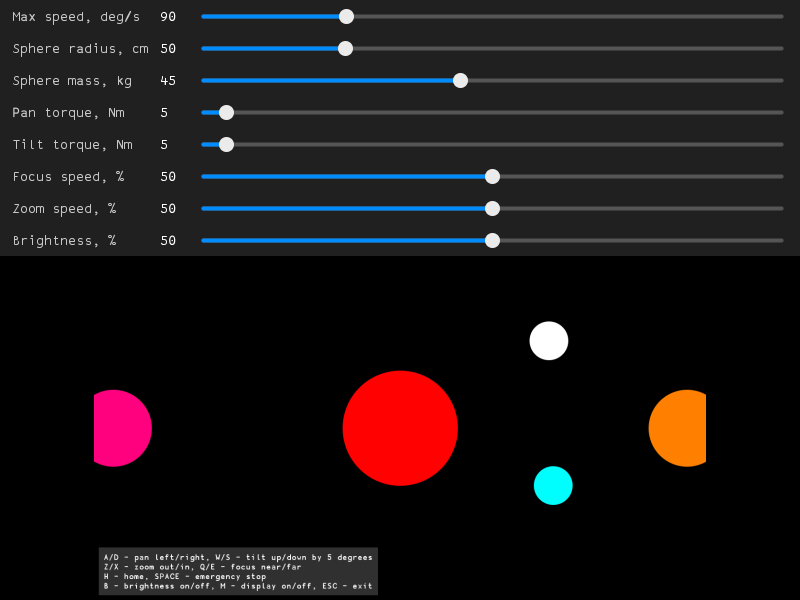
The sliders above the frame set the maximum rotation speed (degrees per second), the radius (centimeters) and the mass (kilograms) of the sphere, the torques of the pan and tilt motors (newton meters), the focus and zoom speeds and the brightness (percents). The keys A/D and W/S rotate the camera by 5 degrees from the current angle, Z/X and Q/E move zoom and focus with their speeds while the keys are held, H rotates the camera to the home position, SPACE stops the rotation at once (emergency stop), B switches the application of the brightness on and off and M shows zoom, focus, pan and tilt in the top left corner of the frame. The application has no command line parameters. If the window can’t be created (for example, there is no display on Linux), the application prints the error and returns -1.