
ObjectVideoGenerator C++ application
v1.0.0
Table of contents
- Overview
- Versions
- Application files
- How the video is generated
- How to run the application
- Configuration file
- Window and control
- Recorded video files
Overview
ObjectVideoGenerator is a C++ application that generates reference video to test video processing algorithms (for example detection and tracking of objects) at a known contrast of the object: a gray rectangular object moves over a background, and Gaussian noise covers the whole frame, the object too. The contrast of the object is set in percent of the background brightness and the noise by its standard deviation in brightness levels; the signal-to-noise ratio follows from them (see the formulas in How the video is generated).
The application reads the parameters from the file ObjectVideoGenerator.json and creates the file with the default parameters if it does not exist. The window shows the generated video and the sliders of the main parameters; a changed parameter is written into the file at once. The key R records the set number of frames into an MP4 file with the main parameters in its name; a recording with the same parameters overwrites the file. The next video is recorded without a restart of the application.
The application uses the libraries ConfigReader (configuration file), SimpleUI (window) and VideoRecorderMp4 (MP4 files) and has no other dependencies.
ObjectVideoGenerator is general-purpose software: it is not tied to any sector or application, and the developer of a program decides what the program does with it.
Versions
Table 1 - Application versions.
| Version | Release date | What’s new |
|---|---|---|
| 1.0.0 | 12.11.2026 | - First version. |
Application files
The repository structure is shown below:
CMakeLists.txt ----------------------- Main CMake file of the application.
src ---------------------------------- Folder with application source code.
    CMakeLists.txt ------------------- CMake file of the application.
    main.cpp ------------------------- Source C++ file of the application: window, configuration file, recording.
    ObjectVideoGenerator.h ----------- Header file of the generator of the frames and of the parameters.
    ObjectVideoGenerator.cpp --------- C++ implementation file of the generator of the frames.
    ObjectVideoGeneratorVersion.h ---- Header file with application version.
    ObjectVideoGeneratorVersion.h.in - File for CMake to generate version header.
static ------------------------------- Folder with images of this documentation.
    objectvideogenerator_web_logo.png  Logo.
    objectvideogenerator_interface.png Window of the application.
How the video is generated
The frames are gray (8 bits per pixel). Each pixel is computed as follows (the names are the parameters of the configuration file):
background pixel = medium + n
object pixel     = medium + n + C
contrast         C = +contrast * medium / 100  (positiveContrast = 1, the object is brighter)
                 C = -contrast * medium / 100  (positiveContrast = 0, the object is darker)
signal-to-noise ratio  SNR = |C| / sko
n is a random value of the normal distribution with the mean 0 and the standard deviation sko (in brightness levels 0 - 255), new for each pixel of each frame. The result is cut to 0 - 255 and rounded down. So contrast is the difference of the mean brightness of the object and of the background in percent of the background brightness, and SNR is this difference in standard deviations of the noise. Example: with sko = 5, medium = 100 and contrast = 15 % the background has the mean brightness 100 and the object 115 (C = 15, SNR = 3), both with the standard deviation 5 (measured: 99.5 and 114.5, the rounding down lowers both by 0.5). With medium = 0 the contrast C is 0: there is no object. With sko = 0 there is no noise (SNR is infinite).
| The SNR holds in the recorded video if sko is at least 2, the brightness stays inside 0 - 255 (medium + | C | + 3 * sko <= 255 for a brighter object, medium - | C | - 3 * sko >= 0 for a darker one) and the JPEG quality is 100: measured 2.2 % lower with sko 2 and 0.4 % lower with sko 5. Otherwise the SNR changes, for example about 15 % lower with sko 0.5 (the rounding to integers changes the noise), about 30 % lower with medium 245 and C = 15 (the brightness is cut) and about 30 % higher with the quality 80 (the noise is smoothed). |
The object is a rectangle of objectW x objectH pixels with the center (x, y): its top left corner is (x - objectW / 2, y - objectH / 2), integer division. The part of the object outside of the frame is not drawn. The object starts at (startX, startY) and moves by (velX, velY) after each frame. A speed changes its sign when the center comes closer than border to an edge of the frame (x < border or x > frameW - border; the same for y and frameH). The random generator (std::mt19937 with std::normal_distribution) gets a new seed at each start of the preview and of each recording.
How to run the application
Requirements: Windows or Linux, CMake 3.13 or newer, a C++17 compiler (MSVC on Windows, GCC or Clang on Linux). On Linux the window needs the X11 development packages (Debian / Ubuntu: sudo apt install libx11-dev libxext-dev).
The repository does not contain sub-repositories. The libraries must be placed in the same folder as ObjectVideoGenerator: copy their folders, for example from the folder modules of the RapidPixel SDK. The folder structure must be:
<work folder>
    ObjectVideoGenerator
    Frame
    ConfigReader
    FormatConverter
    VCodec
    VEncoderJPEG
    VideoRecorderMp4
    SimpleUI
Typical commands to build the application:
cd ObjectVideoGenerator
mkdir build
cd build
cmake ..
make
On Windows use cmake --build . --config Release instead of make. The main CMakeLists.txt file adds the folders ../Frame, ../ConfigReader, ../FormatConverter, ../VCodec, ../VEncoderJPEG, ../VideoRecorderMp4 and ../SimpleUI (in this order); if a folder does not exist CMake stops with an error. The build type defaults to Release, the application has no CMake options. If the application is a part of a bigger CMake project (an SDK with the libraries), the top-level CMakeLists.txt file adds the libraries and the application (in any order); without the libraries the compiler stops with an error like “ConfigReader.h: No such file or directory”. The application is then built from the root of the project:
cd /path/to/SDK
cmake -S . -B build -DCMAKE_BUILD_TYPE=Release
cmake --build build --config Release --target ObjectVideoGenerator
Run the application in the folder for the configuration file and the recordings (the working directory). The executable file is in build/bin (build\bin\Release\ObjectVideoGenerator.exe on Windows):
cd build/bin
./ObjectVideoGenerator
The console shows the messages of the application, for example:
ObjectVideoGenerator v1.0.0
Configuration file ObjectVideoGenerator.json created with the default params
Keys in the window: R - start or stop a recording, ESC - exit
Recording started: sko_5_medium_100_contrast_15_positive_snr_3_frame_640x480_object_16x16_velocity_1_1_quality_100.mp4, 1000 frames
Recording finished: 1000 of 1000 frames generated
The exit code is 0 after ESC or a closed window, and 1 if the configuration file can’t be read or created or has an invalid parameter (the console names it), or if the window can’t be created.
Configuration file
The file ObjectVideoGenerator.json in the working directory with the default parameters:
{
    "VIDEO_PARAMS": {
        "sko": 5.0,
        "medium": 100.0,
        "contrast": 15.0,
        "objectW": 16,
        "objectH": 16,
        "startX": 100,
        "startY": 100,
        "frameW": 640,
        "frameH": 480,
        "border": 80,
        "velX": 1,
        "velY": 1,
        "numFrames": 1000,
        "fps": 30,
        "positiveContrast": 1,
        "jpegQuality": 100
    }
}
Table 2 - Parameters.
| Parameter | Valid values | Description |
|---|---|---|
| sko | 0 - 50 | Standard deviation of the noise, brightness levels (float). |
| medium | 0 - 255 | Mean brightness of the background (float). |
| contrast | 0 - 100 | Contrast of the object, % of medium (float). |
| objectW, objectH | 0 - frameW, 0 - frameH | Size of the object, pixels. 0 - no object. |
| startX, startY | 0 - frameW - 1, 0 - frameH - 1 | Position of the center of the object on the first frame, pixels. |
| frameW, frameH | 64 - 8192 | Frame size, pixels. |
| border | 0 - half of the smaller frame size | Distance from the edges of the frame where the object turns back, pixels. |
| velX, velY | -100 - 100 | Speed of the object, pixels per frame (positive: right, down). |
| numFrames | 1 - 1000000 | Number of frames of a recording. |
| fps | 1 - 1000 | Frame rate of the recordings and of the preview. |
| positiveContrast | 0 or 1 | 1 - the object is brighter than the background, 0 - darker. |
| jpegQuality | 0 - 100 | JPEG quality of the recordings, % (0 is encoded as 1). |
All parameters are required; a number with a fraction in an int parameter is cut to its integer part. If the file can’t be read, is larger than 65536 bytes, is not valid JSON, misses a parameter or has a value out of its range, the application prints the reason and stops with the exit code 1 without changes of the file: correct the file or delete it to get the default parameters. The float parameters are written with 17 significant digits (5.3 as 5.3000001907348633).
Window and control
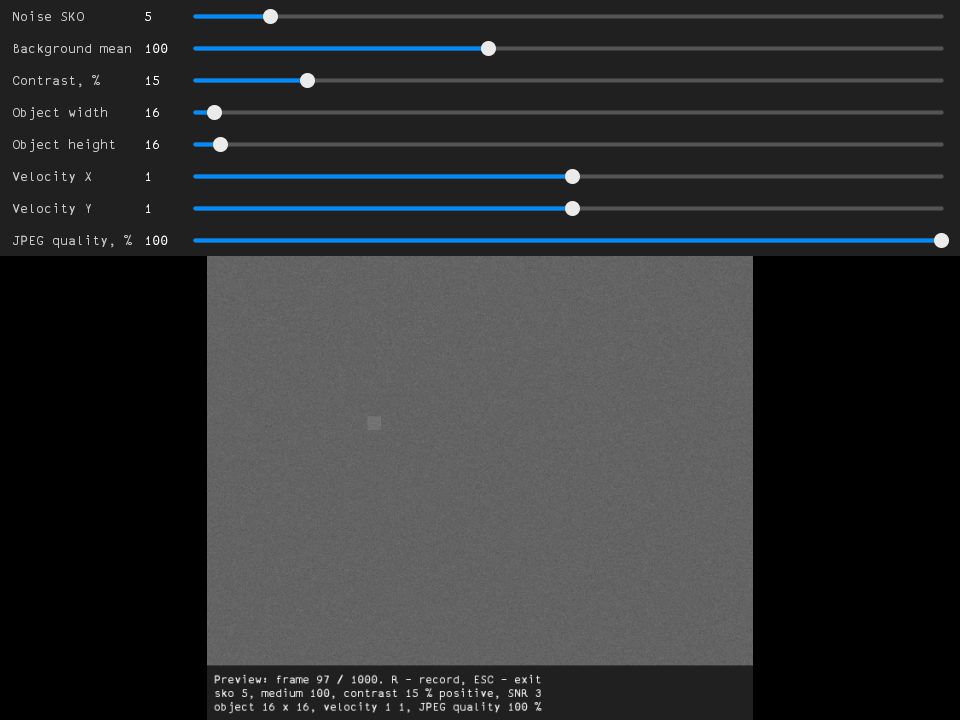
The window shows the sliders, the video scaled to the window and the status (state, frame number, parameters, SNR; the status is not recorded). The preview plays the frames with the frame rate fps and starts again after numFrames frames, so it shows the motion of a recording. A slider change is written into the configuration file at once and restarts the preview; a running recording keeps its parameters. A slider is moved with the mouse or by one step per notch of the mouse wheel.
Table 3 - Sliders.
| Slider | Parameter | Range |
|---|---|---|
| Noise SKO | sko | 0 - 50 |
| Background mean | medium | 0 - 255 |
| Contrast, % | contrast | 0 - 100 |
| Object width, Object height | objectW, objectH | 0 - frame size |
| Velocity X, Velocity Y | velX, velY | -100 - 100 |
| JPEG quality, % | jpegQuality | 0 - 100 |
Table 4 - Keys (the window must be active).
| Key | Description |
|---|---|
| R | Start a recording of numFrames frames with the current parameters (the recording stops by itself after the last frame). R during a recording stops it: the file keeps the recorded frames. |
| ESC | Exit. A running recording is stopped and its file is completed. Closing the window does the same. |
Recorded video files
Each recording writes a file in the working directory, the name contains the main parameters:
sko_<sko>_medium_<medium>_contrast_<contrast>_<positive or negative>_snr_<SNR>_frame_<frameW>x<frameH>_object_<objectW>x<objectH>_velocity_<velX>_<velY>_quality_<jpegQuality>.mp4
| for example sko_5_medium_100_contrast_15_positive_snr_3_frame_640x480_object_16x16_velocity_1_1_quality_100.mp4 (floats with at most 6 significant digits, contrast in %, snr = | C | / sko, inf without noise). A recording with the same parameters in the name overwrites the file, the console adds “(the existing file is overwritten)” to the message “Recording started”. startX, startY, border, numFrames and fps are not in the name: a recording that differs only in them overwrites the file too. Other files are not changed. |
The file is MP4 with Motion JPEG video (grayscale JPEG), frameW x frameH, fps frames per second, numFrames frames; it is played for example by ffmpeg / ffplay. The frames are generated and recorded as fast as possible. The default quality 100 keeps the noise: a decoded pixel differs from the generated one by at most 2 and the standard deviation of the noise stays 5.0 (sko 5, about 195000 bytes per 640 x 480 frame). A lower quality makes smaller files but smooths the noise and changes the signal-to-noise ratio: quality 80 gives 36000 bytes per frame and the standard deviation 3.9 instead of 5.0.
One file can hold less than 4 GiB of video data (a limit of VideoRecorderMp4): about 22000 frames of 640 x 480 or 3200 frames of 1920 x 1080 pixels with the quality 100 and sko 5. If a frame can’t be recorded (the file can’t be created, the file reached the limit or the disk is full), the recording stops with the message “ERROR: Can’t write the file <name>, recording stopped”; a file that reached the limit keeps the frames recorded before it.